
Realistic Job Preview: Examples, Template and How-To (2026)
What a realistic job preview is, what to put in one, six formats, three role examples, a copy-ready template and the metrics to track.

A realistic job preview (RJP) is an honest look at a job, shared with candidates before they accept it. A realistic job preview shows the good parts and the hard parts of the role, such as pay, schedule, workload, pressure points and growth, so candidates can decide early whether the job really fits them.
TL;DR: - A realistic job preview shows candidates the good and hard parts of a role before they accept. - The gap between the job ad and the real job drives early exits, and a preview closes it early in the hiring funnel. - Include pay and schedule, a normal day, the hard parts, team and manager, support and growth, and why people stay. - Six formats are compared by effort and realism, from written summaries to virtual reality tours. - Three role examples and a copy-ready template show the level of detail to aim for. - Track 90-day attrition, withdrawals, offer acceptance and time to productivity to see if your preview works. - Skills tests and job simulations can double as a preview.
 ChatGPT
 Gemini
 Claude
 Grok
Grok Perplexity
What is a realistic job preview?
A realistic job preview is a recruiting step that gives candidates an accurate, balanced picture of a role, including its downsides, before they commit to it. The US Office of Personnel Management describes an RJP as a way to communicate "what a job is really like" and to help candidates decide whether they are a good match.
A job ad sells the role. A realistic job preview tells the truth about it. The preview can be a short written day-in-the-life, a video of real employees, a Q&A with the team, a work task or a trial shift. What makes it a realistic job preview is not the format but the content: it names the parts of the job that people struggle with, next to the parts they enjoy.
OPM's realistic job preview fact sheet lists three goals: give a realistic view of what the job entails, help the candidate judge fit, and reduce turnover.

Why do realistic job previews matter in 2026?
Realistic job previews matter because the gap between the advertised job and the real job is wide, and that gap is expensive. In the 2024 Greenhouse Candidate Experience Report, 53% of employees said companies had advertised job responsibilities that differed significantly from reality once they started.
When the job does not match the pitch, new hires leave early, and every early exit restarts the hiring cycle. The Work Institute suggests a conservative estimate of turnover cost at 33.3% of the departing employee's base salary. On a $75,000 salary, that is about $25,000 per exit, before you count the hours your recruiters and hiring managers spend refilling the seat.
Two newer pressures make previews more important in 2026:
Pay transparency rules
The EU Pay Transparency Directive requires employers to share the starting pay or pay range for a role and bars them from asking about salary history. Member states were due to bring it into national law by 7 June 2026. Pay is now the first line of any honest preview.
AI-written job content
Recruiting tools can now draft job ads and even day-in-the-life videos from a job description. Paradox, for example, describes an AI "Immersive Job Preview" (August 2025) that writes day-in-the-life video scripts from the job description. AI makes previews faster to produce, but a preview drafted from a polished job description repeats the same blind spots unless real employees review it.
How does a realistic job preview work?
A realistic job preview works in two ways: candidates who would not enjoy the job step out early, and candidates who stay join with accurate expectations. Both outcomes cut early attrition. The first prevents a bad hire, and the second prevents the "this is not what I signed up for" moment in the first weeks.
- Candidate sees the job ad. The ad covers the basics: role, location, schedule and pay range.
- Candidate gets the realistic job preview. The preview shows a normal day, the hard parts and why people stay.
- Candidate decides. Some candidates withdraw. Withdrawals at this stage are cheap, because nobody has interviewed, assessed or onboarded them yet.
- The rest continue with accurate expectations. Assessments, interviews and the offer now build on a shared, honest picture of the role.
Pro tip: Put the preview before your most expensive step, not after it. If interviews are your biggest time cost, the preview belongs right after the application or the first screen.
What should a realistic job preview include?
A realistic job preview should include six things: pay and schedule, a normal day, the hard parts, the team and manager, support and growth, and why people stay. OPM adds a useful filter: focus on what applicants are unlikely to know or may have unreasonable expectations about.
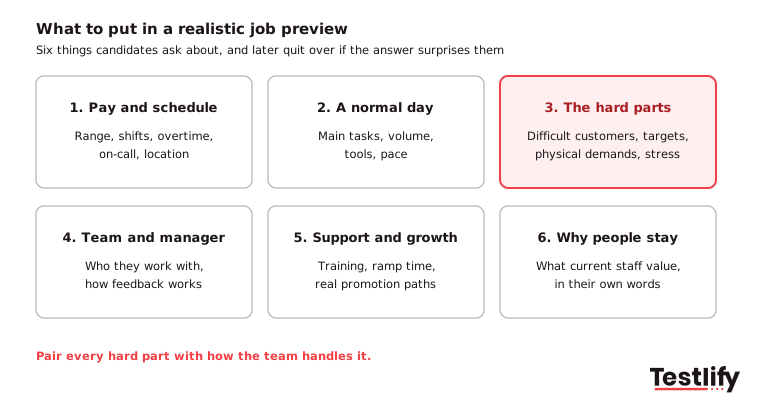
- Pay and schedule. Pay range, shift patterns, weekend and overtime expectations, on-call duty, location or remote rules.
- A normal day. The main tasks, the volume (calls, tickets, orders, patients), the tools used and the pace.
- The hard parts. Difficult customers, sales targets, physical demands, night shifts, repetitive work or emotional strain.
- Team and manager. Who the new hire works with, how often they meet their manager, and how feedback works.
- Support and growth. Training length, time to full productivity, and promotion paths that actually exist.
- Why people stay. What current employees value about the job, in their own words.
Pair every hard part with how the team handles it. "Peak season means 10-hour shifts for six weeks" lands better when followed by "and overtime is paid at time and a half, with shifts posted two weeks ahead."
Types of realistic job previews
The main types of realistic job previews are written day-in-the-life summaries, employee videos, live Q&A sessions, job simulations or work tasks, job shadowing or trial shifts, and virtual reality tours. Formats differ mainly in how much effort they take to build and how real they feel to the candidate.
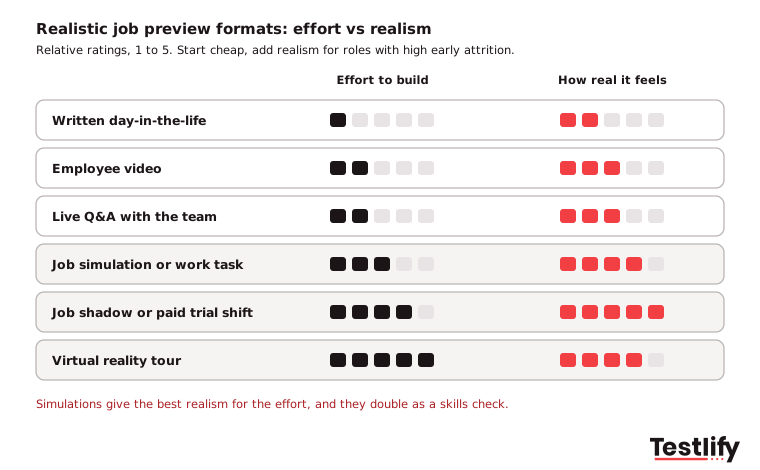
Format | Effort to build | How real it feels | Best stage | Best for |
|---|---|---|---|---|
Written day-in-the-life | Low | Medium-low | Job ad or careers page | Any role, first version |
Employee video | Medium-low | Medium | Careers page, after applying | Volume roles, field roles |
Live Q&A with the team | Medium-low | Medium | After first screen | Specialist and senior roles |
Job simulation or work task | Medium | High | Assessment stage | Contact center, sales, tech, admin |
Job shadow or paid trial shift | High | Very high | Final stage | Healthcare, retail, hospitality |
Virtual reality tour | Very high | High | Career fairs, early stage | Large employers, hazardous sites |
Most teams start with a written preview and one short employee video, then add a simulation for roles with high early attrition. Simulations are the most efficient upgrade, because the same task that shows candidates the job also shows you how they handle it.
How is a job preview different from a job description or job simulation?
A realistic job preview is different because its audience is the candidate's decision, not yours. A job description lists duties and requirements so you can attract and filter applicants. A job simulation tests whether a candidate can do the work. A realistic job preview helps the candidate judge whether they want the work.
Comparison point | Job description | Job preview | Job simulation |
|---|---|---|---|
Main purpose | Attract and filter | Help candidates self-select | Measure skills on real tasks |
Tone | Neutral to positive | Balanced, names the downsides | Practical |
Who decides | Employer | Candidate | Employer |
Typical stage | Before applying | After applying, before interviews | Assessment stage |
The overlap matters. A well-built job simulation is also a realistic job preview, because candidates experience the actual work. Better job descriptions reduce the gap the preview has to close.
How do you create a realistic job preview?
Creating a realistic job preview is a short project, not a campaign. You need honest input from the people who do the job, a format that fits your budget and a clear place in your hiring funnel. A first version for one role can be ready in a week or two. The steps below take you from choosing a role to tracking results.
- Pick one role with an early-exit problem. Start where 90-day attrition is highest or where candidates often drop out after the offer.
- Find out why new hires leave. Read exit interview notes and ask managers what surprises new hires most. These surprises are your preview's core content.
- Collect the real story from current employees. Interview three to five people in the role, including someone who joined in the last six months. Ask: "What do you wish you had known before you started?"
- Choose a format. Use the table above. If budget is tight, a written preview plus a phone-recorded employee video is enough.
- Balance the message. OPM's checklist recommends matching each negative point with a positive one. Keep it specific: numbers, not adjectives.
- Place it in the funnel. Put the short version on the careers page or job ad and the full version right after the application, before interviews.
- Track and refresh. Measure 90-day attrition, withdrawals after the preview, offer acceptance rate and time to productivity. Update the preview whenever pay, tools, targets or shift patterns change.
Key takeaway: The most useful content in a realistic job preview comes from people who joined recently and people who left. Their surprises are exactly what the next candidate needs to hear.
What are some realistic job preview examples?
Realistic job preview examples work best when they are specific to one role and one location. The three examples below show the level of detail to aim for. Adapt the numbers to your own role before you publish them.
Example 1: Contact center agent
"You will handle 50 to 70 customer chats or calls a day, with a target of resolving most issues on the first contact. Some customers will be frustrated or rude, and you will be expected to stay calm and follow the escalation process. Shifts rotate every four weeks and include one weekend day. In return, you get three weeks of paid training, a team lead for every 12 agents, and a clear path to senior agent or quality analyst within 12 to 18 months."
Best format: a short written preview plus a chat simulation that puts candidates in a realistic customer conversation. Add a situational judgment test to show how they handle frustrated customers and escalations.
Example 2: Warehouse associate
"You will be on your feet for most of a 10-hour shift, picking and packing up to 120 orders an hour using a handheld scanner. Peak season runs from October to January, with mandatory overtime on some weeks, paid at time and a half. The warehouse is cool in winter and warm in summer. People stay for the predictable schedule, weekly pay, and the chance to move into forklift or team lead roles."
Best format: a two-minute video walking the floor during a real shift, followed by a site visit before the offer.
Example 3: Software engineer
"You will spend about half your week writing and reviewing code, and the rest in planning, support tickets and on-call. On-call is one week in six, with an average of two night pages per rotation. Parts of the codebase are older and less documented than we would like. You will have a named mentor for your first 90 days, a learning budget, and ownership of a service within six months."
Best format: a paid take-home task or live pairing session on a realistic slice of the codebase, plus a 20-minute Q&A with an engineer on the team.
Is there a realistic job preview template you can copy?
A realistic job preview template is a short set of prompts you fill in with real facts about the role. Use the template below for a written preview, a video script or the talking points for a team Q&A.
Section | Prompt to answer | Example line |
|---|---|---|
Pay and schedule | What will they earn, and when will they work? | "Pay range is X to Y. Shifts are 8am to 5pm, one weekend a month." |
A normal day | What do they actually do, and how much of it? | "About 60 calls a day, logged in our CRM." |
The hard parts | What surprises or frustrates new hires most? | "Month-end is intense. Expect two late nights." |
How we handle the hard parts | What support exists for the hard parts? | "Month-end tasks are split across the team, with a checklist." |
Team and manager | Who do they work with, and how often? | "Team of eight, weekly one-to-one with your manager." |
Ramp-up | How long until they are fully productive? | "Most people are fully up to speed by week ten." |
Growth | What does the next step look like, and when? | "Senior role after 12 to 18 months, based on clear goals." |
Why people stay | What do current employees value most? | Quote one real employee, with their permission. |
Keep the written version under 400 words. Candidates read a preview on their phone, often between other applications.
What are the benefits and drawbacks of a realistic job preview?
The benefits of a realistic job preview are fewer early exits, better-informed candidates and more trust in your employer brand. The main drawback is a smaller applicant pool, because some candidates will withdraw once they see the hard parts.
Benefits:
- Fewer early exits. New hires know what they signed up for, so fewer leave in the first 90 days.
- Cheaper drop-outs. Candidates who are not a fit leave before you spend interview and onboarding time on them.
- Higher offer acceptance from the right people. OPM notes previews can increase the likelihood of job offer acceptance, since candidates who reach the offer already know the job.
- A stronger candidate experience. Honesty is easier to trust than a polished pitch. See how this fits into a positive candidate experience.
Drawbacks and how to handle them:
- Fewer applicants. Some withdrawals are the point. Track whether the people who stay perform and stay longer before you water the preview down.
- Good candidates may overreact to one negative. Pair each hard part with how the team supports it, and keep the tone factual.
- Previews go stale. Pay, tools and targets change. Give each preview an owner and a review date.
- Effort. Video, shadowing and VR take time. Start with a written version and upgrade only where early attrition is costly.
How do you measure whether your realistic job preview works?
Measuring a realistic job preview means comparing hiring and retention numbers for the same role before and after you launch it. The Work Institute recommends tracking turnover at 90 days, six months and one year, which are the right checkpoints for a preview too.
Metric | What it tells you | What good looks like |
|---|---|---|
90-day attrition | Whether new hires found the job they expected | Falls after launch |
Withdrawal after the preview | Whether the preview filters people out early | Rises a little, then holds steady |
Offer acceptance rate | Whether finalists still want the job | Holds or rises |
Time to productivity | Whether new hires arrive ready | Shorter ramp-up |
New-hire survey: "The job matched what I was told" | Direct read on the expectation gap | Most new hires agree |
Use the cost of employee turnover calculator to put a cost on each early exit you avoid. That number is what turns a preview from a nice-to-have into a budget line.
How can Testlify help you identify job-ready talent?
Testlify helps by letting the assessment stage double as a realistic job preview. Instead of only reading about the job, candidates try a slice of it, and your team sees how they handle it.
- Job simulations. Chat simulations, MS Office and Google Workspace tasks, typing tests and live coding put candidates in front of the real work. Browse the test library of 3,500+ tests for role-specific options.
- Situational judgment and role tests. Scenarios built around real dilemmas in the role show candidates the hard parts and show you how they respond.
- Video and audio questions. One-way video interviews let you add a short hiring manager video explaining a normal day and ask candidates to respond on video.
- Built from your job description. Testlify's AI test builder turns a job description into a role-specific assessment, and tests run in 15+ languages for global hiring.
Want to see how a job simulation can double as a realistic job preview for your roles? Book a demo and our team will walk you through it.
Frequently asked questions (FAQs)

People and Talent Partner
Arushi Shah runs day-to-day talent acquisition and candidate experience at Testlify. She writes on interviewing, structured hiring, and giving candidates a fair, fast process.
LinkedInRelated resources
View all
Talent Acquisition
How to scale talent acquisition without losing quality?

Talent Acquisition
Top 10 targeted training strategies to bridge the skills gap

Talent Acquisition
Diversity and inclusion in talent acquisition: Best practices for success

Talent Acquisition
Leveraging technology in talent acquisition: Trends and tools

Talent Acquisition
Building a winning talent acquisition strategy: A step-by-step guide

Talent Acquisition
The evolution of talent acquisition: From traditional to modern approaches
Get started.
Hire on proof, not resumes.
Run your first skills-based assessment free — no credit card required.