
How to scale your business with automated solutions
Where automation pays off as a company grows, which processes to automate first, how to roll them out and how to scale hiring with it too.

To scale your business with automated solutions means letting software run the repeatable work, such as data entry, approvals, follow-ups, screening, and reporting, so output can grow faster than headcount and cost. People keep the work that needs judgment. The goal is more customers, orders, and hires handled per person, at the same or better quality.
 ChatGPT
 Gemini
 Claude
 Grok
 Perplexity
TL;DR
- Scaling with automation means growing output faster than headcount: software runs the repeatable steps, and people keep the decisions.
- Automate first where volume is high and the rules are clear: lead routing, invoices, ticket triage, resume screening, and skills tests.
- Fix and document a process before you automate it. Automating a broken process only produces mistakes faster.
- Around half of US firms automated tasks in the year to early 2024, and about 75% of firms with over 500 employees did, per the Richmond Fed and Duke University CFO Survey.
- HR and hiring are where growth stalls most often: SHRM found 69% of organizations still struggle to fill full-time roles, and 51% already use AI to support recruiting.
- Roll out one process at a time, give it a human owner, and measure cycle time, error rate, and cost per unit, not only hours saved.

What does it mean to scale your business with automated solutions?
Scaling a business with automated solutions means using software to handle the tasks that grow in step with demand, so revenue and volume can rise without hiring at the same rate. Growth adds more of everything. Scaling adds more output for each person, process, and dollar you already have.
Automated solutions cover a wide range of tools: a CRM that logs every customer touch, an e-commerce platform that tracks stock, workflow software that routes approvals, marketing tools that send nurture emails, accounting software that reconciles payments, chatbots that answer routine questions, dashboards that refresh themselves, and hiring tools that screen and assess candidates. Each one removes a manual step that would otherwise need another person as volume grows.
Key takeaway: Automation scales the repeatable parts of a process. A business still needs people for the decisions, the exceptions and the relationships, so the plan is always "automate the steps, keep the judgment".
Why do manual processes stop working as a business grows?
Manual processes stop working because their cost and error rate rise in line with volume. Ten orders, invoices, or job applications a day can be handled by hand. At a thousand a day, the same process needs more people, more handoffs, and more checks, and every handoff adds delay and mistakes.
Three signs show a process has hit its limit:
- Queues build up: Tickets, approvals, or applications wait days for someone to touch them.
- Quality slips with volume: Error rates climb in busy weeks because people rush the routine steps.
- Hiring becomes the only answer: Every growth plan starts with "We need more people to do this."
Firms are responding with automation. According to the Richmond Fed and Duke University CFO Survey published in March 2024, around half of US firms had brought in technology to automate tasks that employees used to do, including about 75% of firms with more than 500 employees and 44% of smaller firms. Over 85% of automating firms named cost savings as a reason, and about 60% named quality control. The same survey found that 60% of automating firms kept hiring at the same pace, so automation more often changed what people do than how many people a firm needed.
Which areas of a business can automated solutions scale?
Automated solutions can scale almost every function that runs on repeatable, rules-based steps. The eight areas below are where most companies see results first.
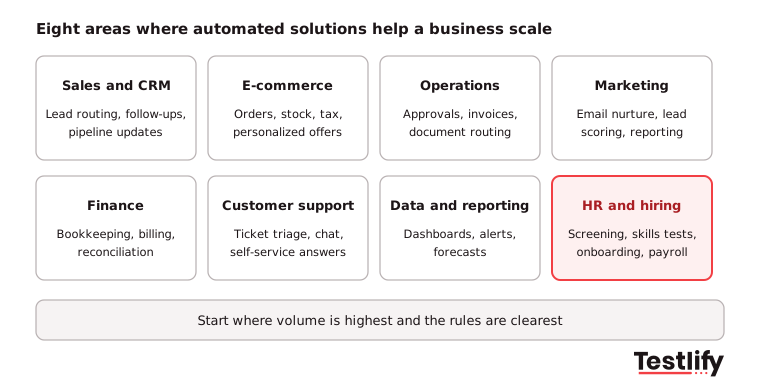
Sales and customer relationship management (CRM)
A CRM keeps every customer record, conversation, and deal in one place, then automates the busywork around them: logging emails, assigning new leads to the right rep, setting follow-up reminders, and flagging accounts ready for an upsell. As the customer base grows, the CRM keeps service personal without each rep tracking more names in their head. Better data on customer behavior also feeds product, pricing, and expansion decisions. For high-volume B2C businesses, AI agents can extend sales automation to WhatsApp, qualifying leads, answering product questions and routing conversations to the right representatives. Customer conversation platforms with capabilities found among the best WhatsApp chatbots can also update customer records and trigger follow-ups, helping teams manage more sales conversations without increasing manual work.
E-commerce and online sales
An e-commerce platform keeps the store open around the clock across time zones and absorbs spikes in demand. Automation handles stock levels and reorders, product recommendations based on browsing and purchase history, and sales tax across states or countries, which gets harder with every new market. Choose a platform that fits your goals, works well on phones, and uses secure payment processing, then build search and marketing on top to bring in traffic.
Workflow and operations
Workflow automation replaces manual routing with rules. Common wins include invoice processing (extract the data, match it to the purchase order, and route it for approval), employee onboarding (forms, training modules, and equipment requests generated on day one), support ticket assignment by topic and urgency, and inventory reorders based on stock levels and supplier lead times.
Marketing
Marketing automation sends the right email to the right lead at the right time, scores leads by how they engage, schedules social posts, and reports on what each campaign returns. The team spends less time sending and more time on the message and the offer.
Finance and accounting
Accounting software cuts manual data entry and calculation errors, gives a real-time view of cash, and produces the reports needed for tax and audits. When choosing one, check that it can handle growing data volumes, connects with your CRM and e-commerce tools, suits a cloud or on-premises setup, and is easy for the team to adopt.
Customer support
Chatbots and AI assistants answer routine questions at any hour and route the rest to people. To do it well, start with the most common questions, build a clean handoff to a human for complex issues, review answers against customer feedback, and run the same assistant across your website, social messaging, and apps.
Data and reporting
Analytics tools pull data from the website, CRM, store, and support desk into one view, build charts that leaders can read at a glance, and send alerts when a KPI moves. Some use machine learning to forecast demand or spot customers likely to leave. Retailers use the same data to recommend products, set inventory levels, and decide which marketing channels deserve more budget.
HR and hiring
HR automation covers applicant tracking, resume screening, skills assessments, interview scheduling, onboarding, payroll, and performance reviews. It gets a section of its own below, because headcount is the place where scaling most often stalls.
Area | What to automate first | Metric that shows it is working |
|---|---|---|
Sales and CRM | Lead routing, follow-up reminders, activity logging | Lead response time, win rate |
E-commerce | Stock reorders, tax calculation, order updates | Stockouts, order error rate |
Operations | Invoice matching, approvals, document routing | Cycle time per invoice or request |
Marketing | Nurture emails, lead scoring, campaign reports | Cost per lead, conversion rate |
Finance | Bank reconciliation, billing, expense capture | Days to close the books |
Customer support | Ticket triage, answers to common questions | First response time, CSAT |
Data and reporting | Scheduled dashboards, KPI alerts | Time from question to answer |
HR and hiring | Resume screening, skills tests, scheduling, onboarding | Time to hire, quality of hire |
How do you choose which process to automate first?
The best process to automate first runs often, follows clear rules, uses data you already trust, and does little damage if one case goes wrong. Score each candidate process on those four points and start with the highest score.
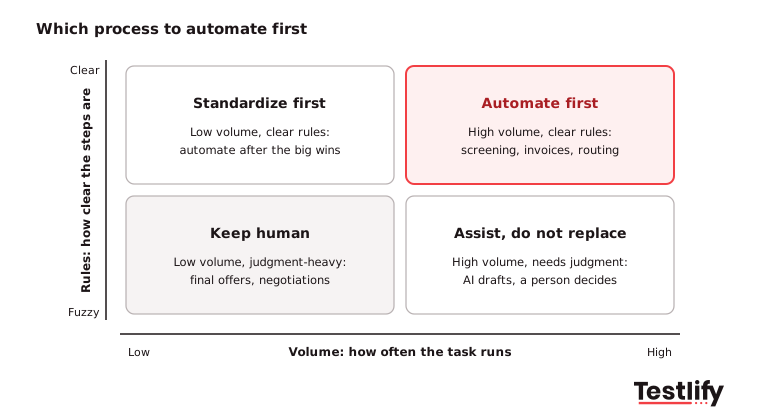
- Volume: How many times a week does the task run? A task that runs 500 times a week saves far more than one that runs twice.
- Clear rules: Can you write the steps as "if this, then that"? Fuzzy, judgment-heavy work is a poor first candidate.
- Data readiness: Is the data the process needs clean and in one place? Automation built on messy data spreads the mess.
- Risk: What happens if the automation gets one case wrong? Start where a mistake is cheap and easy to catch.
Pro tip: Before you buy any tool, write the current process down step by step and remove the steps that add nothing. Automating a broken process only produces the same mistakes faster.
Which HR processes can be automated?
HR processes that run the same way for every employee or candidate can be automated: applicant tracking, resume screening, skills testing, interview scheduling, onboarding paperwork, employee self-service, payroll, performance check-ins, and training. Automation cuts manual errors in records and pay, lets employees serve themselves, helps the team follow employment rules, and frees HR to work on people instead of paperwork.
- Applicant tracking systems (ATS): An applicant tracking system collects applications, moves candidates through stages, and sends updates without manual emails.
- Employee self-service portals: Employees update personal details, download pay slips, and request time off without opening a ticket with HR.
- Payroll: Payroll software calculates salaries, deductions, and taxes on schedule, which cuts pay errors.
- Performance management: Performance management tools track goals, prompt regular check-ins, and collect feedback.
- Learning management systems (LMS): An LMS assigns courses, tracks progress, and reminds people about required training.
- Integration layer: An integration platform or built-in connectors pass data between these systems so nobody re-types the same record twice.
Adoption is moving fast. SHRM's 2025 Talent Trends research found that 43% of organizations use AI in HR tasks, up from 26% in 2024. Recruiting leads the way: 51% of organizations use AI to support it, most often to write job descriptions (66%), screen resumes (44%), and automate candidate searches (32%). Among those users, 89% say it saves time or increases efficiency. For a fuller view of tools and use cases, see the Testlify guide to HR automation.
How do you implement automated solutions step by step?
Implementing automated solutions works best as a series of small, measured rollouts: one process, one owner and one metric at a time. The seven steps below apply to a CRM, an accounting tool or an HR system alike.
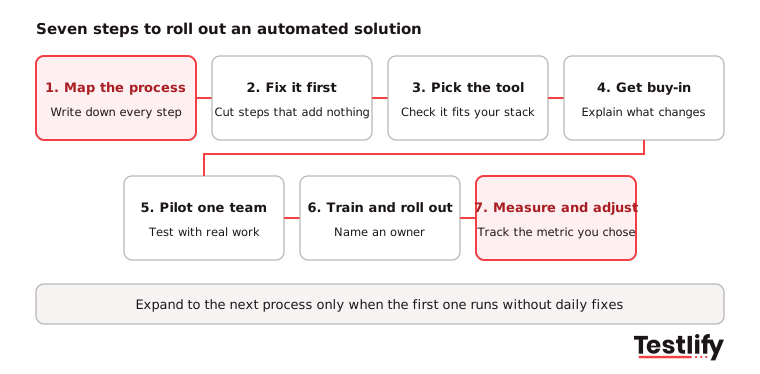
- Map the process: Write down every step, who does it and how long it takes. Agree on what the automation should do and which tasks stay with people.
- Fix it first: Remove duplicate approvals and steps that add nothing, and pick one source of truth for each type of record.
- Pick the tool: Choose software that covers the tasks you mapped, fits your budget, and connects with the systems you already use. Ask for a trial on your own data.
- Get buy-in: Tell the team what will change, why, and what it means for their day. People adopt tools they understand and resist tools that arrive without warning.
- Pilot with one team: Test the automation on real work, check every output for a few weeks, and fix problems before a wider launch.
- Train and roll out: Train every user, then launch to the whole team. Name one owner who reviews the automation's output and updates its rules.
- Measure and adjust: Track the metric you chose in step 1 and keep an eye on errors. Move to the next process only when this one runs without daily fixes.
How do you scale hiring with automation without lowering the bar?
Hiring scales without a drop in quality when automation handles the volume steps (sourcing, screening, testing, scheduling) and every candidate is judged on the same evidence of skill. Speed comes from removing manual reviews. Quality comes from replacing resume guesswork with structured tests and interviews.
Recruiting teams are already moving this way. The LinkedIn Future of Recruiting report found that 37% of organizations are integrating or experimenting with generative AI in hiring, up from 27% a year before, and those users save about 20% of their work week. The same report found that 89% of talent acquisition pros expect measuring quality of hire to matter more, yet only 25% feel highly confident they can measure it today.
A practical setup for a growing company:
- Screen on skills, not keywords: Send every applicant a short, role-specific assessment from a library such as the Testlify test library of 3,500+ tests, so the shortlist is ranked on what people can do.
- Automate the first interview: One-way video or AI interviews ask every candidate the same questions and score answers against the same criteria, so recruiters review a ranked list instead of running dozens of calls.
- Let the ATS stay the system of record: Results should flow back to the ATS automatically. Testlify connects with 100+ ATS and HRIS tools through its integrations, including Workday, Greenhouse, Lever and SmartRecruiters.
- Keep people on the decision: Recruiters and hiring managers review the shortlist, run the final interviews and make the offer.
Testlify brings these steps together: an AI resume screener that scores resumes against the role, skills tests in 15+ languages, AI interviews, and 20+ proctoring checks so scores reflect the candidate's own work. Teams with seasonal or campaign hiring can also look at the volume hiring setup.
What are the risks of automating a growing business?
The main risks of automating a growing business are slow adoption, tools that do not connect, weak data security, unfair automated decisions and too little human oversight. Each one is manageable when it is planned for before launch.
Risk | What goes wrong | How to reduce it |
|---|---|---|
Learning curve | Teams take weeks to trust and use the new tool | Train before launch, keep a short guide, name a go-to person |
Resistance to change | People keep old spreadsheets running alongside | Explain the why, show early wins, retire the old process on a set date |
Integration gaps | Data is re-typed between systems | Check connectors and APIs before you buy, pilot with real data |
Data security | Sensitive customer or employee data is exposed | Check vendor certifications such as ISO 27001 and SOC 2, limit access by role |
Unfair decisions | Automated screening favors some groups over others | Use bias-audited tools, review rejections, give candidates notice |
Broken edge cases | The automation fails on cases its rules did not expect | Build exception paths and a human handoff, review errors weekly |
Automated hiring decisions also carry legal duties in some places. New York City's Local Law 144, explained on the NYC Department of Consumer and Worker Protection AEDT page, bars employers from using an automated employment decision tool unless it has had a bias audit within the past year and candidates are notified. Testlify publishes its own NYC bias audit for its matching model.
How do you measure whether automation is helping you scale?
Automation is helping you scale when output per person rises while quality holds or improves. Hours saved is a start, but the real test is whether the business handles more customers, orders or hires without costs and errors rising at the same rate.
Track four numbers for every automated process:
- Cycle time: How long one unit of work takes from start to finish, such as an invoice, a ticket or a hire.
- Error rate: The share of cases that need a correction or a manual fix.
- Cost per unit: Total cost of the process divided by the volume it handles.
- Quality outcome: The result that matters downstream, such as customer satisfaction, repeat purchases or new-hire performance at 90 days.
Compare each number with the baseline you recorded before launch, then review it monthly. If a metric gets worse, fix the process or the rules before you automate the next one.
Ready to scale hiring with automation?
Testlify helps 1,500+ talent teams screen and assess candidates on real skills, with automated scoring, AI interviews and a ranked shortlist that syncs to your ATS. Browse the Testlify test library, start a 7-day free trial with no credit card, or book a demo to see it on one of your open roles.
Frequently asked questions (FAQs)
Related resources
View all
Employer branding
Building a strong employer brand: A five-step approach
Employer branding
How Testlify is Empowering Businesses Through Effective Pre-Hiring Assessments

Employer branding
17 social media recruiting tips for hiring teams in 2026
Employer branding
What platforms offer white-labeling for talent assessments?

Employer branding
Silent quitting: signs, causes and how HR leaders respond
Employer branding
How to stay connected with top talent when not hiring
Get started.
Hire on proof, not resumes.
Run your first skills-based assessment free — no credit card required.