
Testlify vs. Total Testing: Which Skills Assessment Platform is Best for HR Teams?
Compare Testlify and Total Testing across assessments, candidate experience, integrations, proctoring, reporting, and pricing to find the right platform for your hiring needs.
Skills assessments have become a cornerstone of modern hiring. According to SHRM, 79% of employers consider skill assessments as important or more important than traditional hiring criteria. This shift has created a growing demand for dependable skills assessment platforms.
Testlify and Total Testing have emerged as two leading solutions, each offering comprehensive features to help organizations evaluate candidates objectively and efficiently on a global scale.
However, choosing between Testlify and Total Testing can be challenging, as each has its own strengths. In this comparison, we will break down Testlify vs. Total Testing feature by feature, from test libraries and custom questions to proctoring and pricing to help you determine which platform best fits your hiring needs.
 ChatGPT
 Gemini
 Claude
 Grok
Grok Perplexity
What is Testlify?
Testlify is a leading AI-powered skills assessment platform that empowers organizations to quickly identify the best candidates worldwide and make more objective hiring decisions.
How does Testlify work
Testlify is designed to optimize your hiring process. Our conversational AI-powered interview & talent assessment platform enables recruiters to assess candidates’ skills with precision, empowering you to make well-informed decisions. Here’s how Testlify works:
1. Create tailored assessments
Recruiters can create tailored assessments by choosing from a library of 3,500+ pre-built tests or leveraging AI to generate custom questions. The platform supports diverse question formats, including multiple-choice, open-ended, and even coding challenges.
Furthermore, the platform supports the creation of conversational AI-powered interviews that simulate on-the-job scenarios across chat, voice, and video formats.
2. Send candidate invitations
Once an assessment is ready, recruiters can invite candidates via email. Candidates do not need to create an account; they can access the assessment directly through the invitation link, ensuring a smooth and user-friendly experience.
3. Advanced anti-cheating and proctoring measures
To maintain the integrity of the assessment process, Testlify incorporates advanced proctoring features. These include webcam monitoring, screen recording, browser lockdowns, and location tracking, ensuring that assessments are completed honestly and without external assistance.
4. AI-Powered scoring and analytics
Testlify employs AI to automatically score assessments, providing recruiters with detailed insights into candidates’ performance. The platform offers comprehensive reports that break down scores by skill, question type, and overall performance, facilitating informed decision-making.
5. Integration with applicant tracking systems (ATS)
To streamline the hiring workflow, Testlify integrates seamlessly with over 100 ATS platforms, including Greenhouse, Lever, and Recruitee. This allows you to effortlessly import candidates’ profiles, compare assessment results and make data-driven hiring decisions.
6. Data compliance
Testlify is GDPR compliant and prioritizes the security of your recruitment data. It features advanced admin management, strong security integrations, rigorous data governance, comprehensive audits, and robust privacy protections, all backed by SOC 2 Type II, AICPA, and ISO 27001 certifications.

What is Total Testing?
Total Testing has been a leading provider of web-based skills assessments since 2002. The company specializes in delivering comprehensive evaluations for both job candidates and current employees. The platform offers hundreds of assessments across a wide range of skills, including technical proficiency, personality traits, and behavioral tendencies.
How Total Testing works?
Total Testing emphasizes assessing on-the-job skills of candidates with realistic, role-specific tests that accurately reflect the challenges they’ll face in the workplace. Here’s how the platform work:
1. Create custom assessments
Users can browse Total Testing’s catalog of pre-made exams. These cover cognitive and behavioral topics (personality, attitude, leadership, etc.) as well as hard skills (typing speed, MS Office, clerical tasks, industrial skills, etc.)
If needed, users can also use the custom test builder to assemble tests from their question library or write new questions
2. Invite candidates
After building or selecting a test, the admin distributes it to candidates. Total Testing does not provide automated email scheduling or ATS integration. Typically, recruiters log into the Total Testing admin portal and send candidates a test link, allowing them to complete the assessment remotely or on-site under supervision.
3. Review Results
Upon completion, tests are instantly graded by the Total Testing system. The platform automatically emails a score report to the administrator. The report typically shows a raw score or percentage for the test, and some tests may have basic sub-scores. There is no real-time dashboard – instead, admins collect emailed scorecards for review.
4. Data compliance
Total Testing stresses that its tests are EEOC-validated and professionally developed. This ensures tests are legally sound for employment screening. Furthermore, the platform employs enterprise-grade security measures to protect candidate data.
Testlify vs. Total Testing feature comparison
Choosing the right hiring platform can transform your business. That’s why our in-depth, feature comparison of Testlify and Total Testing highlights the key features you need to make the right choice.
Features | Testlify | Total Testing |
|---|---|---|
Test Library | ||
Role-specific tests | ✓ | ✓ |
Coding tests | ✓ | ✗ |
Cognitive ability tests | ✓ | ✓ |
Programming tests | ✓ | ✗ |
Number of programming languages supported | 45+ | – |
Situational judgment tests | ✓ | ✓ |
Typing test | ✓ | ✓ |
Software skills tests | ✓ | ✓ |
Non-technical tests | ✓ | ✓ |
Psychometric tests | ✓ | ✓ |
Personality tests | ✓ | ✓ |
Motivation test | ✓ | ✓ |
Assessment templates | ✓ | ✓ |
Custom assessments creation | ✓ | ✓ |
Assessments | ||
Custom assessment builder | ✓ | ✓ |
Custom coding questions | ✓ | ✗ |
Multiple-choice questions | ✓ | ✓ |
Short answer questions | ✓ | ✓ |
Long answer questions | ✓ | ✓ |
Rating questions | ✓ | ✗ |
Date questions | ✓ | ✗ |
Fill in the blanks | ✓ | ✓ |
Microsoft Word/Excel/PowerPoint questions | ✓ | ✓ |
Google Docs/Slides/Sheets questions | ✓ | ✗ |
Qualifier questions | ✓ | ✓ |
File upload questions | ✓ | ✗ |
Assessments curated by I/O psychologists | ✓ | ✗ |
Quality check | ✓ | ✓ |
Interview | ||
Audio interviewing (Voice AI) | ✓ | ✗ |
One-way audio interview | ✓ | ✗ |
Video interviewing (Video AI) | ✓ | ✗ |
One-way video interview | ✓ | ✗ |
Chat simulation (Chat AI) | ✓ | ✗ |
Custom interview questions creation | ✓ | ✗ |
Candidate Experience | ||
Customizable email templates | ✓ | ✗ |
Mobile-friendly | ✓ | ✓ |
Candidate support | ✓ | ✓ |
Welcome video | ✓ | – |
Average assessment length | 40–60 minutes | – |
Assessment attempts | Customizable | – |
Anti-cheating Features | ||
Session recording | ✓ | ✗ |
Snapshot capturing | ✓ | ✗ |
Mouse tracking | ✓ | ✗ |
Disabled copy-paste | ✓ | ✗ |
Microphone and camera access | ✓ | – |
Location access | ✓ | ✗ |
IP address tracking | ✓ | ✗ |
Question-level activity logs | ✓ | ✗ |
Full-screen mode | ✓ | ✗ |
Force full-screen mode | ✓ | ✗ |
Tab proctoring | ✓ | ✗ |
AI assistance detection | ✓ | ✗ |
Restrict multiple monitors | ✓ | ✗ |
Randomization of question sequence | ✓ | ✗ |
Time limit on tests | ✓ | ✓ |
Screen sharing | ✓ | ✗ |
Dual camera proctoring | ✓ | ✗ |
Honesty Agreement | ✓ | ✗ |
Reporting and Analytics | ||
Detailed reports | ✓ | ✓ |
Public link to share reports and scorecards | ✓ | ✓ |
Exportable/downloadable reports | ✓ | ✓ |
Recruiting analytics | ✓ | ✓ |
Candidate benchmarking | ✓ | ✗ |
Completion rate and response insights | ✓ | ✗ |
Enterprise Friendly | ||
White label | ✓ | ✓ |
Custom branding | ✓ | ✓ |
ATS integrations | 100+ | – |
User, role, and access management | ✓ | ✓ |
Bulk candidate invite | ✓ | ✓ |
Share the public link invite with candidates | ✓ | ✗ |
Candidate pipeline management | ✓ | ✓ |
Internationalization | ✓ | ✗ |
Campus hiring support | ✓ | ✗ |
Dedicated account manager | ✓ | ✗ |
Security and Compliance | ||
GDPR | ✓ | ✗ |
CCPA | ✓ | ✗ |
SOC2 | ✓ | ✗ |
ISO 27001 | ✓ | ✗ |
Customer Support | ||
24/7 support | ✓ | ✗ |
On-call support | ✓ | ✓ |
Email support | ✓ | ✓ |
Product demo | ✓ | ✓ |
Training & onboarding tour | ✓ | ✓ |
Testlify vs. Total Testing: Test library & test types
Testlify offers unique conversational AI-powered interviews (chat, voice, video), along with over 3,500 tests covering 4,500+ job roles across 50+ industries. Test types include:
- Cognitive ability tests (e.g., problem-solving, logical reasoning, attention to detail)
- Role-specific tests (e.g., tailored assessments for various job roles)
- Blue-collar hiring tests (e.g., practical skill assessments for blue-collar roles)
- Programming tests (e.g., coding, algorithm design, technical proficiency)
- Software skills tests (e.g., Microsoft Office, CRM systems, other software tools)
- Psychometric tests (e.g., personality traits, emotional intelligence, behavioral tendencies)
- Situational judgment tests (e.g., decision-making, conflict resolution, judgment in real-life situations)
- Live coding tests (e.g., real-time coding challenges and assessments)
- Typing tests (e.g., speed, accuracy, data entry proficiency)
- Language tests (e.g., proficiency in speaking and writing specific languages)
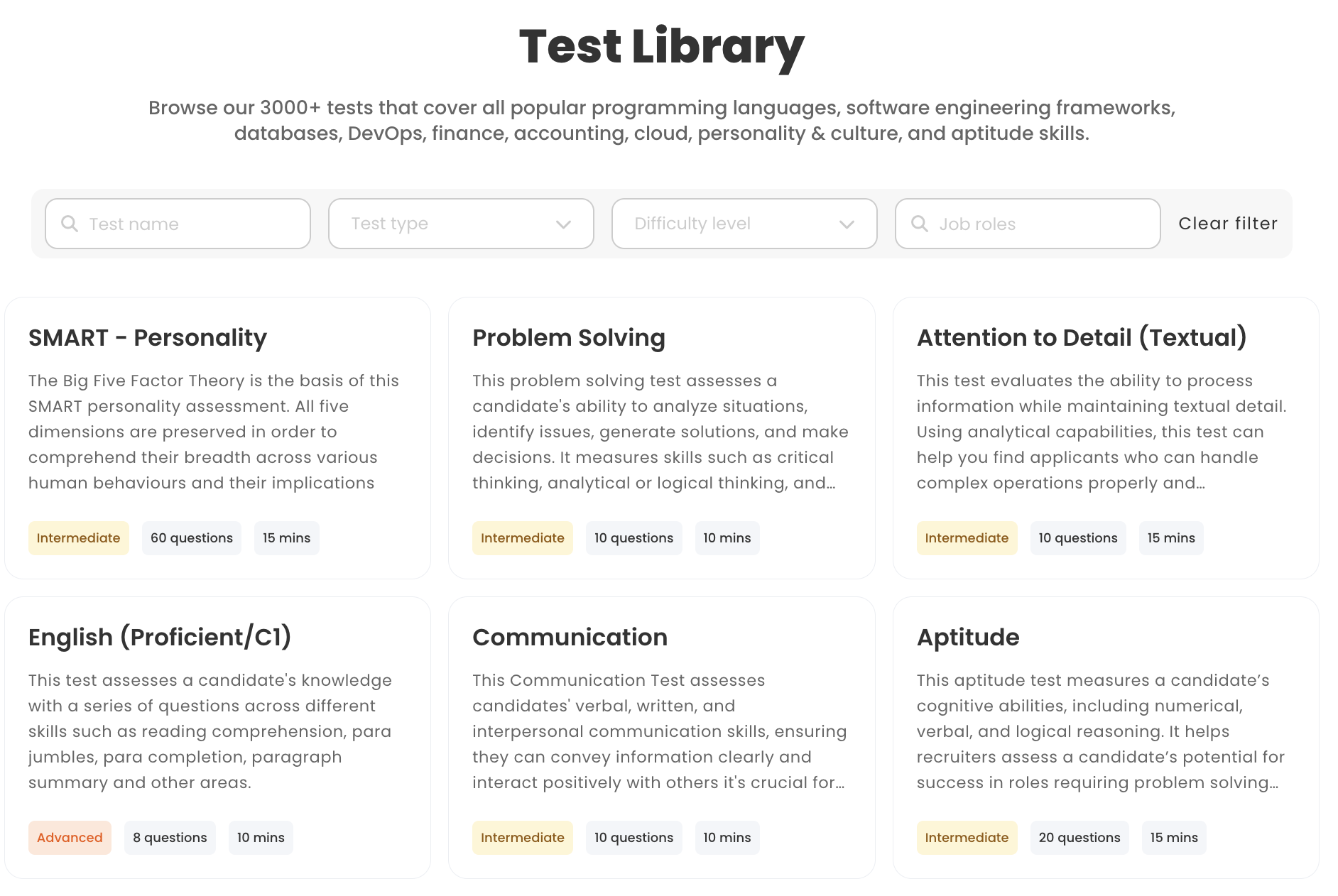
Total Testing also boasts a large skills assessment library, providing instant access to 800+ ready-to-use skills tests covering a broad range of areas including:
- Behavioral and cognitive Tests
- Basic administrative and clerical skills tests
- Microsoft Office skills tests
- Accounting and Finance Tests
- Industrial skills tests
- Retail sales skills tests
- Call center and customer service tests
- Legal office skills tests
- Human resources skills tests
- Medical and nursing skills tests
- Food service skills tests
Verdict: Both Testlify and Total Testing offer extensive test libraries suitable for most organizations, but their strengths lie in different areas.
Testlify stands out with its role-centric approach, offering a vast library of assessments tailored to thousands of specific job roles. It also integrates conversational AI powered assessments such as chat, voice, and video formats, making it ideal for companies hiring for customer-facing roles.
While Total Testing provides a solid catalog of validated tests (especially for clerical and administrative domains), it lacks the depth and flexibility that Testlify brings to high-growth or tech-forward organizations.
Testlify vs. Total Testing: Custom question types
Testlify allows employers to create tailored assessments with 15+ custom question types, including scenario-based MCQs and AI-powered interviews.
- Multiple Choice Questions (MCQs)
- Open-ended and descriptive questions
- AI-powered Chat simulation
- AI-powered Video interview
- AI-powered Audio interview
- Custom coding questions and live coding tests
- Fill-in-the-blanks
- File upload questions
- Google Docs, Sheets, and Slides questions
- Microsoft Office questions
- Rating, number, and date questions
- Qualifier questions
Total Testing enables employers to create personalized assessments with multiple question types:
- Multiple choice questions (MCQ)
- Short answer questions
- Fill in the blanks
- Long answer questions
Verdict: Testlify stands out for its AI-powered assessment builder and innovative question formats such as conversational AI interviews, which can streamline the creation of role-specific tests. It’s an advantage if you want to quickly develop new questions or unique scenarios using AI, or if you have very specific evaluation criteria that aren’t readily available in a question bank.
Total Testing offers an equally flexible test builder with a huge arsenal of existing questions to mix and match, which is advantageous for organizations that want granular control and a wealth of content to pick from.
Testlify vs. Total Testing: White-labeling capabilities
Testlify offers white-labelling capabilities, allowing companies to fully customize the platform with their own branding. This includes adding logos, personalizing emails, and modifying the test interface to best fit the look and feel of your own company.
A standout feature is the ability to personalize invitation and rejection emails. Instead of sending generic messages, companies can craft communications that reflect their brand’s tone and values, leaves a lasting impression on candidates.
Total Testing offers custom branding options only if you pre-pay for 25 tests or more, they provide a “Branded Account” with your logo and return-to-company links.
However, that branded option is contingent on bulk purchase, and there is no mention of custom emails. Overall, Testlify’s platform is designed for enterprise branding, whereas Total Testing’s white-labeling is an optional perk tied to volume.
Verdict: If maintaining your brand presence and keeping candidates comfortable is a priority, Testlify has the upper hand. From custom domains to branded email templates and a seamless candidate experience, Testlify allows full customization out of the box.
It offers a more personalized assessment experience that elevates the overall candidate journey, making each assessment feel like a natural extension of your organization’s hiring process.
Testlify vs. Total Testing: Conversational interviews
Testlify leverages conversational AI to simulate on-the-job scenarios across chat, voice, and video formats, bringing real-world context into the hiring process.
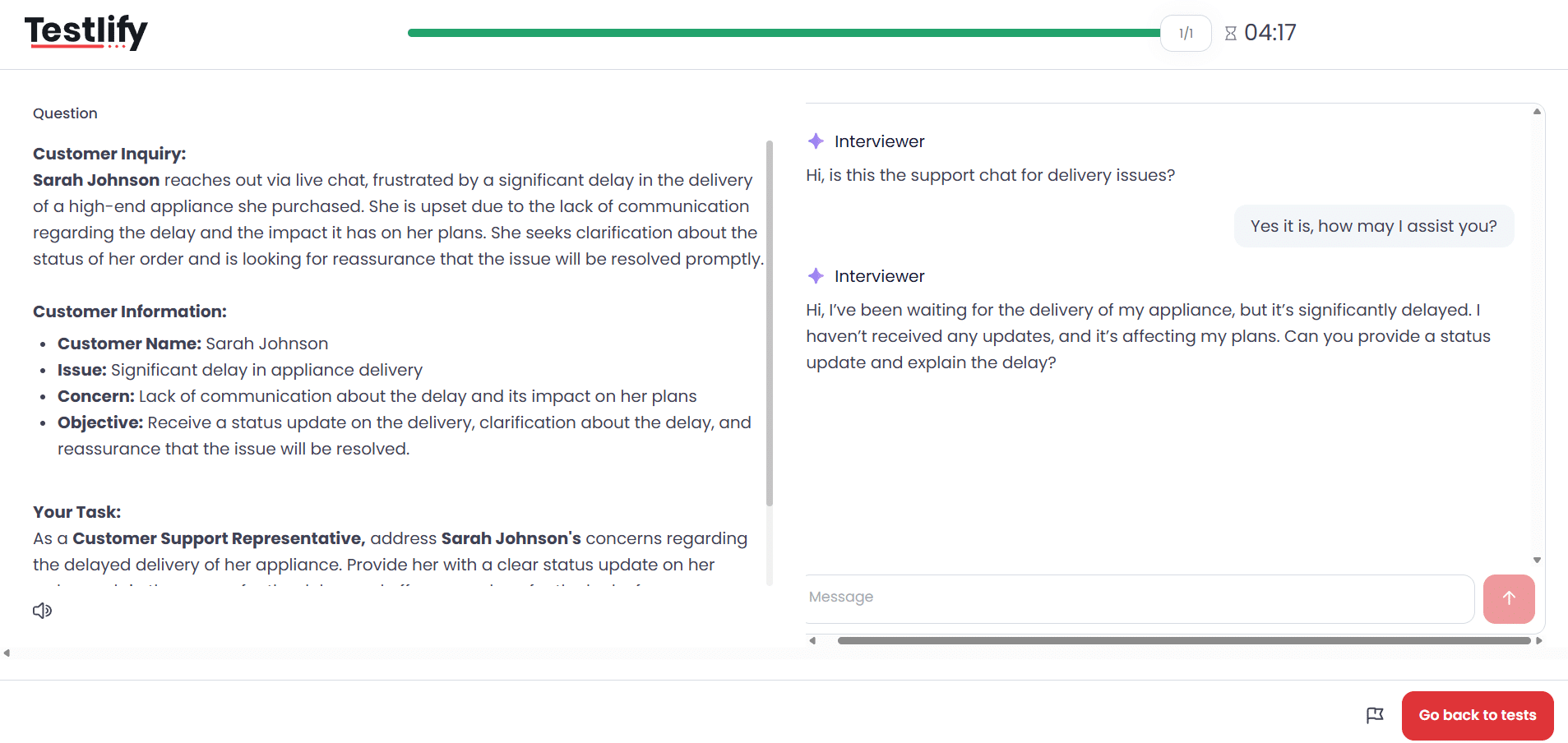
- Chat AI: Assess problem-solving, written communication, and critical thinking by engaging candidates in realistic text-based scenarios, like handling a billing dispute or calming an angry customer.
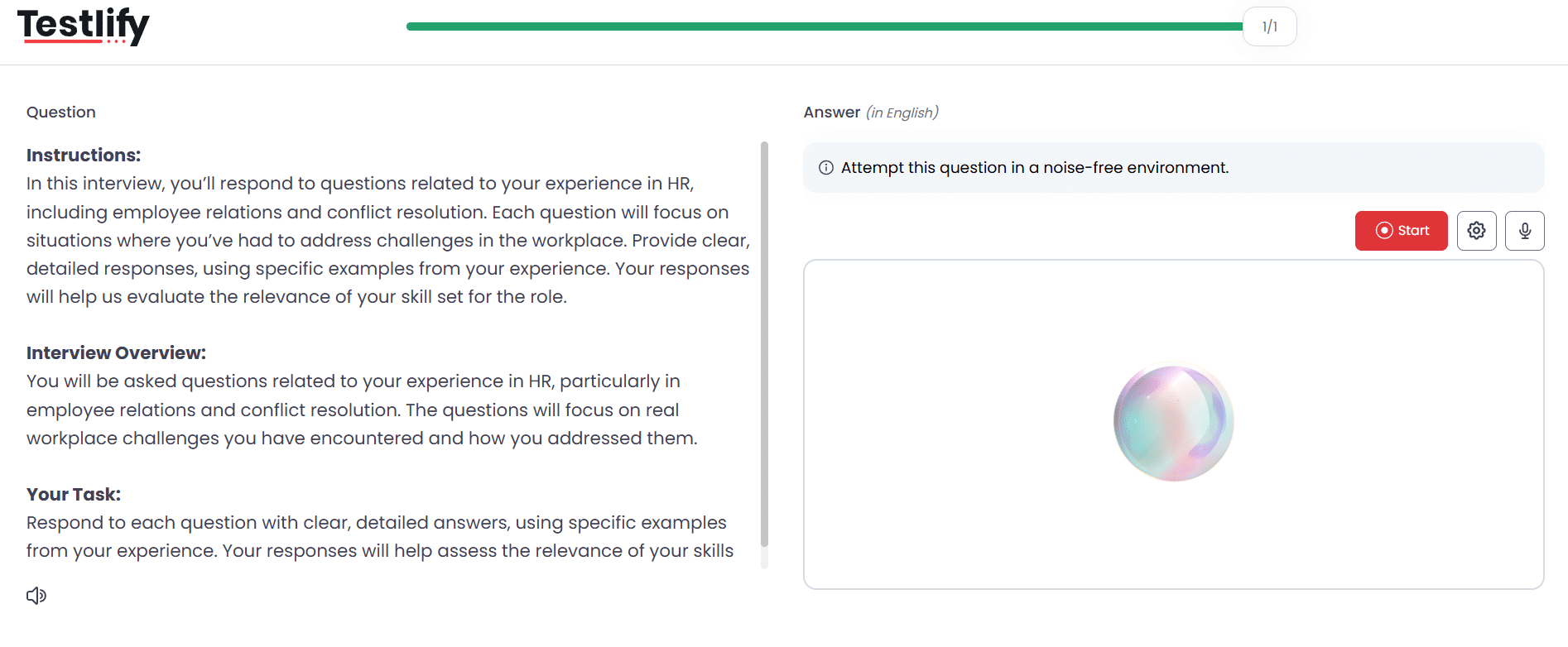
- Voice AI: Evaluate verbal fluency, tone, and persuasion by having candidates respond to role-specific prompts, such as those for sales or customer support.
- Video AI: AI avatars guide candidates through complex job scenarios in asynchronous video interviews, allowing employers to analyze non-verbal communication, confidence levels, and emotional intelligence.
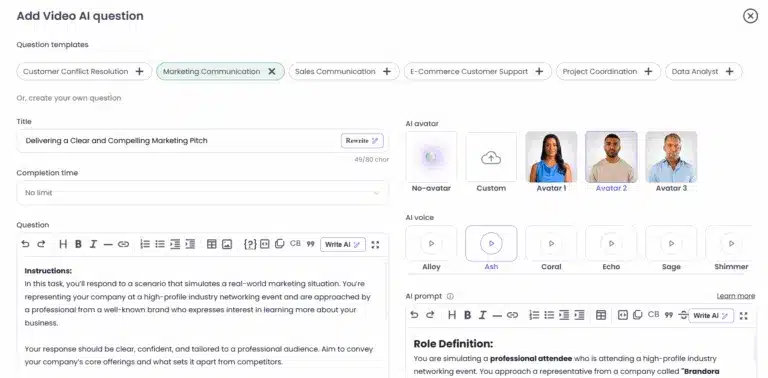
Total Testing does not support conversational interviews or asynchronous video Q&A features. It focuses exclusively on test-based evaluation and does not come with conversational AI powered job simulation capabilities.
Verdict: Testlify is the stronger option for conversational AI interviews. Its support for chat, voice, and video interview formats provides a more comprehensive assessment experience, especially for roles that require strong communication and situational judgment skills.
Total Testing does not currently offer an AI interview module, which may limit its suitability for teams looking to assess communication-intensive or client-facing roles through automated conversational evaluations.
Testlify vs. Total Testing: Anti-cheating & proctoring features
Testlify employs advanced anti-cheating and remote proctoring features ensure that every assessment reflects real skill and genuine effort. The features include:
- Face detection
- Photo id verification
- Webcam snapshots
- Full-screen mode
- Force full-screen mode
- Dual camera proctoring
- Copy/paste tracking
- Mouse-out tracking
- IP proctoring
- Live video monitoring
- Question randomization
- Honesty Agreements
- Question-level activity logs
- AI assistance detection
- Screen recording
- Live environment check
- System requirement check
- Enforce internet speed check
- Focus guard (Anti-Cheat Mode)
- Talking prohibition
Total Testing does not publicly disclose any anti-cheating or proctoring mechanisms. There is no indication of browser lockdowns, webcam monitoring, or test environment control measures being in place.
Verdict: Testlify provides a more comprehensive, all-inclusive proctoring system designed for high-stakes testing environments. It includes advanced features like dual-camera monitoring and AI-powered cheating detection, making it ideal for organizations that need multiple layers of security to ensure assessment integrity.
Testlify vs. Total Testing: Benchmarking Analytics
Testlify comes with benchmarking analytics that provide valuable insights into candidate performance, helping organizations evaluate their candidates effectively through comparative metrics.
These metrics allow companies to benchmark candidates against industry standards, which helps to identify top performers, recognize skills gaps, and make informed hiring decisions.
Total Testing provides more benchmarking capabilities than initially assumed. Score reports include visual dashboards with:
- Overall performance scores
- Comparisons to other test takers
- Breakdowns by skill level
- Topic-specific performance
This allows recruiters to not only see how a candidate performed but also understand how they stack up against others and where their strengths or gaps lie across specific topics.
However, these insights are largely static and test-specific. There is no interactive dashboard, real-time analytics, or customizable benchmarking across departments or organizational history.
Verdict: While Total Testing offers decent benchmarking visuals within individual reports, Testlify provides more powerful and actionable analytics across teams, industries, and historical data. If you’re looking for scalable, real-time performance benchmarking, Testlify is the superior choice.
Testlify vs. Total Testing: Integrations
Testlify integrates seamlessly with 100+ ATS platforms and HRMS, allowing you to effortlessly import candidates’ profiles, compare assessment results and make data-driven hiring decisions.
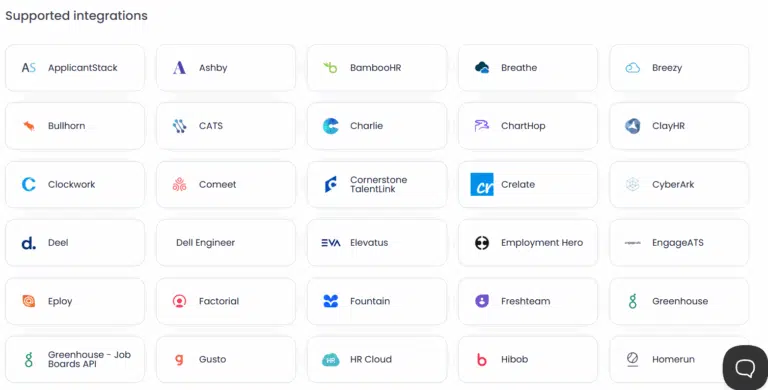
Total Testing comes with basic integration capabilities but it remains unclear how well the platform can connect with popular ATS, HRIS, or collaboration tools, potentially posing challenges for teams looking to streamline their hiring workflows.
Verdict: With over 100+ ATS and HR software integrations, Testlify easily fits into any recruitment tech stack. Total Testing does not offer native integrations, relying on manual workarounds or CSV exports. For streamlined and automated hiring workflows, Testlify is significantly ahead
Testlify vs. Total Testing: AI overviews
Testlify supports AI overviews, which provide a concise summary of a candidate’s overall performance in an assessment, highlighting strengths and areas for improvement to help recruiters quickly evaluate candidates.
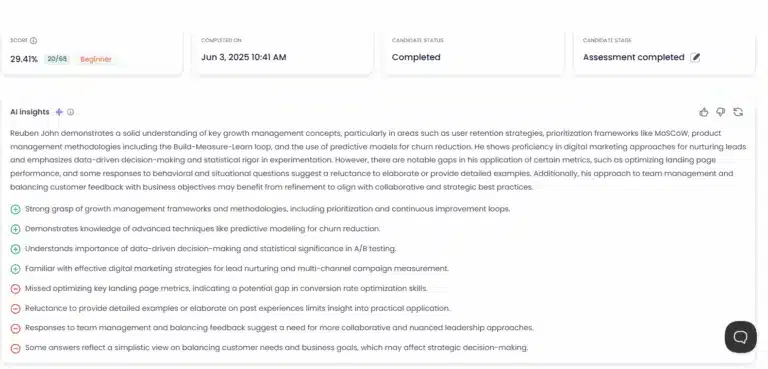
Total Testing does not offer AI-generated performance overviews. While the platform delivers instant analytics, recruiters will have to manually summarize candidate results without AI assistance.
Verdict: Testlify’s AI-generated overviews simplify the evaluation process by offering quick, actionable insights into candidate performance. Total Testing does not come with this feature, meaning recruiters will have to put in the extra effort to interpret assessment results.
Testlify vs. Total Testing: Reporting & insights
Testlify provides detailed analytics on candidate behavior, question-level insights, and benchmarking. You can visualize how candidates compare across roles and industries.
Furthermore, candidate assessment reports can be easily shared with key decision-makers in PDF, Excel, or CSV formats, making it easier for them to make informed hiring decisions.
Total Testing offers comprehensive insights to guide informed talent decisions throughout the entire talent lifecycle. An Total Testing report typically breaks down the candidate’s results by section or skill area, showing scores or percentiles for each.
One of Total Testing’s strengths in reporting is highlighting competency levels: for instance, it may label a candidate as “Proficient” in one skill but “Intermediate” in another, based on their score ranges. This aligns with how some L&D teams think (proficiency categories), and it’s useful for communicating results to non-technical stakeholders.
Like Testlify, Total Testing enables exporting reports in various formats (PDF, Excel, CSV) so you can store or share results outside the platform. If you’re hiring collaboratively, you can grant team members access to view results on the platform, or integrate the results into your ATS to view alongside resumes.
Verdict: Both Testlify and Total Testing deliver powerful reporting and analytics capabilities that make evaluating candidates simple and straightforward.
Common strengths include: comprehensive breakdowns of performance, AI-powered insights, the ability to export/share reports, and global benchmarking capabilities.
If we had to nitpick a difference, Testlify might have a slight edge thanks to its advanced benchmarking visuals and perhaps more nuanced candidate behavior analytics.
Testlify vs. Total Testing: Customer support
Testlify is known for its responsive and personalized customer support, provided by human agents across multiple channels. The platform offers dedicated onboarding for new customers and priority support for enterprise clients, ensuring a great user experience.
The Testlify team also welcomes customer feedback and has been noted to roll out improvements in response to customer needs.
In addition to live support, the platform also features a help center with documentation, FAQs, and best practice guides, so your team can self-serve answers to common questions.
Total Testing provides reliable customer support through multiple channels, including email and phone, ensuring users can access timely assistance for any issues or queries. Additionally, they offer a comprehensive FAQs page that addresses common concerns and provides quick solutions, enhancing the overall user experience.
Verdict: Testlify offers a more comprehensive and customer-focused support experience. With personalized assistance across multiple channels, dedicated onboarding for new users, and priority support for enterprise clients, it goes well beyond the basics.
While Total Testing provides reliable support via email, phone, and a helpful FAQs page, Testlify’s proactive service and commitment to continuous improvement make it the stronger choice.
Testlify vs. Total Testing: Pricing plans
Testlify offers flexible pricing plans that scale with your business, providing everything from basic assessments for startups to advanced features for enterprise-level hiring.
- Starter plan: Ideal for small teams and startups, this plan starts at $139/month (billed at $1,663/year) and includes 100 candidate credits at $17 per credit with support for 3 users.
- Starter: Designed for growing businesses, the Starter starts at $279/month (billed at $3,343/year) and includes 300 credits at $11 per credit with support for 5 users.
- Starter: Built for scaling teams, this plan costs $699/month (billed at $4,192/year) and includes 1,000 credits at $8 per credit with 10 users.
- Premium plan: Suited for high-growth organizations, the Premium plan includes 3,000 credits and supports 20 users, with pricing available upon contacting the sales team.
- Enterprise plan: Designed for large enterprises, this plan includes 10,000 credits and supports 30 users with pricing available upon contacting the sales team.
- Enterprise Plus plan: Designed for large-scale hiring programs, this plan includes 25,000 credits and supports up to 40 users, with pricing details available after contacting the sales team.
- Unlimited plan: For companies seeking unrestricted access, Testlify offers an unlimited plan that includes unlimited candidate credits and full platform functionality, with pricing available on request from the sales team.
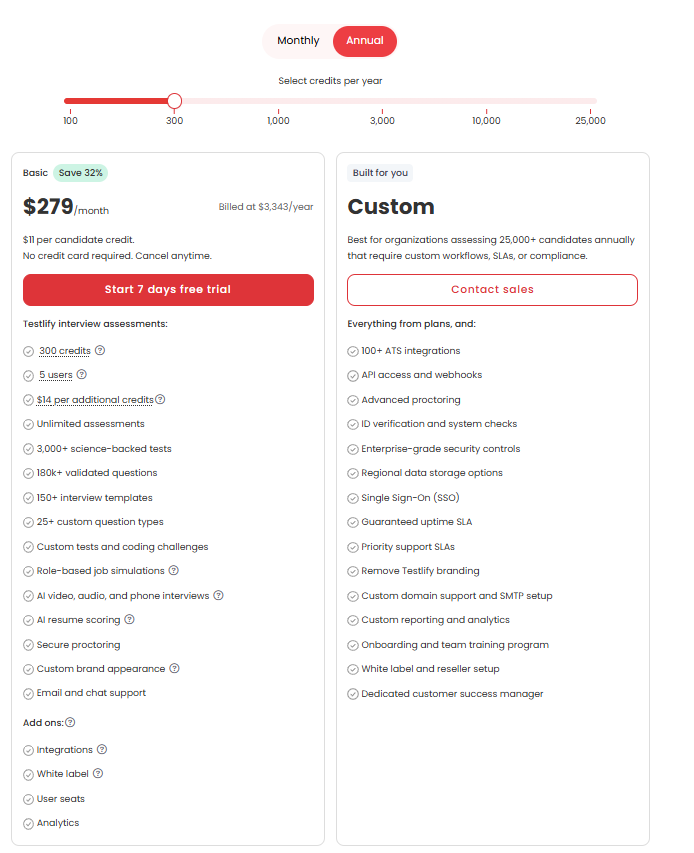
Total Testing also offers a range of pricing plans tailored to meet the diverse needs of organizations:
Staffing agency account: Tailored specifically for recruitment and staffing agencies, this plan offers customized pricing based on your needs. Alongside bulk discounts, it includes ATS integration and support for custom tests. Agencies can call directly to create a plan optimized for their hiring volume and workflow.
Pay as you go: This plan is ideal for companies with occasional hiring needs. You only pay for the tests you use, with no contracts, no sign-up fees, and no monthly commitment. It is a straightforward, low-barrier option for businesses looking for simple, transactional access to assessments.
Pre-pay: Designed for organizations with more consistent hiring needs, this plan allows you to pre-purchase tests in bulk, bringing the cost down to as low as $12 per test. The credits remain valid for a year or more and unlock access to ATS integration and custom test creation, making it a better value for volume users.
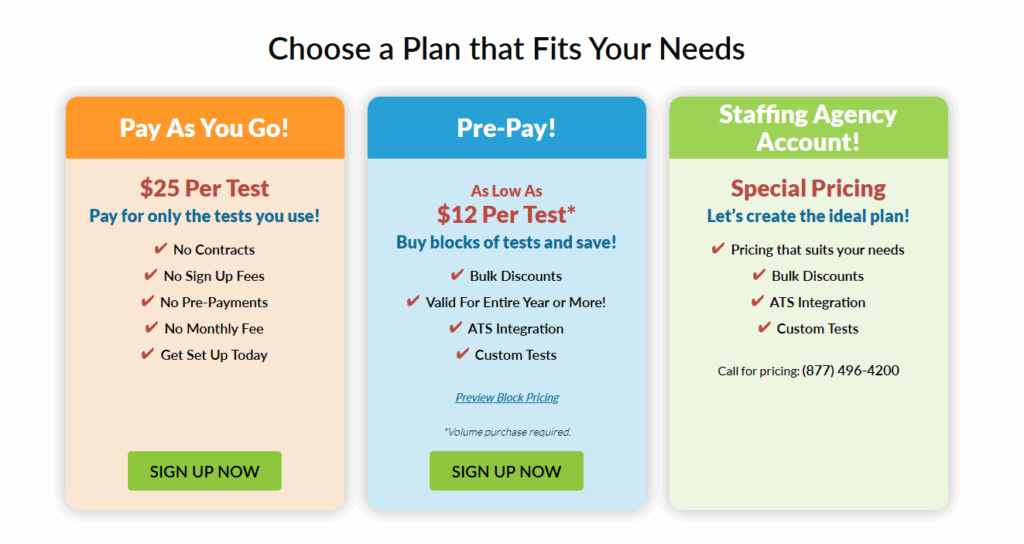
Verdict: Total Testing shines for low-volume, transactional hiring with its pay-per-test flexibility, making it a cost-effective option for companies hiring only occasionally or for a few roles at a time.
However, as hiring needs grow, Testlify’s scalable pricing becomes far more advantageous. Its tiered plans are purpose-built to support startups, mid-sized businesses, and enterprise-scale organizations with features like unlimited assessments, multiple user seats, and advanced AI tools.
Moreover, Testlify’s predictable, subscription-based pricing makes it easier for teams to budget and scale efficiently, especially when conducting frequent assessments.
For high-volume, collaborative, or growth-oriented hiring teams, Testlify offers greater value and better ROI.
Is Testlify a better alternative to Total Testing?
Testlify and Total Testing are both strong contenders in the skills assessment space, but which platform is better ultimately depends on your hiring goals, team structure, and candidate evaluation strategy. That said, Testlify emerges as the stronger alternative, and here’s why:
Broader role-based test coverage
Testlify offers a significantly larger test library in terms of role-specific hiring with over 3,500 assessments tailored to 4,500+ job roles across 50+ industries. This breadth means it comes with role-specific tests that can be used right out of the box.
White label and custom branding
Total Testing offers custom branding options only if you pre-pay for 25 tests or more; they provide a “Branded Account” with your logo and return-to-company links.
In contrast, Testlify offers full customization of the candidate experience, including custom domains, branded colors and logos, and personalized candidate communications. This makes a meaningful difference in employer branding, especially for roles where candidate experience matters.
Advanced conversational interviews:
Testlify features interactive chat, voice, and video interviews powered by conversational AI. This multi-format approach delivers a more immersive, real-world assessment experience in comparison to the traditional pre-made assessments offered by Total Testing.
Superior proctoring
Testlify delivers an advanced proctoring suite with dual-webcam monitoring, tab switching detection, screen recording, AI-assistance detection, and full-screen enforcement. This makes it ideal for organizations that prioritize test integrity, particularly in remote or high-stakes hiring scenarios.
Extensive ATS integrations
Total Testing functions well as a standalone screening solution, but it lacks native integrations with Applicant Tracking Systems (ATS). Testlify offers seamless integrations with over 100 ATS platforms, making it far more adaptable for recruitment teams that want to embed assessments directly into their hiring workflows.
Other best alternatives to Total Testing
Feature | TestGorilla | Adaface | Vervoe | Mercer Mettl | HireVue | TestDome | Codility |
|---|---|---|---|---|---|---|---|
Test Library | 300+ | 500+ | 300+ | 400+ | 1000+ | 130+ | 1100+ |
Custom Test Creation | Yes | Yes | Yes | Yes | Yes | Yes | Yes |
Automated Scoring | Yes | Yes | Yes | Yes | Yes | Yes | Yes |
Video Interviewing | Yes | Yes | Yes | Yes | Yes | Yes | Yes |
Proctoring Options | Yes | Yes | Yes | Yes | Yes | Yes | Yes |
ATS Integrations | 17+ | 9+ | 12+ | 16+ | 15+ | 6+ | 11+ |
Reporting & Analytics | Yes | Yes | Yes | Yes | Yes | Yes | Yes |
Final thoughts
Both Testlify and Total Testing can elevate your hiring process, but the right choice depends on your organization’s priorities. Total Testing offers a well-established, content-rich platform with a broad test library, making it a dependable option for companies seeking a traditional skills assessment platform.
Testlify, on the other hand, represents the future of hiring. It goes beyond standard assessments to transform how you engage with candidates. With a vast test library, conversational AI-powered interviews, and advanced proctoring features, Testlify empowers you to identify top talent and make the right hiring decisions.
Book a demo with Testlify to explore how it can elevate your hiring strategy.

Director of Marketing
Akash Patange is the Director of Marketing at Testlify, where he works closely with HR leaders and recruiters to help organizations improve hiring outcomes. He writes about talent assessment, recruitment technology, and data-driven hiring practices.
LinkedInRelated resources
View all
Competitor Comparisons
Testlify vs. ThriveMap: Which Skills Assessment Platform is Best for HR Teams?
Competitor Comparisons
Testlify vs. UbiAptitude: Which Skills Assessment Platform is Best for HR Teams?
Competitor Comparisons
Testlify vs. Zapilio: Which Skills Assessment Platform is Best for HR Teams?
Competitor Comparisons
Testlify vs. TalentClick: Which Skills Assessment Platform is Best for HR Teams?
Competitor Comparisons
Testlify vs. ASC Smarter Assessment: Which Skills Assessment Platform is Best for HR Teams?
Competitor Comparisons
Testlify vs Canditech: Which Assessment Platform Wins in 2026?
Get started.
Hire on proof, not resumes.
Run your first skills-based assessment free — no credit card required.