
Testlify vs. ThriveMap: Which Skills Assessment Platform is Best for HR Teams?
Testlify vs. ThriveMap: Discover which skills assessment platform best suits your hiring needs
Testlify and ThriveMap both replace resume guesswork with evidence, but they are built for different jobs. ThriveMap makes bespoke day-in-the-life assessments for frontline and entry level roles hired in volume. Testlify is a broader assessment and AI interviewing platform, with 3,500+ tests, published prices and a 7 day free trial, which usually makes it the faster fit for a team under 200 people hiring across mixed roles.
The reason this choice matters is churn. The U.S. Bureau of Labor Statistics counted 3.1 million quits in July 2026, a quits rate of 1.9 percent, and frontline work carries more of that than any other category. Every bad frontline hire is paid for twice, once in the salary and once in the rehire.
TL;DR:
- ThriveMap is the better pick when you hire hundreds of people into one repeatable frontline role and want a co-designed simulation of that exact shift.
- Testlify is the better pick when you hire across several different roles, want to start this week, and need one price you can see before you talk to anyone.
- ThriveMap does not publish prices. Testlify does: $139, $279 and $699 a month on annual billing, plus contact-sales tiers above that.
- Testlify runs voice and video AI interviews, dual-device proctoring and an AI checker. ThriveMap does not compete on assessment integrity tooling.
- A simulation alone is not the strongest predictor available. Work samples score r = .33 for predicting job performance, below structured interviews at .42, so the best process combines signals rather than betting on one.
- Neither tool schedules live human interview panels. If that is what you need, you are shopping for a scheduling product.
 ChatGPT
 Gemini
 Claude
 Grok
Grok Perplexity
Testlify vs ThriveMap at a glance
What you are comparing | Testlify | ThriveMap |
|---|---|---|
Core idea | Multi-signal assessment and AI interviewing | Realistic day-in-the-life job assessments |
Built mainly for | Mixed hiring across technical, professional and frontline roles | Frontline and entry level roles hired at volume |
Ready-made tests | 3,500+ tests, 180,000+ questions, 4,500+ roles | No general test library; assessments are built per role |
Question types | 25+, including coding, typing, Office app tasks and vibe coding | Scenario and simulation content designed around one role |
AI interviewing | One-way video, two-way conversational AI video, voice, and AI phone interviews | Not an interviewing product |
Proctoring | 20+ measures, three presets, dual-device monitoring | Not positioned on proctoring |
Integrations | 100+ ATS integrations, Zapier, webhooks, API | ATS integration available, arranged per customer |
Pricing | Published: $139 to $699 a month on annual billing, then contact sales | Quote only, based on volume, roles and assessment type |
Time to first assessment | Same day, 7 day free trial, no card | 1 to 2 days for the self-build option, 4 to 6 weeks for bespoke |
Pro tip: before you compare features, write down how many roles you hire for. One role at 300 hires a year and eight roles at 20 hires each are different purchases, and that single number decides this comparison faster than any feature list.

What is ThriveMap and who is it built for?
ThriveMap builds realistic job assessments: a candidate works through a simulation of an actual shift, makes the calls that role makes, and sees what the day really looks like. It is a UK company selling into high volume frontline hiring, warehouse, contact centre, care, retail and similar work.
Two ways to buy, per ThriveMap's own pricing page. The Smart Assessment Builder lets you build the assessment yourself and go live in one to two days. Bespoke assessments are co-designed with ThriveMap's team and take roughly four to six weeks from workshop to launch, with no free trial because of the custom build work. Neither option lists a price; you get a quote based on hiring volume, role count and assessment type.
The design bet is honest and it works: show people the job, and the ones who would have quit in week three take themselves out before you pay to train them. For a company hiring 400 warehouse pickers a year into one well-understood role, that is a real answer to a real problem.
The limits follow from the same bet. There is no general library of ready-made skills tests to pull from, so a second role means a second build. And a simulation tells you how someone behaves in that scenario, not whether they can already do the technical parts of the job.
What is Testlify and who is it built for?
Testlify is a pre-hire assessment and interviewing platform. Skills tests, role-based tests, cognitive and personality tests, coding tests, AI interviews across voice and video, proctoring, multi-reviewer scoring, candidate reports and reference checks, in one product.
The library is the headline number: 3,500+ tests, 180,000+ validated questions, 4,500+ roles, 50+ industries, 45+ programming languages. The reason that matters is not the size. It is that adding a role costs you an afternoon of picking tests rather than a project.
Question types run to 25+, and some of them are unusual. Candidates can be given real Google Docs, Sheets, Slides, Word, PowerPoint or Excel tasks. Coding questions run in an embedded VS Code editor with up to 20 test cases, including SQLite database cases. There is a vibe coding format, where candidates direct AI tools to reach a working solution instead of writing syntax by hand, which is closer to how development actually happens now.
For teams that have no applicant tracking system, Testlify ships a simple built-in one: job requisitions, an application form, job-board publishing and an applied to reviewed to shortlisted to rejected pipeline. It is deliberately basic. For the majority who already run Greenhouse, Workday or Lever, Testlify sits in front as the screening and interviewing layer and leaves that system as the record of truth.
How do Testlify and ThriveMap compare feature by feature?
The short version: ThriveMap goes deeper on one role, Testlify goes wider across many, and only one of the two is trying to be an interviewing and integrity product as well.
Test library and test types
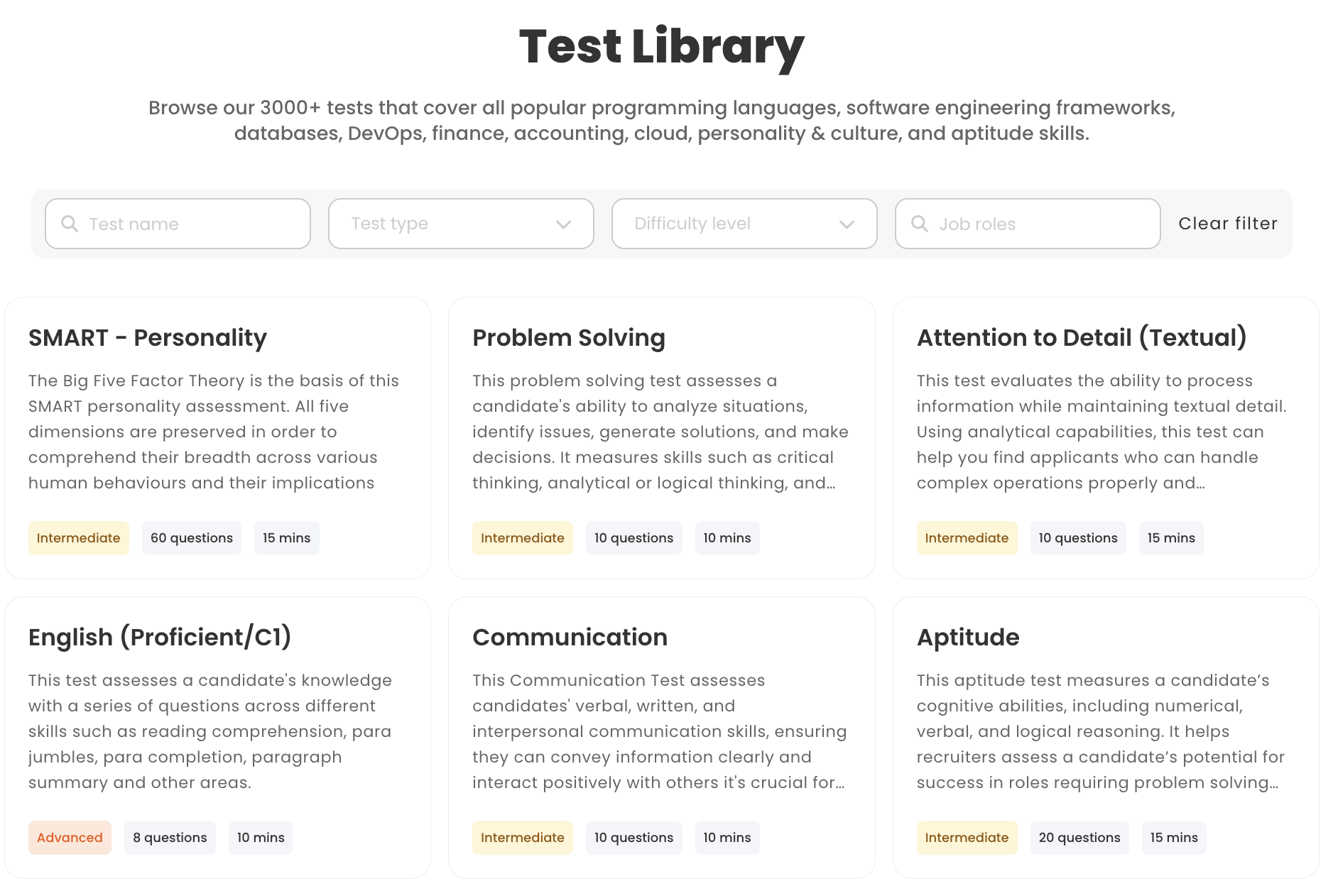
Testlify ships 3,500+ ready tests across blue collar, coding, cognitive ability, language, personality and culture, psychometric, role specific skills, situational judgement, software skills, simulation and gamified categories, each at three difficulty levels. ThriveMap has no equivalent library, by design. Its content is authored for the specific role you are hiring for, which is deeper for that role and starts from zero for the next one.
Custom question types
Testlify gives you 25+ types: single and multiple select, ranking, range, fill in the blank with dropdown or free-text blanks, qualifier screening gates, file upload, practical hands-on tasks submitted by file or URL, typing tests scored on 60% accuracy plus 40% speed by default, and the Office app tasks above. Question banks can be fixed, so everyone sees the same set, or variable, which pulls unused questions at random. The product warns you directly that smaller banks raise the chance of overlap, which is the sort of honest tradeoff most vendors bury.
ThriveMap's building block is the scenario rather than the question type. You are choosing between breadth of measurement and depth of one situation.
Video, voice and AI interviews
This is the clearest split. ThriveMap is not an interviewing product. Testlify runs one-way asynchronous video, two-way conversational AI video, audio and voice questions, and outbound AI phone interviews billed at $0.18 a minute, with 150+ interview templates.
The configuration is where it gets useful rather than gimmicky. You pick the AI avatar, the AI voice, the persona and the context, and write custom prompts. You set the number of attempts, the recording time, the completion time, and preparation time before auto-start. Transcripts are automatic and multilingual, and the AI detects the spoken language itself for recordings of at least 30 seconds. Scores come back with AI insights, and a reviewer can override any of it.
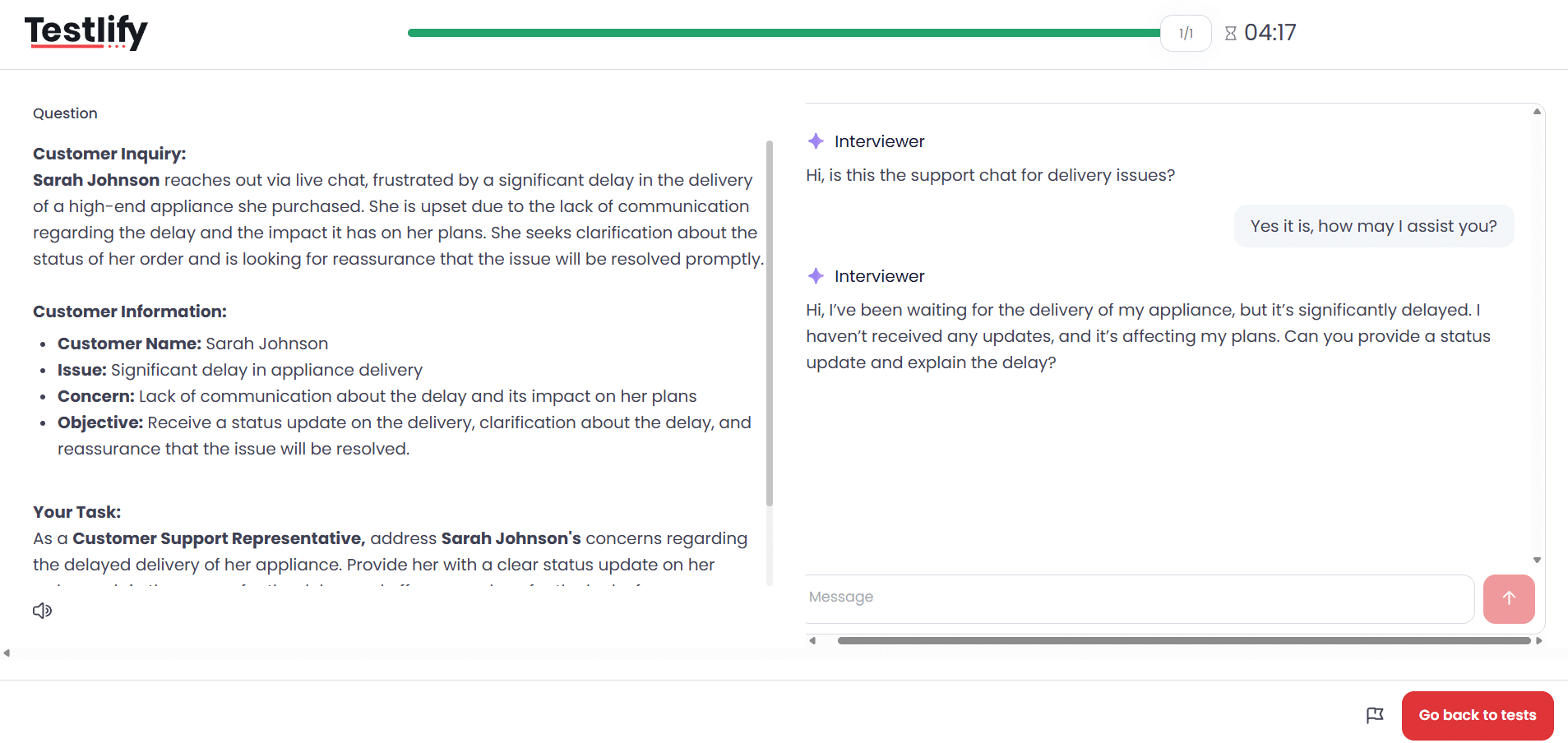
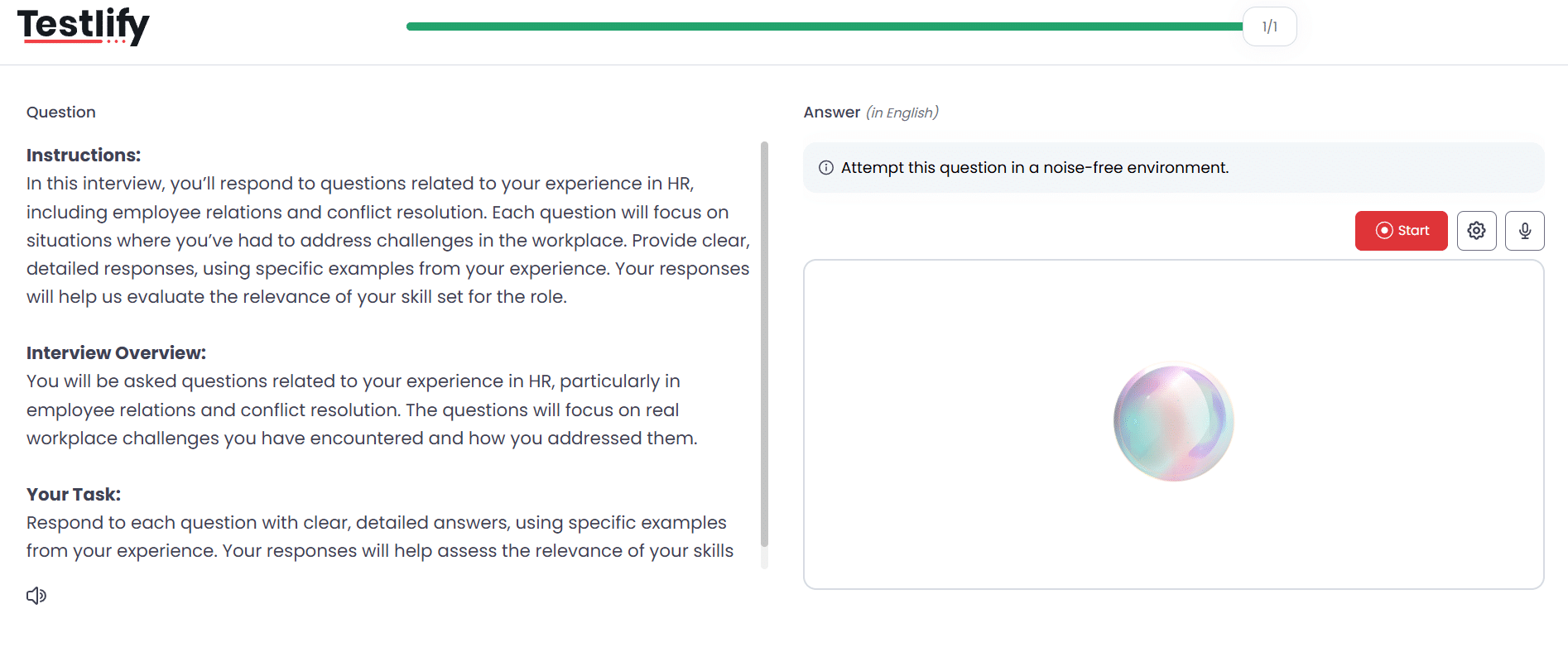
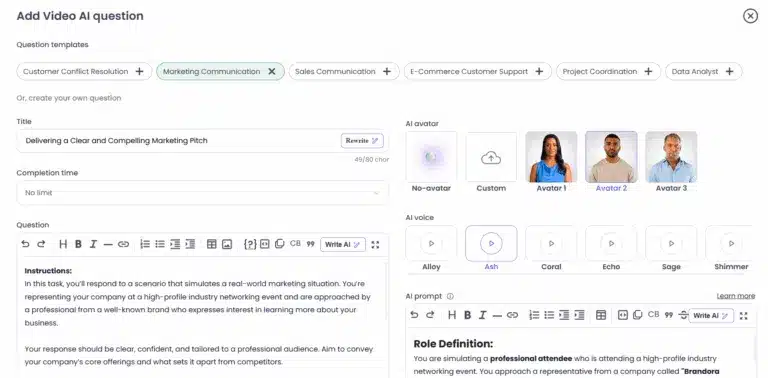
Two things to be straight about. Testlify does not schedule live human interview panels, so calendar coordination for a four-person loop is not what this is. And AI interviewing works best as one signal, not the whole decision.
Anti-cheating and proctoring
Gartner projects that by 2028, one in four candidate profiles worldwide could be fake, and in a survey of 3,000 candidates, 6% admitted to interview fraud, either posing as someone else or having someone else pose as them. That number is the reason integrity tooling stopped being optional.
Testlify runs 20+ measures under three presets, Standard, Strict and Custom: full-screen enforcement, tab-switch detection, face detection and single-presence checks, photo ID verification with face match, periodic webcam snapshots, copy-paste tracking, multi-monitor restriction, AI-tool and browser-extension detection, IP and location checks.
The standout is dual-device proctoring. The candidate's phone becomes a second camera positioned to capture both them and their laptop screen, and the assessment will not start until that monitoring is live. Flags come back green, yellow or red, and yellow says a quick manual review is recommended rather than making the call for you. Auto-termination exists but is opt-in with a threshold you set, which keeps evidence and rejection separate. Face verification data is deleted after 30 days and consent can be withdrawn at any time.
ThriveMap does not compete here. If your risk is fraud rather than fit, that gap is the whole answer.
White labeling and branding
Testlify can hide its branding, run on a custom domain, use custom SMTP, and toggle the powered-by logo, and there is a reseller option. Note that white labeling is a $2,388 a year add-on on the self-serve tiers and is included on the Custom plan, so price it in rather than assuming it is bundled. ThriveMap assessments carry your employer brand by default, since the whole point is showing candidates your workplace.
Integrations and your existing ATS
Testlify offers 100+ ATS integrations, plus Zapier, webhooks and an API, with SAML SSO, SCIM provisioning and SSO group-to-role mapping for larger teams. Same caveat as above: on the self-serve tiers those ATS integrations are a $2,388 a year add-on, included on Custom. The pricing page's hero bar says otherwise; the comparison table and FAQ on that same page are the accurate version.
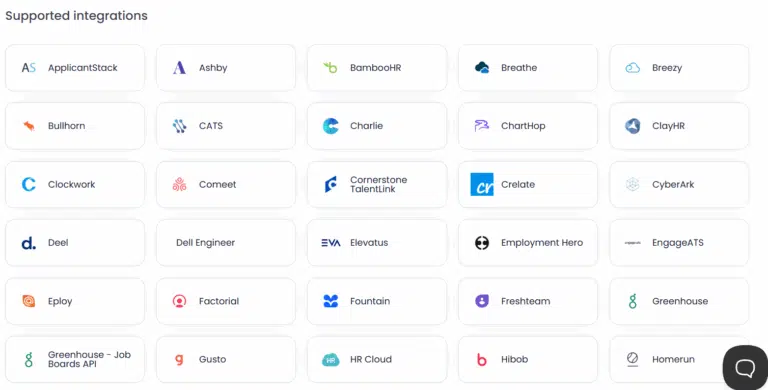
ThriveMap integrates with applicant tracking systems too, arranged as part of the setup rather than sold as a self-serve catalogue. Neither product asks you to give up the system you already trust.
Reporting, AI insights and analytics
Testlify surfaces item-level psychometrics that most platforms keep to themselves: difficulty index, discrimination index, a quality-risk flag for questions with very low accuracy or high skip rates, answer distributions, and score and time distributions. That is the data you need to tell a bad candidate from a bad question.
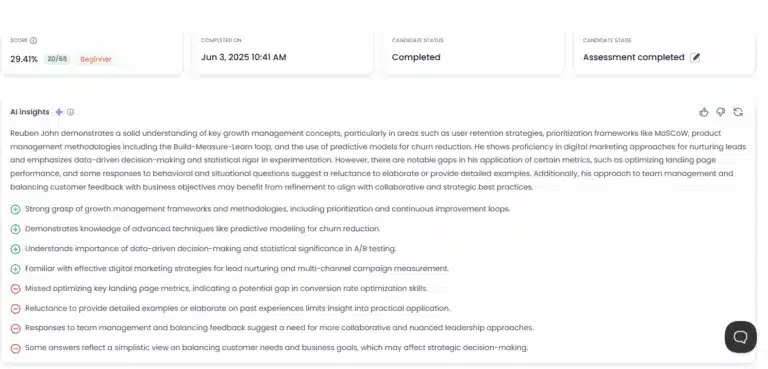
On top of that sit AI insights per candidate and per assessment, an AI checker that classifies an answer as human, AI generated or mixed, pronunciation insights, and shareable reports with granular show-and-hide controls. Every AI score carries the product's own disclaimer that it is for guidance only and human judgment makes the final call, and a customer can leave AI scores out of the final average entirely.
ThriveMap reports on fit and predicted performance in the simulated role, which is narrower and, for that one role, more directly about the job.
Support and onboarding
ThriveMap's bespoke path includes a design workshop with their team, which is genuine consulting and is reflected in the four to six week timeline. Testlify's self-serve path is faster and lighter: you are live the same day, with personalized onboarding and a dedicated customer success manager available on higher tiers.
Pricing
ThriveMap publishes no prices. You get a bespoke quote based on hiring volume, number of roles and assessment type.
Testlify publishes everything. On annual billing:
Plan | Credits a year | Price | Per credit | Seats |
|---|---|---|---|---|
Starter | 100 | $139 a month, billed $1,668 a year | $16.68 | 3 |
Basic | 300 | $279 a month, billed $3,348 a year | $11.16 | 5 |
Business | 1,000 | $699 a month, billed $8,388 a year | $8.39 | 10 |
Premium | 3,000 | Contact sales | Volume based | 20 |
Enterprise | 10,000 | Contact sales | Volume based | 30 |
Custom | 25,000+ | Contact sales | Volume based | 40 |
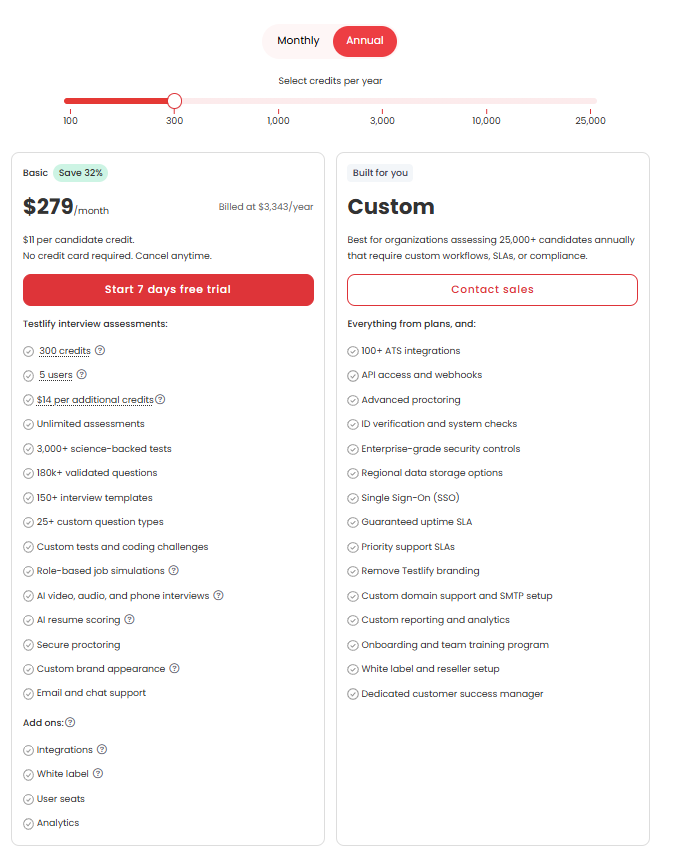
One credit is spent when a qualified candidate starts an assessment, and credits do not roll over. Extra seats are $15 a month each. There is a 7 day free trial with no card, a 30 day money-back guarantee, the price is locked for 24 months, and non-profits get 25% off. Monthly billing exists at different numbers, and metered items sit outside the plan: AI phone interviews at $0.18 a minute, face verification at $0.50 an attempt. Current plan details are worth checking before you buy, since the tiers move.
The practical difference is not the amount, it is the shape. You can size Testlify yourself in ten minutes. Sizing ThriveMap requires a conversation, which is fine at 400 hires and awkward at 30.
Which one fits entry level and high volume hiring?
Both are built for this, which is why the comparison is worth doing properly rather than by feature count.
ThriveMap entry level hiring assessment comparison
Compared head to head on entry level hiring, ThriveMap's realistic job assessment is the stronger self-selection tool and Testlify's multi-signal setup is the stronger measurement tool. A day-in-the-life simulation shows a candidate the reality of the shift, and some of them leave. That is valuable and hard to replicate with a test battery.
What it does not do is tell you which of the remaining candidates will actually perform. Here the selection science is blunt. In the revised meta-analytic estimates from Sackett and colleagues, structured interviews predict job performance at r = .42, job knowledge tests at .40, biodata at .38, work sample tests at .33 and cognitive ability at .31. Work samples, the family realistic job assessments belong to, sit fifth. A process built on a simulation alone is leaving the two strongest predictors on the table.
That is the argument behind the Testlify Multi-Signal Talent Evaluation Model: one signal is fragile, several are not. Rather than betting a frontline hire on a single simulation score, it combines role-relevant signals, an assessment, a structured AI interview, integrity evidence and reviewer feedback, and advances a candidate when those signals agree. Assessments and interviews live in the same tool, so combining them is a setting rather than a project.
Volume changes the arithmetic too. At 1,000 assessments a year, Testlify's Business plan works out at $8.39 a candidate on published pricing. Whether a bespoke simulation beats that depends entirely on your quote, and you cannot know until you ask. For a fifty-person retail chain hiring 120 store staff a year across four roles, the self-serve path is usually live before the bespoke path has finished its design workshop.
When ThriveMap is the better pick
Pick ThriveMap when three things are true at once: you hire in real volume into one or two roles, the day-to-day of those roles is unusual enough that candidates genuinely misunderstand it, and early attrition is your main cost. A care provider losing staff in week two because nobody described the work honestly is exactly the case ThriveMap was built for, and a general test library will not fix that.
Pick Testlify when you hire across several roles, want high volume screening and specialist hiring in one place, need integrity evidence you can defend, or simply want to start before the end of the week.
Gallup put global employee engagement at 20% in 2025, its lowest since 2020, and estimated $10 trillion in lost productivity. Neither of these tools fixes that on its own. What a good assessment does is stop you adding to it.
How does ThriveMap compare to other platforms?
ThriveMap gets shortlisted against a wide range of tools, most of which are solving a different problem. Here is where each pairing actually lands, and where Testlify sits in it.
eSkill vs ThriveMap
eSkill is a test-library platform: job-based and subject-based tests you assemble into a battery. ThriveMap is a simulation platform with no library. So eSkill vs ThriveMap is really breadth of ready-made measurement against depth of one designed scenario. Teams that want both usually end up buying twice. Testlify's answer is 3,500+ tests plus simulation and situational judgement formats in the same product, so the choice does not have to be made.
TestGorilla vs ThriveMap
TestGorilla is a broad multi-measure test library aimed at skills-based hiring across many roles. ThriveMap is narrow and deep on frontline realism. The split mirrors eSkill vs ThriveMap: catalogue versus custom build. Where Testlify differs from both is the interviewing layer, since voice and video AI interviews and the assessment sit in one workflow rather than two tools.
Harver vs ThriveMap
Harver and ThriveMap overlap most directly. Both target high volume frontline hiring, both use situational and simulation-style content, and both sell on reducing early attrition. Harver leans harder on volume workflow automation, ThriveMap on the realism of the assessment itself. Testlify competes here on measurement breadth plus integrity tooling rather than on volume workflow alone.
HireVue vs ThriveMap
HireVue is video interviewing first, with assessments alongside. ThriveMap does not interview at all. So HireVue vs ThriveMap is a comparison between two different stages of the funnel, and buyers running both are usually filling a gap rather than choosing. Testlify covers both stages: one-way and conversational AI video, voice and phone interviews, plus the assessment library underneath.
Vervoe vs ThriveMap
Vervoe uses AI-graded skills simulations that ask candidates to do sample tasks. ThriveMap simulates the shift rather than the task. Vervoe vs ThriveMap therefore comes down to whether you want to measure task capability or role fit. Testlify's position is that these are two signals rather than two products, which is the whole point of combining them.
Criteria Corp vs ThriveMap
Criteria Corp is psychometric first: cognitive aptitude, personality and emotional intelligence testing with a strong validity story. ThriveMap is experiential. Criteria Corp vs ThriveMap is close to the classic trait-versus-behaviour argument, and the honest answer is that the evidence supports using both. Testlify carries cognitive, psychometric and personality categories alongside simulation and situational judgement content.
Thomas International vs ThriveMap
Thomas International sells behavioural and aptitude assessment with a long consulting heritage, often used well beyond hiring into development and team work. ThriveMap is hiring-only and role-specific. Thomas International vs ThriveMap usually splits on whether you want a people-science partner or a hiring tool. Testlify is squarely the second, with the psychometric coverage to support the first use case at screening stage.
SHL vs ThriveMap
SHL is the enterprise incumbent in psychometric and aptitude assessment, with deep validation work and a price and implementation profile to match. ThriveMap is lighter, faster and frontline-specific. SHL vs ThriveMap is largely a question of company size and procurement appetite. Testlify sits between them: published pricing and same-day setup, with item-level psychometrics for teams that care about test quality.
Choosing a ThriveMap alternative
If you are looking for a ThriveMap alternative, sort candidates by the problem rather than the category. Early attrition from role misunderstanding points to simulation tools. Wrong-skills hires point to a test library. Fraud and identity risk points to proctoring depth. Slow shortlists point to AI interviewing. A longer list of options is in the rundown of ThriveMap alternatives, and entry level screening with skills assessments covers the measurement side in more depth.
The one thing worth avoiding is buying a second narrow tool to patch the first narrow tool. That is how a hiring stack ends up costing more than the hires.
Hire frontline teams on evidence, not gut feel
Start a 7 day free trial and build a role-specific assessment this afternoon, no card required, or book a demo and have someone walk you through the frontline setup with your own roles on screen.
Key takeaways
- Count your roles before you compare features. One high-volume role favours a bespoke simulation, because the build cost amortises over hundreds of hires. Several roles favour a library, because every extra role in a bespoke model is another project with another timeline.
- Published pricing is a real feature at small scale. ThriveMap quotes on volume, roles and assessment type, so you cannot size it without a sales conversation. Testlify's $139, $279 and $699 tiers let a founder budget the whole year in ten minutes, which matters most to the teams under 200 people who move fastest.
- One signal is fragile. Work samples predict performance at r = .33, behind structured interviews at .42 and job knowledge tests at .40. A process resting on a single simulation is weaker than one combining an assessment, a structured interview and reviewer judgment, which is what the Testlify Multi-Signal Talent Evaluation Model is for.
- Integrity is now part of the buying decision. With Gartner projecting one in four candidate profiles fake by 2028 and 6% of surveyed candidates admitting interview fraud, dual-device proctoring and AI-assistance detection are risk controls, not extras. ThriveMap does not compete on this, so if fraud is your exposure the comparison ends early.
- Speed to live is a cost, not a convenience. Four to six weeks of bespoke design is fine when you hire year-round into one role and expensive when you needed the assessment for a seasonal peak that starts in three weeks. Match the implementation model to your hiring calendar.
- Check what is bundled before you compare totals. Testlify's ATS integrations, white labeling and SSO are $2,388 a year add-ons on the self-serve tiers and included on Custom, so a like-for-like comparison against a bespoke quote has to include them.
- Neither tool schedules live human interview panels. If the bottleneck is coordinating a four-person interview loop rather than screening, no assessment platform solves it and you are shopping in the wrong category.
FAQs
Final thoughts
The decision comes down to one question you can answer today: is your hiring problem that people do not understand the job, or that you cannot tell who can do it? If it is the first and it is concentrated in one role at real volume, get a ThriveMap quote. If it is the second, or your hiring is spread across roles, build a role-specific assessment on Testlify this week and put a structured AI interview behind it, so the shortlist is scored before anyone spends an hour on a first call.

Director of Marketing
Akash Patange is the Director of Marketing at Testlify, where he works closely with HR leaders and recruiters to help organizations improve hiring outcomes. He writes about talent assessment, recruitment technology, and data-driven hiring practices.
LinkedInRelated resources
View all
Competitor Comparisons
Testlify vs. UbiAptitude: Which Skills Assessment Platform is Best for HR Teams?
Competitor Comparisons
Testlify vs. Zapilio: Which Skills Assessment Platform is Best for HR Teams?
Competitor Comparisons
Testlify vs. TalentClick: Which Skills Assessment Platform is Best for HR Teams?
Competitor Comparisons
Testlify vs. ASC Smarter Assessment: Which Skills Assessment Platform is Best for HR Teams?
Competitor Comparisons
Testlify vs Canditech: Which Assessment Platform Wins in 2026?
Competitor Comparisons
Testlify vs. eSkill: Which Skills Assessment Platform is Best for HR Teams?
Get started.
Hire on proof, not resumes.
Run your first skills-based assessment free — no credit card required.