
Testlify vs TestDome: Skills Assessment Platforms Compared
Testlify vs. Testdome: Discover which skills assessment platform best suits your hiring needs
Testlify vs TestDome comes down to breadth versus depth. Testlify is a broad, AI-assisted skills assessment platform with a 3,500+ test library, conversational AI interviews, white-labeling, and 100+ ATS integrations. TestDome is a leaner code-and-skills testing tool with a smaller 130+ test library and simple pay-per-candidate pricing built for occasional technical screening. For teams hiring across many roles, Testlify usually fits better; for a small team running the odd coding test, TestDome can be enough.
The cost of getting this call wrong keeps climbing. The World Economic Forum estimates that 39% of workers’ core skills will change by 2030, so how accurately you screen matters more every year. And screening on skills pays off: McKinsey finds that hiring for skills is five times more predictive of job performance than hiring for education. The platform you pick decides how well you can act on that.
This guide compares Testlify and TestDome across the things that actually change a hiring decision: test library, custom questions, proctoring, interviews, integrations, reporting, support, and pricing. Use it to match the platform to how your team actually hires.
 ChatGPT
 Gemini
 Claude
 Grok
Grok Perplexity
TL;DR: Testlify vs TestDome
- Test library: Testlify has 3,500+ tests across 4,500+ roles; TestDome runs a focused 130+ tests weighted toward coding and technical skills.
- Interviews: Testlify adds conversational AI interviews (chat, audio, video); TestDome centers on coding tasks and live technical interviews.
- Proctoring: Both catch cheating; Testlify layers on dual-camera monitoring and AI-assistance detection for high-stakes roles.
- Integrations: Testlify connects to 100+ ATS tools; TestDome supports a smaller 6+ set.
- Pricing: TestDome’s pay-per-candidate model suits low, occasional volume; Testlify’s plans (including an unlimited enterprise option) suit steady, multi-role hiring.
- Bottom line: Pick Testlify for breadth and scale across roles; pick TestDome for lightweight, occasional technical tests.

What is Testlify?
Testlify is a leading AI-powered skills assessment platform that helps organizations quickly identify the best candidates worldwide and make more objective hiring decisions.
How does Testlify work
Testlify is designed to optimize your hiring process. Our conversational AI-powered interview and talent assessment platform enables recruiters to assess candidates’ skills with precision, helping you make well-informed decisions. Here’s how Testlify works:
1. Create tailored assessments
Recruiters can create tailored assessments by choosing from a library of 3,500+ pre-built tests or using AI to generate custom questions. The platform supports diverse question formats, including multiple-choice, open-ended and even coding challenges.
The platform also supports conversational AI-powered interviews that simulate on-the-job scenarios across chat, voice, and video formats.
2. Send candidate invitations
Once an assessment is ready, recruiters can invite candidates via email. Candidates do not need to create an account; they can access the assessment directly through the invitation link, ensuring a smooth and user-friendly experience.
3. Advanced anti-cheating and proctoring measures
To maintain the integrity of the assessment process, Testlify incorporates advanced proctoring features. These include webcam monitoring, screen recording, browser lockdowns, and location tracking, ensuring that assessments are completed honestly and without external assistance.
4. AI-Powered scoring and analytics
Testlify employs AI to automatically score assessments, providing recruiters with detailed insights into candidates’ performance. The platform offers comprehensive reports that break down scores by skill, question type, and overall performance, facilitating informed decision-making.
5. Integration with applicant tracking systems (ATS)
To simplify the hiring workflow, Testlify integrates directly with over 100 ATS platforms, including Greenhouse, Lever, and Recruitee. This allows you to effortlessly import candidates’ profiles, compare assessment results and make data driven hiring decisions.
6. Data compliance
Testlify is GDPR compliant and prioritizes the security of your recruitment data. It features advanced admin management, strong security integrations, rigorous data governance, comprehensive audits, and strong privacy protections, all backed by SOC 2 Type II, AICPA, and ISO 27001 certifications.
What is TestDome?
TestDome is a video interviewing and skills assessment platform that focuses primarily on the candidate interview experience. The platform enables organizations to conduct asynchronous video interviews and live video interviews, helping employers assess candidates remotely while maintaining consistency in the interview process.
How TestDome works?
TestDome equips recruiters with the tools to design, deliver, and analyze skill assessments that mirror real-world job demands. The platform ensures every step from building assessments to analyzing results is efficient, insightful, and aligned with real job requirements. Here’s how each part of the process works:
1. Create an assessment
Hiring teams start by choosing a pre-made test from TestDome’s library of 130+ tests. They also have the option to create a custom test by combining questions for different skills or even adding your own custom questions into one test. TestDome also offers an AI-driven test generator to automatically create a test tailored to your job role, expediting the setup process.
2. Invite candidates
Candidates can be invited to take the test via email, a direct link, or through an integrated Applicant Tracking System (ATS). TestDome offers direct ATS integrations with platforms like Greenhouse, SmartRecruiters, and Recruitee, enabling recruiters to send invitations directly from their ATS dashboard. Alternatively, recruiters can generate a shareable test URL to invite candidates manually.
3. Anti-cheating & advanced proctoring measures
Each assessment is conducted online and timed, using real-world scenarios such as live coding problems or role-specific tasks. TestDome’s proctoring system includes webcam recording, screen monitoring, and anti-copying safeguards that run unobtrusively in the background.
These features help ensure test integrity and validate that the results are truly reflective of each candidate’s ability.
4. Review results
Upon completion, tests are automatically graded, and recruiters gain access to detailed performance analytics. Reports include a breakdown of candidate performance by question and skill area, coding-specific metrics as well as total and sectional scores. These reports can then be shared via mail to your team, supporting collaborative evaluation and decision-making.
5. Data compliance
TestDome is fully GDPR-compliant, ensuring the secure and ethical handling of candidate data. The platform supports role-based access control and offers Single Sign-On (SSO) to protect organizational access.
All test data, including video recordings and candidate responses, are stored securely, and only authorized personnel can view or download them. These safeguards help organizations maintain regulatory compliance and uphold data privacy standards during the hiring process
How do Testlify and TestDome compare?
Choosing the right hiring platform can transform your business. That’s why our in-depth, feature comparison of Testlify and TestDome highlights the key features you need to make the right choice
Features | Testlify | TestDome |
|---|---|---|
Test Library | ||
Role-specific tests | ✓ | ✓ |
Coding tests | ✓ | ✓ |
Cognitive ability tests | ✓ | ✗ |
Programming tests | ✓ | ✗ |
Number of programming languages supported | 45+ | 15+ |
Situational judgment tests | ✓ | ✗ |
Typing test | ✓ | ✗ |
Software skills tests | ✓ | ✓ |
Non-technical tests | ✓ | ✓ |
Psychometric tests | ✓ | ✗ |
Personality tests | ✓ | ✗ |
Motivation test | ✓ | ✗ |
Assessment templates | ✓ | ✓ |
Custom assessments creation | ✓ | ✓ |
Assessments | ||
Custom assessment builder | ✓ | ✓ |
Custom coding questions | ✓ | ✗ |
Multiple-choice questions | ✓ | ✓ |
Short answer questions | ✓ | ✓ |
Long answer questions | ✓ | ✓ |
Rating questions | ✓ | ✗ |
Date questions | ✓ | ✗ |
Fill in the blanks | ✓ | ✓ |
Microsoft Word/Excel/PowerPoint questions | ✓ | ✗ |
Google Docs/Slides/Sheets questions | ✓ | ✗ |
Qualifier questions | ✓ | ✓ |
File upload questions | ✓ | ✓ |
Assessments curated by I/O psychologists | ✓ | ✗ |
Quality check | ✓ | ✓ |
Interview | ||
Audio interviewing (Voice AI) | ✓ | ✗ |
One-way audio interview | ✓ | ✗ |
Video interviewing (Video AI) | ✓ | ✗ |
One-way video interview | ✓ | ✗ |
Chat simulation (Chat AI) | ✓ | ✗ |
Custom interview questions creation | ✓ | ✗ |
Candidate Experience | ||
Customizable email templates | ✓ | ✗ |
Mobile-friendly | ✓ | ✓ |
Candidate support | ✓ | ✗ |
Welcome video | ✓ | ✓ |
Average assessment length | 40-60 minutes | – |
Assessment attempts | Customizable | – |
Anti-cheating Features | ||
Session recording | ✓ | ✗ |
Snapshot capturing | ✓ | ✗ |
Mouse tracking | ✓ | ✗ |
Disabled copy-paste | ✓ | ✓ |
Microphone and camera access | ✓ | ✓ |
Location access | ✓ | ✗ |
IP address tracking | ✓ | ✓ |
Question-level activity logs | ✓ | ✗ |
Full-screen mode | ✓ | ✓ |
Force full-screen mode | ✓ | ✓ |
Tab proctoring | ✓ | ✓ |
AI assistance detection | ✓ | ✓ |
Restrict multiple monitors | ✓ | ✗ |
Randomization of question sequence | ✓ | ✗ |
Time limit on tests | ✓ | ✓ |
Screen sharing | ✓ | ✓ |
Dual camera proctoring | ✓ | ✗ |
Honesty Agreement | ✓ | ✗ |
Reporting and Analytics | ||
Detailed reports | ✓ | ✓ |
Public link to share reports and scorecards | ✓ | ✓ |
Exportable/downloadable reports | ✓ | ✓ |
Recruiting analytics | ✓ | ✗ |
Candidate benchmarking | ✓ | ✗ |
Completion rate and response insights | ✓ | ✓ |
Enterprise Friendly | ||
White label | ✓ | ✗ |
Custom branding | ✓ | ✗ |
ATS integrations | 100+ | 6+ |
User, role, and access management | ✓ | ✓ |
Bulk candidate invite | ✓ | ✓ |
Share the public link invite with candidates | ✓ | ✓ |
Candidate pipeline management | ✓ | ✓ |
Internationalization | ✓ | ✗ |
Campus hiring support | ✓ | ✗ |
Dedicated account manager | ✓ | ✗ |
Security and Compliance | ||
GDPR | ✓ | ✓ |
CCPA | ✓ | ✗ |
SOC2 | ✓ | ✗ |
ISO 27001 | ✓ | ✗ |
Customer Support | ||
24/7 support | ✓ | ✗ |
On-call support | ✓ | ✓ |
Email support | ✓ | ✓ |
Product demo | ✓ | ✓ |
Training & onboarding tour | ✓ | ✓ |
Testlify vs. TestDome: Test library & test types
Testlify offers unique conversational AI-powered interviews (chat, voice, video), along with over 3,500 tests covering 4,500+ job roles across 50+ industries. Test types include:
- Cognitive ability tests (e.g., problem-solving, logical reasoning, attention to detail)
- Role-specific tests (e.g., tailored assessments for various job roles)
- Blue-collar hiring tests (e.g., practical skill assessments for blue-collar roles)
- Programming tests (e.g., coding, algorithm design, technical proficiency)
- Software skills tests (e.g., Microsoft Office, CRM systems, other software tools)
- Psychometric tests (e.g., personality traits, emotional intelligence, behavioral tendencies)
- Situational judgment tests (e.g., decision-making, conflict resolution, judgment in real-life situations)
- Live coding tests (e.g., real-time coding challenges and assessments)
- Typing tests (e.g., speed, accuracy, data entry proficiency)
- Language tests (e.g., proficiency in speaking and writing specific languages)
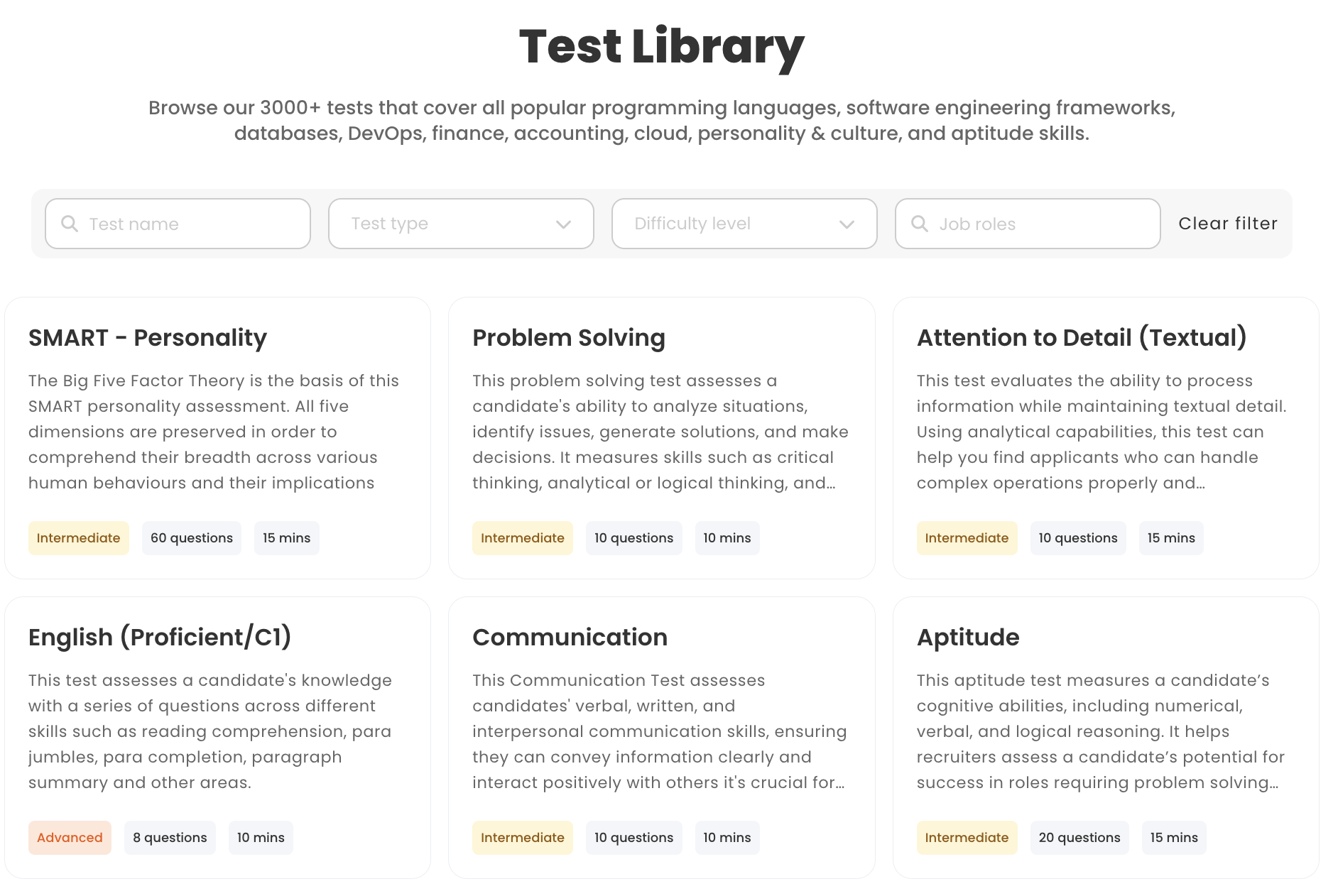
TestDome offers a focused but smaller library, featuring over 150 pre-made tests covering 130+ skills. While it addresses many common requirements for technical and general roles, it does not cater to as many niche positions as Testlify. Test types include:
- Programming tests
- Framework and tool-specific tests
- Cognitive ability tests
- Language proficiency tests
- Live technical coding interview
- Role-specific tests
- Coding tests
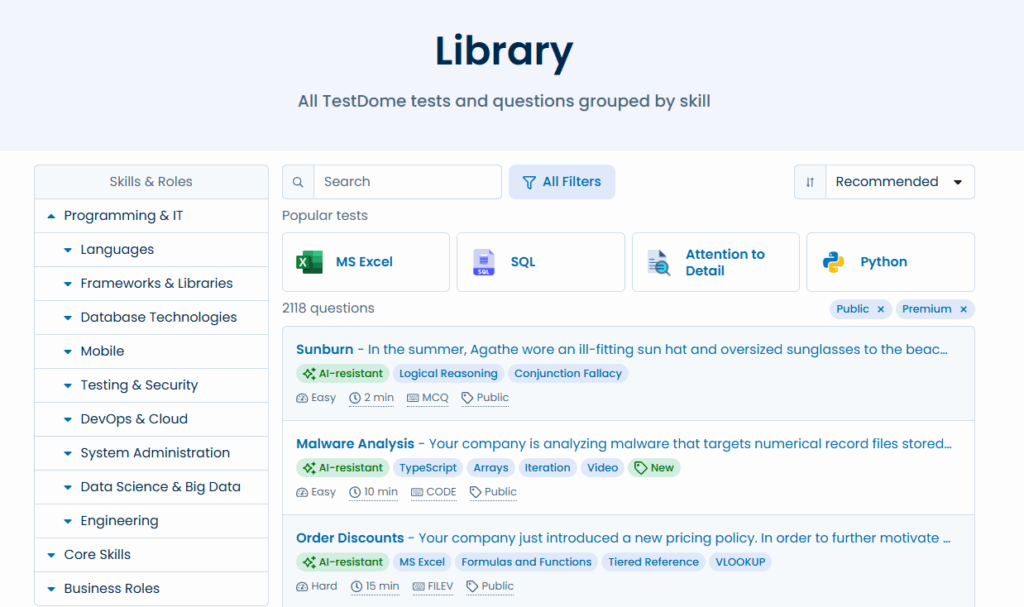
Verdict: Testlify’s comprehensive library and variety of test types give it a clear advantage for organizations hiring for a wide array of roles. With thousands of assessments and even conversational AI interviews, Testlify provides a more immersive and well-rounded evaluation experience. TestDome, while strong in quality for technical tests, is narrower in scope.
Testlify vs. TestDome: Custom question types
Testlify allows employers to create tailored assessments with 15+ custom question types, including scenario-based MCQs and AI-powered interviews.
- Multiple Choice Questions (MCQs)
- Open-ended and descriptive questions
- AI-powered Chat simulation
- AI-powered Video interview
- AI-powered Audio interview
- Custom coding questions and live coding tests
- Fill-in-the-blanks
- File upload questions
- Google Docs, Sheets, and Slides questions
- Microsoft Office questions
- Rating, number, and date questions
- Qualifier questions
TestDome enables employers to create personalized assessments with multiple question types:
- Multiple Choice Questions (MCQ)
- Multiple Correct Answers (MCA)
- Coding questions
- File Upload with Validator (FILEV)
- Number picker
- Fill in the blanks
- Quality assurance
- Text answer
- File upload
Verdict: Both platforms offer flexibility to incorporate your own questions, but Testlify holds a notable edge in diversity of question types. Testlify’s support for conversational AI interviews provides an extra layer of depth and realism in evaluations that TestDome cannot match.
With Testlify, you can design richer, multi-dimensional assessments that closely mimic job challenges. While TestDome excels in covering the fundamentals, particularly in coding and objective-based questions, it lacks the interactive conversational AI question types that Testlify offers.
Testlify vs. TestDome: White-labeling capabilities
Testlify offers white-labelling capabilities, allowing companies to fully customize the platform with their own branding. This includes adding logos, personalizing emails, and modifying the test interface to best fit the look and feel of your own company.
A standout feature is the ability to personalize invitation and rejection emails. Instead of sending generic messages, companies can craft communications that reflect their brand’s tone and values, leaves a lasting impression on candidates.
TestDome takes a more utilitarian approach. On the plus side, TestDome’s interface is simple and easy to use for candidates. It’s fully web-based and mobile-friendly, so candidates can take tests on the go.
However, TestDome significantly falls short on branding. The candidate sees TestDome’s branding by default. For instance, the test invitation might come from a TestDome email/domain, and the testing page will have TestDome’s logo. There is no built-in white-labeling option to add your company’s logo or colors on the assessment interface.
Verdict: If maintaining your brand presence and keeping candidates comfortable is a priority, Testlify has the upper hand. It offers a more personalized assessment experience that elevates the overall candidate journey, making each assessment feel like a natural extension of your organization’s hiring process.
TestDome offers a candidate experience that is efficient and straightforward. However, the lack of branding customization options may be a limitation for organizations seeking to tailor the experience to align with their brand identity.
Testlify vs. TestDome: Conversational interviews
Testlify leverages conversational AI to simulate on-the-job scenarios across chat, voice, and video formats, bringing real-world context into the hiring process.
- Chat AI: Assess problem-solving, written communication, and critical thinking by engaging candidates in realistic text-based scenarios, like handling a billing dispute or calming an angry customer.
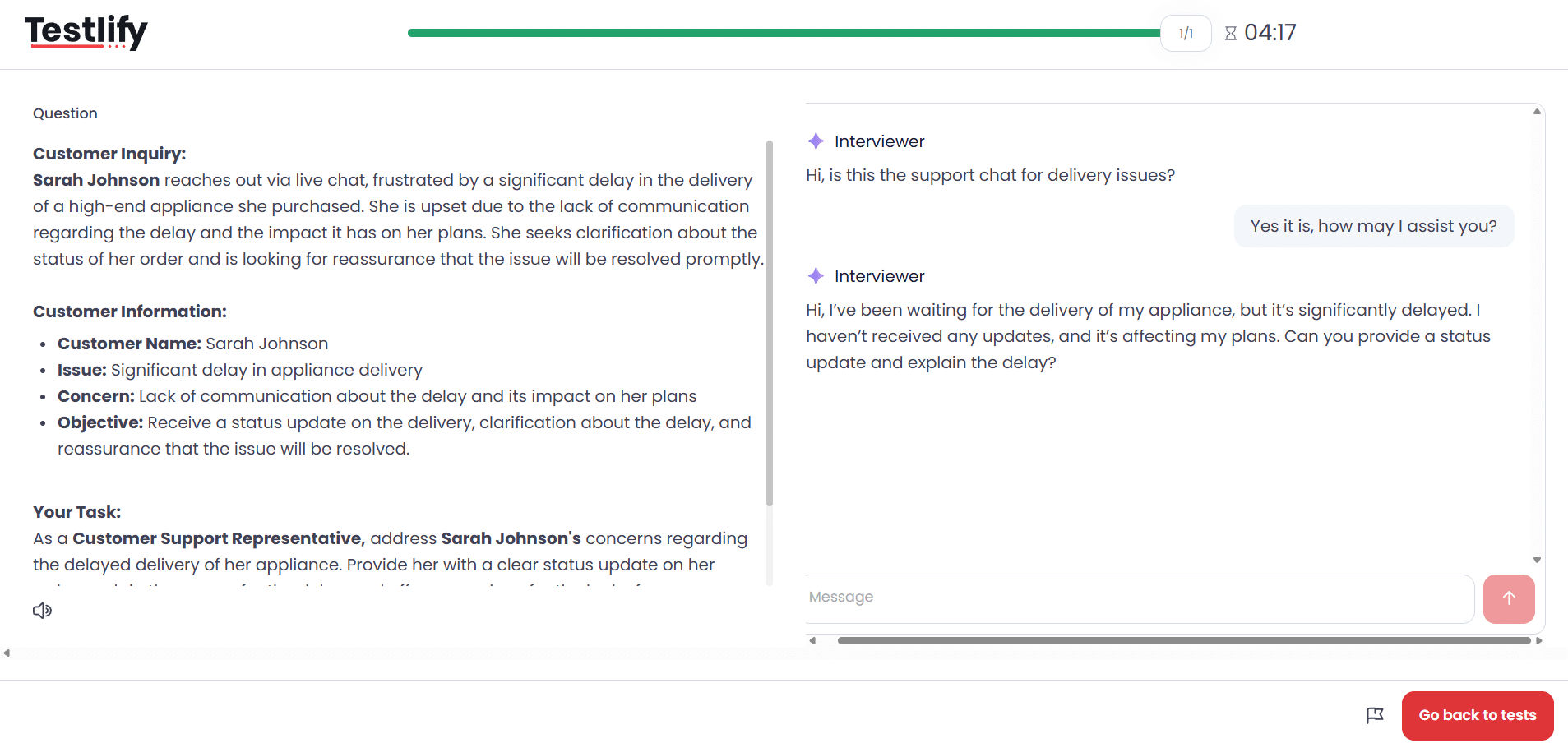
- Voice AI: Evaluate verbal fluency, tone, and persuasion by having candidates respond to role-specific prompts, such as those for sales or customer support.
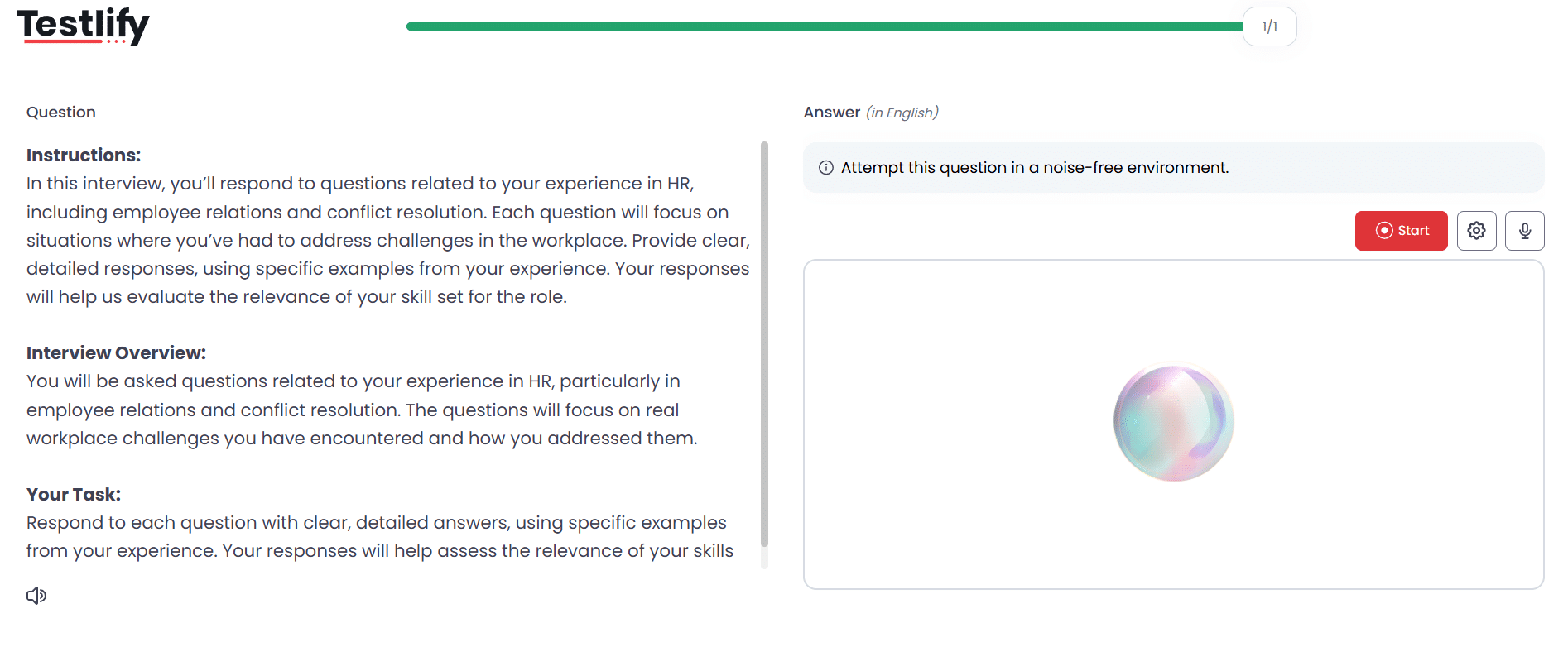
- Video AI: AI avatars guide candidates through complex job scenarios in asynchronous video interviews, allowing employers to analyze non-verbal communication, confidence levels, and emotional intelligence.
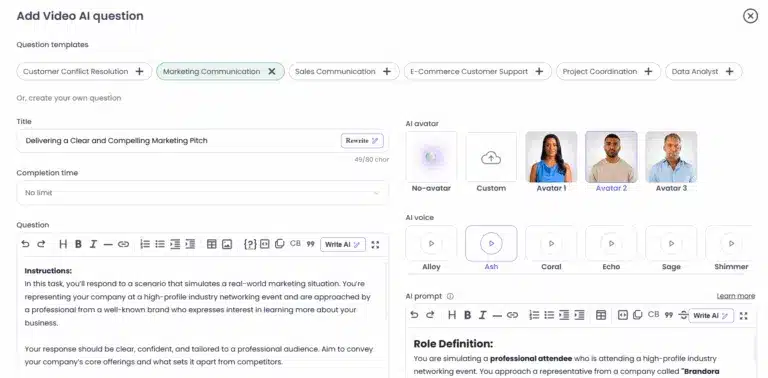
TestDome doesnot include conversational AI interviews. It does not feature an AI chatbot for automated assessments or offer one-way video interviews as part of the screening process.
That said, TestDome does support live technical interviews. When you decide to interview the top candidates after screening, TestDome provides a virtual interview room with the following capabilities:
- Live video call and chat: You can conduct a face-to-face interview with the candidate directly on TestDome, similar to a Zoom or Teams call, but integrated with their testing tools.
- Collaborative coding environment: During the live interview, TestDome offers a code editor where the candidate and interviewer can work on coding problems together in real time.
- Virtual whiteboard: The live interview tool also includes a whiteboard for drawing diagrams or brainstorming, which can be useful for system design questions or visual explanations.
- Question import: Interviewers can pull in questions from TestDome’s library or previously used tests to use during the live interview, ensuring consistency in what’s being evaluated.
- Private notes and evaluation: The interviewer can take notes and mark scores during the session (in a way that the candidate can’t see).
Verdict: Testlify excels in conversational AI-powered interviews, making it ideal for evaluating roles that require strong communication, presentation, or quick-thinking skills without the need for a recruiter to be present.
For hiring strategies that benefit from assessing candidates through conversational scenarios, without scheduling live interviews for every applicant, Testlify offers this feature out-of-the-box.
In contrast, TestDome specializes in live technical interviews but does not come with conversational AI-powered interview capabilities.
Testlify vs. TestDome: Anti-cheating & proctoring features
Testlify employs advanced anti-cheating and remote proctoring features ensure that every assessment reflects real skill and genuine effort. The features include:
- Face detection
- Photo id verification
- Webcam snapshots
- Full-screen mode
- Force full-screen mode
- Dual camera proctoring
- Copy/paste tracking
- Mouse-out tracking
- IP proctoring
- Live video monitoring
- Question randomization
- Honesty Agreements
- Question-level activity logs
- AI assistance detection
- Screen recording
- Live environment check
- System requirement check
- Enforce internet speed check
- Focus guard (Anti-Cheat Mode)
- Talking prohibition
TestDome employs a strong range of anti-cheating features to closely monitor candidate activity throughout assessments, flagging suspicious behavior and areas of concern for further review. The features include:
- Webcam proctoring
- Screen sharing
- Question randomization
- Duplicate IP detection
- Copy-paste disabled
- Email verification
- AI resistant questions
Verdict: Testlify has an extensive suite of remote proctoring tools, including dual-camera support, screen recording, live video monitoring, and detailed activity logs. These features not only detect but also deter cheating in real time, making it a solid choice for high-stakes assessments.
TestDome, however, focuses on essential anti-cheating measures like webcam monitoring, screen tracking, copy-blocking, and timing. While effective, it does not include the broader set of anti-cheating proctoring features that Testlify offers, making TestDome less suited for high-stakes assessments.
Testlify vs. TestDome: Benchmarking Analytics
Testlify comes with benchmarking analytics that provide valuable insights into candidate performance, helping organizations evaluate their candidates effectively through comparative metrics.
These metrics allow companies to benchmark candidates against industry standards, which helps to identify top performers, recognize skills gaps, and make informed hiring decisions.
TestDome does not currently offer benchmarking analytics, which means recruiters and hiring teams lack the ability to compare a candidate’s performance against industry standards, peer groups, or historical benchmarks.
While TestDome provides individual score reports and detailed question-level insights, it lacks the broader context needed to evaluate candidate performance across larger talent pools.
Verdict: For organizations that value clear, automatic benchmarking across a wide range of skills (technical and non-technical), Testlify provides those analytics out-of-the-box. It makes global and industry benchmark comparisons readily available as part of its reporting suite.
Testlify vs. TestDome: Integrations and workflows
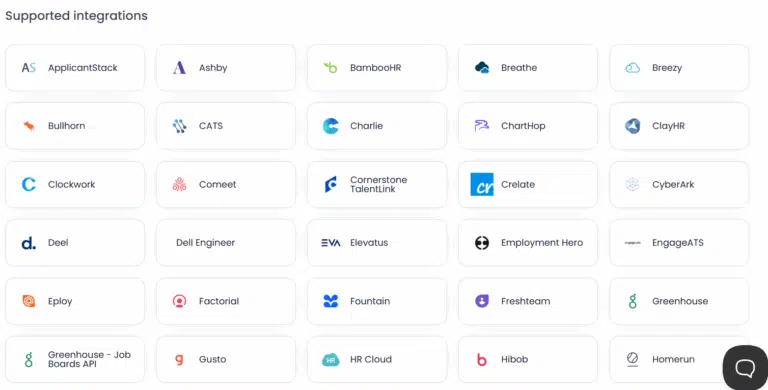
Testlify integrates seamlessly with 100+ ATS platforms and HRMS, allowing you to effortlessly import candidates’ profiles, compare assessment results and make data driven hiring decisions.
TestDome, by comparison, supports a more limited set of 6+ ATS integrations out-of-the-box. The known supported ATS integrations include Greenhouse, Recruitee, TalentLyft, Zapier, SmartRecruiters and a few others.
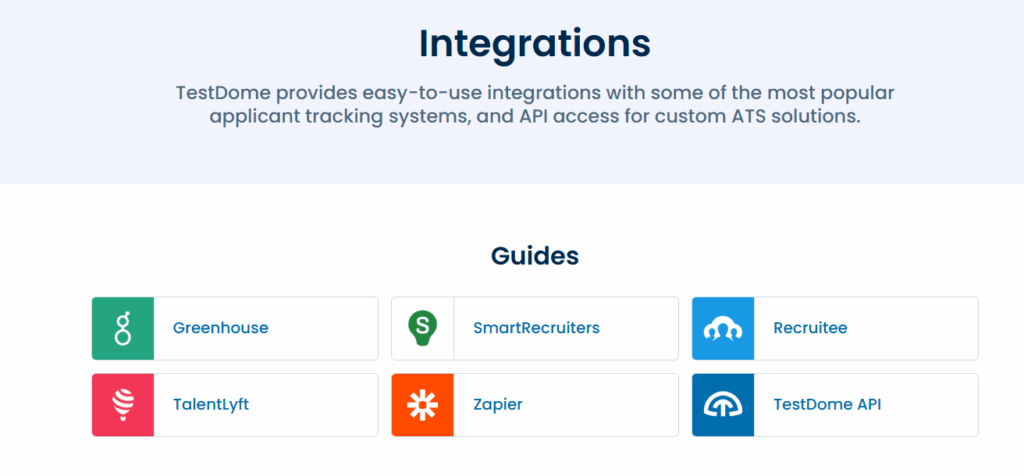
Verdict: Testlify is built with integration in mind, offering direct connectivity with over 100 Applicant Tracking Systems (ATS) and third-party tools. This extensive compatibility makes it highly adaptable to diverse recruitment workflows.
In contrast, TestDome supports a more limited set of 6+ integrations, which may pose challenges for organizations looking for broader system compatibility and end-to-end workflow automation.
Testlify vs. TestDome: AI overviews
Testlify supports AI overviews, which provide a concise summary of a candidate’s overall performance in an assessment, highlighting strengths and areas for improvement to help recruiters quickly evaluate candidates.
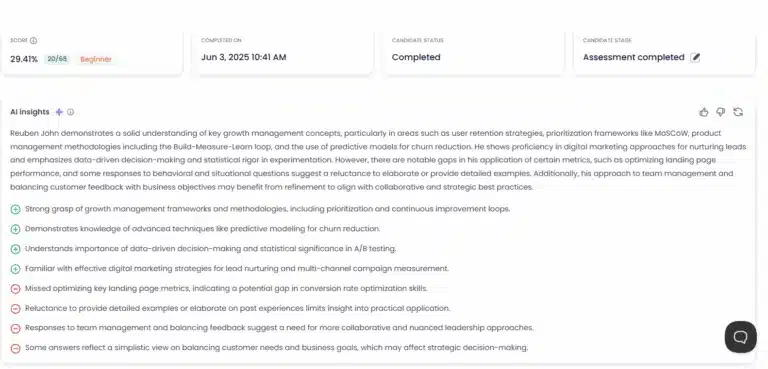
TestDome does not support AI-generated overviews or summaries of candidate performance. This means hiring teams must manually review test results and interpret individual question scores manually. This can slow down decision-making, especially when evaluating large volumes of candidates, and may lead to inconsistencies in how results are interpreted.
Verdict: Testlify’s AI-generated overviews are a valuable add-on that can simplify and speed up the evaluation process. Especially when dealing with high volume hiring, these quick summaries help busy recruiters identify the standout points about each candidate without digging through every data point.
TestDome, on the other hand, lacks this convenience. Recruiters do get access to actionable data, but they will have to take the extra effort to summarize it themselves. s.
Testlify vs. TestDome: Reporting & insights
Testlify provides detailed analytics on candidate behavior, question-level insights, and benchmarking. You can visualize how candidates compare across roles and industries.
Furthermore candidate assessment reports can be easily shared with key decision-makers in PDF, Excel, or CSV formats, making it easier for them to make informed hiring decisions.
TestDome provides clear reporting with a skill-by-skill breakdown for multi-skill tests, a minute-by-minute submission timeline to track coding progress, and statistical comparisons to see how each candidate ranks against others who took the same test. Reports can be exported as PDF or Excel and shared via email or public URL for easy collaboration.
Verdict: Both Testlify and TestDome excel in providing thorough reporting and analytics, making it easy for hiring teams to evaluate and share candidate insights.
However, while Testdome’s reports are informative, they lack advanced features such as industry benchmarking or AI-generated summaries, which limits the depth of performance analysis.
Testlify vs. TestDome: Customer support
Testlify is known for its responsive and personalized customer support, provided by human agents across multiple channels. The platform offers dedicated onboarding for new customers and priority support for enterprise clients, ensuring a great user experience.
The Testlify team also welcomes customer feedback and have been noted to roll out improvements in response to customer needs.
In addition to live support, the platform also features a help center with documentation, FAQs, and best practice guides, so your team can self-serve answers to common questions.
TestDome offers multi-channel customer support, including email, phone, and a comprehensive knowledge base. These resources are designed to efficiently address basic queries, ensuring users have access to the information they need in a timely manner. However, it lacks live chat support, which could provide more immediate assistance for urgent issues.
Verdict: Both Testlify and TestDome offer dependable customer support, but Testlify provides a more hands-on, multi-channel support experience.
Testlify’s human agents are available 24/7 via live chat, email, and even phone for enterprise users, which means you can get quick answers and personalized guidance whenever needed. The dedicated onboarding and customer success focus make Testlify feel like a partner in your recruitment process.
Testlify vs. TestDome: Pricing plans
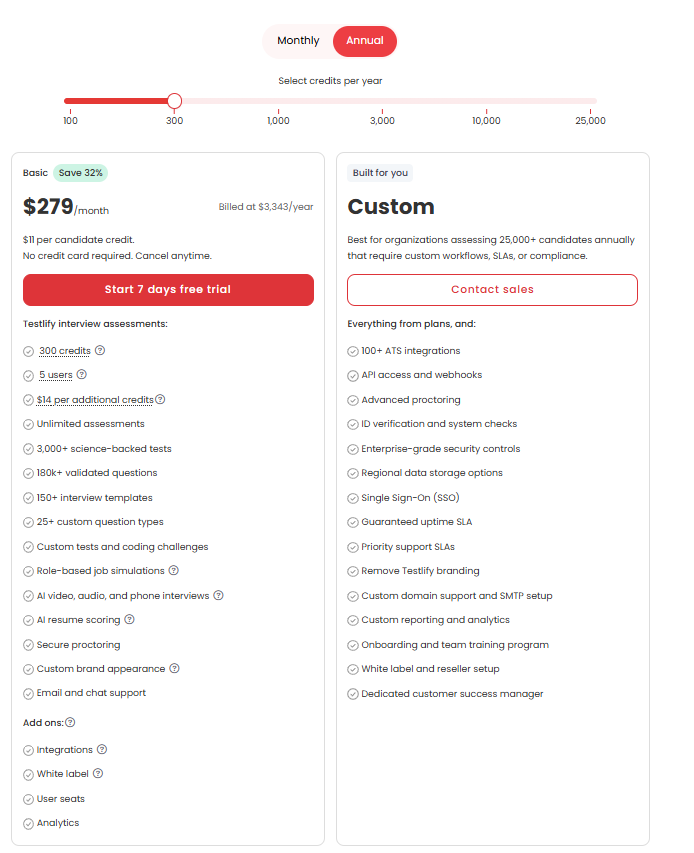
Testlify offers flexible pricing plans that scale with your business, providing everything from basic assessments for startups to advanced features for enterprise-level hiring.
- Starter plan: Ideal for small teams and startups, this plan starts at $139/month (billed at $1,663/year) and includes 100 candidate credits at $17 per credit with support for 3 users.
- Starter: Designed for growing businesses, the Starter starts at $279/month (billed at $3,343/year) and includes 300 credits at $11 per credit with support for 5 users.
- Starter: Built for scaling teams, this plan costs $699/month (billed at $4,192/year) and includes 1,000 credits at $8 per credit with 10 users.
- Premium plan: Suited for high-growth organizations, the Premium plan includes 3,000 credits and supports 20 users, with pricing available upon contacting the sales team.
- Enterprise plan: Designed for large enterprises, this plan includes 10,000 credits and supports 30 users with pricing available upon contacting the sales team.
- Enterprise Plus plan: Designed for large-scale hiring programs, this plan includes 25,000 credits and supports up to 40 users, with pricing details available after contacting the sales team.
- Unlimited plan: For companies seeking unrestricted access, Testlify offers an unlimited plan that includes unlimited candidate credits and full platform functionality, with pricing available on request from the sales team.
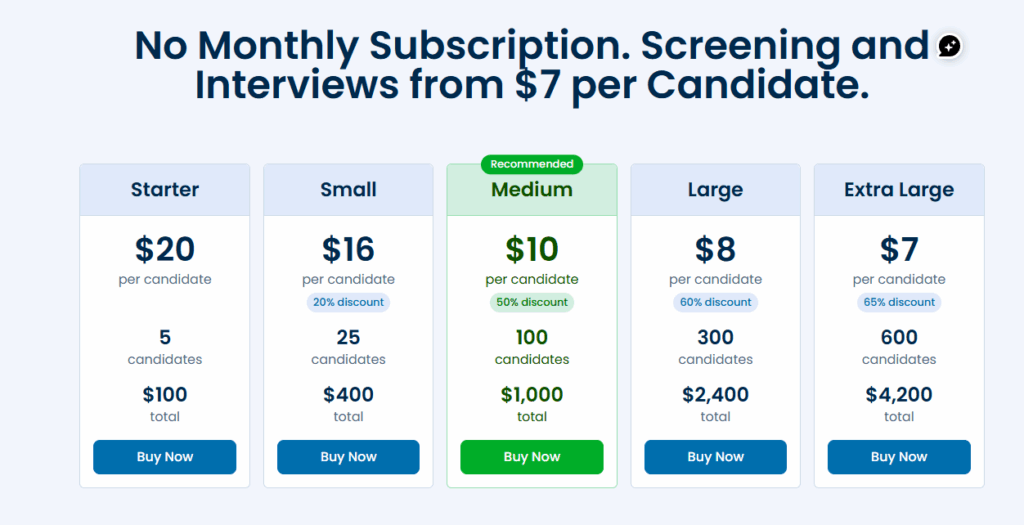
TestDome offers a straightforward, pay-per-candidate pricing model with no monthly subscription fees. Organizations can choose from five tiered packages based on their hiring volume:
- Starter: $20 per candidate for 5 candidates ($100 total)
- Small: $16 per candidate for 25 candidates ($400 total) – 20% discount
- Medium: $10 per candidate for 100 candidates ($1,000 total) – 50% discount
- Large: $8 per candidate for 300 candidates ($2,400 total) – 60% discount
- Extra Large: $7 per candidate for 600 candidates ($4,200 total) – 65% discount
However, unlike platforms with unlimited-use enterprise tiers, scalability in TestDome is tied directly to candidate volume, which may be less predictable for organizations with fluctuating hiring needs.
Verdict: TestDome’s pricing model is appealing for small to mid-sized teams. The tiered discounts offer clear value as volume increases, and the lack of hidden fees or recurring charges makes budgeting straightforward.
However, for larger organizations with high-volume hiring needs, this per-candidate pricing can add up quickly. In contrast, platforms like Testlify offer unlimited candidate assessments under flat-rate enterprise plans, making them far more cost-effective in the long run.
Pro Tip: Before you commit, run one real role through both tools. Build the same assessment in each, invite three colleagues as test candidates, and compare the reports side by side. The platform that hands your hiring manager a clear shortlist in the fewest clicks is the one your team will actually keep using.
Is Testlify a better alternative to TestDome?
Testlify and TestDome are both strong contenders in the skills assessment space, but which platform is better depends on your hiring goals, team structure, and candidate evaluation strategy. That said, Testlify emerges as the stronger alternative and here’s why:
One way to frame the choice: under the Testlify Multi-Signal Talent Evaluation Model, a more confident hire comes from combining several role-relevant signals (skills tests, interviews, and reviewer feedback) rather than a single score. Testlify is built to capture more of those signals in one place, which matters because a mis-hire is expensive. SHRM benchmarking puts the average cost per hire at nearly $4,700, before you count the cost of replacing someone who does not work out.
- Broader test coverage: Testlify offers a significantly larger test library with over 3,500 assessments tailored to 4,500+ job roles across 50+ industries. TestDome’s library, while high-quality, comes with only 130+ tests and is primarily focused on assessing technical skills.
- Advanced conversational interviews: While both platforms support skill testing, Testlify goes a step further with interactive chat, voice, and video interviews powered by conversational AI. This multi-format conversational approach simulates real job scenarios more fully and helps recruiters make informed hiring decisions.
- Superior proctoring: Testlify offers a more advanced proctoring suite (dual-camera, live monitoring, detailed behavior logs, AI assistance detection, etc.), making it well-suited for large-scale assessments. TestDome does have strong anti-cheating tools, but it’s a leaner setup. In scenarios like pre-employment testing for critical roles or academic assessments, Testlify’s extra layers of security are advantageous for maintaining the integrity of assessments.
- Extensive ATS integrations: Testlify supports 100+ ATS and HR tool integrations, giving it a clear advantage over TestDome’s 6+ integrations. This makes Testlify more adaptable for teams that rely on integrated hiring pipelines and automated workflows.
- AI-Driven insights: Testlify’s AI-generated overviews and benchmarking analytics help recruiters evaluate candidates faster and with more confidence. TestDome, while offering detailed scorecards, lacks AI summaries, requiring manual interpretation of results.
- Cost-Effective Scalability:Testlify provides a more flexible pricing modelthat can accommodate small teams and scale up as needed, including an unlimited enterprise option at a predictable cost.
Which platform should you choose?
Both Testlify and TestDome are capable skills assessment platforms, each offering unique strengths. TestDome impresses with its engaging, simulation-based assessments and is a strong option for organizations that want a candidate-centric tool with AI grading capabilities.
Testlify, however, provides a more comprehensive solution overall. With its expansive test library, conversational AI-powered interviews, advanced proctoring features and a richer integration ecosystem, Testlify delivers a richer, more immersive assessment experience.
For many HR teams and recruiters, these advantages translate into identifying better-fit talent more efficiently and with greater confidence.
See how Testlify fits your hiring
Compare roles, test candidates, and build shortlists on evidence instead of resumes. Book a demo to see Testlify run on your own hiring workflow.
Key Takeaways
- Match breadth to your hiring pattern. Testlify’s 3,500+ tests span technical, cognitive, and soft skills across 4,500+ roles, so teams hiring for many different jobs screen from one platform. TestDome’s 130+ tests concentrate on coding and technical skills, which is plenty if that is nearly all you hire for and wasteful if it is not.
- Interviews change what you can measure. Testlify’s conversational AI interviews add chat, audio, and video signals beyond a raw test score, so you see communication and judgment before the first call. If you only need to confirm someone can code, TestDome’s live technical interviews cover it without the extra layers.
- Weigh proctoring against role risk. Both platforms detect cheating, but Testlify’s dual-camera monitoring and AI-assistance detection earn their keep for high-stakes or remote-at-scale hiring. For low-stakes screens, TestDome’s lighter controls keep the candidate experience simple.
- Integrations decide how much manual work stays. Testlify’s 100+ ATS connections push results into your pipeline automatically; TestDome’s 6+ integrations mean more copying between tools, and that gap grows with hiring volume.
- Price on volume, not sticker. TestDome’s pay-per-candidate pricing is cheapest for low, irregular volume. Testlify’s plans, including an unlimited enterprise option, get more predictable once you screen steadily across roles.
- Choose on evidence quality, not feature counts. The right pick is the platform that gives your hiring team a clearer, faster shortlist for the roles you actually fill, not the one with the longest feature list.
Frequently asked questions

Director of Marketing
Akash Patange is the Director of Marketing at Testlify, where he works closely with HR leaders and recruiters to help organizations improve hiring outcomes. He writes about talent assessment, recruitment technology, and data-driven hiring practices.
LinkedInRelated resources
View all
Competitor Comparisons
Testlify vs. Hirevue: Which Skills Assessment Platform is Best for HR Teams?
Competitor Comparisons
Testlify vs. iMocha: Which Skills Assessment Platform is Best for HR Teams?
Competitor Comparisons
Testlify vs. Mercer Mettl: Which Platform is Best for HR Teams?
Competitor Comparisons
Testlify vs. Codility: Which Platform is Best for HR Teams?
Competitor Comparisons
Testlify vs. Vervoe: Which Platform is Best for HR Teams?
Competitor Comparisons
Testlify vs. Adaface: Which Skills Assessment Platform Wins in 2026?
Get started.
Hire on proof, not resumes.
Run your first skills-based assessment free — no credit card required.