
Testlify vs Pin: AI sourcing or skills proof in 2026?
Pin finds and contacts candidates; Testlify tests their skills. A fair look at features, ATS fit, pricing models and when to use both.

Testlify vs Pin is a comparison of two AI recruiting tools that work at different stages of hiring. Pin is an AI sourcing and outreach platform: it finds candidates, contacts them and books interviews. Testlify is a skills assessment and AI interviewing platform: it tests candidates, interviews them and ranks them on proof of skill. Many teams end up using both.
 ChatGPT
 Gemini
 Claude
 Grok
 Perplexity
TL;DR
- Pin finds and contacts candidates. Testlify tests their skills. The right pick depends on where your hiring stalls.
- Choose Pin if your bottleneck is finding and reaching enough qualified people for hard-to-fill roles.
- Choose Testlify if you already get applicants but cannot tell who has the skills, or you screen too many by hand.
- Pin's website describes no skills tests, coding tests or proctoring. Testlify offers 3,500+ tests, AI interviews and 20+ proctoring checks.
- Both connect to your ATS: Testlify lists 100+ ATS integrations and Pin lists 120+.
- Both use AI to judge candidates, so NYC Local Law 144 and the EU AI Act apply. Ask each vendor about bias audits.
- For hard-to-fill and high-volume roles, run them together: Pin sources, your ATS tracks, Testlify tests and shortlists.

Testlify vs Pin: what is the difference?
The difference between Testlify and Pin is the job each tool does. Pin uses AI to find candidates in a large profile database, write outreach and schedule interviews. Testlify uses skills tests, AI interviews and AI resume screening to measure whether candidates can do the job, then ranks them on scored evidence. Pin answers "who should we contact?" Testlify answers "who should we hire?"
Testlify | Pin | |
|---|---|---|
Main job | Test, interview and rank candidates on skills | Source, contact and schedule candidates |
Best for | Teams with applicants who need proof of skill | Teams that need more qualified people in the pipeline |
Skills tests | 3,500+ tests across tech and non-tech roles | None described on its site |
AI interviews | Video AI, Voice AI and Chat AI interviews, scored | AI notetaker for interviews run by people |
Candidate sourcing | Not a sourcing database | 850M+ profiles, per Pin's site |
Outreach | Assessment invites by email and WhatsApp | Email, LinkedIn and text sequences |
Proctoring | 20+ anti-cheating checks included | None described |
ATS integrations | 100+ ATS and HR platforms | 120+ ATS listed |
Free option | 7-day free trial, no credit card | Free plan with limited credits |
Pin facts in this post come from data on Pin's website, checked on November 26, 2026. Vendor pages change, so check them again before you buy.
What is Pin?
Pin is an AI recruiting platform built around sourcing and outreach. Its home page describes the product as going "from job description to booked interviews." A recruiter gives Pin a role, Pin drafts the search criteria, and its agents handle the steps that take up most of a sourcer's week.
- Sourcing: Pin searches what it describes as 850M+ candidate profiles, with coverage across North America and Europe, and explains why each person fits the brief.
- Outreach: Pin writes personalized sequences that send from a connected Gmail or Outlook account and can include LinkedIn steps and text messages.
- Inbox handling: Pin reads replies, archives declines, answers common candidate questions from a knowledge base and asks the recruiter in Slack when it does not know an answer.
- Scheduling and notes: Pin offers interview times, sends the invite and has an AI notetaker that joins Zoom, Google Meet and Teams calls to write a summary.
- Automation levels: Teams choose between co-pilot, hybrid and full autopilot modes for each role.
For in-house teams, Pin adds a shared inbox, flags candidates a teammate is already contacting and reports on pipeline speed and reply rates. According to Pin's website, the company is SOC 2 Type 2 compliant. If you want to see how Pin fits the wider market, our guide to the sourcing tools recruiters use to find candidates covers the category.
What is Testlify?
Testlify is an AI-native skills assessment and interviewing platform. A hiring team turns a job description into a role-specific assessment, invites candidates, and gets a ranked shortlist with a score for every skill. The goal is to hire on proof of skill instead of resumes.
- Test library: 3,500+ tests covering role skills, software, coding, cognitive ability, situational judgment, language, personality and more, plus custom tests.
- AI test builder: Generates a custom assessment from a job description, with suggested skills and scoring criteria.
- AI interviews: One-way video and audio interviews, plus two-way Chat AI interviews, Voice AI and Video AI interviews that are scored against the same criteria for every candidate.
- AI resume screener: The AI resume screener pulls resumes from the ATS, gives each an explainable match score and can auto-advance candidates above a threshold.
- Proctoring: 20+ anti-cheating and proctoring checks, including tab tracking, webcam snapshots, AI assistance detection and copy-paste blocking.
- Languages and scale: 25+ question types and 15+ languages, trusted by 1,500+ hiring teams.
How do Testlify and Pin compare feature by feature?
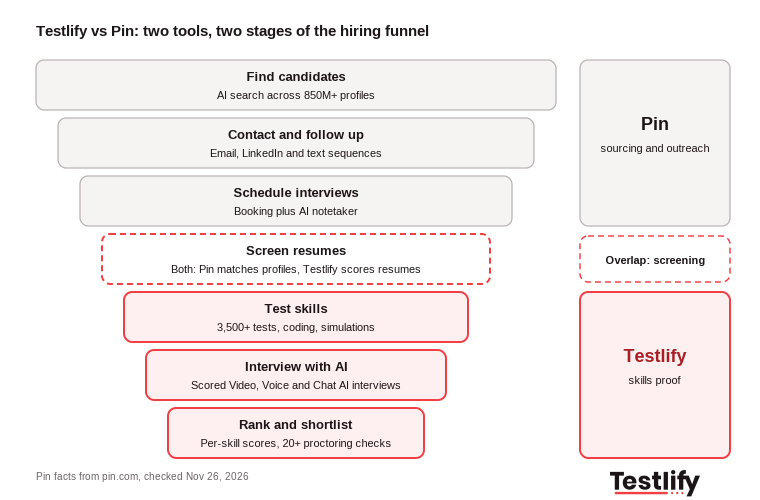
Testlify and Pin compare best stage by stage, because they overlap only at the screening step. Pin covers sourcing, outreach and scheduling. Testlify covers assessment, interviewing and ranking. Where both touch screening, Pin matches profiles to criteria, while Testlify measures skills with tests and scored interviews.
Stage | Testlify | Pin |
|---|---|---|
Find candidates | Works with applicants from your ATS and job ads | AI search across its profile database |
Contact candidates | Invites and reminders for assessments | Multi-step email, LinkedIn and text outreach |
Screen resumes | AI resume screener with match score and fit labels | AI matching with fit explanations and must-haves |
Test skills | Role-specific tests, coding, simulations, typing, language | Not offered |
Interview | Scored AI interviews by video, voice or chat; live coding | Schedules interviews; AI notetaker for live calls |
Rank and report | Per-skill scores, benchmarks, AI candidate insights, PDF and CSV export | Pipeline, outreach and conversion analytics |
Stop cheating | 20+ proctoring checks | Not offered |
Hiring manager view | Shareable candidate reports | Review link to approve or pass on candidates |
The table shows why "Testlify vs Pin" is often the wrong question. A common setup is a sourcing tool at the top of the funnel and an assessment step before the first live interview. A team can have a full pipeline from Pin and still not know which ten people can do the job. A team can have great tests and still struggle to get enough applicants for a niche role.
Does Pin test candidates' skills?
Pin does not test candidates' skills, based on what its website describes. Its "skills-based screening" refers to AI matching: Pin reads profiles and resumes and compares them against the criteria you set. That tells you who looks qualified on paper. It does not show whether a candidate can write the code, handle the customer or build the spreadsheet.
That gap matters for quality of hire. LinkedIn's Future of Recruiting 2025 report found that 93% of talent acquisition professionals say accurately assessing a candidate's skills is crucial for improving quality of hire, yet only 25% are highly confident in how their company measures quality of hire.
Testlify fills that step with role-based tests from the test library, so every shortlisted candidate has a score you can show a hiring manager.
How do the two tools handle AI and hiring compliance?
AI hiring compliance applies to both tools, because both use AI to judge candidates. Pin's matching decides who gets contacted. Testlify's scoring helps decide who moves forward. Rules in New York City and the EU treat both kinds of tool as automated hiring decisions, so buyers should ask each vendor what support they give.
- NYC Local Law 144: The NYC rules on automated employment decision tools require a bias audit within a year before use, a public summary of the results and notice to candidates before the tool is used.
- EU AI Act: The EU AI Act lists AI used to filter applications and evaluate candidates as high-risk, with duties on human oversight and transparency.
- Testlify: Testlify published a third-party NYC Local Law 144 bias audit of its Matching Model, completed June 16, 2023. It also holds ISO 27001 and SOC 2 Type II and supports GDPR and CCPA.
- Pin: Pin states SOC 2 Type 2 compliance and says no names, gender or protected demographic data go into its matching model. Its pages do not describe a published bias audit, so ask for one if you hire in New York City.
How do Testlify and Pin connect to your ATS?
Testlify and Pin both sync with your applicant tracking system, so neither needs to replace it. Testlify lists 100+ ATS and HR platform integrations with two-way sync, including Workday, Greenhouse, Lever, SmartRecruiters, BambooHR and SAP SuccessFactors. Pin lists 120+ ATS integrations, including Greenhouse, Lever, Ashby and Workday.
Two details are worth checking in a demo. Testlify's pricing page lists 100+ ATS integrations on every plan; see the full integrations list. On Pin, ATS integration is an add-on on the Solo and Professional plans and included on Enterprise. Ask both vendors how deep the sync goes for your specific ATS, since stage, score and note syncing varies by system.
How does pricing compare?
Testlify and Pin price on different units, so compare cost per hire rather than list prices. Testlify uses credits: one credit is one candidate who starts an assessment, with unlimited assessments and a 7-day free trial with no credit card. Pin charges per seat, with a free plan that has limited contact lookups and paid plans that add credits and agents.
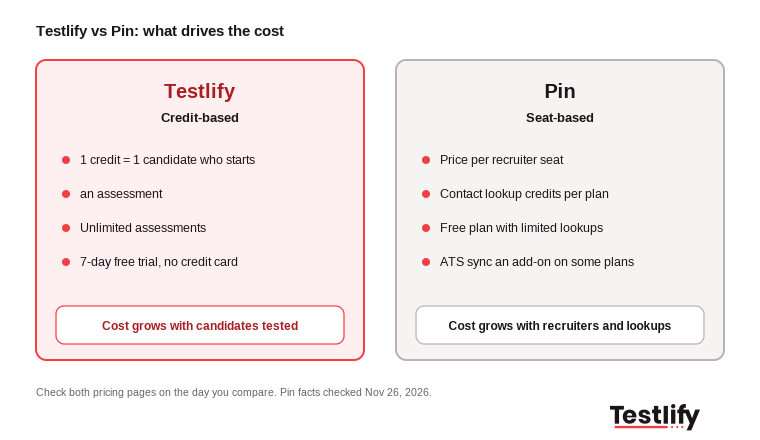
In practice, Testlify's cost grows with the number of candidates you test, while Pin's cost grows with the number of recruiters using it and the contacts they look up. A team hiring a few senior engineers a quarter will see very different numbers from a contact center hiring hundreds of agents a month. Check both pricing pages on the day you compare, because both change their plans.
When is Pin the better choice?
Pin is the better choice when your hardest problem is getting qualified people into the pipeline at all. Pin is stronger than Testlify at sourcing, outreach and scheduling, and Testlify does not try to compete there.
- Hard-to-fill roles: Niche technical or senior roles where few people apply and recruiters must go find them.
- Lean sourcing teams: Teams that want AI agents to write outreach, follow up and book calls with little manual work.
- Agency-style recruiting: Recruiters who live in outbound sequences and need a shared inbox and de-duplication across the team.
When is Testlify the better choice?
Testlify is the better choice when you already have applicants and need to know who can do the job. Testlify is stronger than Pin at measuring skills, running scored first-round interviews and protecting test results from cheating.
- High-volume hiring: Contact centers, BPO, retail and support teams that get hundreds of applicants per role and need a fair, fast shortlist.
- Skills-heavy roles: Engineering, finance, data and customer roles where a resume says little about ability.
- Structured, defensible decisions: Teams that must explain every hiring decision, with per-skill scores behind them. That matters more as the EU AI Act brings human oversight duties to AI used in hiring.
- Global hiring: Assessments in 15+ languages with proctoring that works for remote candidates.
Can you use Testlify and Pin together?
Testlify and Pin work well together because each covers the stage the other skips. Pin finds and contacts candidates, your ATS tracks them, and Testlify tests and ranks them before anyone spends time on a live interview.
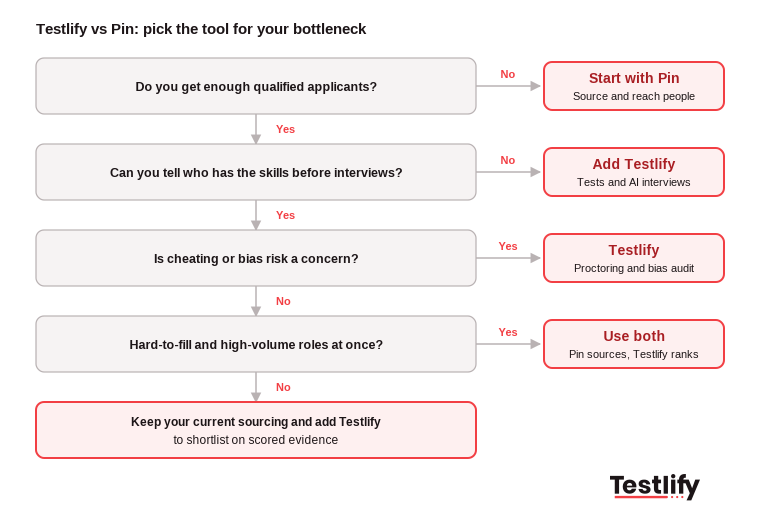
- Source with Pin: Pin builds the search, contacts candidates and moves interested people into your ATS.
- Trigger an assessment: A stage change in the ATS sends a Testlify assessment built from the job description.
- Interview with AI: Candidates above the score threshold get a Testlify AI interview, scored against the same criteria for everyone.
- Shortlist on evidence: The hiring manager sees a ranked list with per-skill scores, then books live interviews only with the top candidates.
This setup is close to what many teams already do with AI interviews for candidate screening: automate the volume work, keep people in charge of the final decision.
Ready to add skills proof to your pipeline?
Whether your candidates come from Pin, job boards or referrals, Testlify shows you who can do the job before the first live interview. Build an assessment from your job description, add an AI interview and get a ranked shortlist. Start a 7-day free trial with no credit card, or book a demo to see it with your ATS.
Frequently asked questions (FAQs)

Related resources
View all
Competitor Comparisons
Testlify vs Testwise: Comparison guide for recruiters
Competitor Comparisons
Testlify vs Symphony Talent: Which Is Better in 2026?
Competitor Comparisons
Testlify vs TestTrick: Which skills assessment platform is best for recruiters?
Competitor Comparisons
Testlify vs CodeSignal: Which Talent Assessment Platform is Best for You?
Competitor Comparisons
Testlify vs. Equip: Which Skills Assessment Platform is Best for HR Teams?
Competitor Comparisons
Testlify vs. Harver: Which Skills Assessment Platform is Best for HR Teams?
Get started.
Hire on proof, not resumes.
Run your first skills-based assessment free — no credit card required.