
How to run a candidate system check before online assessment?
Ensure smooth online assessments with a complete candidate system check. Learn what to test, how to run checks, and improve hiring efficiency.
A candidate system check is a short automated test that confirms a candidate's computer, browser, camera, microphone and internet connection can actually run your assessment before they sit it. Send it with the invitation, set a pass threshold, and fix what fails while there is still time to fix it.
Most hiring teams find out about a dead webcam at minute three of a proctored session, when the candidate is already nervous and the clock is already running. That is the expensive way to learn it. The check below takes a candidate about 10 minutes and moves every one of those problems to a day when nobody is being scored.
TL;DR
- A system check validates the candidate's setup against your assessment's technical requirements. It is a readiness gate, not a skills test.
- Send it 24 to 48 hours ahead, inside the invitation email. On the day is too late to fix anything.
- Check seven things: device, operating system, browser, camera and microphone, bandwidth, security software, and the room itself.
- Set thresholds against the assessment type. A timed multiple-choice quiz and a recorded video interview do not need the same connection.
- A failed check is a support ticket, not a rejection. Write the remediation path before you send the first invitation.
- Accommodation and privacy belong in the check itself. You are collecting data about someone's home.
 ChatGPT
 Gemini
 Claude
 Grok
Grok Perplexity
What is a candidate system check?
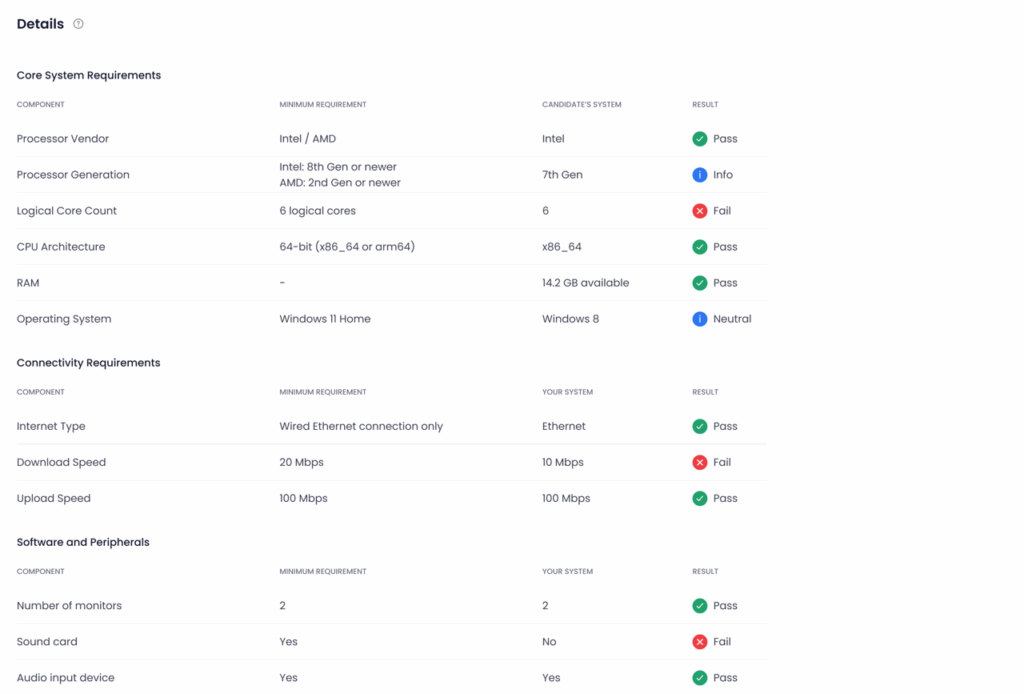
A candidate system check is an automated scan, usually run in the browser, that compares a candidate's hardware, software and network against the minimum requirements of the assessment platform. It reports pass or fail per component, tells the candidate what to fix, and gives the hiring team a record of who is ready.
It is sometimes called a system diagnostic or a compatibility scan. The naming matters less than the timing: a check run inside the assessment window has no value, because a candidate who fails it has nowhere to go. Run before the window opens, it is the cheapest quality control in the whole screening stage. If you want the candidate-facing view of the same process, what a failed compatibility check means walks through the error messages they see.

Why does a failed setup skew results?
Because the score stops measuring the candidate. A coding assessment on a machine that freezes for 40 seconds costs the candidate 40 seconds of thinking time, and the report cannot tell the difference between a slow laptop and a slow reasoner. That is a measurement error, and it lands unevenly.
It lands unevenly because connectivity is not distributed evenly. In the United States, Pew Research Center's broadband figures put home broadband subscription at 78 percent of adults, with 16 percent of adults online through a smartphone and no home broadband at all. Hire across borders and the gap widens: the ITU counts 2.2 billion people still offline in 2025, most of them in low and middle income countries. A requirement you never stated is still a requirement the candidate has to meet.
The candidate notices too. A 2004 meta-analysis in Personnel Psychology by Hausknecht, Day and Thomas pooled 86 samples and roughly 48,750 applicants and found that reactions to a selection process track perceived fairness, job-relatedness, and how candidates are treated along the way. A test that breaks on them is a data point about your company, and they will read it that way.
This is the environment-control layer of the Testlify Assessment Integrity Framework, which protects the trustworthiness of a result through identity checks, environment control, behavior signals, AI-assistance detection and reviewable evidence, with the final judgment left to a human. Environment control usually gets discussed as an anti-cheating measure. It is equally a validity measure: you cannot trust a score produced in conditions you never verified.
What should a system check test?
Seven components, in roughly this order of how often they break. Adapt the thresholds to the assessment type; a timed knowledge test and a recorded video interview have very different needs.
Component | What to verify | Why it breaks the assessment |
|---|---|---|
Device and hardware | Processor and memory headroom | An underpowered machine turns thinking time into loading time, and the score cannot separate the two. |
Operating system | Version is still supported | A forced update mid-session ends the session. A wrong clock can invalidate a timed result. |
Browser | A supported Chromium browser | Testlify runs on Chromium desktop, so a candidate on Safari or Firefox is stopped at the door. Brave users have to switch the shield off. |
Camera and microphone | Browser permission granted, not just the device working | Granted permission is the step candidates miss. The hardware is usually fine; the browser prompt was dismissed. |
Network | Download and upload speed | Upload is the one people forget. A recorded or proctored session uploads continuously for the whole sitting. |
Security software | Endpoint protection active but not blocking the platform | A managed work laptop will often refuse camera access or block the domain outright, and the candidate cannot change that. |
Room and environment | Lighting adequate for face detection | Face detection fails in a dark room and gets logged as a proctoring flag, which reads as suspicion rather than lighting. |
Pro tip: test upload speed and hold the connection for two or three minutes rather than running a single-burst speed test. A connection that peaks at 50 Mbps and drops every 30 seconds fails an assessment that a steady 6 Mbps line passes comfortably.
How do you run a candidate system check?
Five steps, and only the first one is about tooling. The other four are process decisions that outlast whichever tool you pick.
Step 1: Pick the check and wire it to the assessment
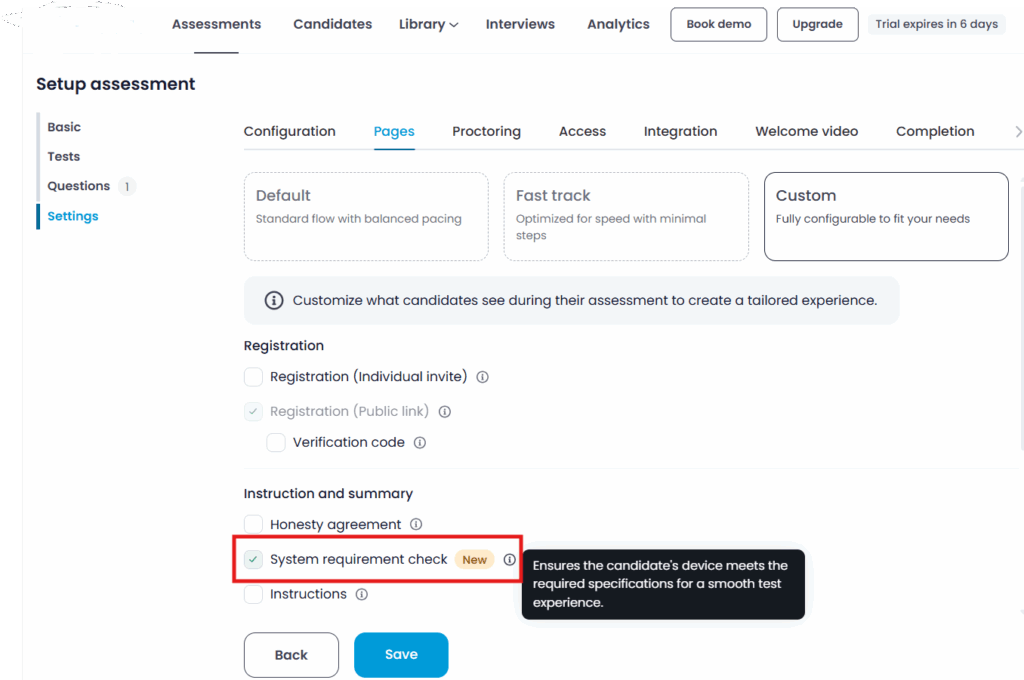
Use a check that runs where the assessment runs. A generic speed test on a phone proves nothing about a browser session on a laptop. Testlify includes a system requirement check that runs as part of the candidate flow, so the requirements report is produced in the same browser that will run the assessment. Some setups need a standalone download instead, billed at $0.25 per check. If you are still choosing, this rundown of tools that run these checks compares the options.
Step 2: Write the requirements down before you enforce them
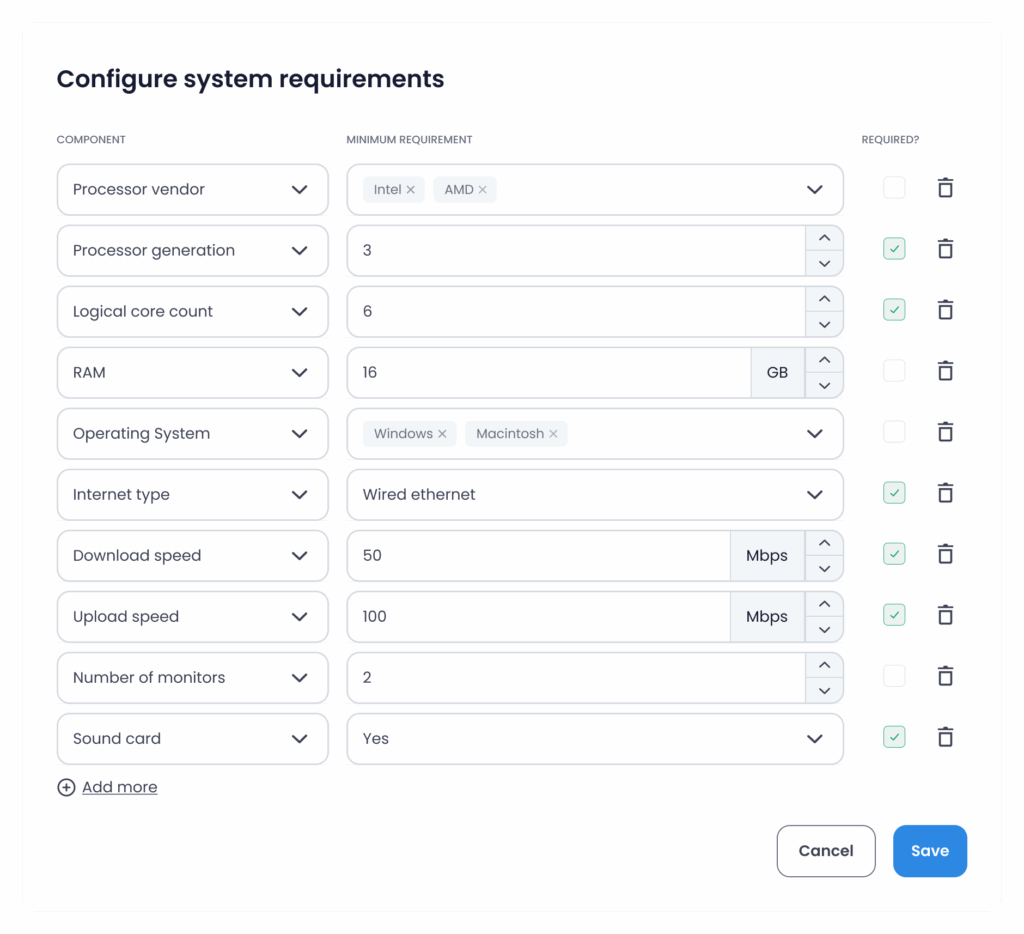
Decide your minimum and recommended specification, then publish it in plain language. Two numbers, not a spec sheet. A reasonable starting point for a browser-based assessment with video is 8 GB of memory, a current Chromium browser, and a connection holding 5 Mbps down and 2 Mbps up. Raise the network floor if sessions are recorded; lower it if the assessment is text only. Those are starting points to tune against your own failure data, not a standard anybody publishes.
Step 3: Send it 24 to 48 hours before the window opens
Early enough to fix a problem, late enough that the setup they tested is the setup they will use. Put the link in the invitation email, say how long it takes, and say plainly what happens if it fails. Candidates who know there is a support path use it. Candidates who do not, quietly drop out, and that churn looks like disinterest in your funnel when it was a permissions dialog.
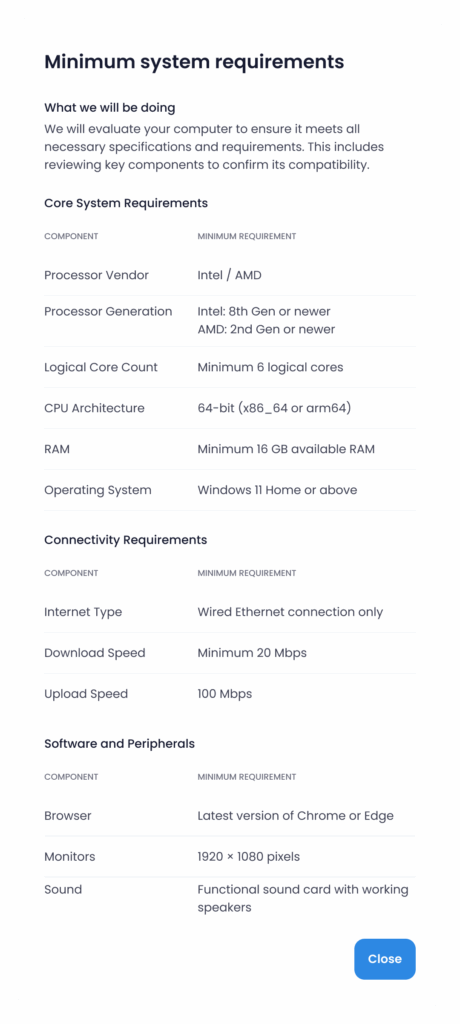
Step 4: Let the candidate run it, and tell them what the result means
A good check reports per component, in words a non-technical person can act on. "Camera blocked" is useful. "Media device error 0x8007" is not. Ask candidates to run it on the same device, in the same room, on the same connection they will use on the day, and to rerun it if any of those three change.
Step 5: Read the failures as a queue, not as a verdict
Every failure is a task for somebody on your side. Group them: browser problems get a one-line instruction, permission problems get a screenshot, connection problems get a conversation about timing or an alternative arrangement. Track which component fails most often, because that number tells you what to change in the invitation email next month. If nobody is reading the reports, the check is decoration.
What thresholds should you set?
Match the requirement to what the assessment actually does. Enforcing webcam and upload bandwidth on an untimed written exercise adds friction and excludes people for no measurement gain, and that is a real cost, not a hypothetical one.
Assessment type | Enforce | Leave optional |
|---|---|---|
Untimed written or upload task | Browser version, stable connection | Camera, microphone, upload speed, room checks |
Timed knowledge or cognitive test | Browser, device performance, connection stability, correct clock | Camera and microphone unless proctored |
Coding assessment in a browser editor | Browser, memory headroom, stable connection, and time for the editor to load (the in-browser code editor takes 1 to 3 minutes to open) | Room lighting |
Recorded or AI video interview | Camera, microphone, browser permissions, sustained upload, lighting | Multiple displays |
Proctored high-stakes assessment | Everything above, plus security software, single display, and the second-device camera if you use dual-device monitoring | Nothing |
Dual-device proctoring is worth calling out because it changes the check. The candidate's phone becomes a second camera, and the session will not start until that phone is connected. If you turn it on, the system check has to cover the phone too, or you have moved the failure to the worst possible moment. Proctoring controls and system requirements are the same decision made twice, so make them together.
Common failures and how to fix them
Six problems account for most of what lands in the support inbox. None of them are exotic.
Failure | Usual cause | Fix, and who owns it |
|---|---|---|
Unsupported browser | Safari, Firefox, or a locked corporate build | Name the supported browsers in the invitation. Candidate installs Chrome or Edge, or switches device. |
Camera or microphone blocked | The browser permission prompt was dismissed, not a hardware fault | Send a two-screenshot instruction for resetting site permissions. Owned by you, not the candidate. |
Connection fails under load | Shared Wi-Fi, peak-hour congestion, or upload starvation | Suggest wired or a hotspot, and offer an off-peak slot. Some of this you cannot fix, so plan for it. |
Device too slow | Old hardware, or 30 browser tabs | Ask them to close everything else first. If the hardware genuinely cannot cope, offer a different format rather than a worse score. |
Proctoring component will not launch | Firewall, operating-system version, or a managed device | Test the install path yourself on a locked-down machine before you roll it out. Offer an alternative arrangement. |
Face detection keeps flagging | Backlit window, single lamp behind the candidate | One sentence in the invitation about facing a light source prevents most of these. |
One rule holds across all six: a proctoring flag raised by a technical fault is evidence to review, never a reason to reject. Yellow means a human should look. It does not mean cheating.
Accessibility, privacy and consent
Key takeaway: a system check collects information about someone's home and their body, so treat it as a privacy and accessibility exercise, not only a technical one.
Start with the legal floor. In the United States, the ADA rules for job applicants require that application tests are given in a format that does not demand use of an impaired skill, unless the test is designed to measure that skill, and an employer cannot refuse to consider someone because they need an accommodation to compete. A system check that silently screens out a candidate using a screen reader is a compliance problem before it is a candidate-experience problem. The Justice Department's web accessibility guidance names the Web Content Accessibility Guidelines as the existing technical standard for web content, which is the yardstick to hold your assessment vendor to.
So build the request path into the check, not next to it. Testlify supports a candidate-initiated accommodation request that routes to an administrator, who adjusts the session by hand, plus a setting for screen-reader usability. That is a human-reviewed request, not automatic extra time, and the difference matters when you write the instructions.
On privacy, say what you collect and how long you keep it. Face verification data in Testlify is deleted after 30 days and consent can be withdrawn at any point; video and audio responses are removed after 6 months. Put those numbers in the candidate-facing notice rather than in a policy nobody opens. Collect the minimum that answers the question "can this person sit this assessment", and nothing about the rest of the machine.
Your pre-assessment checklist
Work down this list once, then turn it into the template you reuse.
- Minimum and recommended specification written down and published in the invitation
- Supported browsers named explicitly, with the Chromium requirement stated up front
- System check link sent 24 to 48 hours before the window opens
- Expected duration stated, so candidates set aside the time
- Camera and microphone permission instructions attached as screenshots
- Upload speed tested, not only download, for any recorded session
- Connection stability measured over minutes, not one burst
- Accommodation request route visible before the check, not after a failure
- Privacy notice naming what is collected and the retention period
- Named owner for failed checks, with a response time candidates are told about
- Second-device requirements covered if dual-device proctoring is on
- Completion tracked, with a target such as 90 percent ready before the window opens
- Most common failure reviewed each cycle and fixed in the invitation copy
Teams running this without a dedicated IT function usually stop after the first four items. The last three are where the compounding is: fix the invitation email once and the support queue shrinks every cycle after that. For distributed teams, the same discipline applies to the rest of the stack, which is the subject of system diagnostics for remote teams.
Hire on skills, not on bandwidth
A system check is a small piece of process that decides whether your assessment data is worth anything. Build it once, and every score after it measures the candidate instead of their router. If you want to see the requirements report, accommodation flow and proctoring controls working together on a real assessment, book a demo and bring your hardest hiring scenario.
FAQs

Content Writer
Yashika Khandelwal is a Content Writer with 3+ years of experience creating research-backed content on hiring, talent assessment, and HR technology. She is a registered Organizational Psychologist and subject matter expert who combines behavioral science with practical recruitment insights to produce accurate, evidence-based content.
LinkedInRelated resources
View all
System compatibility & setup
How to conduct system diagnostics for remote work?
Skill assessment
What skills-based hiring data shows beyond the US and UK

HR & recruitment
AI across all stages of the hiring process in 2026

AI in recruitment
Best practices for hiring data analysts using assessments?

Candidate assessment
What tools support voice responses for language proficiency testing?

Candidate assessment
How do ATS-integrated assessments streamline hiring workflows?
Get started.
Hire on proof, not resumes.
Run your first skills-based assessment free — no credit card required.