
Mobile HR tools: 7 apps that simplify HR tasks in 2026
Seven mobile apps for the HR tasks that stall when people leave their desks, plus what to keep on desktop and how to roll them out safely.

A hiring manager is travelling, so an offer sits unapproved. The candidate accepts another job while it waits.
Mobile HR tools are apps and mobile-ready web platforms that let recruiters, hiring managers and HR teams finish HR tasks from a phone. The best ones handle the small, frequent decisions that hold up hiring.
This guide reviews seven tools by the job each one does and shows which tasks to keep on desktop. It also covers the candidate experience and the features to insist on.
TL;DR:
- Mobile HR tools let recruiters, managers and employees finish short HR tasks from a phone.
- Seven tools are reviewed by the job each one does, from screening and sourcing to secure documents.
- Some tasks should stay on desktop, such as building jobs, comparing shortlists and running reports.
- Mobile helps the candidate experience, especially for frontline and shift roles.
- Look for push notifications, one-tap actions, ATS sync, single sign-on and role-based access.
 ChatGPT
 Gemini
 Claude
 Grok
Grok Perplexity
What are mobile HR tools?
Mobile HR tools are software products, usually a native iOS or Android app or a web platform built to work in a phone browser, that cover part of the HR or recruiting workflow. Most are the mobile side of a system you already run, such as an applicant tracking system (ATS), an HR information system (HRIS) or a sourcing platform.
The difference from full HR software is scope. Full HR software is where you design jobs, configure workflows, run reports and manage settings.
A mobile HR app is where you act on what that system sends you: an application to review, an offer to approve, a scorecard to submit, a time-off request to accept.
Phones are already where most people are. Pew Research Center's 2026 survey found that 91% of US adults own a smartphone and 98% own a cellphone of some kind.
For HR teams, that means candidates, employees and hiring managers can all be reached on a phone, even when they are rarely at a desk.

Which HR tasks can mobile HR tools handle?
Mobile HR tools handle six kinds of HR work well: screening applications, approvals, sourcing, interviews and assessments, documents, and team decisions. Each one is a short task that blocks someone else while it waits, so finishing it from a phone in two minutes saves hours or days for the candidate and the team.
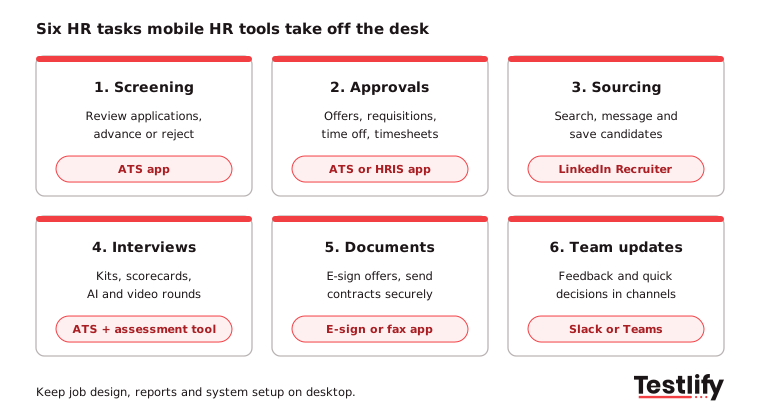
- Screening: reviewing new applications and moving each one forward or out.
- Approvals: job requisitions, offers, time off and timesheets.
- Sourcing: searching for, saving and messaging candidates.
- Interviews and assessments: interview kits and scorecards for the hiring team; skills tests and AI interviews for candidates.
- Documents: signing and sending offer letters and contracts securely.
- Team decisions: quick feedback from hiring managers in the channels they already use.
Pro tip: Before you buy anything, list the tasks where your hiring process waits on one person. Those wait points are where mobile HR tools pay off first, and most of them are covered by apps your ATS and HRIS already include.
What are the best mobile HR tools in 2026?
The best mobile HR tools in 2026 are the ones that remove a specific wait from your process. The seven below cover screening, sourcing, assessments, employee self-service, team decisions and documents.
Features listed come from each vendor's own help or product pages
Tool | Main HR task | Who uses it on mobile | Best fit |
|---|---|---|---|
Greenhouse Recruiting app | Screening, scorecards, approvals | Recruiters, hiring managers | Teams already on Greenhouse |
Workable app | Screening, scheduling, offers | Recruiters, hiring managers | Lean TA teams on Workable |
LinkedIn Recruiter mobile | Sourcing and messaging | Recruiters, sourcers | Hard-to-fill and senior roles |
Testlify | Skills tests and AI interviews | Candidates (recruiters review results) | Volume and skills-based hiring |
BambooHR mobile app | Self-service, approvals, hiring steps | Employees, managers | HR teams on BambooHR |
Slack mobile | Hiring team feedback and decisions | Hiring managers, recruiters | Teams that already work in Slack |
Municorn Fax app | Sending signed documents securely | HR admins | Teams whose partners still need fax |
1. Greenhouse Recruiting app: screening and approvals
The Greenhouse Recruiting app lets users review applications for a job and reject, advance, skip or leave feedback on each one. Interviewers can open the interview kit, check the job description and scorecard questions, and submit a scorecard from the app.
An Approvals panel shows pending offer and job approvals. A hiring manager can clear them without opening a laptop.
Greenhouse's own tip is to turn on push notifications so approvals do not sit in a queue. Application review needs the Recruiter or Hiring Manager role on the job's hiring team.
2. Workable app: hiring for lean teams
The Workable app shows every application waiting for your review, filtered by job if you prefer. Recruiters and hiring managers can advance or disqualify candidates, tag teammates in comments, call candidates from their profile, schedule interviews, and complete a quick evaluation or a full scorecard.
When an offer needs sign-off, the app sends a notification to review and e-sign it, and another when the candidate accepts.
Workable also covers time-off requests and time tracking in the same app, which suits smaller HR teams that want one app for hiring and basic HR.
3. LinkedIn Recruiter mobile: sourcing on the move
LinkedIn Recruiter's mobile app covers the sourcing loop: start searches with filters and keywords, open searches started on desktop, review full profiles, save or hide candidates, add notes and send messages using templates. Recruiters can also post a job, review applicants, manage a project pipeline and get push alerts for InMail replies, new applicants and new candidates who are open to work.
LinkedIn Recruiter needs a paid Recruiter seat, so the mobile app adds value for teams that already pay for one.
4. Testlify: skills tests and AI interviews candidates take on their phone
Testlify is different from the other tools on this list: the person using it on a phone is usually the candidate, not the recruiter. Candidates can complete assessments from a mobile device, any time, which keeps completion rates up for applicants who do not sit at a computer all day.
Invites and reminders can go out on WhatsApp as well as email.
Recruiters pick from 3,500+ tests in the Testlify test library or generate one from a job description, and can add AI interviews by chat, voice or video. Each response is scored automatically, and results come back as a ranked list with shareable report links that a hiring manager can open on any phone.
Testlify connects with 100+ ATS and HR tools, including Greenhouse, Workable, BambooHR and Slack, so scores sit next to the rest of the candidate record.
5. BambooHR mobile app: employee self-service and approvals
The BambooHR mobile app is built for employees and managers. Employees can request time off, clock in and out, e-sign documents, view paystubs and tax forms, update personal details, enroll in benefits and give feedback.
Managers can approve time off and timesheets, complete assessments for direct reports, and handle hiring steps such as reviewing applications and moving candidates through stages.
What each person sees depends on the BambooHR plan and their permissions, so check access settings before you announce the app to managers.
6. Slack mobile: faster hiring team decisions
Slack is not an HR tool, but it is where many hiring managers answer fastest. A private channel per open role keeps feedback in one place: the recruiter posts a shortlist or a report link, the hiring manager replies from a phone, and the decision is on record.
Many ATS and assessment tools, Testlify included, send updates into Slack, which saves a manual step.
Keep candidate data in the ATS and share links, not attachments, so access stays controlled when someone leaves the channel.
7. Municorn Fax app: sending signed documents securely
Some partners, especially in healthcare, government and legal work, still ask for documents by fax. The Municorn Fax app sends faxes from a phone and encrypts them with 256-bit AES and TLS, according to AppleInsider's 2025 review.
That lets an HR admin send a signed contract without searching for places to fax or waiting for an office machine.
If the documents include health information, ask the vendor for its compliance documents before use. For everything else, an e-signature step inside your ATS or HRIS is usually faster than fax.
Which HR tasks should stay on desktop?
HR tasks that need a big screen, careful reading or system access should stay on desktop: designing jobs and assessments, comparing many candidates side by side, building reports, configuring integrations and handling sensitive employee cases. Mobile HR tools are for acting on decisions, not for setting up the system that produces them.
Task | Mobile or desktop | Why |
|---|---|---|
Approve an offer or requisition | Mobile | A yes or no with the details already prepared |
Review a new application | Mobile | One profile, one decision |
Submit an interview scorecard | Mobile | Best done minutes after the interview |
Reply to a candidate message | Mobile | Speed matters more than length |
Build a job, test or interview plan | Desktop | Needs time, templates and team input |
Compare a full shortlist | Desktop | Side-by-side scores need screen space |
Run hiring reports | Desktop | Filters, exports and charts |
Handle an employee relations case | Desktop | Sensitive, needs records and privacy |
How do mobile HR tools improve the candidate experience?
Mobile HR tools improve the candidate experience by letting people apply, take assessments, join AI interviews and sign offers from the phone they already carry. Candidates in frontline, shift and field roles often have no regular computer access, so a process that only works on a laptop quietly loses them.
Three things matter most on the candidate side:
- Short steps that work on a small screen. Short skills tests, multiple-choice questions and one-way video or voice answers suit phones. Long coding tasks and spreadsheet exercises are easier on a laptop, so tell candidates which device to use in the invite.
- Invites where candidates read messages. WhatsApp and SMS reminders often get seen sooner than email for hourly roles.
- Fair checks on every device. Proctoring should work the same on mobile and desktop. Testlify includes 20+ anti-cheating and proctoring checks and runs tests in 15+ languages.
For high-volume roles, the volume hiring guide shows how mobile-first assessments fit a full hiring flow, from invite to shortlist. For a definition of the wider practice, see mobile recruiting.
What features should mobile HR tools have?
Mobile HR tools should have push notifications, one-tap actions, ATS and HRIS sync, secure sign-in, role-based access and a low-bandwidth mode. Without these, people fall back to email and the app becomes another inbox nobody checks.
- Push notifications: Alerts for pending approvals, new applications and candidate replies stop work sitting in a queue. Let users choose which alerts they get, so they do not mute them all.
- One-tap actions: Approve, reject, advance and submit a scorecard should each take a tap or two. If a task needs a laptop to finish, the app adds little.
- ATS and HRIS sync: Changes made on a phone should appear in your main system straight away. That keeps one record per candidate and avoids double entry.
- Single sign-on and multi-factor authentication: Staff sign in with their company login and a second check. This protects candidate and employee data if a phone is lost.
- Role-based access: Recruiters, hiring managers and employees should each see only what their job needs. Check this before you invite managers to the app.
- Offline or low-bandwidth mode: Field and travelling users often have weak signal. The app should load key screens and queue actions until the connection returns.
- Easy candidate messaging: Templates and quick replies let recruiters answer from a phone in seconds, which matters most for high-volume roles.
Mobile HR tools speed up decisions, but they need good information to act on. Testlify supplies that for the screening step.
Candidates take skills tests and AI interviews on their phone, and recruiters and hiring managers open ranked results on theirs. Book a demo to see how it fits your hiring flow, or start a 7-day free trial with no credit card.
Frequently asked questions (FAQs)

Founder and CEO, Testlify
Abhishek Shah is the Founder and CEO of Testlify, a pre-employment assessment platform used by 1,500+ companies globally to hire fairly and at scale. He focuses on skills-based, bias-free hiring technology. Testlify is part of the SHRM Labs 2026 WorkplaceTech Accelerator.
LinkedInRelated resources
View all
HR & recruitment
How to incorporate gamification in corporate training
HR & recruitment
Why legacy ATS tools fail enterprise hiring teams?

HR & recruitment
What’s hot in HR lingo: 2026’s HR buzzwords explained

HR & recruitment
Enterprise guide: Centralized vs decentralized recruitment

HR & recruitment
How image-to-video AI is transforming HR communication
HR & recruitment
How to build a recruitment tech stack that works at enterprise scale
Get started.
Hire on proof, not resumes.
Run your first skills-based assessment free — no credit card required.