
Advanced Excel skills: the 2026 list for hiring teams
The advanced Excel skills that matter in 2026, how they differ from basic ones, which roles need them, and how to check them before hiring.

Almost every resume says "advanced Excel". Very few say what the person can actually build.
Advanced Excel skills range from lookup and dynamic array functions to Power Query, data models and automation. Yet the same phrase can describe someone who only knows PivotTables.
This guide lists the advanced Excel skills that matter in 2026 and the roles that need them. It also shows how to test candidates so you hire real skill, not confidence.
TL;DR:
- Advanced Excel skills in 2026 include modern lookups, dynamic arrays, Power Query, data models and automation.
- Basic users work in sheets others built, intermediate users build summaries, and advanced users build systems others rely on.
- Some skills on older lists, such as Power View and VLOOKUP as an advanced skill, are now out of date.
- Finance, analytics and operations roles need these skills most, and each role uses a different set.
- Interview prompts about real workbooks separate advanced users from confident ones.
- A short timed test, a practical task and a walk-through give a fair, role-specific check.
 ChatGPT
 Gemini
 Claude
 Grok
Grok Perplexity
What are advanced Excel skills?
Advanced Excel skills let someone work with messy data, build models other people can use, and automate manual work. A basic user enters and formats data, and an intermediate user summarises it.
An advanced user designs how the whole workbook works. That covers the data source, the cleaning, the calculations and the monthly update.
Advanced is a relative label. A finance team and a sales ops team will expect different things from it.
That is why the most useful definition for hiring teams is task-based. What can this person build, clean, model or automate in the files your team uses?

How do basic, intermediate and advanced Excel skills differ?
Basic, intermediate and advanced Excel skills differ mainly in what the person can do without help. Basic users can work in a sheet someone else built.
Intermediate users can build their own summaries. Advanced users can build systems that other people depend on.
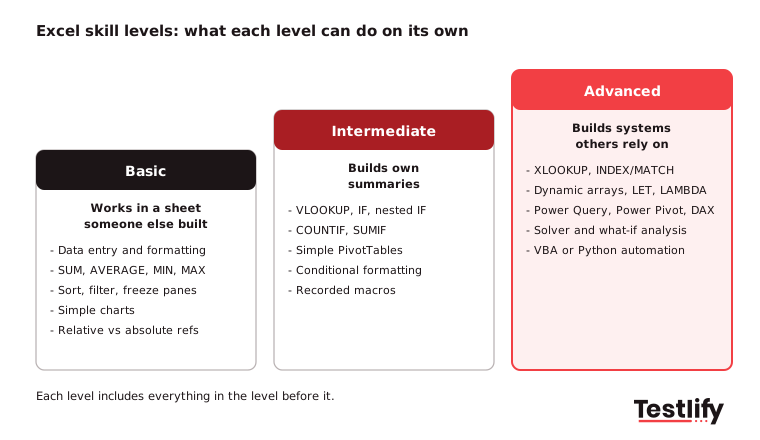
- Basic: data entry and formatting, SUM, AVERAGE, MIN and MAX, sorting and filtering, simple charts, freezing panes, relative and absolute cell references.
- Intermediate: VLOOKUP, IF and nested IF, COUNTIF and SUMIF, simple PivotTables, conditional formatting rules, data validation drop-downs, recording a basic macro.
- Advanced: XLOOKUP and INDEX/MATCH across sheets, dynamic arrays, LET and LAMBDA, Power Query, Power Pivot with DAX, what-if analysis with Solver, VBA or Python automation, and dashboards built for other people.
Training providers do not always agree on where the line sits. Some place COUNTIF and SUMIF in the advanced group, while most level guides treat them as intermediate.
For hiring, the label matters less than the job. Decide which skills the role uses every week and test those.
Which advanced Excel skills matter most in 2026?
The advanced Excel skills that matter most in 2026 are the ones that save hours on real reporting work: modern lookups, dynamic arrays, Power Query, data models and automation. Here are 12 worth looking for, in roughly the order most analyst roles use them.
- XLOOKUP and INDEX/MATCH. XLOOKUP replaces VLOOKUP and HLOOKUP in Microsoft 365 and recent versions of Excel. It looks left as well as right and handles missing values cleanly. INDEX/MATCH still matters because many shared workbooks were built with it, and it handles two-way lookups well.
- Conditional aggregation. SUMIFS, COUNTIFS, AVERAGEIFS and MAXIFS with several conditions at once, often combined with dates and wildcards. This is the backbone of most management reports.
- Dynamic array functions. FILTER, SORT, UNIQUE and SEQUENCE return a whole range from one formula that "spills" into the cells below. A strong user can build a live, filtered report with no copying and pasting.
- LET and LAMBDA. LET names parts of a long formula so it is easier to read and faster to calculate. LAMBDA turns a formula into a custom, reusable function. Few candidates know these, so they are a good signal of depth.
- PivotTables and PivotCharts. Grouping by date, calculated fields, slicers and timelines. Advanced users also know when a PivotTable is the wrong tool.
- Power Query. Importing data from files, folders, databases and the web, then cleaning it with repeatable steps: removing duplicates, splitting columns, unpivoting and merging tables. One refresh replaces an hour of manual clean-up.
- Power Pivot and DAX. Building a data model with relationships between large tables, then writing DAX measures. This is also the bridge to Power BI.
- What-if analysis. Goal Seek, Scenario Manager, data tables and the Solver add-in for forecasting, budgeting and planning under different assumptions.
- Advanced conditional formatting and data validation. Formula-based rules, dependent drop-down lists and input checks that stop bad data from entering a shared model.
- Macros and VBA. Recording and editing macros, writing VBA to automate repeat tasks, and knowing how to make code safe for other users. VBA is older, but a large share of finance and operations workbooks still depend on it.
- Python in Excel. The Register reported that Python in Excel became generally available in September 2024 for Excel for Windows on Microsoft 365 Business and Enterprise plans. Analysts can now run pandas and charting libraries inside a cell, which matters for data roles.
- Working well with Copilot in Excel. Microsoft Support describes Copilot in Excel as a way to build and edit workbooks using tables, charts, PivotTables and formulas. The advanced skill is not asking Copilot for a formula. The advanced skill is checking whether the formula it wrote is right.
Pro tip: Ask candidates which of these they use weekly and which they have only read about. The honest split tells you more than a self-rating of "8 out of 10".
Which Excel skills on older lists are out of date?
Excel skills that appear on older lists but are now out of date include Power View, the standalone Power Map add-in and treating VLOOKUP as an advanced skill. A refresh of your job descriptions and tests should remove them.
- Power View. Older guides list Power View as a core reporting feature. Interactive reporting of this kind now sits in Power BI.
- Power Map. The old add-in became 3D Maps inside Excel. It is a niche feature, not a core hiring requirement for most roles.
- Power BI as an Excel feature. Power BI is a separate Microsoft product. Knowing it is useful, but it should be listed and tested as its own skill.
- VLOOKUP as an advanced skill. VLOOKUP is now an intermediate skill. If a test treats it as the top of the scale, the test is too easy for senior roles.
Which jobs require advanced Excel skills?
Jobs that require advanced Excel skills are mostly in finance, analytics and operations, where people build models and recurring reports. The table below maps common roles to the skills they use most, so you can test the right ones instead of "Excel" in general.
Role | Advanced Excel skills used most | Typical task to test |
|---|---|---|
Financial analyst / FP&A | XLOOKUP, SUMIFS, what-if analysis, data tables, three-statement models | Build a 12-month forecast with two scenarios |
Accountant / auditor | Power Query, reconciliation formulas, PivotTables, data validation | Reconcile two ledgers and flag mismatches |
Data or business analyst | Power Query, dynamic arrays, Power Pivot and DAX, Python in Excel | Clean a raw export and build a filtered summary |
Operations / supply chain | SUMIFS, PivotTables, Solver, conditional formatting | Find stock items below reorder level by site |
Sales or revenue ops | PivotTables, XLOOKUP, dashboards, slicers | Build a pipeline report by region and stage |
HR and people analytics | PivotTables, COUNTIFS, Power Query, data privacy controls | Summarise attrition by team and tenure band |
Project and PMO roles | Date functions, conditional formatting, timeline charts | Build a tracker that flags late milestones |
Testlify's financial Excel modeling test and data analyst Excel test cover two of the most common profiles in this table.
How can you tell if a candidate really has advanced Excel skills?
Hiring teams can tell if a candidate really has advanced Excel skills by asking them to explain how they built something, not what they know. People who use these skills every week talk about data sources, refresh steps and errors they had to fix. People who do not tend to list function names.
Resume claims are a weak signal on their own. Checking the skills directly is what makes a skills-first approach work.
Interview prompts that separate real users from confident ones:
- "Walk me through a workbook you built that someone else still uses." Good answers cover where the data comes from, how it refreshes and how they stopped others from breaking it.
- "How would you combine 12 monthly files with slightly different columns?" Strong candidates mention Power Query and a folder connection. Weak answers involve copying and pasting.
- "When would you use XLOOKUP instead of INDEX/MATCH, and the other way round?" Look for a reason, not a preference.
- "Your report total does not match finance's number. What do you check first?" Good answers are systematic: filters, duplicates, data types, hidden rows, date ranges.
- "What have you automated, and how much time did it save?" Real answers come with a before and after.
Resume tells worth noticing: named tools tied to outcomes ("built a Power Query model that cut month-end close by two days") beat lists of functions. For more finance-related Excel questions, explore Excel for finance interview questions.
How do you test advanced Excel skills before you hire?
Testing advanced Excel skills works best as a short, role-specific sequence: a timed skills test to screen, a practical task for the shortlist, and a walk-through in the interview. Each step checks something the previous one cannot.
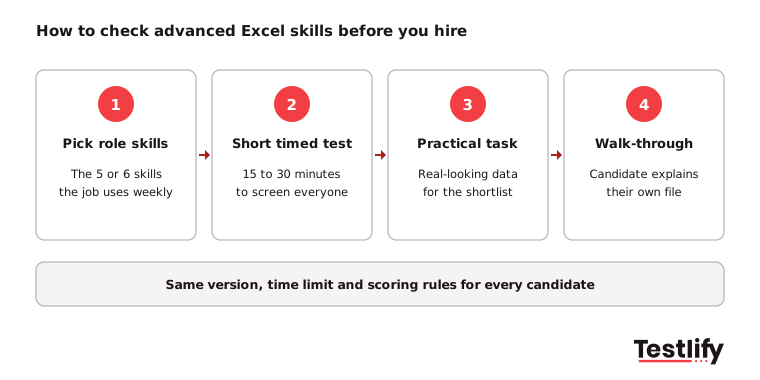
- Pick the five or six skills the role uses weekly. Use the role table above. Leave out anything the person will rarely touch.
- Screen with a short timed test. 15 to 30 minutes is enough to separate intermediate from advanced users without driving good candidates away.
- Give the shortlist a practical task. A real-looking dataset and a clear brief, such as cleaning an export and building a summary, shows how they work, not only what they know.
- Ask them to explain their file. A five-minute walk-through confirms the work is their own and shows how they think.
Keep the test fair: give every candidate the same version, time limit and scoring rules, and check results against people already doing the job well. The guide to advanced Excel assessments covers formats, scoring and common mistakes in detail.
How does Testlify help you check Excel skills?
Testlify helps hiring teams check Excel skills with ready-made tests, hands-on simulations and file-based tasks, all scored automatically. The Advanced Excel test runs 15 minutes and has 12 questions on lookups, conditional aggregation, logic, dynamic arrays, data cleaning and PivotTables.
For hands-on work, the Microsoft Excel simulation test covers PivotTables, advanced formulas, query and import functions, and VBA.
You can pair an Excel test with a numerical reasoning or role test from 3,500+ ready-to-use tests. You can also add your own task using 25+ question types, including Microsoft Excel and Google Sheets file uploads.
20+ proctoring checks help confirm the work is the candidate's own. Browse the full test library to build the right mix for each role.
Want to see it in action? Book a demo to see how Testlify can help your team check Excel skills before you hire.
Frequently asked questions (FAQs)

Related resources
View all
Skill assessment
How to Conduct a Structured Job Interview (2026 Guide)

Skill assessment
How to assess sales skills when hiring
Skill assessment
CVs vs. online assessments: Which gives you better hires?

Skill assessment
How to assess computer skills to increase technical hiring accuracy

Skill assessment
Assess the personality and attitude of candidates to find the best fit
.png?dpl=dpl_6EF1e1bbhYuseK7CKKJE2ZCuSqYD)
Skill assessment
Skills Taxonomy vs Skills Ontology: A Guide for Hiring Teams
Get started.
Hire on proof, not resumes.
Run your first skills-based assessment free — no credit card required.