
Testlify vs. Pixonality: Which Skills Assessment Platform is Best for HR Teams?
Testlify vs. Pixonality: Discover which skills assessment platform best suits your hiring needs
Did you know that organizations adopting skills-based hiring tools have reported up to a 50% reduction in time-to-hire.
As a result the demand for reliable skills assessment platforms has grown exponentially and companies are gravitating toward providers with proven track records of success.
Testlify and Pixonality have emerged leading skills assessment platforms in the market, each offering comprehensive pre-employment assessment capabilities designed to enhance the hiring process for organizations worldwide.
However, choosing between the two can be quite a challenge. In this article, we will be drawing comparisons between the two platforms to help you determine which platform best fits your hiring needs.
 ChatGPT
 Gemini
 Claude
 Grok
Grok Perplexity
What is Testlify?
Testlify is a leading AI-powered skills assessment platform that empowers organizations to quickly identify the best candidates worldwide and make more objective hiring decisions.
How does Testlify work
Testlify is designed to optimize your hiring process. Our conversational AI powered interview & talent assessment platform enables recruiters to assess candidates’ skills with precision, empowering you to make well-informed decisions. Here’s how Testlify works:
1. Create tailored assessments
Recruiters can create tailored assessments by choosing from a library of 3,500+ pre-built tests or leveraging AI to generate custom questions. The platform supports diverse question formats, including multiple-choice, open-ended and even coding challenges.
Furthermore the platform supports the creation of conversational AI-powered interviews that simulates on-the-job scenarios across chat, voice, and video formats.
2. Send candidate invitations
Once an assessment is ready, recruiters can invite candidates via email. Candidates do not need to create an account; they can access the assessment directly through the invitation link, ensuring a smooth and user-friendly experience.
3. Advanced anti-cheating and proctoring measures
To maintain the integrity of the assessment process, Testlify incorporates advanced proctoring features. These include webcam monitoring, screen recording, browser lockdowns, and location tracking, ensuring that assessments are completed honestly and without external assistance.
4. AI-Powered scoring and analytics
Testlify employs AI to automatically score assessments, providing recruiters with detailed insights into candidates’ performance. The platform offers comprehensive reports that break down scores by skill, question type, and overall performance, facilitating informed decision-making.
5. Integration with applicant tracking systems (ATS)
To streamline the hiring workflow, Testlify integrates seamlessly with over 100 ATS platforms, including Greenhouse, Lever, and Recruitee. This allows you to effortlessly import candidates’ profiles, compare assessment results and make data driven hiring decisions.
6. Data compliance
Testlify is GDPR compliant and prioritizes the security of your recruitment data. It features advanced admin management, strong security integrations, rigorous data governance, comprehensive audits, and robust privacy protections, all backed by SOC 2 Type II, AICPA, and ISO 27001 certifications.

What is Pixonality?
Pixonality is a talent assessment management platform that gives companies access to a library of ready-made assessments supplied by third-party providers. In essence, Pixonality aggregates 100+ validated tests from multiple vendors (such as Hogan, SHL, EPSI, Pearson, etc.) into one platform.
The platform focuses on science-based and benchmark-validated assessments to evaluate candidates’ skills, cognitive abilities, personality traits, and organizational fit.
How Pixonality works
Pixonality’s workflow centers around selecting and administering existing assessments. Here’s how the platform works:
1. Browse and select assessments
Users start by exploring Pixonality’s library of assessment solutions. The tests are organized by categories such as providers, evaluation types, context of use, job category, skills and proce.
2. Invite candidates
Through Pixonality’s assessment management platform, you can add candidates and send out assessment invitations (individually or in bulk).
3. Candidates complete the test
After candidates complete the assessments, Pixonality provides the results through its platform. Because these are third-party tests, the scoring is usually automatic and based on the test provider’s algorithms. Recruiters can download reports for each assessment
4. Reporting and analytics
Once candidates complete their assessment, recruiters can access in-depth reports on their performance to make objective, data-driven decisions. You can share candidates’ results with your team directly through the platform, export detailed PDF or Excel reports, or sync all data to your ATS.
5. Data compliance
Pixonality is GDPR compliant and built on a secure platform to handle candidate data responsibly. The platform allows you to maintain an archive of completed assessments and their results. Since Pixonality partners with well-known assessment providers, the tests themselves often have strong validation and compliance in terms of fairness and reliability.
Testlify vs. Pixonality feature comparison
Choosing the right hiring platform can transform your business. That’s why our in-depth, feature comparison of Testlify and Pixonality highlights the key features you need to make the right choice.
Features | Testlify | Pixonality |
|---|---|---|
Test Library | ||
Role-specific tests | ✓ | ✓ |
Coding tests | ✓ | ✗ |
Cognitive ability tests | ✓ | ✓ |
Programming tests | ✓ | ✗ |
Number of programming languages supported | 45+ | ✗ |
Situational judgment tests | ✓ | ✓ |
Typing test | ✓ | ✓ |
Software skills tests | ✓ | ✓ |
Non-technical tests | ✓ | ✓ |
Psychometric tests | ✓ | ✓ |
Personality tests | ✓ | ✓ |
Motivation test | ✓ | ✓ |
Assessment templates | ✓ | ✓ |
Custom assessments creation | ✓ | ✗ |
Assessments | ||
Custom assessment builder | ✓ | ✗ |
Custom coding questions | ✓ | ✗ |
Multiple-choice questions | ✓ | ✓ |
Short answer questions | ✓ | ✓ |
Long answer questions | ✓ | ✓ |
Rating questions | ✓ | ✗ |
Date questions | ✓ | ✗ |
Fill in the blanks | ✓ | ✗ |
Microsoft Word/Excel/PowerPoint questions | ✓ | ✗ |
Google Docs/Slides/Sheets questions | ✓ | ✗ |
Qualifier questions | ✓ | ✗ |
File upload questions | ✓ | ✗ |
Assessments curated by I/O psychologists | ✓ | ✓ |
Quality check | ✓ | ✓ |
Interview | ||
Audio interviewing (Voice AI) | ✓ | ✗ |
One-way audio interview | ✓ | ✗ |
Video interviewing (Video AI) | ✓ | ✗ |
One-way video interview | ✓ | ✗ |
Chat simulation (Chat AI) | ✓ | ✗ |
Custom interview questions creation | ✓ | ✗ |
Candidate Experience | ||
Customizable email templates | ✓ | ✗ |
Mobile-friendly | ✓ | ✗ |
Candidate support | ✓ | ✗ |
Welcome video | ✓ | ✗ |
Average assessment length | 40-60 minutes | – |
Assessment attempts | Customizable | – |
Anti-cheating Features | ||
Session recording | ✓ | ✗ |
Snapshot capturing | ✓ | ✗ |
Mouse tracking | ✓ | ✗ |
Disabled copy-paste | ✓ | ✗ |
Microphone and camera access | ✓ | ✗ |
Location access | ✓ | ✗ |
IP address tracking | ✓ | ✗ |
Question-level activity logs | ✓ | ✗ |
Full-screen mode | ✓ | ✗ |
Force full-screen mode | ✓ | ✗ |
Tab proctoring | ✓ | ✗ |
AI assistance detection | ✓ | ✗ |
Restrict multiple monitors | ✓ | ✗ |
Randomization of question sequence | ✓ | ✗ |
Time limit on tests | ✓ | ✓ |
Screen sharing | ✓ | ✗ |
Dual camera proctoring | ✓ | ✗ |
Honesty Agreement | ✓ | ✗ |
Reporting and Analytics | ||
Detailed reports | ✓ | ✓ |
Public link to share reports and scorecards | ✓ | ✗ |
Exportable/downloadable reports | ✓ | ✓ |
Recruiting analytics | ✓ | ✓ |
Candidate benchmarking | ✓ | ✗ |
Completion rate and response insights | ✓ | ✓ |
Enterprise Friendly | ||
White label | ✓ | ✗ |
Custom branding | ✓ | ✗ |
ATS integrations | 100+ | – |
User, role, and access management | ✓ | ✓ |
Bulk candidate invite | ✓ | ✓ |
Share public link invite to candidates | ✓ | ✗ |
Candidate pipeline management | ✓ | ✓ |
Internationalization | ✓ | – |
Campus hiring support | ✓ | ✗ |
Dedicated account manager | ✓ | ✗ |
Security and Compliance | ||
GDPR | ✓ | ✓ |
CCPA | ✓ | ✗ |
SOC2 | ✓ | ✗ |
ISO 27001 | ✓ | ✗ |
Customer Support | ||
24/7 support | ✓ | ✗ |
On-call support | ✓ | ✓ |
Email support | ✓ | ✓ |
Product demo | ✓ | ✓ |
Training & onboarding tour | ✓ | ✗ |
Testlify vs. Pixonality: Test library & test types
Testlify offers unique conversational AI-powered interviews (chat, voice, video), along with over 3,500 tests covering 4,500+ job roles across 50+ industries. Test types include:
- Cognitive ability tests (e.g., problem-solving, logical reasoning, attention to detail)
- Role-specific tests (e.g., tailored assessments for various job roles)
- Blue-collar hiring tests (e.g., practical skill assessments for blue-collar roles)
- Programming tests (e.g., coding, algorithm design, technical proficiency)
- Software skills tests (e.g., Microsoft Office, CRM systems, other software tools)
- Psychometric tests (e.g., personality traits, emotional intelligence, behavioral tendencies)
- Situational judgment tests (e.g., decision-making, conflict resolution, judgment in real-life situations)
- Live coding tests (e.g., real-time coding challenges and assessments)
- Typing tests (e.g., speed, accuracy, data entry proficiency)
- Language tests (e.g., proficiency in speaking and writing specific languages)
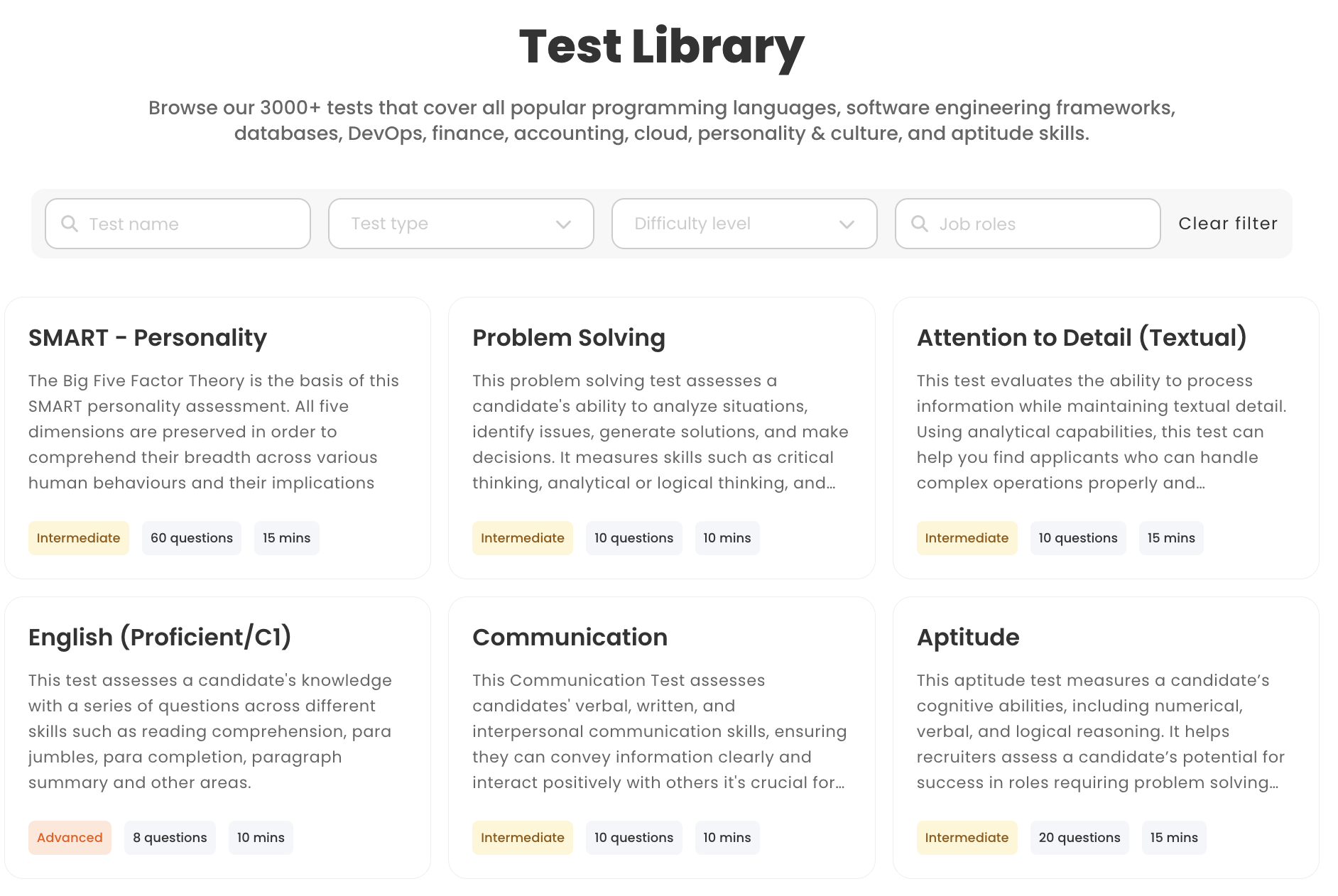
Pixonality test library is much smaller and is composed of third-party assessments. The platform brings together just over 100+ assessments sourced from external providers across a wide range of categories:
- Situational judgment tests
- General aptitude / critical thinking tests
- Business skills tests
- Basic IT skills or typing tests
- Personality questionnaires
- Language proficiency tests
Verdict: Testlify’s larger and more diverse test library gives it a significant edge here. With thousands of tests including coding and role specific tests Testlify enables a far more comprehensive evaluation of candidates.
Pixonality, while offering high-quality assessments from reputable sources, covers a narrower range of skills and lacks the interactive formats and depth that Testlify provides.
If your hiring needs go beyond standard aptitude and personality tests, Testlify’s expansive catalog and test variety will better equip you to identify the best-fit talent for any role.
Testlify vs. Pixonality: Custom question types
Testlify allows employers to create tailored assessments with 15+ custom question types, including scenario-based MCQs and AI-powered interviews.
- Multiple Choice Questions (MCQs)
- Open-ended and descriptive questions
- AI-powered Chat simulation
- AI-powered Video interview
- AI-powered Audio interview
- Custom coding questions and live coding tests
- Fill-in-the-blanks
- File upload questions
- Google Docs, Sheets, and Slides questions
- Microsoft Office questions
- Rating, number, and date questions
- Qualifier questions
Pixonality offers little to no support for custom questions or tests. Because it operates like a marketplace of fixed assessments, users cannot author new questions or tweak the content of the third-party tests on offer.
Essentially, you must work with the tests as-is. This limitation can be significant for teams that prefer to include custom tasks (like writing samples, bespoke case studies, or company-specific quizzes) as part of their hiring process. With Pixonality, that would require administering those outside the platform.
Verdict: Testlify clearly outshines Pixonality in customization. Testlify’s ability to incorporate custom questions and even AI-generated content means you can tailor assessments precisely to your hiring objectives.
Pixonality’s one-size-fits-all test offerings may be sufficient for basic roles, but the inability to tweak or expand them could be a deal-breaker if you have unique assessment needs.
Testlify vs. Pixonality: White-labeling capabilities
Testlify offers white-labelling capabilities, allowing companies to fully customize the platform with their own branding. This includes adding logos, personalizing emails, and modifying the test interface to best fit the look and feel of your own company.
A standout feature is the ability to personalize invitation and rejection emails. Instead of sending generic messages, companies can craft communications that reflect their brand’s tone and values, leaves a lasting impression on candidates.
Pixonality on the other hand, offers limited to no white-labeling on its standard platform. Since it essentially resells tests from various providers, the focus is not on branding customization.
Pixonality essentially treats assessments as standardized products, so every company’s candidates get a similar look and feel. While this might be acceptable for internal employee assessments or low-volume hiring, it could be a missed opportunity in competitive recruiting where candidate impression matters.
Verdict: Both platforms let you deliver assessments to candidates, but only Testlify allows you to do so under your brand umbrella customizing the test interface and candidate facing communications to match your corporate identity.
This level of personalization enhances the overall candidate journey, making assessments feel like a natural extension of your organization’s hiring process.
Testlify vs. Pixonality: Conversational interviews
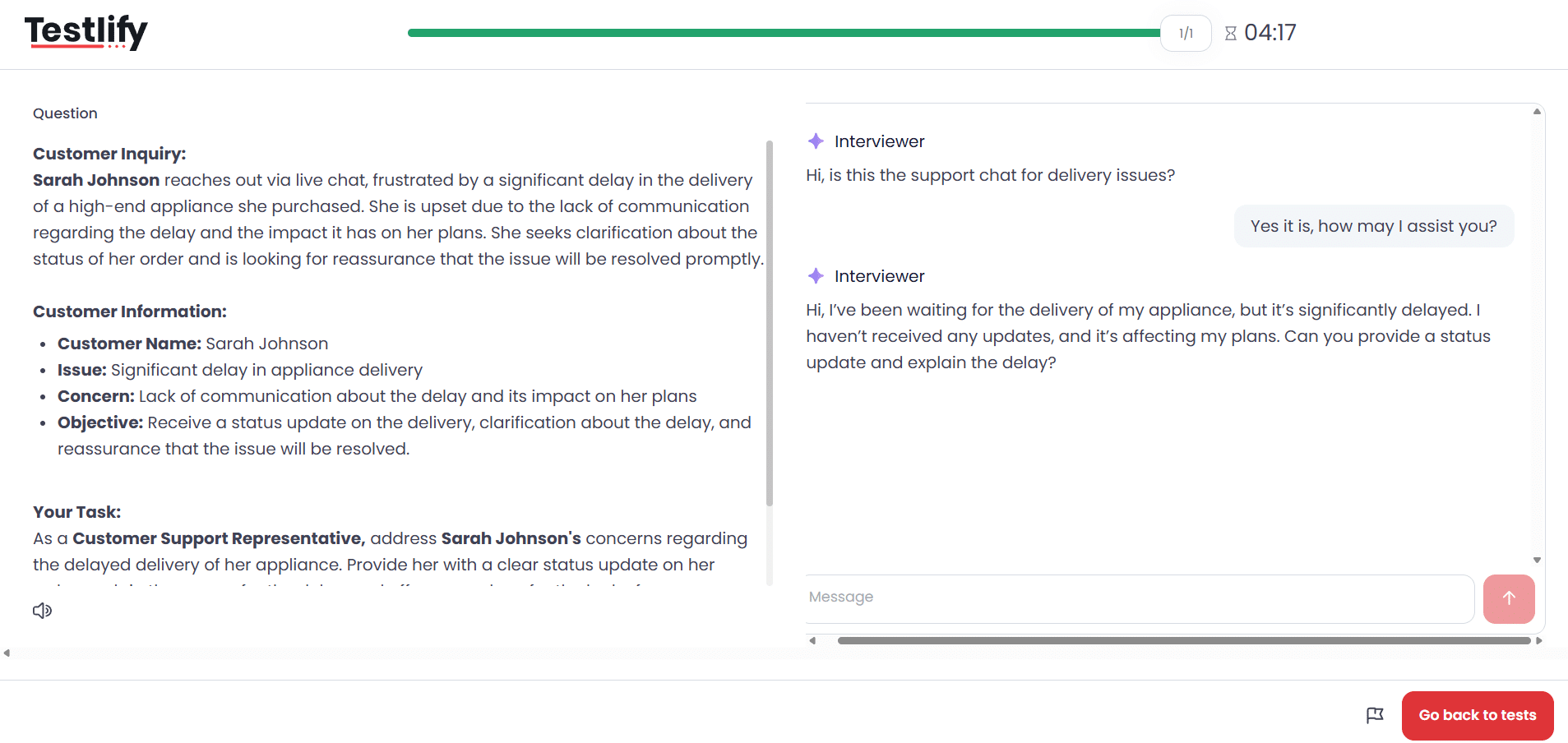
Testlify leverages conversational AI to simulate on-the-job scenarios across chat, voice, and video formats, bringing real-world context into the hiring process.
- Chat AI: Assess problem-solving, written communication, and critical thinking by engaging candidates in realistic text-based scenarios, like handling a billing dispute or calming an angry customer.
- Voice AI: Evaluate verbal fluency, tone, and persuasion by having candidates respond to role-specific prompts, such as those for sales or customer support.
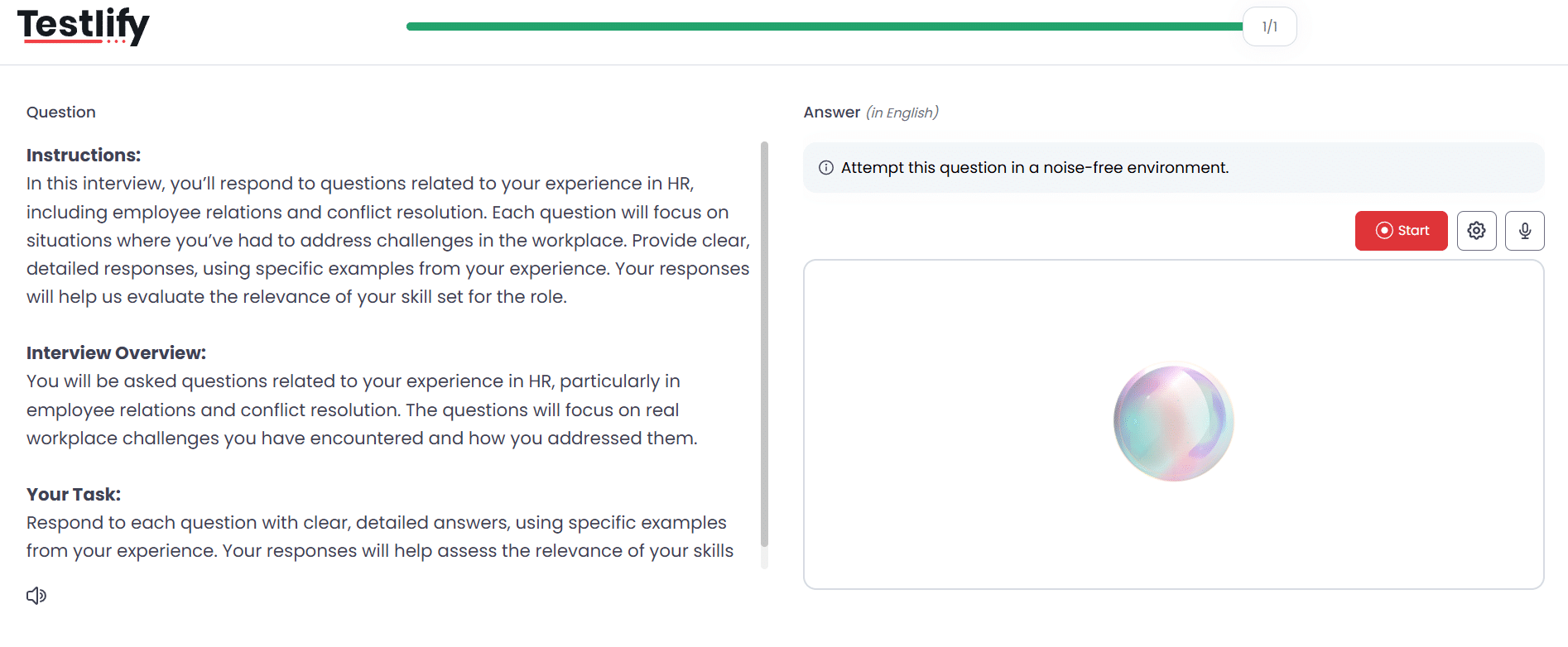
- Video AI: AI avatars guide candidates through complex job scenarios in asynchronous video interviews, allowing employers to analyze non-verbal communication, confidence levels, and emotional intelligence.
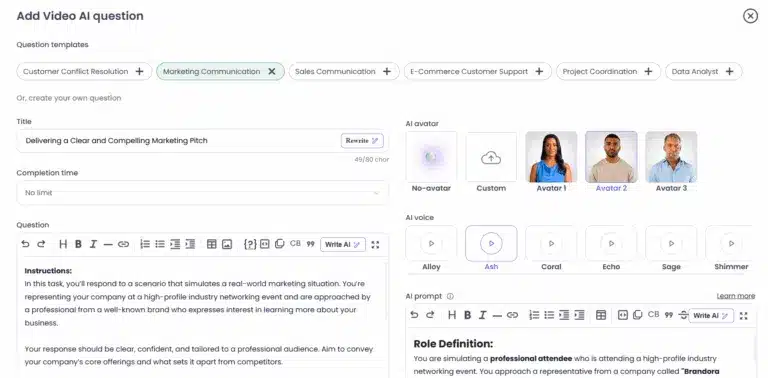
Pixonality does not include any interview functionality. The platform is centered on traditional assessments (questionnaires, tests) and does not have a feature for one-way video interviews or live chat interviews.
Verdict: Testlify clearly wins here. Its support for conversational AI powered interviews provides a more immersive assessment experience, making it ideal for roles that demand strong communication skills and real-world problem-solving abilities.
Testlify vs. Pixonality: Anti-cheating & proctoring features
Testlify employs advanced anti-cheating and remote proctoring features ensure that every assessment reflects real skill and genuine effort. The features include:
- Face detection
- Photo id verification
- Webcam snapshots
- Full-screen mode
- Force full-screen mode
- Dual camera proctoring
- Copy/paste tracking
- Mouse-out tracking
- IP proctoring
- Live video monitoring
- Question randomization
- Honesty Agreements
- Question-level activity logs
- AI assistance detection
- Screen recording
- Live environment check
- System requirement check
- Enforce internet speed check
- Focus guard (Anti-Cheat Mode)
- Talking prohibition
Pixonality provides only basic anti-cheating measures. According to available information, its primary tools are user authentication and test time limits.
User authentication typically means the platform verifies the test-taker’s identity (perhaps via email verification or requiring an ID at test start), ensuring the person invited is the one taking the test.
Verdict: Testlify is the stronger option for anti-cheating and proctoring. The platform comes with an extensive suite of remote proctoring features (webcam, screen recording, dual-camera, copy-paste tracking, AI cheat detection, etc.), delivering greater control and assurance against misconduct.
While Pixonality covers the basics (verifying who is taking the test and timing them), it doesn’t go nearly as far in preventing or detecting cheating.
For organizations concerned about test integrity especially when hiring is competitive or must meet compliance standards, Testlify provides a level of security and oversight that Pixonality cannot match.
Testlify vs. Pixonality: Integrations
Testlify integrates seamlessly with 100+ ATS platforms and HRMS, allowing you to effortlessly import candidates’ profiles, compare assessment results and make data driven hiring decisions.
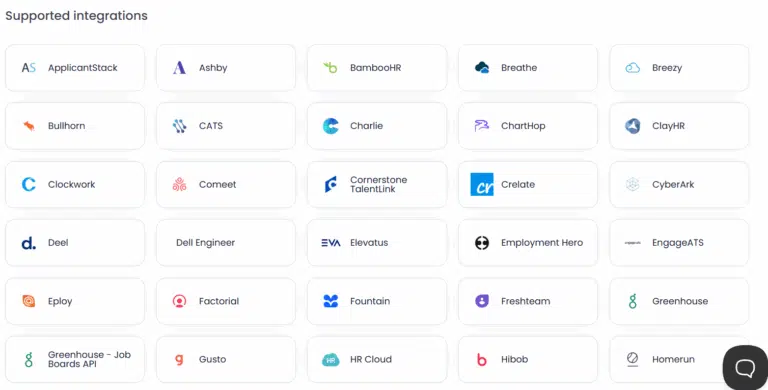
Pixonality does not offer native ATS integrations. Users of Pixonality will generally operate it as a standalone platform. To get candidate data or results into another system, you would need to export the data (like downloading results as Excel/PDF) and then manually upload or input it into your ATS or HRIS.
Verdict: Testlify is built with integration in mind, offering seamless connectivity with over 100 Applicant Tracking Systems (ATS) and third-party tools. This extensive compatibility makes it highly adaptable to diverse recruitment workflows.
Pixonality, in contrast, operates in a silo with no ATS integrations, which could pose challenges for teams that rely on end-to-end software automation
Testlify vs. Pixonality: AI overviews
Testlify supports AI overviews, which provide a concise summary of a candidate’s overall performance in an assessment, highlighting strengths and areas for improvement to help recruiters quickly evaluate candidates.
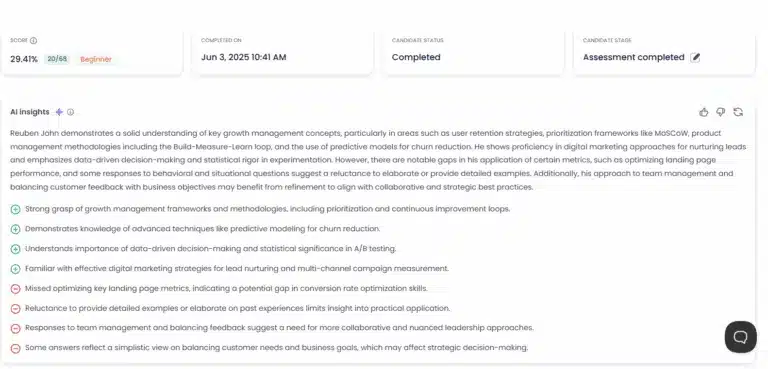
Pixonalitydoes not offer AI-generated performance overviews. While the platform delivers detailed scorecards and analytics, recruiters will have to manually summarize candidate results without AI assistance.
Verdict: Testlify’s AI-generated overviews simplify the evaluation process by offering quick, actionable insights into candidate performance. Pixonality does not come with this feature, meaning recruiters will have to put in the extra effort to interpret assessment results.
Testlify vs. Pixonality: Reporting & insights
Testlify provides detailed analytics on candidate behavior, question-level insights, and benchmarking. You can visualize how candidates compare across roles and industries.
Furthermore candidate assessment reports can be easily shared with key decision-makers in PDF, Excel, or CSV formats, making it easier for them to make informed hiring decisions.
Pixonality’s reporting is straightforward but more basic. For each test purchased and administered, you receive that test’s results and any analysis that comes with it. Pixonality’s platform allows you to track candidate completion (i.e., who has finished which tests) and then download the test reports for review.
Each report will vary in format depending on the test. Pixonality itself doesn’t unify these results into a single dashboard; you’ll likely be looking at them one test at a time. It does, however, facilitate sharing results with others: since you can download reports, you can then forward them or attach them to candidate profiles externally.
The platform also includes history tracking so you can see which tests a candidate has taken and their status, which is useful for managing the hiring process.
Verdict: Testlify’s reporting stands out for its depth and ease of interpretation, featuring visual analytics, AI insights, and one-click export/sharing options.
Pixonality covers the basics of reporting but doesn’t synthesize data across tests or utilize AI, placing more burden on the recruiter to interpret results.
Testlify vs. Pixonality: Customer support
Testlify is known for its responsive and personalized customer support, provided by human agents across multiple channels. The platform offers dedicated onboarding for new customers and priority support for enterprise clients, ensuring a great user experience.
The Testlify team also welcomes customer feedback and have been noted to roll out improvements in response to customer needs.
In addition to live support, the platform also features a help center with documentation, FAQs, and best practice guides, so your team can self-serve answers to common questions.
Pixonality offers standard customer support through customer facing channels including email and phone.
They do not appear to offer a live chat option, so immediate real-time help might not be available. Pixonality does maintain a small FAQ section on their site and a collection of how-to videos and blog articles that discuss their product offerings.
Verdict: Testlify offers multi-channel support (including live chat) and hands-on onboarding which can be invaluable for new users or enterprises with complex needs.
Pixonality’s support covers the basics (phone and web tickets) and does have resources like an FAQ section, but it lacks the immediacy of live chat and the depth of dedicated support that Testlify delivers.
In practice, most users will find Testlify more customer-care centric especially when rolling out the platform or troubleshooting in real time.
Testlify vs. Pixonality: Pricing plans
Testlify offers flexible pricing plans that scale with your business, providing everything from basic assessments for startups to advanced features for enterprise-level hiring.
- Starter plan: Ideal for small teams and startups, this plan starts at $139/month (billed at $1,663/year) and includes 100 candidate credits at $17 per credit with support for 3 users.
- Starter: Designed for growing businesses, the Starter starts at $279/month (billed at $3,343/year) and includes 300 credits at $11 per credit with support for 5 users.
- Starter: Built for scaling teams, this plan costs $699/month (billed at $4,192/year) and includes 1,000 credits at $8 per credit with 10 users.
- Premium plan: Suited for high-growth organizations, the Premium plan includes 3,000 credits and supports 20 users, with pricing available upon contacting the sales team.
- Enterprise plan: Designed for large enterprises, this plan includes 10,000 credits and supports 30 users with pricing available upon contacting the sales team.
- Enterprise Plus plan: Designed for large-scale hiring programs, this plan includes 25,000 credits and supports up to 40 users, with pricing details available after contacting the sales team.
- Unlimited plan: For companies seeking unrestricted access, Testlify offers an unlimited plan that includes unlimited candidate credits and full platform functionality, with pricing available on request from the sales team.
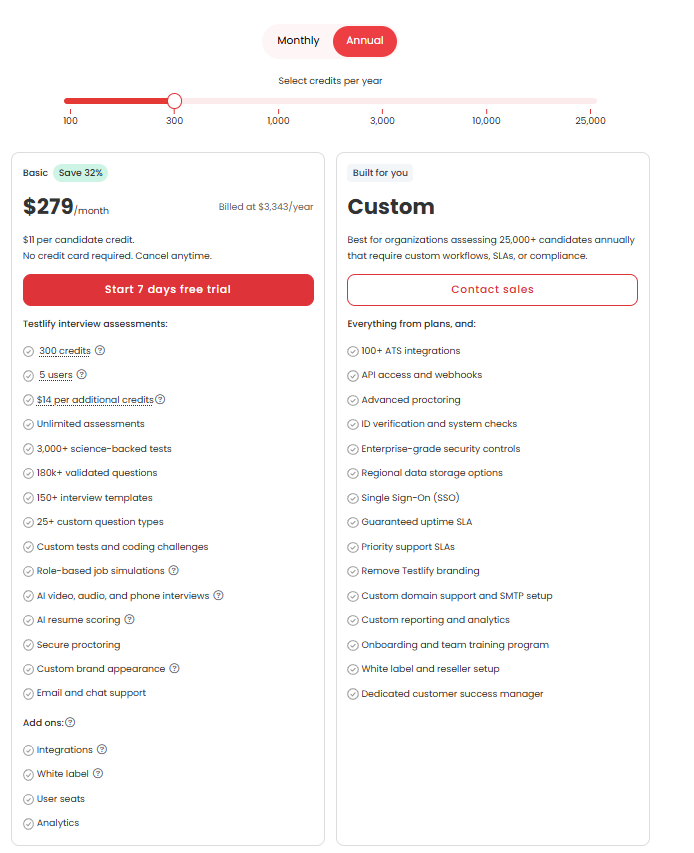
Pixonality’s pricing works very differently. Instead of subscription tiers, Pixonality uses a pay-per-test model. Each assessment available on the platform is sold individually, with its own price. Prices can range widely roughly from $23 at the low end to over $2,000 for certain specialized assessments.
In summary, Pixonality’s model is a la carte: you pay for each assessment you want to use. This can be advantageous if you only need a few assessments occasionally (you’re not locked into a big subscription). However, it can get very expensive if you need to test many candidates or use multiple tests per candidate, since costs add up per usage. It also requires more upfront planning to determine what you need to purchase.
Verdict: Testlify and Pixonality cater to different pricing preferences, but Testlify offers more predictable value for most organizations. Testlify’s tiered plans provide a clear, scalable cost structure. This is great for high-volume hiring as the marginal cost per candidate can be much lower.
Pixonality’s pay-per-test approach might benefit organizations with very occasional assessment needs or those who want top-tier assessments for select cases without a subscription.
Is Testlify a better alternative to Pixonality?
Testlify and Pixonality are both strong contenders in the skills assessment space, but which platform is better ultimately depends on your hiring goals, team structure, and candidate evaluation strategy. That said, Testlify emerges as the stronger alternative and here’s why:
- Broader role-based test coverage: Testlify provides a much larger and more diverse test library over 3,000 assessments covering virtually any role or skill. In comparison, Pixonality offers a smaller catalog (~100+) focusing on general skills and psychometrics. If you need assessments for a wide variety of positions (especially technical or specialized roles), Testlify has you covered more comprehensively.
- Advanced conversational interviews: Testlify goes beyond traditional tests by offering conversational AI interviews in chat, voice, and video formats. This multi-format approach delivers a more immersive, real-world evaluation of candidates. Pixonality has no equivalent interview feature and is limited to conventional tests
- Superior proctoring: Testlify goes further with advanced proctoring features such as dual-camera proctoring, AI assistance detection, and detailed activity logs, making it more suitable for high-stakes or compliance-driven assessments.
- Extensive ATS integrations: Testlify supports 100+ ATS and HR tool integrations, giving it a clear advantage over Pixonality. This makes Testlify more adaptable for teams that rely on integrated hiring pipelines and automated workflows.
Other best alternatives to Pixonality
Feature | TestGorilla | Adaface | Vervoe | Mercer Mettl | HireVue | TestDome | Codility |
|---|---|---|---|---|---|---|---|
Test Library | 300+ | 500+ | 300+ | 400+ | 1000+ | 130+ | 1100+ |
Custom Test Creation | Yes | Yes | Yes | Yes | Yes | Yes | Yes |
Automated Scoring | Yes | Yes | Yes | Yes | Yes | Yes | Yes |
Video Interviewing | Yes | Yes | Yes | Yes | Yes | Yes | Yes |
Proctoring Options | Yes | Yes | Yes | Yes | Yes | Yes | Yes |
ATS Integrations | 17+ | 9+ | 12+ | 16+ | 15+ | 6+ | 11+ |
Reporting & Analytics | Yes | Yes | Yes | Yes | Yes | Yes | Yes |
Final thoughts
Both Testlify and Pixonality can elevate your hiring process, but the right choice depends on your organization’s priorities. Pixonality offers a unique model by aggregating high-quality assessments from established providers. This gives you access to rigorously developed tests for evaluating cognitive abilities, personality, and other traits, which can be valuable for organizations that want proven psychometric content without developing their own.
Testlify, on the other hand, represents the future of hiring. It goes beyond standard assessments to transform how you engage with candidates. With a vast test library, conversational AI-powered interviews, and advanced proctoring features, Testlify empowers you to identify top talent and make the right hiring decisions.
Book a demo with Testlify to explore how it can elevate your hiring strategy.

Director of Marketing
Akash Patange is the Director of Marketing at Testlify, where he works closely with HR leaders and recruiters to help organizations improve hiring outcomes. He writes about talent assessment, recruitment technology, and data-driven hiring practices.
LinkedInRelated resources
View all
Competitor Comparisons
Testlify vs. Perspect AI: Which Skills Assessment Platform is Best for HR Teams?
Competitor Comparisons
Testlify vs. Evalgator: Which Skills Assessment Platform is Best for HR Teams?
Competitor Comparisons
Testlify vs. Peoplogica Skills: Which Skills Assessment Platform is Best for HR Teams?
Competitor Comparisons
Testlify vs. Predictive Index: Which Skills Assessment Platform is Best for HR Teams?
Competitor Comparisons
Testlify vs. Sova: Which Skills Assessment Platform is Best for HR Teams?
Competitor Comparisons
Testlify vs. Glider AI: Best Skills Assessment Platform 2026
Get started.
Hire on proof, not resumes.
Run your first skills-based assessment free — no credit card required.