
How to screen and hire an AR developer: Skills, tests and interview questions
A five-stage process to screen AR developers: skills to test, a short device-based work sample, interview questions and red flags to avoid.

An AR developer builds apps that place digital content on top of the real world through a phone camera or a headset, using SDKs such as ARKit and ARCore and engines such as Unity. Screening one well means testing those tools on a real device, not just reading a resume full of tool names.
TL;DR / Key Takeaways
- Screen an AR developer in five stages: resume and portfolio check, a 30 to 45 minute skills test, a 3 to 4 hour work sample, a structured technical interview, and a team interview.
- The work sample tells you the most: ask for plane detection and object placement running on a real device, then score it on a rubric.
- Test the core skills first: ARKit or ARCore, Unity with C#, 3D math, tracking and on-device performance.
- Ask how candidates hit a stable frame rate on a mid-range phone. Strong AR developers answer with numbers and trade-offs.
- Watch for portfolios with only edited demo videos, no device testing and no performance figures.
- BLS puts the median pay for US software developers at $135,980 (May 2025). Experienced AR specialists often earn more.
 ChatGPT
 Gemini
 Claude
 Grok
 Perplexity
What does an AR developer do?
An AR developer designs, builds and tests augmented reality experiences: apps that detect surfaces, track the user's position and anchor 3D content in the room so it stays put as the camera moves. If the term is new to your team, start with the augmented reality glossary entry.
Most AR work today runs on three kinds of platform:
- Mobile AR: iPhone apps built with Apple's ARKit and Android apps built with Google's ARCore. Google's ARCore documentation lists motion tracking, environmental understanding, depth, light estimation and a Geospatial API among its core capabilities, across Android, iOS, Unity and the web.
- Headsets and smart glasses: Mixed reality and spatial computing devices, usually built in Unity or Unreal Engine.
- Web AR: Browser-based experiences that need no app install, popular for retail try-ons and marketing campaigns.
Day to day, an AR developer writes the app logic (often C# in Unity), imports and optimizes 3D assets from artists, tests on real devices, fixes tracking and performance problems, and works with designers on how users move through the experience. Companies hire them for product visualization, retail try-ons, field service and maintenance guides, training, healthcare and games.

What skills should you screen for in an AR developer?
AR developer screening should cover six skill areas: AR SDKs and the engine, programming, 3D math and graphics, tracking and computer vision, performance on devices, and spatial UX with teamwork. The first three are cheap to test online. The last three show up best in a work sample and interviews.
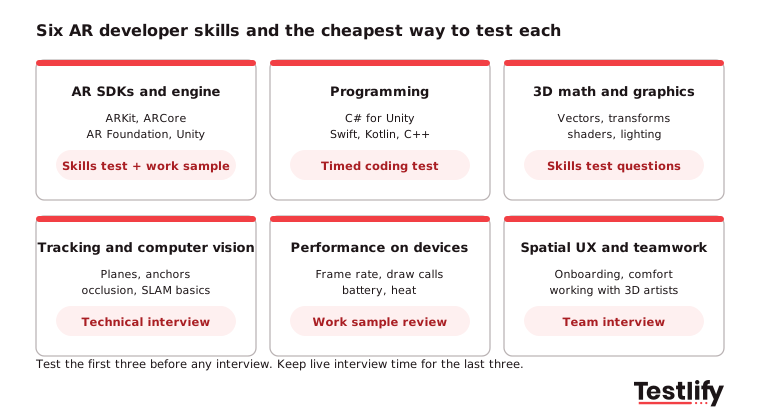
Match the test to your stack. A Unity team should weight C# heavily: the Stack Overflow 2025 Developer Survey found 29.9% of professional developers use C#, so the pool is large and easy to test. A native iOS team should weight Swift and ARKit instead.
Pro tip: Write down the two or three skills that would sink the project if missing before you open the role. Most AR projects fail on performance and tracking, not on features, so give those skills the most weight.
How do you screen candidates for AR developer positions?
Screening candidates for AR developer positions works best in five stages that get more expensive as the pool shrinks: a resume and portfolio check, an online skills test, a short work sample, a structured technical interview, and a team and product interview. Each stage should remove the candidates the next stage would waste time on.
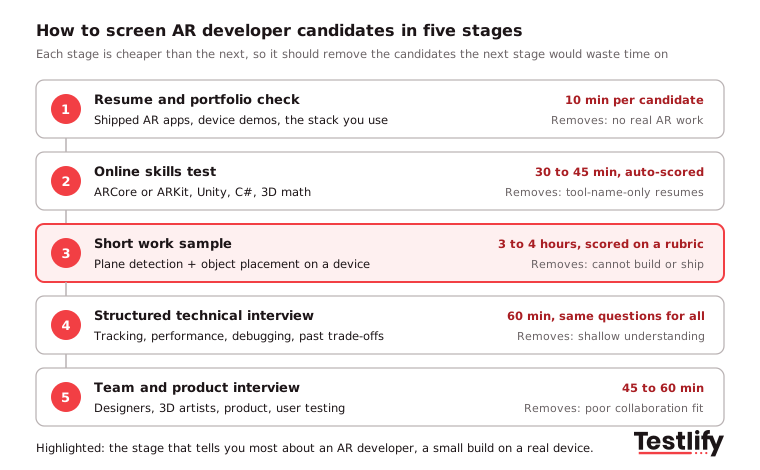
- Resume and portfolio check: Look for shipped AR apps (App Store or Google Play links), device recordings rather than edited trailers, and the SDKs your team uses. About 10 minutes per candidate.
- Online skills test: Send a 30 to 45 minute auto-scored test covering ARCore or ARKit, Unity, C# and 3D math. This removes resumes that list tools the candidate has barely used. Our guide to technical screening covers how to set pass marks.
- Short work sample: Ask for a small build that runs on a real device, scored on a shared rubric (see the next section). Cap it at 3 to 4 hours.
- Structured technical interview: Use the same questions for every candidate and a written interview scorecard. Have the candidate walk through their work sample and explain trade-offs.
- Team and product interview: Bring in a designer or 3D artist. AR projects depend on smooth handoffs between code, art and UX.
Across the teams we work with, the biggest time saver is moving the skills test before the first call. Recruiters stop booking interviews with candidates who cannot pass the basics, and hiring managers only see people who can already build.
Key takeaway: Put the cheap, objective stages first. Live interview time is the most expensive step in the process, so it should go to the few candidates who have already shown they can build.
What should an AR developer work sample include?
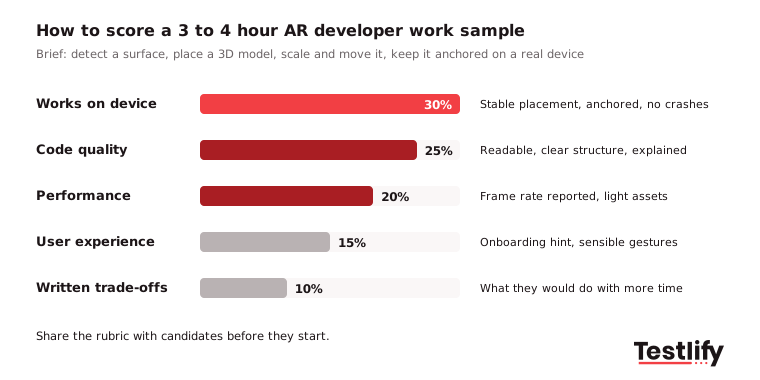
An AR developer work sample should be a small, realistic build that runs on a device: detect a horizontal surface, let the user place and move a 3D object, and keep it anchored as the camera moves. It should take 3 to 4 hours, not days, and be scored on a rubric shared with the candidate up front.
Some interview guides suggest multi-day AR prototypes. We have seen strong candidates drop out of week-long take-homes, especially senior people who are already employed. A short brief tests the same core skills and respects their time. If the role is senior, pay for longer tasks.
A good brief includes:
- The task: Plane detection, tap to place a provided 3D model, pinch to scale, drag to move.
- The platform: Unity AR Foundation, native ARKit or ARCore, or WebXR for web roles. The W3C WebXR Device API is the browser standard for AR and VR on the web.
- The deliverable: Source code, a build or a short screen recording from a real device, and a README on trade-offs.
- The constraint: Target a mid-range phone and report the frame rate.
If you would rather start from a ready-made test than write your own brief, compare platforms first. Our sample hiring test comparison shows how two assessment tools handle role-based tests.
What interview questions should you ask an AR developer?
AR developer interview questions should test real decisions the candidate has made: how they handled tracking loss, hit a frame-rate target, picked an SDK or worked with 3D artists. Ask every candidate the same questions and score answers against what good looks like, much like our Salesforce interview questions guide.
Technical questions:
- Tracking: "Walk me through what happens when tracking is lost mid-session. How did you handle it in your last app?" Good answers mention tracking states, user prompts and re-localization.
- SDK choice: "When would you choose AR Foundation over native ARKit or ARCore?" Good answers weigh cross-platform reach against access to the newest native features.
- Performance: "Your scene runs at 30 frames per second on a mid-range Android phone. What do you check first?" Good answers name a profiler, draw calls, texture sizes, polygon counts and lighting.
- Occlusion and depth: "How would you make a virtual object appear behind a real table?" Good answers cover depth APIs, occlusion and their limits on older devices.
- Headsets: "What changes when you move an app from phones to a headset?" Microsoft's OpenXR documentation describes OpenXR as an open, royalty-free standard that lets engines like Unity and Unreal target many headsets with one codebase, so strong candidates often bring it up.
Applied and behavioral questions:
- Collaboration: "Tell me about a 3D asset from an artist that did not work in AR. What did you change, and how did you agree it with the artist?"
- User testing: "How do you test an AR app with real users in real rooms, lighting and spaces?"
- Privacy: "AR apps use the camera all the time. How do you handle camera data and user consent?"
- Learning: "Which AR feature or SDK update did you learn most recently, and how did you use it?"
- Trade-offs: "Tell me about a feature you cut to ship on time. Was it the right call?"
Use a structured interview format so two interviewers scoring the same answer reach a similar score.
What red flags should you watch for when hiring an AR developer?
Red flags in AR developer candidates usually show up as a gap between what the portfolio claims and what the candidate can explain. Watch for these during the portfolio check and the interviews:
- Only edited demo videos: No store links, no source code and no raw device recordings.
- No device testing: Work only shown in the editor or a simulator, never on a phone or headset.
- No performance numbers: Cannot say what frame rate the app ran at or on which device.
- Tool lists without depth: Lists ARKit, ARCore, Vuforia and Unreal but cannot explain anchors or plane detection.
- Unclear role on team projects: Cannot say which parts they built themselves.
- No interest in users: Talks only about features, never about onboarding, comfort or testing in real spaces.
How much does it cost to hire an AR developer?
The cost to hire an AR developer in the US starts from general software developer pay and rises with AR specialization. The US Bureau of Labor Statistics reports a median annual wage of $135,980 for software developers in May 2025 and projects 10% job growth from 2025 to 2035, per its Occupational Outlook Handbook.
AR roles often sit above that median. Coursera, citing Glassdoor data from June 2026, puts the total median pay for US augmented reality developers at about $147,000 including bonuses. Senior engineers with shipped headset or computer vision work cost more again.
The bigger cost is a mis-hire. A developer who cannot hit performance targets can stall a project for months, which is why a short test and work sample before interviews pays for itself. Freelancers are an option for one-off campaigns, but a product with ongoing AR features usually needs an in-house developer who owns performance over time.
How can Testlify help you screen AR developers?
Testlify helps hiring teams run the first stages of AR developer screening online, so interview time goes only to candidates who can already build. Teams typically combine a few ready-made tests from the test library into one assessment:
- AR tests: The ARCore test, the ARKit, MapKit and RESTful APIs test and the augmented reality basics test.
- Engine and language tests: The Unity developer test and the C# test, plus coding tests in a live coding environment.
- Computer vision: The computer vision test for roles that work on tracking and recognition.
- Custom questions: Add your own work-sample brief as a file upload or practical task question. Testlify supports 25+ question types.
Testlify scores every response automatically, ranks candidates and gives per-skill breakdowns, so a recruiter without an AR background can still shortlist with confidence. Anti-cheating and proctoring with 20+ proctoring checks keeps remote tests fair, and results sync with 100+ ATS and HRIS tools. The library holds 3,500+ tests, so the same platform covers the designers, 3D artists and QA testers on the wider AR team.
Ready to screen your next AR developer?
Build an AR developer assessment from the ARCore, ARKit, Unity and C# tests, send it to your applicants and get a ranked shortlist before the first interview. Start a 7-day free trial with no credit card, or book a demo to see it set up for your stack. Need the job ad too? Adapt the Unity developer job description template.
FAQs about hiring an AR developer?
Related resources
View all
Hiring Guide
How to screen candidates for JavaScript developer

Hiring Guide
How to Screen Candidates for Ruby on Rails Developers

Hiring Guide
How to Screen Candidates for PHP Developers

Hiring Guide
How to Screen Candidates for .NET Developer

Hiring Guide
How to screen candidates for java developer

Hiring Guide
How to Screen Candidates for Python Developer
Get started.
Hire on proof, not resumes.
Run your first skills-based assessment free — no credit card required.