
15 campus hiring and job fair email templates that get replies
Fifteen ready-to-send job fair emails for campus recruiters, from career center outreach and invites to follow-ups, screening and offers.

A job fair email is any message a recruiter sends to students or a university career center before, during or after a campus career fair, from the first invitation to the final offer. The booth conversation lasts three minutes. The emails around it decide whether a student applies, shows up to the assessment, and accepts.
TL;DR: Effective job fair emails help campus recruiters turn student conversations into applications, interviews, and offers. Send invitations two weeks before the fair, follow up with booth visitors within 24 hours, and use one clear call to action per email. Personalize messages with details from your conversations, send assessment and status updates promptly, and re-engage students who miss deadlines or are interested in future openings.
 ChatGPT
 Gemini
 Claude
 Grok
Grok Perplexity
What is a job fair email?
A job fair email is a short, stage-specific message that moves a student one step closer to a hire. Most campus teams need four kinds: outreach to the career center to book the fair, invitations and reminders to students, follow-ups after the booth, and screening emails that take students from application to offer.
Each email should do one job. An invitation gets a student to your booth. A thank-you gets an application. An assessment invite gets a completed test. Mixing these jobs in one message is the most common reason students do nothing.

Why do job fair emails matter in campus hiring?
Job fair emails matter because students meet many employers in one afternoon and remember very few of them. According to NACE's 2024-25 career services benchmarks, the median in-person career fair now hosts 109 organizations, and median student attendance rose from 419 in 2021-22 to 700 in 2023-24.
That is a busy room. Your booth is one of more than a hundred, and the follow-up email is often the only thing a student takes home that has your name, the role and a link to apply.
The format has also shifted back to campus. NACE's 2025 internship and co-op survey found that employer participation in virtual fairs fell from 94.2% in 2021 to 58.8% in 2024. More than two-thirds of employers rated in-person fairs effective, against less than one-fifth for virtual ones. The same report notes 93.9% of career centers planned in-person fairs for 2024-25, and 33.2% planned a virtual one.
So plan your emails around an in-person job fair first, and treat the virtual version as a smaller, separate track.
When should you send each job fair email?
Job fair emails work best on a fixed schedule: outreach to the career center three to six weeks before, the student invitation two weeks before, booth details the day before, a thank-you the same day, and an application or assessment nudge within three days. Status updates follow within two weeks.
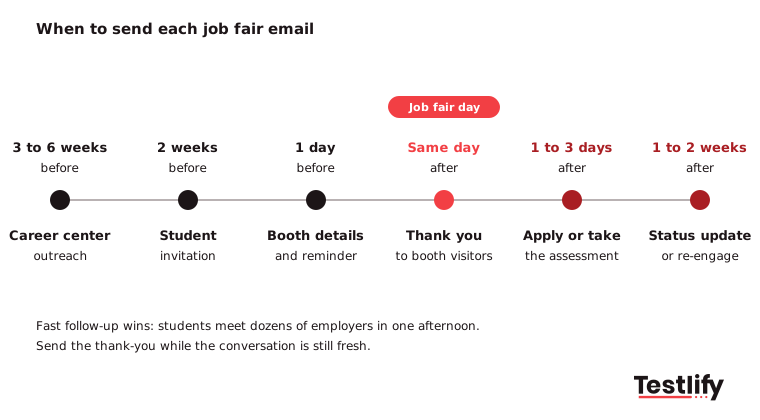
When to send | Goal | |
|---|---|---|
Career center outreach | 3 to 6 weeks before | Book a booth or an info session |
Student invitation | 2 weeks before | Get target students to your booth |
Booth details and reminder | 1 day before | Turn sign-ups into visits |
Same-day thank you | Within 24 hours | Get an application while you are remembered |
Apply or assessment nudge | 1 to 3 days after | Move students into screening |
Status update | Within 2 weeks of applying | Keep good students from accepting elsewhere |
Re-engagement | 3 to 4 weeks after, or next season | Rebuild your talent pool |
Students hear the same timing advice from their side. The University of Utah career center tells students to follow up with recruiters the same day or the next when a specific role is open. Recruiters who reply on that clock look organized. Recruiters who take a week look like they have moved on.
Speed matters after the fair as well. NACE's 2025 recruiting benchmarks put the average gap between interview and hiring decision at 27.3 days. A status email in that gap keeps students from assuming silence means no.
What makes a job fair email work?
A job fair email works when a student can read it on a phone in under 30 seconds and know exactly what to do next. That takes six parts: a specific subject line, a personal hook, a one-line intro, the opportunity, one next step, and a real sign-off.
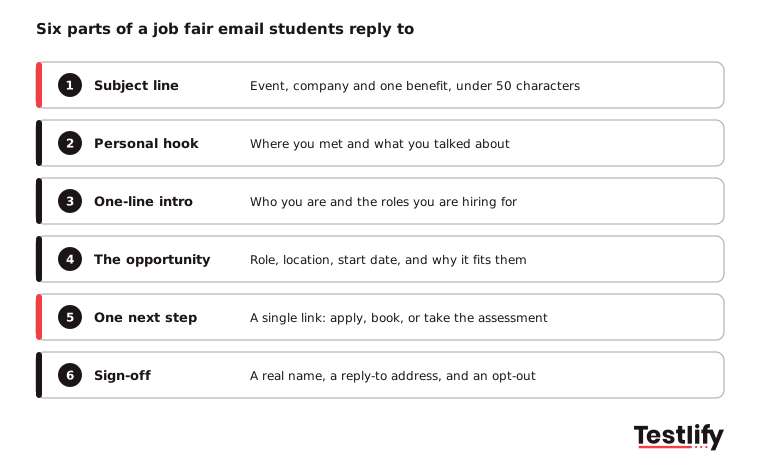
- Subject line: Name the event, your company and one benefit. Keep it under 50 characters so it does not get cut off on mobile. "Thanks for stopping by at the State career fair" beats "Follow-up".
- Personal hook: Mention where you met and one thing you discussed. One sentence is enough.
- One-line intro: Students rarely know mid-market brands. Say what you do in plain words.
- The opportunity: Role, team, location and start date. Link to the full job post instead of pasting it.
- One next step: One link and one ask. Apply, book a call, or take the assessment. Never all three.
- Sign-off: A real person's name, a reply-to address that someone reads, and a way to stop receiving emails.
Pro tip: Write your subject lines first and read them as a list. Students see your email in an inbox next to every other employer from the same fair, so the subject line is the only part that competes.
Which emails should you send before a job fair?
Before a job fair, send four emails: a request to the university career center, an invitation to target students, a virtual fair invitation if you run one, and a details email the day before. The first secures your place; the other three fill your booth with the right students.
Template 1. Career center outreach to book the job fair
Subject: [Company] would like to join the [University] career fair
Hi [Career Center Contact Name],
I lead campus hiring at [Company], a [one-line description] based in [City]. We are hiring [number] graduates and interns this season for [teams or roles], and we would like to take part in the [University] career fair on [Date].
Could you share the registration steps and booth options? We would also be glad to run a short info session or a resume workshop for [Department] students if that helps.
Thanks, [Your Name], [Title], [Company] | [Phone]
Template 2. Student invitation to your job fair booth
Subject: Meet [Company] at the [University] career fair on [Date]
Hi [First Name],
[Company] will be at the [University] career fair on [Date], booth [Number]. We are hiring [roles] for [start date], and your background in [Major or Club] fits the work our [Team] team does.
Stop by between [Time] and [Time] to meet the hiring team and ask what the first year looks like. Bring a resume if you have one ready; it is not required.
See you there, [Your Name], [Title], [Company]
Template 3. Virtual job fair invitation
Subject: Join [Company]'s virtual session at the [Event Name]
Hi [First Name],
We are hosting a 20-minute session at the [Event Name] on [Date] at [Time and Time Zone]. Our [Role] team will walk through the graduate program, show a real project, and answer questions live.
Save your spot here: [Registration Link]. A recording goes to everyone who registers.
Best, [Your Name], [Title], [Company]
Template 4. Booth details and reminder, the day before
Subject: Tomorrow: [Company] at booth [Number]
Hi [First Name],
A quick reminder that we will be at the [University] career fair tomorrow. Here is what you need:
- Where: [Venue], booth [Number]
- When: [Time] to [Time]
- Who you will meet: [Names and roles of people at the booth]
- What to bring: A resume if ready, and your questions
If you cannot make it, you can still see our open roles here: [Careers Link].
[Your Name], [Title], [Company]
Which emails should you send right after the job fair?
Right after the job fair, send a same-day thank-you to everyone you met, a personal follow-up to your strongest conversations, a short note to students who signed up but did not visit, and an apply-now nudge two or three days later.
Template 5. Same-day thank you to booth visitors
Subject: Thanks for stopping by, [First Name]
Hi [First Name],
Thanks for visiting the [Company] booth at the [University] career fair today. It was good to hear about your interest in [topic they mentioned].
The [Role] position we discussed is open until [Deadline]. You can apply here in about ten minutes: [Application Link].
Reply to this email if you have questions. A real person reads it.
[Your Name], [Title], [Company]
Template 6. Personal follow-up after a strong conversation
Subject: Following up on our chat about [specific topic]
Hi [First Name],
I enjoyed our conversation about [specific project, class or question] at the career fair. Your experience with [skill or project] is close to what our [Team] team works on every day.
I would like to move you straight to the next step. Here is the link to apply: [Link]. Once you submit, I will make sure the hiring manager sees your application this week.
Best, [Your Name], [Title], [Company]
Template 7. Missed connection for sign-ups who did not visit
Subject: Sorry we missed you at the [University] career fair
Hi [First Name],
You signed up to hear from [Company] but we did not get to meet at the fair. Here is what you missed: we are hiring [roles] for [start date] in [locations].
Browse the open roles here: [Careers Link]. If one fits, apply by [Deadline], or reply with a question.
[Your Name], [Title], [Company]
Template 8. Apply-now nudge, two to three days after
Subject: Applications for [Role] close on [Date]
Hi [First Name],
A quick note in case the career fair week got busy. Applications for our [Role] program close on [Date].
The application takes about ten minutes, and you will hear back from us within [timeframe]: [Application Link].
[Your Name], [Title], [Company]
Which emails move students from the booth to an offer?
Five emails move students from the booth to an offer: the skills assessment invite, the interview invite, a status update while the team decides, a respectful rejection that keeps the door open, and the offer itself. Clear emails at this stage protect your acceptance rate.
Template 9. Skills assessment invitation
Subject: Next step for [Role]: a short skills assessment
Hi [First Name],
Thanks for applying to [Company]. The next step is a [duration]-minute online assessment that covers [skills, for example problem solving and Excel]. There are no trick questions, and everyone who applies takes the same one, so it is a fair start for every candidate.
Please complete it by [Date]: [Assessment Link]. Use a laptop with a stable connection and set aside quiet time.
Good luck, [Your Name], [Title], [Company]
Template 10. Interview invitation
Subject: Interview invitation: [Role] at [Company]
Hi [First Name],
Your assessment results stood out, and we would like to invite you to a [duration]-minute interview with [Interviewer Name, Title].
Please pick a time that suits you here: [Scheduling Link]. The interview will cover [topics]. Nothing to prepare beyond reading about the team: [Link].
[Your Name], [Title], [Company]
For more variations, see these interview invitation email templates.
Template 11. Status update while the team decides
Subject: An update on your [Role] application
Hi [First Name],
A quick update so you are not left guessing: we are still reviewing applications from the career fair and expect to share decisions by [Date].
You do not need to do anything right now. If you receive another offer before then, please tell me and I will do what I can to speed things up.
[Your Name], [Title], [Company]
Template 12. Rejection that keeps the door open
Subject: Your application to [Company]
Hi [First Name],
Thank you for the time you put into the [Role] process, including the [assessment or interview]. We have decided to move forward with other candidates for this round.
This was a close decision. With your permission, we would like to keep your details for our [next intake or season] program and contact you when it opens. Reply "yes" if that suits you.
[Your Name], [Title], [Company]
The candidate rejection email templates guide has more versions for each stage.
Template 13. Offer email
Subject: Your offer from [Company]
Hi [First Name],
I am happy to share that we would like to offer you the [Role] position on our [Team] team, starting on [Start Date]. Your offer letter with salary and benefits details is attached.
Please reply by [Date] to accept, or book 15 minutes with me here if you have questions: [Link]. We hope to welcome you soon.
[Your Name], [Title], [Company]
For internship programs, adapt these internship offer email templates.
How do you re-engage students who went quiet after the job fair?
Re-engage quiet students with two emails: a final deadline reminder before applications close, and a talent community invite a few weeks later. Students who did not apply after a job fair are often busy with exams, not uninterested, so a short, low-pressure note brings many back.
Template 14. Final deadline reminder
Subject: Last day to apply for [Role]
Hi [First Name],
Applications for the [Role] program close tonight at [Time and Time Zone]. If you meant to apply after the career fair, here is the link: [Application Link].
If the timing is wrong this year, reply and let me know. We hire every [season].
[Your Name], [Title], [Company]
Template 15. Talent community invite for next season
Subject: Want to hear about [Company]'s next graduate intake?
Hi [First Name],
We met at the [University] career fair in [Month]. Our current intake has closed, but we open new graduate and internship roles every [season].
Join our talent community and you will hear about new roles before they are posted publicly: [Link]. One or two emails a term, and you can leave at any time.
[Your Name], [Title], [Company]
How do you send job fair emails at scale and keep them personal?
Job fair emails stay personal at scale when you capture one detail per student at the booth, group students into a few segments, and use merge fields for the rest. The personal line does the work; the template carries everything else.
- Tag students at the booth: Use a QR code that opens a short form: name, email, major, graduation date and role interest. Add a one-line note and a priority tag (A, B or C) after each conversation.
- **Write one email per segment: A students get Template 6 with a personal line. B students get Template 5. C students and sign-ups who did not visit get Template 7.
- Send from your ATS or CRM, not a personal inbox: Replies, status and history then sit with the candidate record, and the next recruiter can pick up the thread.
- Keep sender basics clean: Use a real name, an accurate subject line and an easy way to unsubscribe. The FTC's CAN-SPAM compliance guide treats messages mainly about employment as relationship content, but promotional newsletters to a talent pool can count as commercial, so honor opt-outs within 10 business days either way.
- Screen applicants on skills, not booth memory: A busy job fair can produce hundreds of applications in a week. Send every applicant the same short assessment (Template 9), then interview the top scorers.
Across the teams we work with on campus hiring, the slowest part of the process is rarely the fair itself. The bottleneck is the week after, when a few recruiters try to read hundreds of near-identical graduate resumes.
Testlify fits at step 5. You can build a role-based assessment from the job description, pick from 3,500+ ready tests in the Testlify test library, and add a short AI interview so students can complete the first round from their phone or laptop the same evening. The campus hiring solution shows how teams run this across several universities at once.
What mistakes should you avoid in job fair emails?
The most common job fair email mistakes are sending too late, asking for too many things in one email, writing generic copy that could come from any employer, and going silent after the student applies. Each one has a simple fix.
Mistake | Why it costs replies | Fix |
|---|---|---|
Thank-you sent a week later | Students have met dozens of employers since | Send within 24 hours, schedule it before the fair |
Three calls to action | Students pick none | One link, one ask per email |
"We are a leading company in our industry" | Says nothing a student can use | Name the role, team, location and start date |
Same email to everyone | Strong candidates feel like a list entry | Add one personal line for your A-list |
Silence after the application | Students assume a no and accept elsewhere | Send a status update within 2 weeks |
No reply-to or opt-out | Students cannot ask questions or leave | Use a monitored address and an unsubscribe link |
Job post pasted into the email | Long, hard to read on a phone | Link to the job post instead |
Your booth also does half of this work. A clear stand, a visible QR code and a team that can answer real questions all make follow-ups easier. See how to plan that in this guide to employer branding at career fairs.
Key takeaway: The job fair is the start of the conversation, not the hire. Plan every email before the fair, send the thank-you within a day, give each email one job, and keep students updated until they have an answer.
Frequently asked questions (FAQs)

Related resources
View all
HR & recruitment
Internal job posting email: Free Templates & guide

HR & recruitment
Internship & probation confirmation emails: templates & guide
HR & recruitment
12 HR communication email templates for hiring managers

HR & recruitment
Discriminant validity: meaning, examples and how to test it
HR & recruitment
Candidate rejection email template: 16 examples for every hiring stage

HR & recruitment
Interview Invitation Email Templates: 17 Free Samples for 2026
Get started.
Hire on proof, not resumes.
Run your first skills-based assessment free — no credit card required.