
25 Zendesk Software Engineer Interview Questions (2026)
The 25 questions Zendesk software engineers report by round, from ticket state machines to SLA design, and what a strong answer shows.

Solving the coding problem is only part of a Zendesk interview. The questions are framed around tickets, SLAs and routing, so generic prep often falls short.
Zendesk software engineer interview questions test whether you can write clean code, design systems that handle millions of support tickets, and explain your trade-offs. This guide gives you 25 of them by round, with what a strong answer shows, so you can prepare or build a similar loop.
TL;DR:
- This guide lists 25 questions Zendesk software engineer candidates report or are likely to face.
- Questions are grouped by round: coding, system design, craft deep-dive, CS fundamentals and behavioral.
- Each question has a short note on what a strong answer shows.
- The loop usually runs a recruiter screen, a hiring manager screen, a technical screen and a virtual onsite of four to five rounds.
- The last sections cover how to prepare and what hiring teams at other SaaS companies can borrow.
A note on sources: Zendesk does not publish its question bank. The questions below come from candidate reports, prep guides such as TechPrep's Zendesk interview breakdown, and the skills Zendesk lists in its engineering job posts.
This guide is not affiliated with Zendesk, and your loop may differ by team, level and office.
 ChatGPT
 Gemini
 Claude
 Grok
Grok Perplexity
What is the Zendesk software engineer interview process?
The Zendesk software engineer interview process has five stages that usually take three to four weeks from first contact to offer. Candidates report a recruiter call, a hiring manager screen, a technical screen, then a virtual onsite with coding, system design, a craft deep-dive, and a behavioral round.
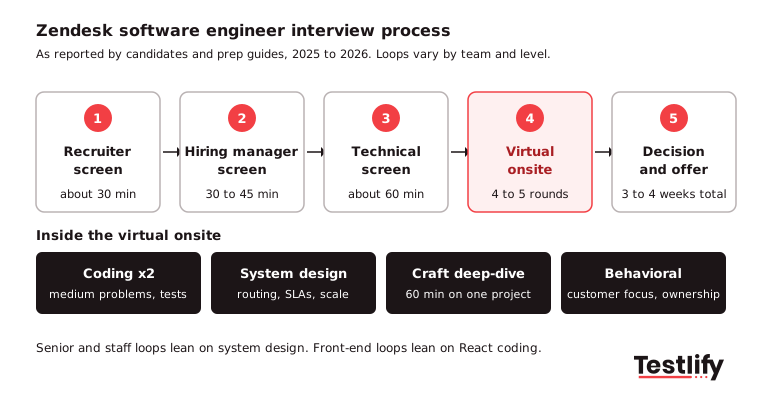
- Recruiter screen (about 30 minutes). Background, the role, location and salary expectations.
- Hiring manager screen (30 to 45 minutes). A mix of behavioral questions and high-level technical talk, such as trade-offs in a system you built.
- Technical screen (about 60 minutes). A live coding problem at roughly LeetCode medium level. Some recent candidates report a take-home assignment instead.
- Virtual onsite (four to five rounds). According to the techinterview.org Zendesk guide, updated in July 2026, a common mix is two coding rounds, one system design round, one craft deep-dive and one behavioral round.
- Decision and offer. Some candidates report an extra round after what they thought was the final one, so keep your notes until you hear back.
Senior and staff candidates report more system design and less algorithm work. Front-end roles lean toward React coding in place of pure algorithms.

What coding questions does Zendesk ask software engineers?
Zendesk coding questions are usually medium-difficulty problems framed around the product: tickets, queues, routing and state changes. Interviewers care about readable code, tests and how you talk through edge cases, not only the final answer.
1. Model a ticket that moves from New to Open, Pending, On-hold and Solved, and reject invalid transitions.
What a strong answer looks like: A state machine with allowed transitions defined as data, not a long chain of if statements, plus tests for the invalid moves.
Red flags: Nested if statements, no tests for invalid moves, or silently accepting a bad transition.
2. Implement the Next Permutation algorithm.
What a strong answer looks like: An in-place solution and a clear explanation of why the swap and reverse steps work. Candidates on TechPrep report this one.
Red flags: Recited code with no explanation, extra arrays, or missing the case where the input is already in descending order.
3. Given a list of support agents with skills and current load, assign each incoming ticket to the best agent.
What a strong answer looks like: A graph or priority queue approach, with the tie-break rule stated before coding.
Red flags: Coding before agreeing on rules, ignoring agents at full load, or no plan for when no agent is free.
4. Find tickets that depend on each other and return a safe order to resolve them.
What a strong answer looks like: A topological sort that detects a cycle and says what to do when one appears.
Red flags: Assuming the input has no cycles, or being unable to explain the time complexity.
5. Call a paginated API, merge the results and handle a failed page.
What a strong answer looks like: Retries, timeouts, a clear return value on partial failure and a unit test at the end. Candidates report async API work in coding rounds.
Red flags: Assuming every page succeeds, retrying forever, or skipping the test.
6. Build a small React component that lists tickets with filters and loading states.
What a strong answer looks like: Simple state, handled loading, empty and error views, and a short explanation of how you would test it.
Red flags: State duplicated across components, no loading or error handling, or no mention of testing.
The software developer interview questions cover more general coding prompts if you want extra practice.
What system design questions come up at Zendesk?
Zendesk system design questions focus on the problems a customer service platform faces at scale: routing work across channels, tracking deadlines across time zones and keeping data consistent for the 80,000+ customer companies listed on the Zendesk company page.
7. Design a multi-channel ticket routing system across email, chat, voice and social.
What a strong answer looks like: Covers intake, a shared ticket model, routing rules, queues per channel and what happens when an agent goes offline. This is the most reported prompt.
Red flags: A separate system per channel with no shared model, no plan for offline agents, or naming tools before clarifying requirements.
8. Design SLA tracking with time-zone-aware deadlines.
What a strong answer looks like: Stores the policy separately from the clock and recalculates on every status change, allowing for business hours, holidays, and pauses while a ticket is pending.
Red flags: Ignoring time zones and holidays, hard-coding deadlines, or no handling of paused tickets.
9. Design an issue tracker like Jira.
What a strong answer looks like: Walks through projects, workflows, permissions, search and notifications on top of a clear data model. One senior candidate reported this prompt in 2025.
Red flags: A feature list with no data model, ignoring permissions, or never asking about scale.
10. Design a webhook delivery service for customer integrations.
What a strong answer looks like: Retries with backoff, ordering, signed payloads and protection from one slow customer endpoint.
Red flags: No retries or endless retries, one slow endpoint blocking others, or unsigned payloads.
11. Design an AI feature that summarises a ticket thread for the agent.
What a strong answer looks like: Covers where the model runs, latency, cost per call and how agents correct a bad summary. Prep guides list ticket routing and summarisation as AI themes.
Red flags: Ignoring latency and cost, no way for agents to fix errors, or no thought for customer data privacy.
Pro tip: Ask about scale before you draw anything. Tickets per day, peak traffic and read-to-write ratio change the design more than the choice of database does.
What happens in the Zendesk craft deep-dive?
The Zendesk craft deep-dive is a 60-minute conversation about one project you built, reported by TechPrep and other prep guides. Interviewers go deep on your decisions, trade-offs and failures to see how you think when there is no textbook answer.
12. Walk me through a system you designed. What would you change now?
What a strong answer looks like: A project where you made real decisions, not one where you followed a plan, with a clear view of what you would change.
Red flags: Unable to name your own decisions, blaming others, or saying you would change nothing.
13. What was the hardest bug you fixed in production, and how did you find it?
What a strong answer looks like: The debugging steps, the tools used, and what you changed so it would not happen again.
Red flags: A guessed root cause, no tools named, or no prevention step.
14. Tell me about a trade-off you made between speed and quality.
What a strong answer looks like: Names the cost you accepted and how you paid it back later.
Red flags: Claiming there was no trade-off, naming no cost, or never going back to fix it.
15. How did you measure whether the project worked?
What a strong answer looks like: Numbers such as latency, error rate, tickets handled, adoption or time saved.
Red flags: Only saying it went well, or using metrics unrelated to the goal.
Which CS fundamentals questions should you expect?
CS fundamentals questions at Zendesk check the basics behind a large Ruby on Rails, MySQL, and Kafka system, which is the stack Zendesk engineering job posts list most often, alongside React, Redis, and Kubernetes on AWS.
16. What happens when a multi-step update fails halfway through?
What a strong answer looks like: Covers transactions, rollbacks, idempotency, and what to do when the steps span two services.
Red flags: Assuming steps never fail, no mention of idempotency, or ignoring the multi-service case.
17. When would you use a message queue such as Kafka instead of a direct API call?
What a strong answer looks like: Talks about decoupling, back-pressure, ordering, and replaying events.
Red flags: Using a queue for everything, ignoring ordering and duplicates, or no replay plan.
18. How would you speed up a slow SQL query on a large tickets table?
What a strong answer looks like: Reads the query plan first, then considers indexes, pagination, and when to cache in Redis.
Red flags: Adding indexes blindly, never reading the query plan, or caching before fixing the query.
19. Explain a REST API to someone who is not technical.
What a strong answer looks like: Plain language and a simple analogy. The test is clear communication, which matters in a company that sells to support teams. An intern candidate reported this one.
Red flags: Heavy jargon, talking down to the listener, or a long answer that loses them.
Our Ruby on Rails developer interview questions guide goes further on the framework many Zendesk teams use.
What behavioral questions does Zendesk ask?
Zendesk behavioral questions look for customer focus, ownership, and the ability to work across teams in a mature SaaS product. Expect them in the hiring manager screen and in a dedicated onsite round, so prepare four or five stories you can tell in about two minutes each.
20. Tell me about a time you pushed back on a product decision.
What a strong answer looks like: Shows how you used data and kept the relationship intact.
Red flags: A story about winning an argument, no data, or a damaged relationship.
21. Describe a time you disagreed with a senior engineer. How did you resolve it?
What a strong answer looks like: A calm process and a clear outcome, not a story about being right.
Red flags: Blaming the other person, no resolution, or claiming you never disagree.
22. Tell me about an incident you were on call for.
What a strong answer looks like: Walks through detection, the fix, the customer message and the post-mortem.
Red flags: No post-mortem, blaming one person, or skipping customer communication.
23. How have you made a customer's life easier through your code?
What a strong answer looks like: Links your work to the end user. Zendesk builds for support agents, so this carries weight.
Red flags: Only internal technical wins, no link to users, or no evidence of impact.
24. Tell me about a time you had to learn a new language or framework fast.
What a strong answer looks like: A specific example with a learning plan and a result. At least one Zendesk job post asks candidates to be willing to learn Ruby, so this is likely for engineers from Java, Go or Python.
Red flags: Saying you only work in one language, no learning plan, or no example.
25. Why Zendesk, and why this team?
What a strong answer looks like: Shows you know what the team ships and names one product change you would make.
Red flags: Generic praise, no product knowledge, or no reason tied to the team.
Key takeaway: Most reported Zendesk questions are framed around tickets, SLAs and routing. Practise standard patterns, then rehearse explaining them in the language of a support product.
Which Zendesk software engineer interview questions matter most for each round?
Zendesk software engineer interview questions differ by round, and the table below maps each round to what it tests, a sample prompt from this list and what interviewers tend to reward.
Round | What it tests | Sample question | What interviewers reward |
|---|---|---|---|
Technical screen | Coding at medium level | Ticket state machine (Q1) | Clean code, tests, edge cases |
Coding onsite | Algorithms and practical code | Agent assignment (Q3), paginated API (Q5) | Clear tie-break rules, error handling |
System design | Scale and trade-offs | Multi-channel routing (Q7), SLA tracking (Q8) | Asking about scale first, simple first design |
Craft deep-dive | Ownership of past work | System you designed (Q12) | Honest trade-offs and numbers |
CS fundamentals | Databases, queues, failure | Partial failure (Q16) | Idempotency and rollback plans |
Behavioral | Customer focus, teamwork | Pushing back (Q20), on-call incident (Q22) | Specific stories with outcomes |
How should you prepare for Zendesk software engineer interview questions?
Preparation for a Zendesk software engineer interview works best as a two- to three-week plan that splits time between coding practice, two or three system design drills on support-style products and rehearsed project stories.
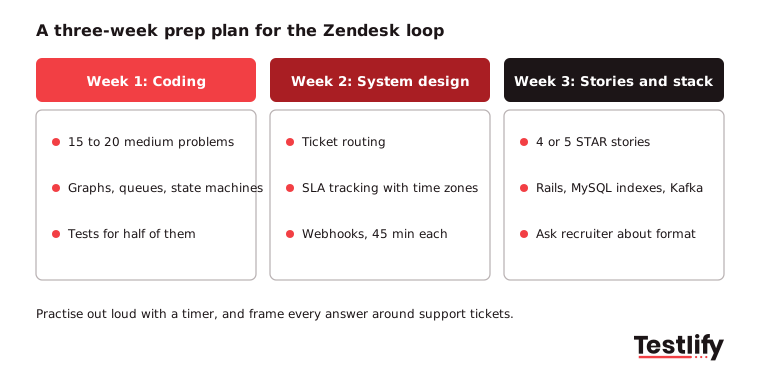
- Week 1: coding. Do 15 to 20 medium problems on graphs, queues, state machines and arrays. Write tests for at least half of them.
- Week 2: system design. Practise routing, SLA tracking and webhooks out loud, with a timer, for 45 minutes each.
- Week 3: stories and stack. Prepare four or five STAR stories and refresh Ruby on Rails, MySQL indexing and Kafka basics if the job post lists them.
- Before each round: ask your recruiter which language you can use, whether there is a take-home and who is on the panel.
What can hiring teams learn from the Zendesk interview loop?
Hiring teams at other SaaS companies can borrow three habits from the Zendesk loop: product-framed questions, a craft deep-dive that rewards real experience, and an early technical screen that filters before the onsite. All three tie the interview to the work and make scores easier to compare.
Skills-based screening also widens the pool. LinkedIn's skills-based hiring report from March 2025 found that a skills-based approach could expand talent pools by 6.1x globally, and by 8.2x for AI roles.
Integrity is the other lesson. HR Dive's August 2025 report on Gartner research notes that 6% of 3,000 surveyed candidates admitted to interview fraud, and Gartner predicts that by 2028, 1 in 4 candidate profiles worldwide could be fake.
Remote coding rounds need identity and AI-assistance checks, not only a camera.
For the full method behind consistent scoring, read our guide to structured interviews. For understanding the interview process of another prominent company, read the OpenAI interview process.
How can Testlify help you run a similar loop?
Testlify helps hiring teams run the screening part of a Zendesk-style loop before engineers spend time in onsite rounds. You can build a coding assessment from a job description with the AI test builder, or start from 3,500+ tests such as the software engineer test and the backend software engineer Ruby and Linux test.
- Coding and live coding. Coding questions, a live coding IDE and pair-programming interviews, with automated scoring.
- Integrity. 20+ proctoring checks, including AI assistance detection, copy-paste blocking and webcam snapshots. See proctored live coding projects.
- Fit with your stack. Two-way sync with 100+ ATS and HRIS tools, including Greenhouse, Lever, and Workday.
Pricing is credit-based, so you pay only when a candidate starts an assessment, and there is a 7-day free trial with no credit card.
Ready to identify top engineering talent? Testlify helps your team identify top engineers with skills-based assessments and conversational AI interviews. Book a demo to see how it works.
Frequently asked questions

Co-Founder and CTO
Jiten Modi is Testlify's CTO and leads a 50-person engineering organization. He writes on technical hiring, evaluating developers with real-world assessments, and building engineering teams.
LinkedInRelated resources
View all
Interview questions
7 interview questions to check if the candidate is tech-savvy

Interview questions
60 HRIS Analyst interview questions to ask job applicants

Interview questions
Employee Relations Specialist Interview Questions: 60 to Ask (2026)

Interview questions
60 Warehouse Operator interview questions to ask job applicants

Interview questions
60 Maintenance Coordinator interview questions to ask job applicants

Interview questions
60 Credit Risk Analyst interview questions to ask job applicants
Get started.
Hire on proof, not resumes.
Run your first skills-based assessment free — no credit card required.