
Testlify vs. Talview: Which Skills Assessment Platform is Best for HR Teams?
Testlify vs. Talview: Discover which skills assessment platform best suits your hiring needs
Did you know that organizations adopting skills-based hiring tools have reported up to a 50% reduction in time-to-hire.
As a result the demand for reliable skills assessment platforms has grown exponentially and companies are gravitating toward providers with proven track records of success.
Testlify and Talview have emerged leading skills assessment platforms in the market, each offering comprehensive pre-employment assessment capabilities designed to enhance the hiring process for organizations worldwide.
However, choosing between the two can be quite a challenge. In this article, we will be drawing comparisons between the two platforms to help you determine which platform best fits your hiring needs.
 ChatGPT
 Gemini
 Claude
 Grok
Grok Perplexity
What is Testlify?
Testlify is a leading AI-powered skills assessment platform that empowers organizations to quickly identify the best candidates worldwide and make more objective hiring decisions.
How does Testlify work
Testlify is designed to optimize your hiring process. Our conversational AI powered interview & talent assessment platform enables recruiters to assess candidates’ skills with precision, empowering you to make well-informed decisions. Here’s how Testlify works:
1. Create tailored assessments
Recruiters can create tailored assessments by choosing from a library of 3,500+ pre-built tests or leveraging AI to generate custom questions. The platform supports diverse question formats, including multiple-choice, open-ended and even coding challenges.
Furthermore the platform supports the creation of conversational AI-powered interviews that simulates on-the-job scenarios across chat, voice, and video formats.
2. Send candidate invitations
Once an assessment is ready, recruiters can invite candidates via email. Candidates do not need to create an account; they can access the assessment directly through the invitation link, ensuring a smooth and user-friendly experience.
3. Advanced anti-cheating and proctoring measures
To maintain the integrity of the assessment process, Testlify incorporates advanced proctoring features. These include webcam monitoring, screen recording, browser lockdowns, and location tracking, ensuring that assessments are completed honestly and without external assistance.
4. AI-Powered scoring and analytics
Testlify employs AI to automatically score assessments, providing recruiters with detailed insights into candidates’ performance. The platform offers comprehensive reports that break down scores by skill, question type, and overall performance, facilitating informed decision-making.
5. Integration with applicant tracking systems (ATS)
To streamline the hiring workflow, Testlify integrates seamlessly with over 100 ATS platforms, including Greenhouse, Lever, and Recruitee. This allows you to effortlessly import candidates’ profiles, compare assessment results and make data driven hiring decisions.
6. Data compliance
Testlify is GDPR compliant and prioritizes the security of your recruitment data. It features advanced admin management, strong security integrations, rigorous data governance, comprehensive audits, and robust privacy protections, all backed by SOC 2 Type II, AICPA, and ISO 27001 certifications.

What is Talview?
Talview is a comprehensive talent assessment and interviewing platform that uses AI to help enterprises evaluate and hire candidates efficiently. Its core offering includes pre-employment assessments (marketed as Talview Employee Assessments) and AI powered proctoring and interview solutions for enterprises.
How Talview works?
Talview positions itself as an end-to-end assessment and interviewing platform, combining skill tests, AI-driven interviews, and secure proctoring. The typical workflow looks like this:
1. Create or select assessments
Recruiters can custom build or select an assessment using Talview’s library of 2,000+ assessments across 500+ skills. These assessments are designed by industry-leading psychologists and domain experts, providing a holistic evaluation of candidates for varied roles and positions.
2. Invite candidates
Once an assessment or interview is configured, recruiters can send invites by email or generate shareable links. Candidates access the Talview platform directly in their browser or mobile device, without complicated setup.
3. Conduct proctored assessments or interviews
Talview provides flexible evaluation formats:
- Automated assessments with AI-driven monitoring (browser lockdown, ID verification, and secondary mobile-camera proctoring)
- Video interviews (one-way or live) where candidates record or participate in real-time discussions.
- Ivy AI Interviewer, an AI agent that asks scenario-based questions, probes deeper with follow-ups, and evaluates tone, expressions, and body language .
4. Reporting and analytics
Talview automatically generates detailed reports after each assessment. These include score breakdowns by skill area, behavioral insights from interviews, and an Integrity Score summarizing test security. Reports can be exported or viewed within dashboards.
5. Data compliance
Talview is fully GDPR, SOC Type 2 and ISO 27001 compliant, ensuring the secure, transparent, and responsible handling of candidate data throughout the recruitment process.
Testlify vs. Talview feature comparison
Choosing the right hiring platform can transform your business. That’s why our in-depth, feature comparison of Testlify and Talview highlights the key features you need to make the right choice.
Features | Testlify | Talview |
|---|---|---|
Test Library | ||
Role-specific tests | ✓ | ✓ |
Coding tests | ✓ | ✓ |
Cognitive ability tests | ✓ | ✓ |
Programming tests | ✓ | ✓ |
Number of programming languages supported | 45+ | – |
Situational judgment tests | ✓ | ✗ |
Typing test | ✓ | ✗ |
Software skills tests | ✓ | ✓ |
Non-technical tests | ✓ | ✓ |
Psychometric tests | ✓ | ✗ |
Personality tests | ✓ | ✓ |
Motivation test | ✓ | ✗ |
Assessment templates | ✓ | ✗ |
Custom assessments creation | ✓ | ✓ |
Assessments | ||
Custom assessment builder | ✓ | ✓ |
Custom coding questions | ✓ | ✓ |
Multiple-choice questions | ✓ | ✓ |
Short answer questions | ✓ | ✓ |
Long answer questions | ✓ | ✓ |
Rating questions | ✓ | ✗ |
Date questions | ✓ | ✗ |
Fill in the blanks | ✓ | ✗ |
Microsoft Word/Excel/PowerPoint questions | ✓ | ✗ |
Google Docs/Slides/Sheets questions | ✓ | ✗ |
Qualifier questions | ✓ | ✓ |
File upload questions | ✓ | ✗ |
Assessments curated by I/O psychologists | ✓ | ✗ |
Quality check | ✓ | ✓ |
Interview | ||
Audio interviewing (Voice AI) | ✓ | ✓ |
One-way audio interview | ✓ | ✓ |
Video interviewing (Video AI) | ✓ | ✓ |
One-way video interview | ✓ | ✓ |
Chat simulation (Chat AI) | ✓ | ✓ |
Custom interview questions creation | ✓ | ✓ |
Candidate Experience | ||
Customizable email templates | ✓ | ✓ |
Mobile-friendly | ✓ | ✓ |
Candidate support | ✓ | ✓ |
Welcome video | ✓ | ✓ |
Average assessment length | 40-60 minutes | – |
Assessment attempts | Customizable | – |
Anti-cheating Features | ||
Session recording | ✓ | ✗ |
Snapshot capturing | ✓ | ✓ |
Mouse tracking | ✓ | ✗ |
Disabled copy-paste | ✓ | ✓ |
Microphone and camera access | ✓ | ✓ |
Location access | ✓ | ✓ |
IP address tracking | ✓ | ✓ |
Question-level activity logs | ✓ | ✗ |
Full-screen mode | ✓ | ✗ |
Force full-screen mode | ✓ | ✗ |
Tab proctoring | ✓ | ✓ |
AI assistance detection | ✓ | ✗ |
Restrict multiple monitors | ✓ | ✗ |
Randomization of question sequence | ✓ | ✓ |
Time limit on tests | ✓ | ✓ |
Screen sharing | ✓ | ✓ |
Dual camera proctoring | ✓ | ✓ |
Honesty Agreement | ✓ | ✗ |
Reporting and Analytics | ||
Detailed reports | ✓ | ✓ |
Public link to share reports and scorecards | ✓ | ✗ |
Exportable/downloadable reports | ✓ | ✓ |
Recruiting analytics | ✓ | ✓ |
Candidate benchmarking | ✓ | ✗ |
Completion rate and response insights | ✓ | ✓ |
Enterprise Friendly | ||
White label | ✓ | ✓ |
Custom branding | ✓ | ✓ |
ATS integrations | 100+ | 16+ |
User, role, and access management | ✓ | ✓ |
Bulk candidate invite | ✓ | ✓ |
Share public link invite to candidates | ✓ | ✓ |
Candidate pipeline management | ✓ | ✓ |
Internationalization | ✓ | – |
Campus hiring support | ✓ | ✓ |
Dedicated account manager | ✓ | ✓ |
Security and Compliance | ||
GDPR | ✓ | ✓ |
CCPA | ✓ | ✓ |
SOC2 | ✓ | ✓ |
ISO 27001 | ✓ | ✓ |
Customer Support | ||
24/7 support | ✓ | ✓ |
On-call support | ✓ | ✓ |
Email support | ✓ | ✓ |
Product demo | ✓ | ✓ |
Training & onboarding tour | ✓ | – |
Testlify vs. Talview: Test library & test types
Testlify offers unique conversational AI-powered interviews (chat, voice, video), along with over 3,500 tests covering 4,500+ job roles across 50+ industries. Test types include:
- Cognitive ability tests (e.g., problem-solving, logical reasoning, attention to detail)
- Role-specific tests (e.g., tailored assessments for various job roles)
- Blue-collar hiring tests (e.g., practical skill assessments for blue-collar roles)
- Programming tests (e.g., coding, algorithm design, technical proficiency)
- Software skills tests (e.g., Microsoft Office, CRM systems, other software tools)
- Psychometric tests (e.g., personality traits, emotional intelligence, behavioral tendencies)
- Situational judgment tests (e.g., decision-making, conflict resolution, judgment in real-life situations)
- Live coding tests (e.g., real-time coding challenges and assessments)
- Typing tests (e.g., speed, accuracy, data entry proficiency)
- Language tests (e.g., proficiency in speaking and writing specific languages)
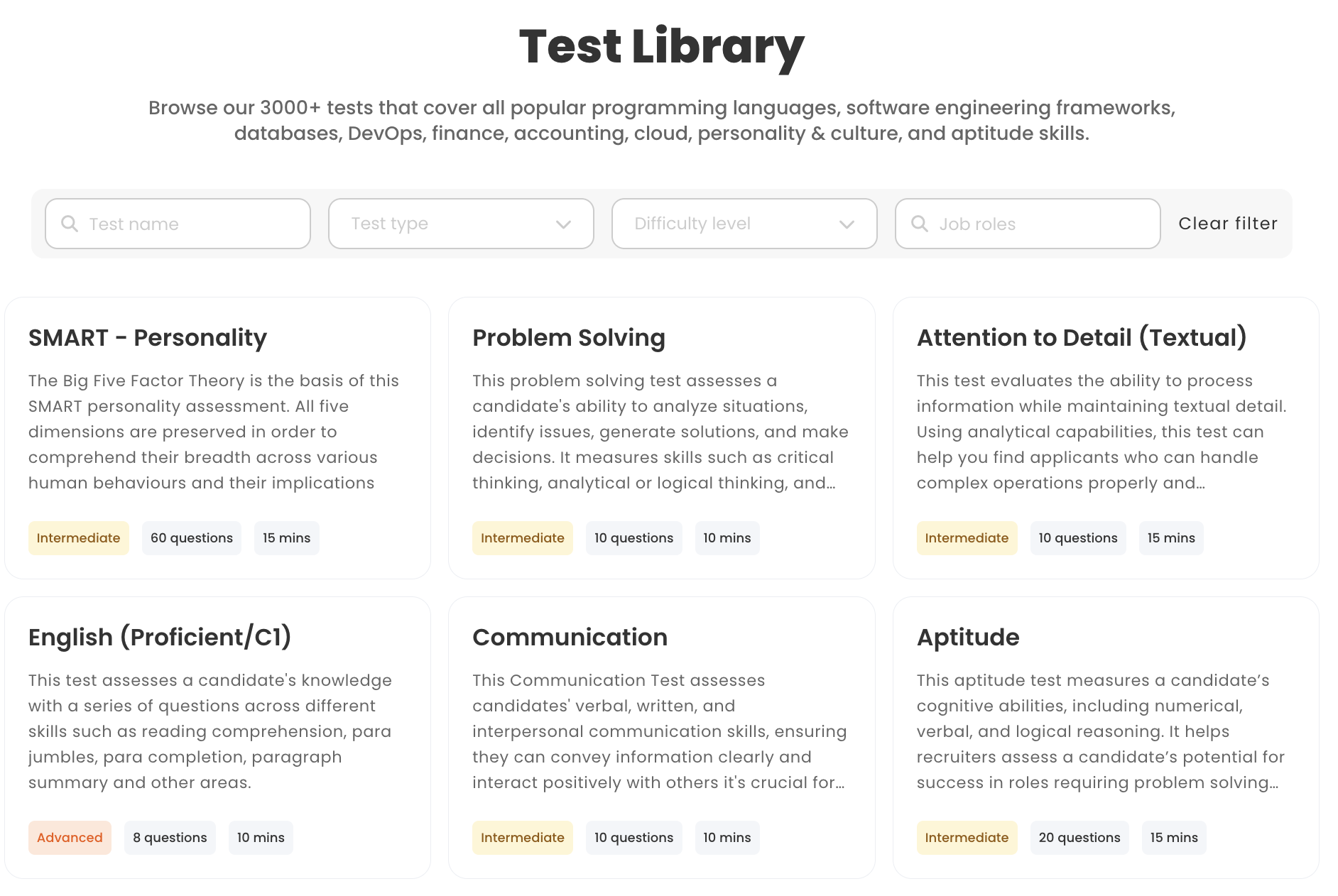
Talview also provides a diverse test catalog, though with a somewhat different focus. It offers 2,000 unique assessments covering 500+ skills across a wide range of categories:
- Cognitive ability tests
- Job-specific tests
- Language proficiency tests
- Personality tests
- Coding tests
Verdict: Both platforms offer extensive libraries, but their emphases differ. Testlify stands out for its role-centric approach and very wide array of test formats, making it easy to deploy a ready-to-go assessment for a specific job. Talview is strong in domain-focused and technical tests (especially coding and industry-standard psychometric tests)
Overall, Testlify gives the edge if you want plug-and-play, role-aligned tests right out of the box, whereas Talview is ideal if you need deep coverage of technical and cognitive skill areas.
Testlify vs. Talview: Custom question types
Testlify allows employers to create tailored assessments with 15+ custom question types, including scenario-based MCQs and AI-powered interviews.
- Multiple Choice Questions (MCQs)
- Open-ended and descriptive questions
- AI-powered Chat simulation
- AI-powered Video interview
- AI-powered Audio interview
- Custom coding questions and live coding tests
- Fill-in-the-blanks
- File upload questions
- Google Docs, Sheets, and Slides questions
- Microsoft Office questions
- Rating, number, and date questions
- Qualifier questions
Talview enables employers to create personalized assessments with multiple question types:
- MCQ
- MCA
- Essay
- Coding
- SQL
- Front end
- Conversational video Interview
- Code
Verdict: Both platforms allow extensive customization. Testlify edges ahead with its AI-powered question generation and broader format support (chat/voice/video interviews, document-based questions, etc.), making it easier to create unique or realistic job simulations on demand.
Talview’s builder is powerful and flexible, but it focuses more on standard assessment types. In practice, Testlify’s variety may benefit teams that want to innovate in how they evaluate candidates.
Testlify vs. Talview: White-labeling capabilities
Testlify offers white-labelling capabilities, allowing companies to fully customize the platform with their own branding. This includes adding logos, personalizing emails, and modifying the test interface to best fit the look and feel of your own company.
A standout feature is the ability to personalize invitation and rejection emails. Instead of sending generic messages, companies can craft communications that reflect their brand’s tone and values, leaving a lasting impression on candidates.
Talview offers full white-labeling and custom branding options, allowing you to personalize your assessments with your company logo, background image, color scheme, and messaging.
Verdict: Both Testlify and Talview offer extensive white-labeling capabilities, enabling you to deliver assessments under your own brand umbrella. You really can’t go wrong with either here, as both platforms let you customize logos, colors, and candidate communications to fit your company identity
This level of personalization enhances the overall candidate journey, making assessments feel like a natural extension of your organization’s hiring process.
Testlify vs. Talview: Conversational interviews
Testlify leverages conversational AI to simulate on-the-job scenarios across chat, voice, and video formats, bringing real-world context into the hiring process.
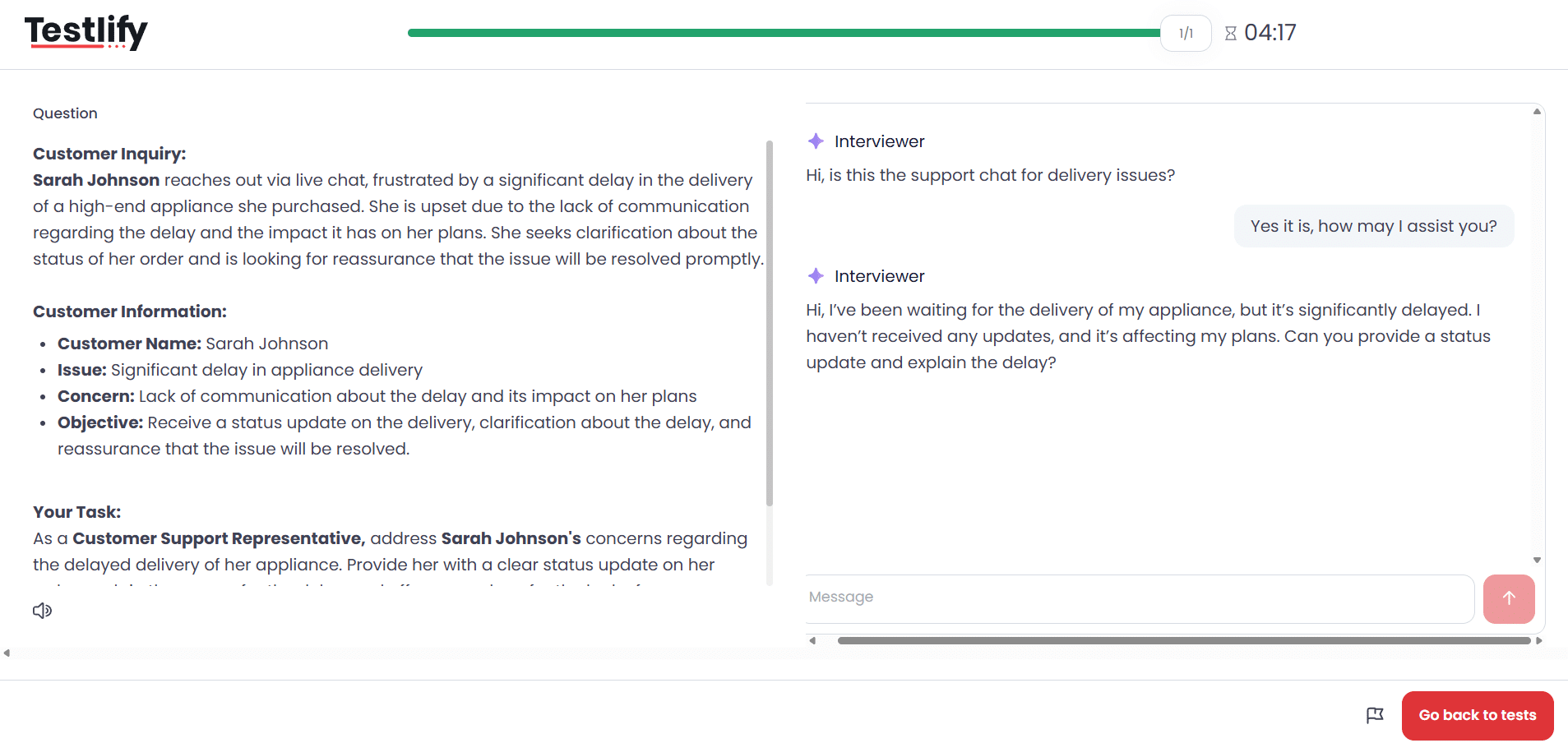
- Chat AI: Assess problem-solving, written communication, and critical thinking by engaging candidates in realistic text-based scenarios, like handling a billing dispute or calming an angry customer.
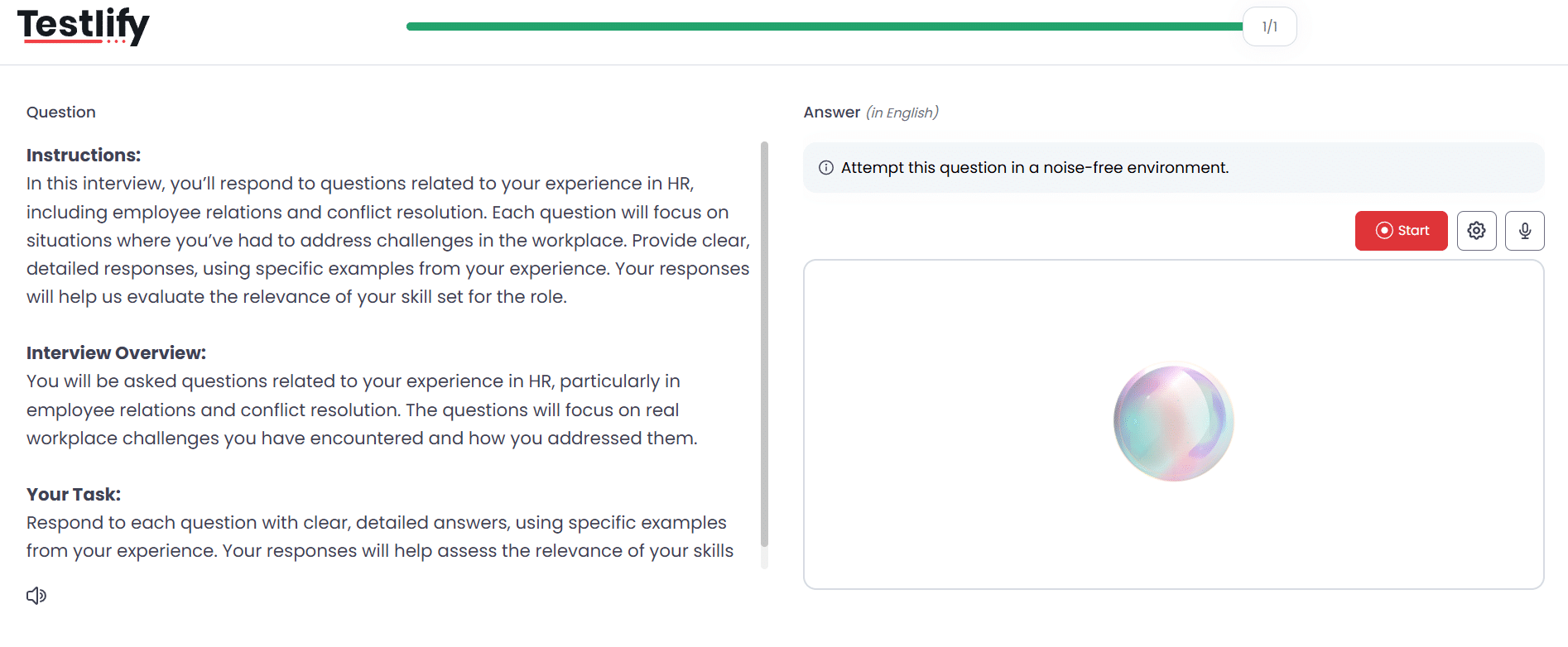
- Voice AI: Evaluate verbal fluency, tone, and persuasion by having candidates respond to role-specific prompts, such as those for sales or customer support.
- Video AI: AI avatars guide candidates through complex job scenarios in asynchronous video interviews, allowing employers to analyze non-verbal communication, confidence levels, and emotional intelligence.
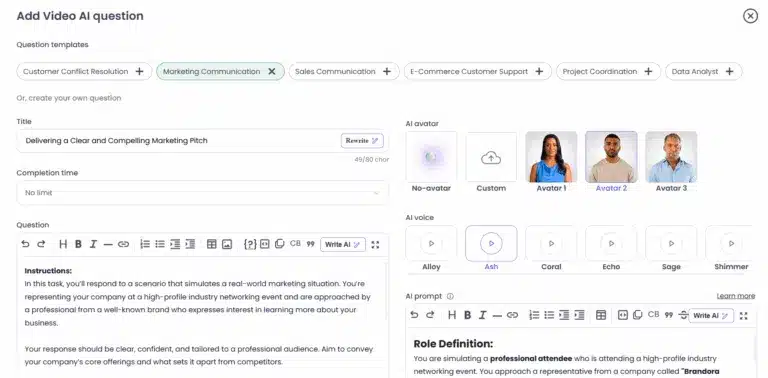
Talview's conversational interview tool is primarily its Ivy AI Interviewer. Ivy conducts spoken video interviews using natural language: it asks questions, listens in real time, provides follow-up queries, and even analyzes tone and body language.
After each interview, Ivy AI generates detailed reports that include transcripts and scoring metrics. This data-driven approach allows hiring teams to make informed decisions based on objective criteria, ensuring that the best candidates rise to the top.
Verdict: Both Testlify and Talview offer advanced conversational AI–powered interview capabilities. In practice, the two platforms are equally strong in this area, equipping organizations with powerful tools to assess the knowledge and problem-solving capabilities of candidates at scale
Testlify vs. Talview: Anti-cheating & proctoring features
Testlify employs advanced anti-cheating and remote proctoring features to ensure that every assessment reflects real skill and genuine effort. The features include:
- Face detection
- Photo ID verification
- Webcam snapshots
- Full-screen mode
- Force full-screen mode
- Dual camera proctoring
- Copy/paste tracking
- Mouse-out tracking
- IP proctoring
- Live video monitoring
- Question randomization
- Honesty Agreements
- Question-level activity logs
- AI assistance detection
- Screen recording
- Live environment check
- System requirement check
- Enforce internet speed check
- Focus guard (Anti-Cheat Mode)
- Talking prohibition
Talview employs a robust range of anti-cheating features to closely monitor candidate activity throughout assessments, flagging suspicious behavior and areas of concern for further review. The features include:
- Dual camera proctoring
- Snapshot capturing
- Candidate id verification
- Screen proctoring
- Webcam proctoring
- Screen recording
- Integrity score
- Copy-paste disabled
- Browser lockdown
Verdict: Both Testlify and Talview provide strong anti-cheating and remote proctoring measures to maintain the integrity of assessments, with features like dual-camera proctoring, screen recording, snapshot capturing, and copy-paste prevention ensuring fairness and reliability.
While they are comparable in offering comprehensive protection against malpractice, Testlify goes a step further with advanced capabilities such as AI assistance detection and detailed activity logs.
Testlify vs. Talview: Benchmarking analytics
Testlify comes with benchmarking analytics that provide valuable insights into candidate performance, helping organizations evaluate their candidates effectively through comparative metrics.
These metrics allow companies to benchmark candidates against industry standards, which helps to identify top performers, recognize skills gaps, and make informed hiring decisions.
Talview public materials do not prominently advertise a similar benchmarking feature for assessments. We did not find explicit global vs. internal comparison tools on their site. Talview focuses more on skill/category insights within the candidate’s profile
Verdict: In this category, Testlify leads. It explicitly delivers benchmarks against larger talent pools for every test. Talview’s documentation doesn’t show a direct equivalent, so Testlify’s analytics will most certainly give more context about how candidates rank industry-wide.
Testlify vs. Talview: Integrations
Testlify integrates seamlessly with 100+ ATS platforms and HRMS, allowing you to effortlessly import candidates’ profiles, compare assessment results and make data-driven hiring decisions.
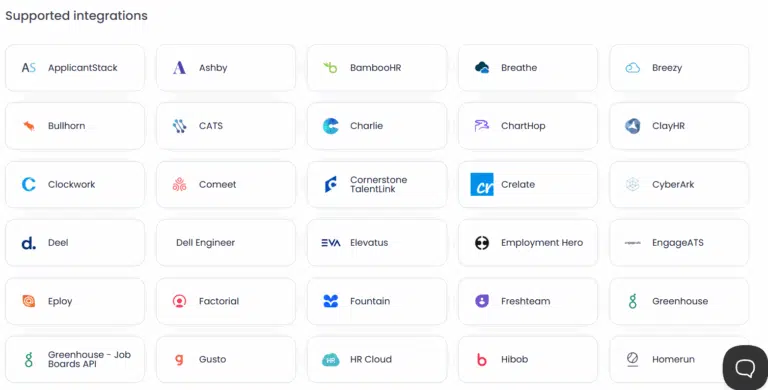
Talview offers 16 out-of-the-box integrations with major ATS platforms like Greenhouse and SAP SuccessFactors allowing you to send pre-hire assessments, measure results, and extend offers all from one platform.
Verdict: Testlify is built with integration in mind, offering seamless connectivity with over 100 Applicant Tracking Systems (ATS) and third-party tools. This extensive compatibility makes it highly adaptable to diverse recruitment workflows.
In contrast, Talview supports a more limited set of 16+ ATS integrations, which may pose challenges for organizations looking for broader system compatibility and end-to-end workflow automation.
Testlify vs. Talview: Reporting & insights
Testlify provides detailed analytics on candidate behavior, question-level insights, and benchmarking. You can visualize how candidates compare across roles and industries.
Furthermore candidate assessment reports can be easily shared with key decision-makers in PDF, Excel, or CSV formats, making it easier for them to make informed hiring decisions.
Talview also provides robust reporting. Its Assessment Engine produces a consolidated report covering candidate scores, skill competencies, and other key insights. Beyond raw scores, Talview offers “Interview Insights” to evaluate interviewer performance and “Behavioral Insights” on personality factors from interviews
Verdict: Both Testlify and Talview deliver strong reporting and analytics capabilities that turn raw assessment data into meaningful insights for hiring decisions.
Common strengths include: comprehensive performance breakdowns, easy identification of top candidates, and the ability to share results with stakeholders in a digestible format.
Testlify offers more in terms of analytics depth and visualization. The platform’s reports incorporate AI insights and benchmarking charts that can be very compelling when making the case for a candidate or for refining your tests.
Testlify vs. Talview: Customer support
Testlify is known for its responsive and personalized customer support, provided by human agents across multiple channels. The platform offers dedicated onboarding for new customers and priority support for enterprise clients, ensuring a great user experience.
The Testlify team also welcomes customer feedback and have been noted to roll out improvements in response to customer needs.
In addition to live support, the platform also features a help center with documentation, FAQs, and best practice guides, so your team can self-serve answers to common questions.
Talview offers 24/7 multi-channel customer support including email, phone, and a dedicated support portal which helps answer basic queries and provides priority assistance for enterprise clients.
Verdict: Both Testlify and Talview offer robust, multi-channel customer support with priority assistance for enterprise clients. Each platform ensures a smooth user experience through responsive communication and helpful onboarding resources, making them equally reliable when it comes to customer support.
Testlify vs. Talview: Pricing plans
Testlify offers flexible pricing plans that scale with your business, providing everything from basic assessments for startups to advanced features for enterprise-level hiring.
- Starter plan: Ideal for small teams and startups, this plan starts at $139/month (billed at $1,663/year) and includes 100 candidate credits at $17 per credit with support for 3 users.
- Starter: Designed for growing businesses, the Starter starts at $279/month (billed at $3,343/year) and includes 300 credits at $11 per credit with support for 5 users.
- Starter: Built for scaling teams, this plan costs $699/month (billed at $4,192/year) and includes 1,000 credits at $8 per credit with 10 users.
- Premium plan: Suited for high-growth organizations, the Premium plan includes 3,000 credits and supports 20 users, with pricing available upon contacting the sales team.
- Enterprise plan: Designed for large enterprises, this plan includes 10,000 credits and supports 30 users with pricing available upon contacting the sales team.
- Enterprise Plus plan: Designed for large-scale hiring programs, this plan includes 25,000 credits and supports up to 40 users, with pricing details available after contacting the sales team.
- Unlimited plan: For companies seeking unrestricted access, Testlify offers an unlimited plan that includes unlimited candidate credits and full platform functionality, with pricing available on request from the sales team.
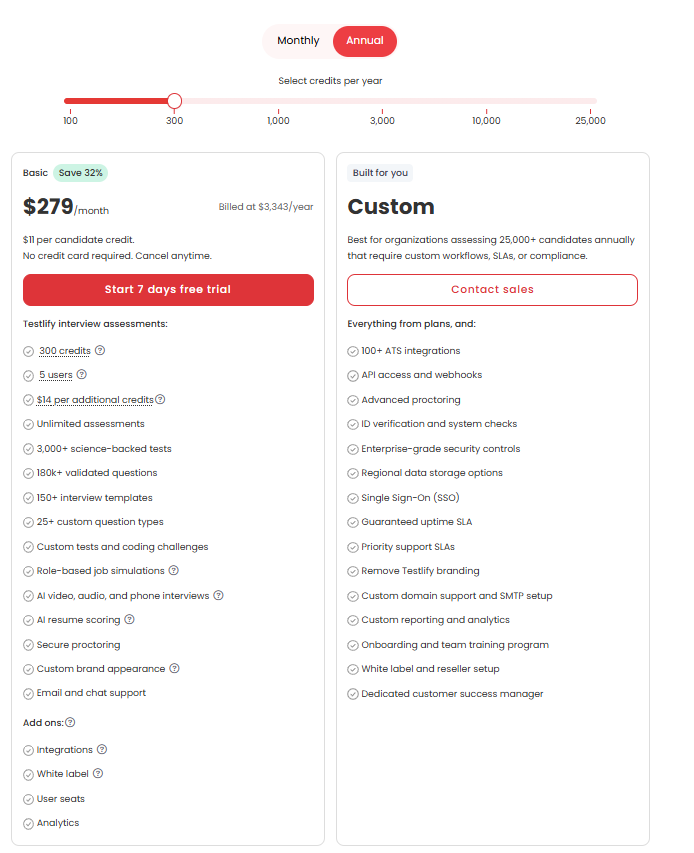
Talview follows a quote-based pricing model. They do not list detailed pricing on their public website; instead, interested customers must contact the company to get a custom quote tailored to their requirements.
Verdict: Testlify’s transparent, tiered plans make it easy to understand costs upfront and to choose a plan that matches your hiring volume and needed features. With transparent pricing, organizations can also plan and scale their hiring efforts effectively, moving to higher tiers as needed without the risk of unforeseen expenses.
Talview’s quote-based pricing model can be fine-tuned to your exact needs but comes at the expense of transparency.
Is Testlify a better alternative to Talview?
Testlify and Talview are both strong contenders in the skills assessment space, but which platform is better ultimately depends on your hiring goals, team structure, and candidate evaluation strategy. That said, Testlify emerges as the stronger alternative and here’s why:
- Broader test coverage: Testlify offers over 3,500 assessments mapped to 4,500+ job roles across 50+ industries, making it easier to deploy tests directly aligned with specific positions. Talview’s library, while extensive with 2,000+ assessments covering 500+ skills, focuses more on technical and cognitive tests rather than role-centric scenarios.
- Transparent pricing: Testlify provides clear, tiered pricing plans that scale with hiring needs, starting from entry-level packages to enterprise-grade unlimited plans. Talview, on the other hand, uses a quote-based model with minimum commitments, making it less straightforward for organizations to budget and plan.
- Extensive integrations: Testlify integrates with over 100 ATS and HR tools, ensuring seamless workflow connectivity for teams of all sizes. Talview integrates with major ATS and LMS platforms but supports fewer out-of-the-box integrations compared to Testlify.
Other best alternatives to Talview
Feature | TestGorilla | Adaface | Vervoe | Mercer Mettl | HireVue | TestDome | Codility |
|---|---|---|---|---|---|---|---|
Test Library | 300+ | 500+ | 300+ | 400+ | 1000+ | 130+ | 1100+ |
Custom Test Creation | Yes | Yes | Yes | Yes | Yes | Yes | Yes |
Automated Scoring | Yes | Yes | Yes | Yes | Yes | Yes | Yes |
Video Interviewing | Yes | Yes | Yes | Yes | Yes | Yes | Yes |
Proctoring Options | Yes | Yes | Yes | Yes | Yes | Yes | Yes |
ATS Integrations | 17+ | 9+ | 12+ | 16+ | 15+ | 6+ | 11+ |
Reporting & Analytics | Yes | Yes | Yes | Yes | Yes | Yes | Yes |
Final thoughts
Choosing the right assessment tool depends on your hiring goals. If you need extensive, pre-built role-based tests and the ability to create conversational AI interviews, Testlify is a compelling solution. If your priority is maximum test security and a holistic interviewing ecosystem, Talview is equally compelling.
In either case, these platforms can significantly streamline hiring. We encourage you to request demos or trials of both to see which workflow resonates best with your team.
Book a demo with Testlify to explore how it can elevate your hiring strategy.

Director of Marketing
Akash Patange is the Director of Marketing at Testlify, where he works closely with HR leaders and recruiters to help organizations improve hiring outcomes. He writes about talent assessment, recruitment technology, and data-driven hiring practices.
LinkedInRelated resources
View all
Competitor Comparisons
Testlify vs. Cangrade: Which Skills Assessment Platform is Best for HR Teams?
Competitor Comparisons
Testlify vs Test Partnership: Comparison Guide for HR Teams
Competitor Comparisons
Testlify vs. Alva Labs: Which Skills Assessment Platform Wins in 2026?
Competitor Comparisons
Testlify vs. Pixonality: Which Skills Assessment Platform is Best for HR Teams?
Competitor Comparisons
Testlify vs. Perspect AI: Which Skills Assessment Platform is Best for HR Teams?
Competitor Comparisons
Testlify vs. Evalgator: Which Skills Assessment Platform is Best for HR Teams?
Get started.
Hire on proof, not resumes.
Run your first skills-based assessment free — no credit card required.