
12 best internal communication tools in 2026 (by use case)
A neutral guide to the best internal communication tools in 2026, grouped by job, with a comparison table and a stack for each company size.

The best internal communication tools in 2026 are the ones that get the right message to the right employee on the device they actually use: chat for quick questions, video for meetings, an intranet or employee app for company news, a mobile app for frontline staff, and tracked email for updates nobody can miss. No single product covers every job well, so most organisations combine three or four.
TL;DR / Key Takeaways
- No single tool covers every job well. Most organisations combine three or four: chat, video, an intranet or employee app, and tracked email or a frontline app.
- Pick chat by the suite you already pay for: Microsoft Teams for Microsoft 365, Google Chat for Workspace, Slack for a large integration catalogue.
- Use Zoom Workplace for town halls and large meetings, and Loom for recorded updates that would otherwise be a 30-minute meeting.
- Staffbase, Simpplr, Workvivo by Zoom and Viva Engage suit organisations of roughly 500 people or more, where news gets lost in chat.
- Reach frontline staff with mobile apps that need no company email, such as Connecteam, Blink or Microsoft Teams frontline licences.
- Gartner found 47% of digital workers struggle to find information and desk workers use 11 apps. Add a tool only when current ones stop reaching people.
- Workplace from Meta closed on 1 June 2026, and Yammer is now Microsoft Viva Engage.
 ChatGPT
 Gemini
 Claude
 Grok
Grok Perplexity
What are internal communication tools?
Internal communication tools are the software an organisation uses to share information with its own employees and to let employees talk to each other. The category covers team chat, video meetings, intranets and employee apps, internal email and newsletters, frontline mobile apps, and survey tools that collect feedback.
Internal communication tools serve two directions at once. Top-down tools carry announcements, policy changes and leadership updates to everyone. Two-way tools carry questions, ideas and feedback across teams and back up to leaders. A good stack covers both without forcing people to check five apps a day.
For the planning side, our guide on how to build an internal communication strategy covers goals, audiences and channels before you buy anything.

Why do internal communication tools matter in 2026?
Internal communication tools matter because engagement is falling and attention is scarce. Gallup's State of the Global Workplace 2026 found that only 20% of employees worldwide were engaged in 2025, and manager engagement fell to 22%. Gallup puts the cost of low engagement at about $10 trillion in lost productivity.
At the same time, people are buried in messages. Microsoft's 2025 Work Trend Index reports that employees are interrupted about every two minutes, roughly 275 times a day, by meetings, email or chat, and the average worker receives 117 emails and 153 Teams messages a day. More channels do not fix that. The right tools, used with clear rules, do.
For HR and people teams, the stakes are practical:
- New hires need the right information in their first week, or they leave early.
- Frontline staff often have no company email, so a policy change sent by email never reaches them.
- Hiring managers need fast, focused channels to give interview feedback and approve offers.
- Leaders need to know whether a message was read, not just sent.
What are the main types of internal communication tools?
The main types of internal communication tools are chat and collaboration apps, video tools, intranets and employee apps, frontline and deskless apps, internal email and newsletter tools, and survey and feedback tools. Each type does one job best.
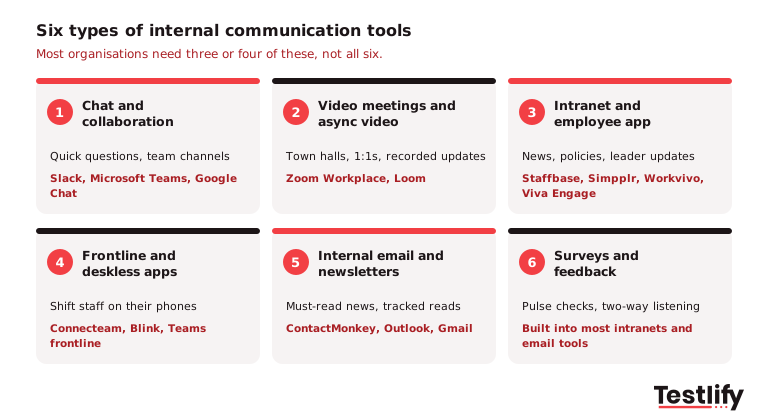
Project management tools such as Asana, Trello and Monday.com help teams coordinate tasks, but they are not internal communication tools in the sense searchers mean. They sit next to the stack, not inside it.
What are the best internal communication tools in 2026?
The best internal communication tools in 2026 are Slack, Microsoft Teams, Google Chat, Zoom Workplace, Loom, Staffbase, Simpplr, Workvivo by Zoom, Microsoft Viva Engage, Connecteam, Blink and ContactMonkey. They are grouped below by the job they do best, so you can shortlist one or two per job instead of comparing all twelve.
Tool | Type | Best for | Free option | Watch out for |
|---|---|---|---|---|
Slack | Chat | Fast-moving teams that live in channels | Free plan, 90-day message history | Notification overload without channel rules |
Microsoft Teams | Chat and meetings | Organisations on Microsoft 365 | Free version for small groups | Can feel heavy for simple chat |
Google Chat | Chat | Organisations on Google Workspace | Included with Workspace | Fewer third-party apps than Slack |
Zoom Workplace | Video, chat, phone | Large meetings, town halls, webinars | Free plan with time-limited meetings | Chat is less used than Slack or Teams |
Loom | Async video | Recorded updates and walkthroughs | Limited free plan | Videos pile up without a home |
Staffbase | Intranet and employee app | Large enterprises with mixed desk and frontline staff | Demo | Needs an owner and a content plan |
Simpplr | Intranet | AI-driven, personalised intranet for desk staff | Demo | Best value at larger headcounts |
Workvivo by Zoom | Employee experience app | Culture, recognition and social feed | Demo | Feed can get noisy |
Microsoft Viva Engage | Enterprise social network | Communities and leadership updates in Microsoft 365 | Core features in many Microsoft 365 plans | Adoption drops without active leaders |
Connecteam | Frontline app | Deskless teams that also need scheduling | Free plan for small teams | Advanced reporting is limited |
Blink | Frontline app | Mobile-first news and chat for shift workers | Demo | Desk staff may prefer Teams or Slack |
ContactMonkey | Internal email | Tracked newsletters in Outlook and Gmail | Demo | Email only, not a chat tool |
Plans and limits change often. Check each vendor's pricing page before you commit, and run a short pilot with real users.
Which chat and collaboration tools work best?
Chat and collaboration tools work best when your organisation picks one and sets rules for channels, mentions and response times. Slack, Microsoft Teams and Google Chat cover most needs, and the right choice usually follows the productivity suite you already pay for.
1. Slack
Slack organises conversations into channels by team, project or topic, with threads to keep replies tidy. Huddles add quick audio and video calls, and Slack Connect lets you share channels with partners such as recruitment agencies. Workflow Builder automates routine requests, and the app directory connects thousands of tools, including many ATS and HR systems. Paid plans add AI features such as channel and thread summaries.
Best for: teams that work across many projects and want a large integration catalogue.
2. Microsoft Teams
Microsoft Teams combines chat, channels, meetings, calling and file collaboration through SharePoint and OneDrive. For organisations already on Microsoft 365, Teams is usually the default because identity, files, calendars and Copilot are in one place. Teams also has frontline features, covered further down.
Best for: organisations on Microsoft 365 that want one hub for chat and meetings.
3. Google Chat
Google Chat brings spaces, threaded conversations and direct messages into Google Workspace, next to Gmail, Calendar, Drive and Meet. Gemini can summarise conversations on eligible plans. Google Chat is simpler than Slack, and that simplicity suits teams that want fewer settings.
Best for: organisations on Google Workspace.
Pro tip: Whichever chat tool you choose, publish a one-page channel guide on day one: which channels are for announcements, which are for questions, and what response time people should expect. A guide like that prevents more noise than any setting.
Which video tools work best for meetings and updates?
Video tools work best when live meetings are kept for decisions and discussion, and routine updates move to recorded video. Zoom Workplace covers large live events, and Loom covers short recorded updates that people watch on their own time.
4. Zoom Workplace
Zoom Workplace bundles Meetings, Team Chat, Phone, Whiteboard and webinar and events tools in one platform. Zoom AI Companion, included with most paid plans, writes meeting summaries and action items. For all-hands meetings, virtual town halls and large training sessions, Zoom remains a reliable choice, and the webinar tools suit virtual hiring events.
Best for: large meetings, town halls and external events alongside internal ones.
5. Loom
Loom records your screen and camera so you can share a short video instead of booking a meeting. Leaders use it for weekly updates, HR uses it for policy walkthroughs, and recruiters use it to brief hiring managers on a shortlist. Atlassian acquired Loom in 2023, so it now connects closely with Confluence and Jira.
Best for: async updates that would otherwise be a 30-minute meeting.
Which intranet and employee experience platforms work best?
Intranet and employee experience platforms work best for organisations of roughly 500 people or more, where company news and policies get lost in chat. Staffbase, Simpplr, Workvivo by Zoom and Microsoft Viva Engage lead this group, and each takes a different angle.
6. Staffbase
Staffbase combines an employee app, an intranet and internal email in one platform. Communicators can target news by location, role and language, and see who read what. Staffbase is built for large enterprises that need to reach desk and frontline employees from the same place.
Best for: large, distributed organisations with a dedicated internal comms team.
7. Simpplr
Simpplr is an AI-powered intranet that personalises the news feed and search for each employee and connects to the workplace suites and HR systems most organisations already run. Simpplr is a strong fit when the main problem is that people cannot find policies, forms and answers.
Best for: knowledge-heavy organisations with mostly desk-based staff.
8. Workvivo by Zoom
Workvivo is a social-style employee experience platform that combines internal communication, a social intranet, recognition and an employee app. Zoom acquired Workvivo in 2023, and Meta named it the preferred migration partner when Workplace from Meta closed.
Best for: organisations that want internal comms to feel like a community, with culture and recognition at the centre.
9. Microsoft Viva Engage
Microsoft Viva Engage is the enterprise social network inside Microsoft 365 and Teams, and it replaced the Yammer brand. According to Microsoft Learn's Viva Engage overview, Viva Engage is where people ask questions, share knowledge and build communities, while Viva Connections acts as the gateway for company news and resources. Leaders can post updates, and communities can form around teams, locations or interests.
Best for: Microsoft 365 organisations that want communities and leadership updates without another vendor.
For more on the engagement side of these platforms, see our list of employee engagement tools.
Which tools reach frontline and deskless employees?
Frontline and deskless employees are best reached by mobile-first apps that work on personal phones, do not need a company email address, and combine news, chat and shift tools. Connecteam and Blink are built for this, and Microsoft Teams offers frontline features for organisations already on Microsoft 365.
Frontline reach matters most in industries with large shift workforces: BPO and contact centres, healthcare, retail, logistics and e-commerce fulfilment.
10. Connecteam
Connecteam is an all-in-one app for deskless teams that combines chat, company updates, a knowledge base and surveys with scheduling, time tracking and digital forms. Because one app handles both work and communication, frontline staff open it every shift. Connecteam offers a free plan for teams of up to 10 users.
Best for: shift-based teams that also need scheduling and time clocks in the same app.
11. Blink
Blink is a mobile-first employee app with a news feed, chat, a company directory and a hub for documents and links to other systems. Blink is designed for people who never sit at a desk, so the experience feels like a consumer app rather than corporate software.
Best for: large frontline workforces that need a simple app for news and chat.
Microsoft Teams also covers frontline work. Microsoft 365 for frontline workers includes Teams chat, Walkie Talkie, Shifts for scheduling, targeted announcements in Viva Connections, and AI translation, on frontline licences built for shared and personal mobile devices.
Which tools handle internal email and newsletters?
Internal email and newsletter tools handle the updates every employee must see, such as policy changes, benefits enrolment and leadership news. Email still reaches people who are not online at the same time, and it leaves a record. The upgrade is tracking: knowing who opened, read and clicked.
12. ContactMonkey
ContactMonkey adds a newsletter builder, read tracking, pulse surveys and SMS to Outlook and Gmail, so internal comms teams can send designed emails from the inbox they already use and measure engagement by team or location. ContactMonkey is the simplest upgrade for organisations that rely on email but have no data on whether anyone reads it.
Best for: internal comms teams that send regular newsletters and need proof of reach.
If your hiring managers send a lot of email to candidates and interviewers, our HR communication email templates for hiring managers save time on the messages you write most.
How do you choose the best internal communication tools for your team?
Choosing the best internal communication tools for your team starts with your audience, not with features. Map who needs to hear from you and on which device, check which suite you already pay for, and only then compare products.
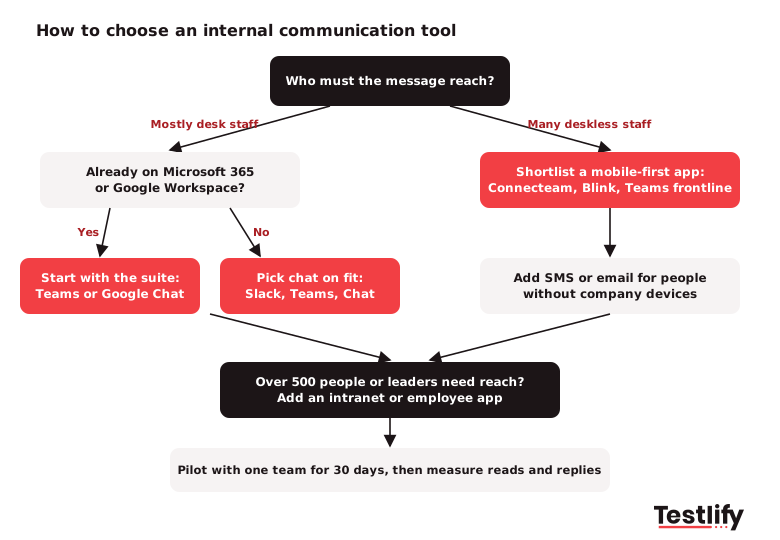
Use these criteria to compare a shortlist:
- Audience reach: Can every employee get the message, including people without a company email or laptop?
- Fit with your existing suite: Tools that share sign-in, files and calendars with Microsoft 365 or Google Workspace get adopted faster.
- Targeting: Can you send by location, department, role and language?
- Two-way features: Comments, reactions, Q&A and pulse surveys turn broadcasts into conversations.
- Measurement: Look for read rates and replies by audience, not just open rates.
- Integrations: Connections to your HRIS, ATS and identity provider keep employee lists current without manual work.
- Security and compliance: Check SSO, data residency, retention controls and certifications such as ISO 27001 or SOC 2.
- Admin effort: Someone has to own content and channels. Price that time in.
Avoid adding a tool for every problem. A Gartner survey of digital workers found that 47% of digital workers struggle to find the information they need to do their jobs, and that the average desk worker now uses 11 applications, up from six in 2019. Every new tool you add makes that search harder.
What should your internal communication stack look like by company size?
An internal communication stack should grow with headcount and with the share of staff who work away from a desk. Smaller organisations can run well on chat, video and email. Larger and frontline-heavy organisations need a central place for news and a mobile app that reaches everyone.
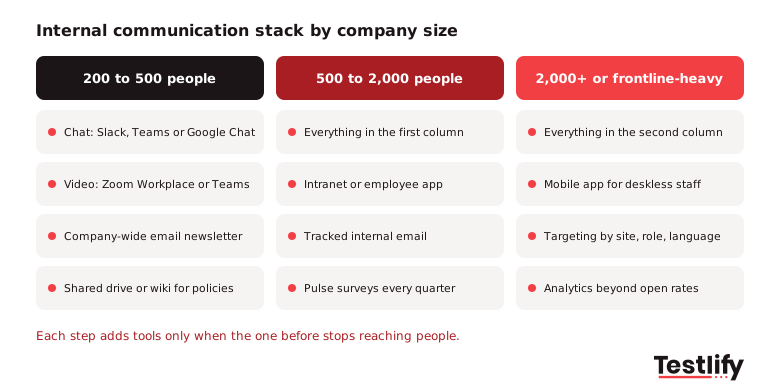
- 200 to 500 people: one chat tool, one video tool, a company-wide email newsletter, and a shared drive or wiki for policies. Most of this already comes with Microsoft 365 or Google Workspace.
- 500 to 2,000 people: add an intranet or employee app for news and policies, tracked internal email, and a quarterly pulse survey. Assign a named owner for internal comms.
- 2,000+ people or frontline-heavy: add a mobile app for deskless staff, targeting by site, role and language, and analytics that show reach by audience.
Remote and hybrid teams lean harder on chat and async video. Our guide to remote work collaboration tools covers the wider remote toolkit.
How do hiring and onboarding teams use internal communication tools?
Hiring and onboarding teams use internal communication tools to keep recruiters, hiring managers and interviewers moving at the same pace, and to give new hires a clear first week. Across the teams we talk to at Testlify, the biggest delays in hiring are not sourcing problems; they are waiting for feedback and approvals.
Common setups that work:
- One channel per open role in Slack or Teams, with the recruiter, hiring manager and interviewers. Updates, scorecards and questions live in one place instead of scattered email threads.
- A 24-hour feedback rule after each interview, posted in the role channel. We have seen interview feedback arrive faster when the reminder lives in the same place the team already talks.
- Approval workflows for offers and headcount through Slack Workflow Builder, Microsoft Teams Approvals or your ATS.
- Assessment updates in chat: The Testlify and Slack integration (an add-on) posts notifications about invitations, completed assessments, scores and status changes into the channels you choose, so hiring managers see results without opening another dashboard.
- A day-one onboarding message with the schedule, a buddy introduction and links to the intranet pages a new hire needs. Our employee onboarding process guide covers the full checklist.
If you are hiring the person who will run these channels, an internal comms manager or HR coordinator, a communication skills test shows how clearly candidates write before you interview them. For roles that live in these tools all day, there are also skills tests for Slack and Microsoft Teams.
What happened to Workplace from Meta and Yammer?
Workplace from Meta has closed, and Yammer has been renamed. Both still appear on older lists of internal communication tools, so it is worth knowing where their users went.
- Workplace from Meta: Meta announced in May 2024 that it would shut Workplace down. The platform became read-only on 1 September 2025 and closed on 1 June 2026. Meta named Workvivo by Zoom as its preferred migration partner, and many former customers also moved to Staffbase, Simpplr or Viva Engage.
- Yammer: Microsoft renamed Yammer to Viva Engage in 2023. The product continues inside Microsoft 365 and Teams with the same core features, plus communities, leadership updates and Copilot.
If an internal comms vendor or an old guide still recommends either product under its old name, check its other facts too.
Key takeaway: Start from who you need to reach and on which device, use the chat and video tools in the suite you already pay for, and add an intranet, a frontline app or tracked email only when your current tools stop reaching people. Fewer, better-owned tools beat a long list.
Frequently asked questions

Content Writer
Yashika Khandelwal is a Content Writer with 3+ years of experience creating research-backed content on hiring, talent assessment, and HR technology. She is a registered Organizational Psychologist and subject matter expert who combines behavioral science with practical recruitment insights to produce accurate, evidence-based content.
LinkedInRelated resources
View all
HR & recruitment
Interview questions to ask while hiring a machine learning engineer

HR & recruitment
35 Interview questions to ask while hiring a game developer

HR & recruitment
Interview questions to ask while hiring a DevOps engineer

HR & recruitment
How to create a positive candidate experience in 2026

HR & recruitment
Power BI Test: What It Assesses and How to Hire in 2026

HR & recruitment
What makes a good problem-solving assessment to test candidates?
Get started.
Hire on proof, not resumes.
Run your first skills-based assessment free — no credit card required.