
Types of Assessment Questions and How to Use Them in Hiring
Learn about various assessment question types and how to use them effectively to streamline talent assessment and enhance hiring accuracy.

Assessment questions come in three broad families: closed-ended formats such as multiple choice, rating, and ranking; open-ended formats such as short answer and long answer; and skills-based formats such as coding tasks and work simulations. The format you choose sets a ceiling on what you can learn about a candidate, so picking the right type of question matters as much as writing a good one.
That choice is getting harder. LinkedIn’s 2025 workforce research found the average job has already seen 32% of its skills change in the past three years, with that shift projected to hit 50% globally by 2030, so the abilities you screen for keep shifting. A question that only checks whether someone memorized a fact tells you little about whether they can still do the job a year from now.
This guide covers 13 types of assessment questions used in hiring, what each one measures, and how to match a format to the skill you are testing. The examples follow how hiring teams actually use these questions, not how a classroom exam would.
TL;DR
- Assessment questions split into closed-ended, open-ended, and skills-based formats, and each one measures a different kind of ability.
- Closed-ended questions (multiple choice, rating, ranking) score automatically and suit high-volume screening.
- Open-ended questions (short and long answer) show reasoning and communication, but they take reviewer time to grade.
- Skills-based questions (coding, chat simulation, document tasks) test whether a candidate can do the actual work.
- Match every question to a competency first; a structured, scored format predicts performance far better than an unstructured chat.
- Mixing a few formats in one role-focused assessment gives the most complete picture of a candidate.
 ChatGPT
 Gemini
 Claude
 Grok
Grok Perplexity
What are assessment questions?
Assessment questions are the prompts inside a hiring assessment that measure a candidate’s knowledge, skills, or behavior. They fall into two camps: objective questions, which have one correct answer and score automatically, and subjective questions, which ask candidates to build a response in their own words. Strong assessments use both.
The best assessments keep questions structured and consistent across candidates, so every person is measured against the same bar. Change the questions from one candidate to the next and the scores stop being comparable, which is the fastest way to let bias back in.

The 13 types of assessment questions
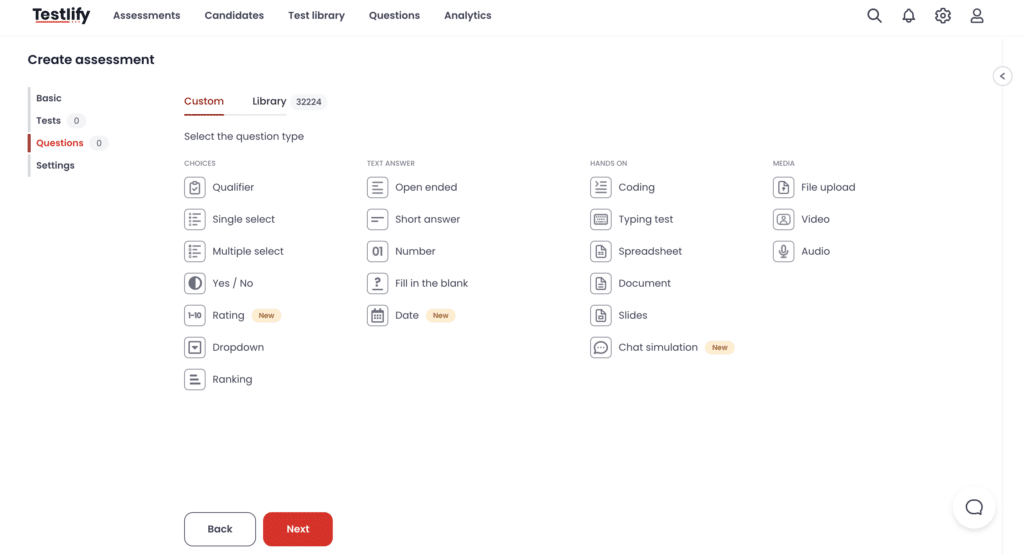
Below is a quick comparison of the 13 formats, followed by a short breakdown of each. Before the graded questions, many teams add qualifier questions to screen out anyone who does not meet a hard requirement, such as work authorization or a required certification.
# | Question type | What it measures | Type | Best for |
|---|---|---|---|---|
1 | Single select (multiple choice) | Factual knowledge, recall | Objective | Fast, high-volume screening |
2 | Multiple select | Depth of knowledge, judgment | Objective | When more than one answer is correct |
3 | Yes / No | Binary facts, eligibility | Objective | Quick checks and qualifiers |
4 | Dropdown | Single-answer knowledge | Objective | Long option lists, tidy layout |
5 | Rating scale | Confidence, judgment of a sample | Objective | Self-ratings and scored samples |
6 | Ranking | Prioritization, decision-making | Objective | Ordering items by importance |
7 | Fill in the blank | Precise terms, formulas | Objective | Testing exact recall |
8 | Number | Quantitative skill, calculation | Objective | Data and math-heavy roles |
9 | Short answer | Concise written communication | Subjective | A few-sentence explanation |
10 | Long answer (open-ended) | Reasoning, structure, depth | Subjective | Plans, analysis, arguments |
11 | Coding | Programming and problem-solving | Skills-based | Developer and data roles |
12 | Chat simulation | Written communication under pressure | Skills-based | Support and customer-facing roles |
13 | Docs, sheets, and slides tasks | Tool fluency, applied work | Skills-based | Roles that live in these tools |
1. Single select (multiple choice)
A single-select question gives candidates a list of options and lets them pick one. It is the workhorse of custom question types: fast to answer, scored the moment it is submitted, and ideal for checking factual knowledge across a large pool. The catch is that a lucky guess looks the same as real knowledge, so use several questions per topic rather than one.
2. Multiple select
Multiple-select questions look like multiple choice but allow more than one correct answer. They raise the bar, because a candidate has to recognize every right option and reject the wrong ones. That makes them useful when the real skill is judgment about which factors apply, not just recalling a single fact.
3. Yes / No questions
A yes/no question asks for a straight binary answer. It is best for eligibility checks and simple facts, not for anything that needs nuance. Because the odds of guessing right are one in two, treat yes/no answers as a filter rather than a real measure of depth.
4. Dropdown questions
Dropdown questions work like single select but hide the options until the candidate clicks. They keep the screen tidy when a question has a long list of choices, such as a country or a software version. What they measure is the same as single select: recognition of one correct answer.
5. Rating questions
Rating questions ask a candidate to score something on a scale, such as rating their confidence with a tool or judging the quality of a work sample. They are quick to score and good for structured self-assessment, though self-ratings alone are weak evidence, so pair them with a format that checks actual skill.
6. Ranking questions
Ranking questions ask candidates to put items in order, such as prioritizing tasks in a busy week. They test decision-making and a sense of what matters most. Two candidates can both be reasonable and still rank differently, so score the logic behind the order, not just the order itself.
7. Fill in the blank questions
Fill-in-the-blank questions remove a key term from a sentence and ask the candidate to supply it. They test precise recall, which is useful for terminology, formulas, or steps in a process. Keep the expected answer tight, or automatic scoring will mark a correct synonym as wrong.
8. Number questions
Number questions accept a numeric answer, so they suit calculations, data reading, and any role where the right answer is a figure. They score automatically against an exact value or a range. Because the answer is a number, they are hard to fake and easy to compare across candidates.
9. Short answer questions
A short answer question asks for a response of a few sentences. It is the lightest way to see how a candidate writes and whether they can explain something clearly and briefly. Short answers still need a human to score, but they read fast, which keeps the reviewer load manageable.
10. Long answer (open-ended) questions
Long-answer questions give candidates room to write a full response, such as outlining a plan or analyzing a scenario. They reveal reasoning, structure, and depth that no closed format can. The trade-off is time: every answer has to be read and scored against a rubric, so reserve them for the competencies that truly need them.
11. Coding questions
Coding questions ask candidates to write and run real code against test cases. Testlify’s coding assessments measure programming skill and problem-solving directly, which beats asking about syntax in a quiz. For developer and data roles, a working solution is far stronger evidence than a candidate describing how they would solve the problem.
12. Chat simulation questions
Chat simulations drop candidates into a scripted conversation, such as a frustrated customer or a colleague asking for help. They test written communication and judgment under mild pressure, in something close to the real task. That makes them a good fit for support, sales, and other customer-facing roles.
13. Document, spreadsheet, and slides tasks
These questions ask candidates to complete a real task inside a document, spreadsheet, or slide deck, such as cleaning a dataset or building a short deck. They measure tool fluency and applied work rather than knowledge about the tool. For roles that live in these apps all day, it is one of the most predictive formats available.
Are objective or subjective questions better?
Neither is better on its own; they answer different questions. Objective questions (multiple choice, fill in the blank, number) score instantly and scale to thousands of candidates, so they fit early screening. Subjective questions (short and long answer) show how a candidate thinks and writes, which no auto-scored format can capture. The right mix depends on the role and the stage.
The honest trade-off is reviewer time. Objective questions cost almost nothing to grade once they are written. Subjective questions cost a person’s attention on every submission, and that cost scales with your applicant pool.
Pro Tip: Open-ended questions cost reviewer time. Add three long-answer questions to a screening test taken by 500 candidates and someone has to read 1,500 responses. Reserve open-ended formats for later rounds, or for the two or three competencies that genuinely need them.
How do you choose the right question type?
Work backwards from the competency, not the format. List the three to five skills that actually predict success in the role, then choose the question type that produces evidence of each. A coding role needs a coding task, not a multiple-choice quiz about syntax; a writing role needs a writing sample, not a grammar dropdown.
Testlify’s Competency-to-Evidence Matrix makes this concrete. It maps every role to the competencies that matter, then connects each competency to the assessment method that measures it. Instead of starting with a test you like, you start with the role: name the competency, pick the format that shows it, set a benchmark, and add reviewer input wherever the answer is subjective.
This shift is already mainstream, not a trend to wait out. 55% of business leaders say their organization has already begun moving to a skills-based talent model, which is exactly what a competency-first question set builds toward.
Take a customer support lead as an illustrative example. The role needs product knowledge, clear writing, and calm judgment. Product knowledge maps to single-select and fill-in-the-blank questions. Clear writing maps to a short-answer prompt. Judgment maps to a chat simulation of an angry customer. Three competencies, three formats, one assessment that reflects the actual job.
How do you write effective assessment questions?
Good assessment questions are specific, tied to the job, and scored the same way for everyone. Vague prompts produce vague answers you cannot compare. Aim for a question where a strong candidate and a weak one give clearly different responses, and where two reviewers would score the same answer the same way.
- Map each question to a competency. If it does not measure a skill the role needs, cut it. Every extra question that tests nothing adds candidate fatigue and drop-off.
- Match the format to the skill. Recall goes to closed-ended questions, reasoning to open-ended ones, and doing to skills-based formats like coding or document tasks.
- Keep it structured and consistent. Ask every candidate the same questions with the same scoring guide. Unstructured questions let bias back in fast: 48% of HR managers admit bias affects who they hire, and asking every candidate the same scored question is the most direct fix.
- Watch the length. Balance depth against candidate time. A test that runs too long raises drop-off and costs you good applicants before they finish.
- Write the scoring guide first. Decide what a good answer looks like before launch, not while you grade. It keeps scoring fair and makes reviewer disagreements easy to resolve.
The payoff shows up in the data. In one survey, 79% of HR professionals said scores on skills assessments now matter as much as or more than traditional criteria like a degree or years of experience. Getting the question types right is what makes those scores worth trusting.
Hire on skills, not guesswork
Testlify gives you every question type in this guide, from single select and coding to chat simulation and document tasks, inside one assessment builder. Closed-ended questions score automatically; open-ended ones flow into reviewer workflows so the scoring stays consistent. Build a role-focused assessment in minutes. Start a free trial, or book a demo to see it on your own roles.
Key takeaways
- Format decides measurement. The question type sets a ceiling on what you can learn about a candidate, so choose it before you write a single question, or you will measure the wrong thing well.
- Closed-ended questions scale. Multiple choice, rating, and ranking score automatically, which makes them the right tool for screening large pools without piling on reviewer hours.
- Open-ended questions add depth at a cost. Short and long answers show reasoning and communication that no auto-scored format captures, but each one has to be read, so spend them where the competency justifies the time.
- Skills-based formats predict best. Coding tasks, chat simulations, and document work ask candidates to do the job, which is far closer to real performance than asking them to describe it.
- Structure beats gut feel. Asking every candidate the same scored questions is the biggest driver of a fair, predictive assessment; inconsistent questions quietly undo the value of the whole exercise.
- Mix formats on purpose. A role-focused assessment that combines two or three formats measures several competencies at once and covers the blind spots of any single question type.
Frequently asked questions (FAQs)

Content Writer
Yashika Khandelwal is a Content Writer with 3+ years of experience creating research-backed content on hiring, talent assessment, and HR technology. She is a registered Organizational Psychologist and subject matter expert who combines behavioral science with practical recruitment insights to produce accurate, evidence-based content.
LinkedInRelated resources
View all
HR & recruitment
7 reasons to use cognitive ability tests in recruitment

HR & recruitment
How to hire top talent using developer test

HR & recruitment
HR Analytics for Data-Driven Decision Making: The 2026 Guide

HR & recruitment
How to build a resilient workforce in challenging times

HR & recruitment
How to incorporate CEFR test into your recruitment strategy

HR & recruitment
How to simplify candidate screening with CEFR test
Get started.
Hire on proof, not resumes.
Run your first skills-based assessment free — no credit card required.