
Testlify vs. Xobin: Which Skills Assessment Platform is Best for HR Teams?
Testlify vs. Xobin: Discover which skills assessment platform best suits your hiring needs
For most hiring teams weighing Testlify vs. Xobin in 2026, Testlify is the better pick: it ships conversational AI interviews in voice and video, outbound AI phone interviews, 25+ question types, and a published price of $16.68 per candidate on its Starter plan. Xobin is the better pick when you want unlimited recruiter seats with no per-seat fee, a lockdown browser on every test, and a credit pack you can buy without a subscription.
Both platforms cover the same job: replace resume guesswork with a skills assessment before you spend interview hours. Where they differ is in how many kinds of evidence you can collect, how the proctoring is layered, and how you pay. This comparison walks through all three, with September 2026 prices from both vendors' own pages, so you can decide in one read.
TL;DR
- Testlify gives you more evidence per candidate: 3,500+ tests, 25+ question types (including in-app spreadsheet tasks and vibe coding), and conversational AI interviews in voice and video plus outbound phone interviews. Xobin gives you 3,400+ skill assessments, 2,500+ role-based tests and one-way video plus an agentic AI interviewer.
- Both proctor hard. Xobin leans on a lockdown browser and auto-submits a test after too many tab switches. Testlify adds identity verification, dual-device proctoring (the candidate's phone becomes a second camera) and AI-assistance detection, with the strictest layers on its Custom plan.
- Pricing is the clearest split. Testlify's Starter plan is $139 a month (billed yearly) for 100 candidates. Xobin sells credits: $900 buys 100 credits, and 100 credits cover 30 evaluations, so about $30 per candidate.
- Testlify's 100+ ATS integrations and white-label branding are paid add-ons on the Starter plan. Xobin lists about a dozen native integrations plus Zapier, and does not charge per seat.
- Pick Testlify if you want depth of evidence and per-candidate pricing. Pick Xobin if you want a flat credit pack, unlimited teammates and browser-level lockdown on every test.
 ChatGPT
 Gemini
 Claude
 Grok
Grok Perplexity
What is Testlify?
Testlify is an AI-assisted, human-led talent assessment platform. Recruiters build a skills assessment from a library of 3,500+ tests and 180,000+ validated questions, add conversational AI interviews where a role needs them, proctor the session, and get a scored report with AI insights that a hiring team then reviews and decides on. AI supports the process. People make the call.
How does Testlify work?
The workflow is the same whether you are screening 20 candidates for one role or 20,000 across a campus drive. Six steps, start to finish:
1. Create tailored assessments
Pick from the library of 3,500+ pre-built tests or generate custom questions with AI. Testlify supports 25+ question types, including multiple choice, open text, coding, file upload, and questions that run inside Google Docs, Sheets and Slides or Microsoft Office, so a finance candidate can actually build the spreadsheet instead of describing one.
Coding questions run in an embedded VS Code editor with up to 20 test cases, single-file or multi-file projects, and a vibe-coding mode that lets candidates direct AI tools to a working solution instead of typing every line of syntax. That last one matters in 2026, because it tests the way developers now actually work.
You can also add conversational AI interviews that simulate on-the-job scenarios in voice or video. A sales hire pitches over voice. A support hire handles an escalation on camera. The candidate does the work. The platform records the evidence.
2. Send candidate invitations
Invite by email, bulk upload, ATS trigger or a public link. Candidates do not create an account. They click the link and start, which is why completion rates hold up on mobile.
3. Advanced anti-cheating and proctoring measures
Testlify's proctoring controls cover identity (face detection, photo ID verification with a face match against the ID), environment (webcam snapshots, dual-device proctoring, multi-monitor restriction), behavior (tab and mouse-out tracking, copy/paste monitoring, full-screen enforcement, question-level activity logs) and AI-assistance detection. Three presets (Standard, Strict, Custom) set how hard any of it bites. Every flag lands in the report for a human to judge. A flag is a signal, not a verdict.
4. AI-powered scoring and analytics
Objective questions score instantly. Open-ended, coding and interview answers get AI-assisted evaluation plus AI insights on each candidate report: strengths, gaps and suggested follow-up questions, broken down by skill and by question. An AI checker classifies each written answer as human, AI-generated or mixed, which is a more useful answer than a yes-or-no verdict when a candidate edited an AI draft. The product's own disclaimer is worth quoting: AI scores and insights are for guidance only, and human judgment makes the final call.
5. Integration with applicant tracking systems (ATS)
Testlify connects to 100+ ATS and HR platforms, including Greenhouse, Lever, Recruitee and Zoho Recruit, plus API and webhooks. On the Starter plan the ATS integration pack is a paid add-on (more on that in the pricing section).
6. Data compliance
Testlify is GDPR compliant and holds SOC 2 Type II and ISO 27001 certification, with role-based admin controls, audit logs and SSO on the Custom plan.

What is the Xobin platform?
Xobin is a skills assessment and hiring platform that bundles pre-employment tests, psychometric assessments, coding tests, one-way video interviews and an agentic AI interviewer into one credit-based product. Its own site lists 3,400+ skill assessments, 2,500+ role-based assessments, 5,000+ hiring teams and more than 5.2 million assessments conducted. It also sells a talent-management suite (X360) for performance reviews, which is outside the scope of this comparison.
How does Xobin work?
Xobin's flow mirrors Testlify's, with a few differences in where the effort goes:
1. Create assessments
Choose a ready-made skill or role-based test, or combine skills into one assessment. Recruiters can edit questions, generate new ones with AI, and draft a job description with Xobin's NURA recruiting agent.
2. Invite candidates
Three invitation routes: a single email invite, a bulk email invite from an uploaded list, or an open link you can post on a job board. Bulk invites are the default for campus drives.
3. Anti-cheating and proctoring measures
Xobin's support documentation describes nine cheating-prevention layers: code playback (every keystroke in a coding test is recorded), randomized questions, a consistency checker that repeats questions to test honesty, off-tab tracking with a warning pop-up, webcam proctoring, AI flags for multiple people or unauthorized devices, screen recording with ambient audio, an eye-movement monitor called EyeGazer, and a lockdown browser. Exceed four off-tab warnings and Xobin auto-submits the test.
4. Automated scoring and AI evaluation
Objective answers score automatically. Xobin's AI Evaluate feature grades coding exercises, free-text responses and video answers, and returns an AI Trust Score that combines the proctoring signals into one number per candidate.
5. Reporting and analytics
Reports show a score per skill section with color-coded proficiency bands, a percentile against Xobin's global pool, the full proctoring log, and AI-suggested follow-up interview questions. Reports export to PDF or Excel and sync to the ATS.
6. Data compliance
Xobin lists SOC 2 Type I and Type II, ISO 27001, GDPR and CSA STAR on its site, with encryption at rest and role-based access.
Testlify vs. Xobin feature comparison
The table below is built from both vendors' public feature pages and pricing pages as of September 2026. "Not listed" means the vendor's public pages do not name the feature; it may still exist behind a sales conversation, so ask before you assume.
Features | Testlify | Xobin |
|---|---|---|
Test library | ||
Pre-built tests | 3,500+ tests, 180,000+ validated questions | 3,400+ skill assessments, 2,500+ role-based |
Role-specific tests | ✓ | ✓ |
Coding and programming tests | ✓ | ✓ |
Programming languages supported | 45+ | Not listed |
Cognitive ability tests | ✓ | ✓ |
Situational judgment tests | ✓ | ✓ |
Typing and software skills tests | ✓ | ✓ |
Psychometric and personality tests | ✓ | ✓ |
Custom assessment builder | ✓ | ✓ |
Question types | ||
Custom question types | 25+ | Multiple choice, video, coding, open text |
Fill in the blanks, rating, date, qualifier | ✓ | Not listed |
Microsoft Office and Google Workspace tasks | ✓ | Not listed |
File upload questions | ✓ | Not listed |
Vibe coding (candidate directs AI to a solution) | ✓ | Not listed |
Interviews | ||
One-way video interview | ✓ | ✓ |
Conversational AI interview (voice) | ✓ | ✓ (Agentic AI Interviews) |
Conversational AI interview (video) | ✓ | ✓ (Agentic AI Interviews) |
AI phone interview | ✓ ($0.18 per minute) | Not listed |
Interview templates | 150+ | Not listed |
Anti-cheating and proctoring | ||
Webcam snapshots and recording | ✓ | ✓ |
Screen recording | ✓ | ✓ (with ambient audio) |
Tab switch tracking | ✓ | ✓ (auto-submit after 4 warnings) |
Copy/paste tracking | ✓ | ✓ |
Lockdown or secure browser | Full-screen enforcement, focus guard | ✓ (XoLock) |
Eye tracking | Not listed | ✓ (EyeGazer) |
Photo ID verification | ✓ (face match against the ID) | Not listed |
Dual-device proctoring (phone as second camera) | ✓ | Not listed |
Multi-monitor restriction | ✓ | Multi-device detection |
AI assistance detection | ✓ (AI checker: human, AI-generated or mixed) | AI Trust Score |
Keystroke recording in coding tests | Question-level activity logs | ✓ (code playback) |
Live proctoring | ✓ | ✓ |
Honesty agreement | ✓ | Consistency checker questions |
Reporting and analytics | ||
Skill-level breakdown | ✓ | ✓ |
Item-level test analytics (difficulty, discrimination) | ✓ | Not listed |
Candidate benchmarking | ✓ | ✓ (global percentile) |
AI candidate summary | ✓ (AI Insights) | AI-suggested interview questions |
Public shareable report link | ✓ | Not listed |
Export to PDF, Excel, CSV | ✓ | ✓ (PDF, Excel) |
Enterprise and workflow | ||
ATS integrations | 100+ (paid add-on on Starter) | About a dozen named, plus Zapier |
White label | ✓ (paid add-on on Starter) | ✓ (pricing not public) |
User seats | 3 included, $15 per extra seat per month | Unlimited, no per-seat fee |
SSO | ✓ (Custom plan) | ✓ (Enterprise) |
Bulk invite and open link | ✓ | ✓ |
Security and compliance | ||
GDPR | ✓ | ✓ |
SOC 2 | Type II | Type I and Type II |
ISO 27001 | ✓ | ✓ |
CSA STAR | Not listed | ✓ |
Pricing (September 2026) | ||
Entry plan | Starter, $139 per month, billed $1,668 per year | $900 for 100 credits |
What that buys | 100 candidate credits per year | 30 evaluations (100 credits) |
Cost per candidate | $16.68 ($21 per extra credit) | About $30 ($9 to $10 per credit) |
Free trial | 7 days, no card | 14 days, 5 credits, no card |
Money-back guarantee | 30 days | Refund policy published on site |
Testlify vs. Xobin: Test library and test types
Testlify pairs its 3,500+ tests with conversational AI interviews, so one assessment can mix a cognitive test, a role-specific knowledge test and a five-minute voice scenario. Test families include:
- Cognitive ability tests (problem solving, logical reasoning, attention to detail)
- Role-specific tests for 4,500+ job titles across 50+ industries
- Blue-collar and skilled-trade tests for hands-on roles
- Coding and live coding tests in 45+ languages
- Software skills tests (Microsoft Office, Google Workspace, CRM tools)
- Psychometric tests (personality, emotional intelligence, behavioral tendencies)
- Situational judgment, typing and language tests
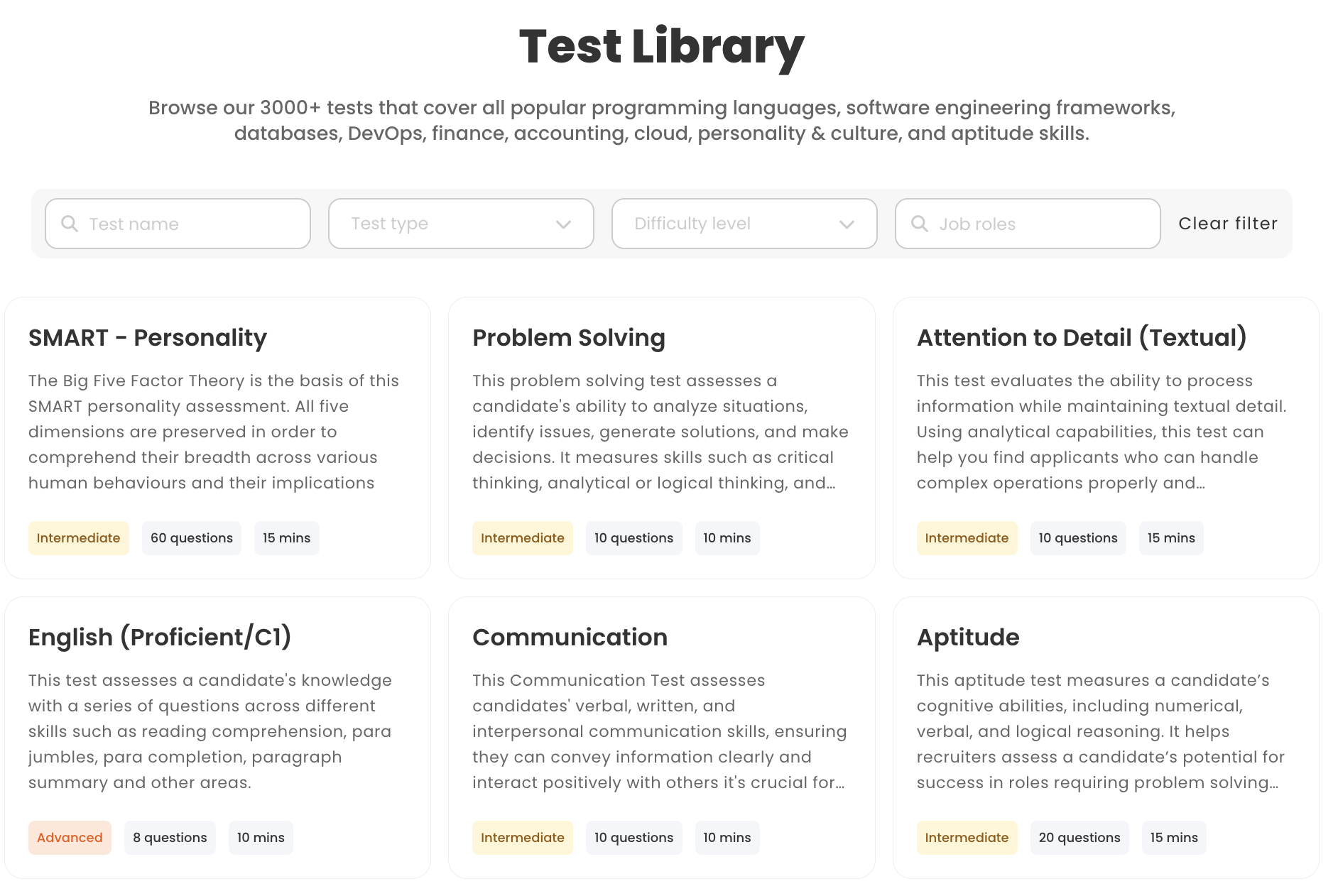
Xobin covers the same categories with 3,400+ skill assessments and 2,500+ role-based assessments: programming, cognitive, role-specific, software skills, language proficiency, personality, psychometric and typing tests. Its psychometric range is a genuine strength, and the role-based tests are pre-assembled so a recruiter can send one without editing.
Verdict: Roughly even on library size. Testlify wins on the variety of evidence you can collect in one assessment, because the AI interview formats and the Office and Workspace task questions sit in the same builder as the tests. If your roles are mostly generalist and a ready-made role test is enough, Xobin's 2,500+ role bundles get you there fast.
Testlify vs. Xobin: Custom question types
Testlify lists 25+ custom question types on its pricing page. The ones that matter for a work-sample style assessment are:
- Multiple choice, open-ended and descriptive questions
- AI-powered voice interviews and video interviews
- Custom coding questions, live coding, and vibe coding, where the candidate directs AI tools to a working solution
- Fill in the blanks, rating, number and date questions
- File upload questions (a design portfolio, a drafted contract, a model)
- Google Docs, Sheets and Slides questions and Microsoft Office questions
- Qualifier questions that screen out before the test starts
Xobin supports multiple choice, video-based, coding and open-text questions, plus its agentic AI video interview. That's enough for most knowledge tests and for a coding round.
Verdict: Testlify, clearly. The gap isn't the count. It's that file-upload, in-app spreadsheet and vibe-coding questions let you test the actual task, and structured, job-related evidence is exactly what the selection research rewards. Sackett and colleagues' 2022 reanalysis in the Journal of Applied Psychology put structured interviews at the top of the predictor list (validity about .42) and revised general cognitive ability tests down to about .31. The exact coefficients are still argued over in print. The ranking of structured, job-related evidence above resumes and years of experience is the part that keeps surviving every reanalysis.
Testlify vs. Xobin: White-labeling capabilities
Testlify offers white-label branding: your logo, your colors, your domain, and invitation and rejection emails written in your voice rather than a vendor template. On the Starter plan it is a $2,388 per year add-on; on the Custom plan it is negotiated into the contract.
Xobin sells white labeling as a product line aimed at staffing firms and HR consultancies, with sub-domain control, custom branding and a welcome video on the candidate landing page. Its price is not published.
Verdict: Even on capability. Testlify is more transparent on cost. Agencies reselling assessments under their own brand should get both quotes, because at agency volumes the add-on math flips depending on how many candidates you run. Our white-label platform roundup covers the wider field.
Testlify vs. Xobin: Conversational AI interviews
Testlify uses conversational AI to put candidates inside realistic job scenarios. Two formats ship today, and a third is on the way:
- Voice AI: a spoken prompt (a sales objection, a support escalation), scored on fluency, tone and persuasion. The candidate is muted while the AI speaks, so it takes turns like a real conversation instead of playing recorded prompts.
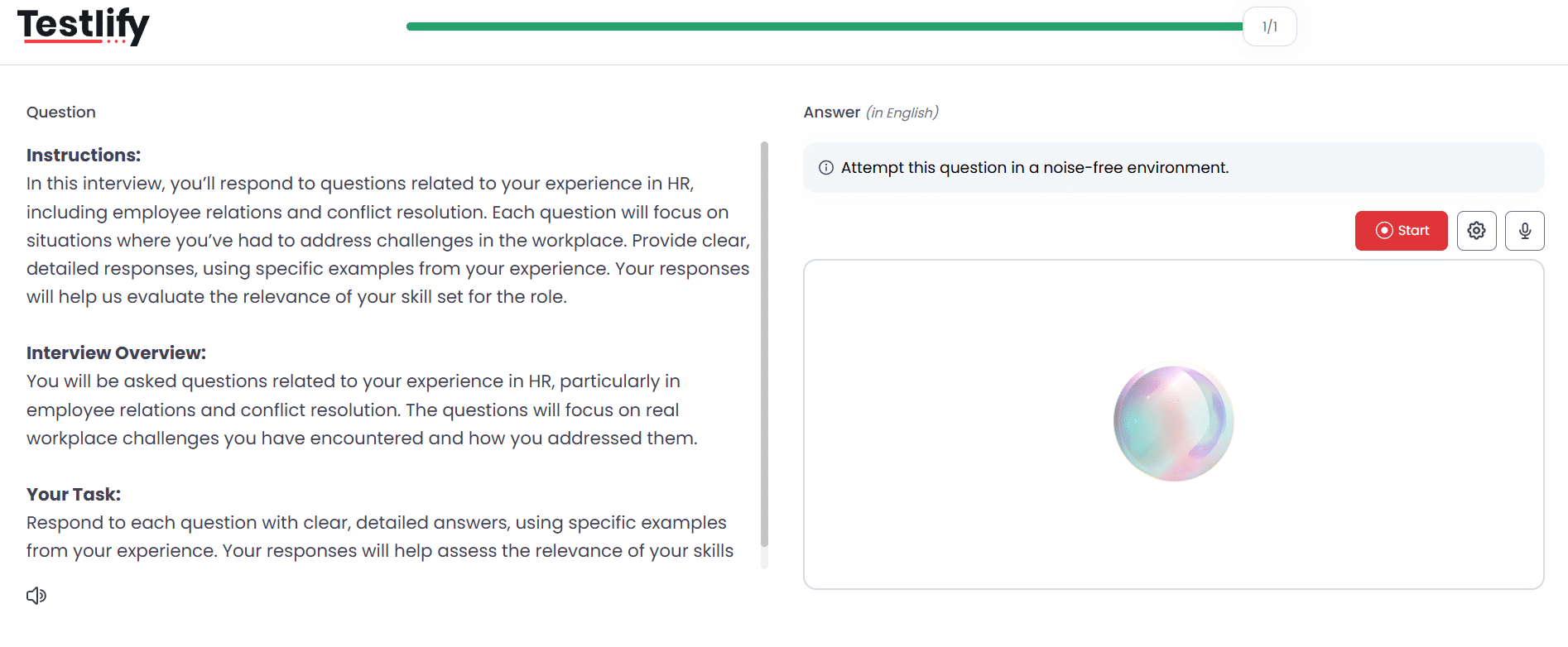
- Video AI: an AI avatar runs an asynchronous interview so you can review confidence and non-verbal communication alongside the transcript.
- Chat AI: a text scenario such as a billing dispute, scored on written communication and judgment. The product lists this one as coming soon, so treat it as a roadmap item and don't buy on it yet.
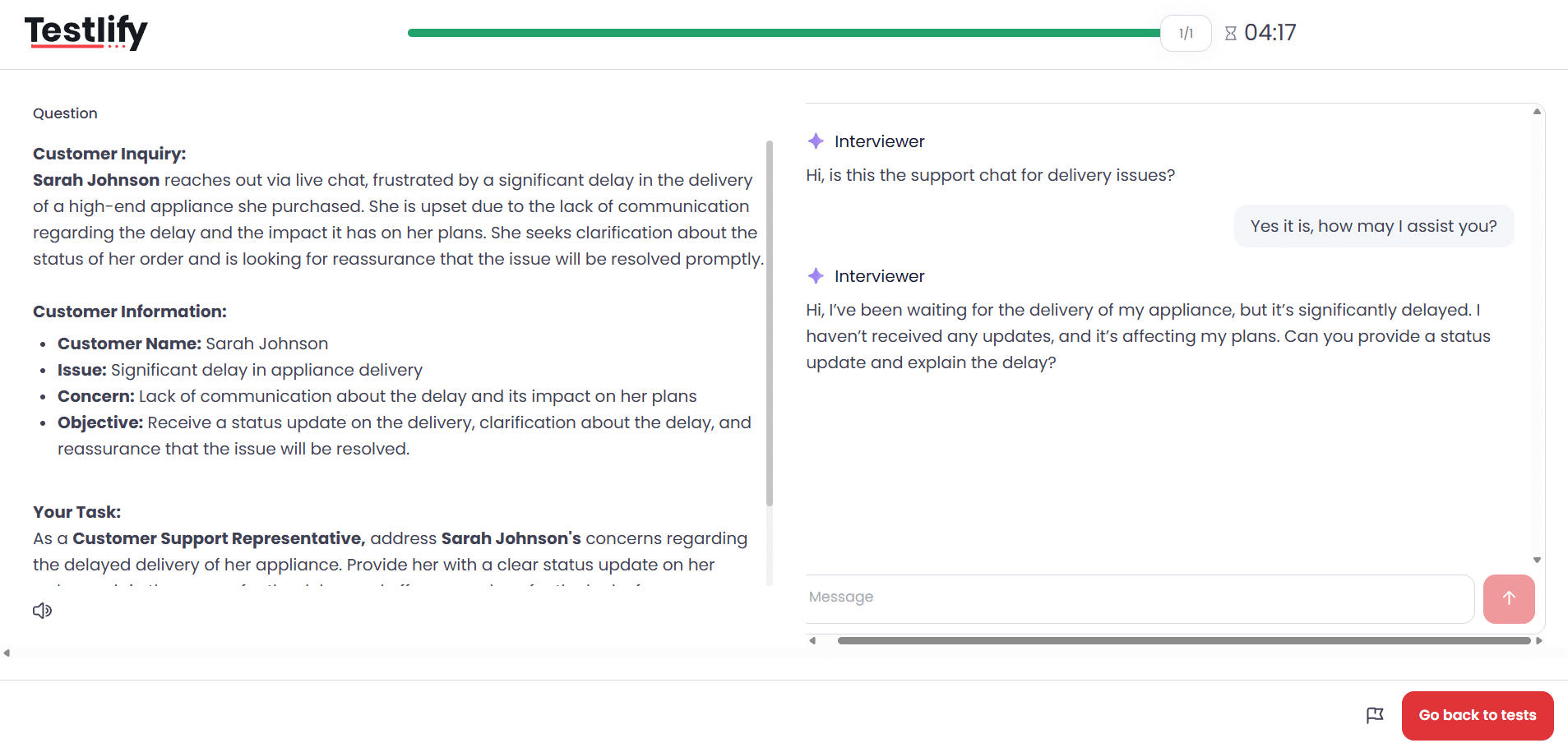
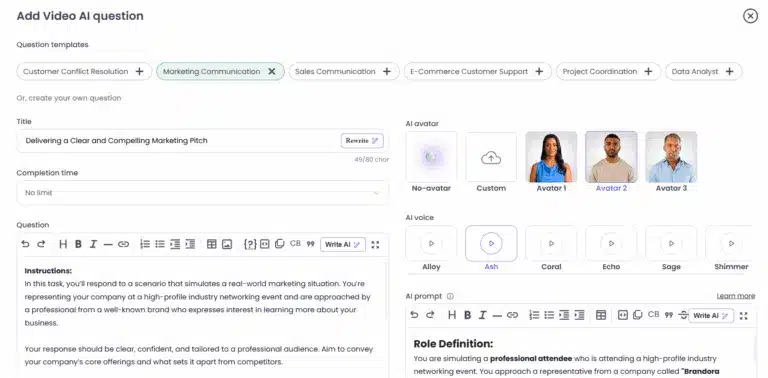
The parts buyers underrate are the controls around the interview. You pick the AI avatar, the voice, the persona and the prompt, set how many attempts a candidate gets (including no limit), cap recording and completion time, and give preparation time before recording auto-starts. Transcripts are automatic and multilingual for any recording over 30 seconds, and the reviewer can replay the screen, download the audio or video, and regenerate the interview report. Testlify also runs AI phone interviews at $0.18 per minute, which is the format that works for frontline candidates who never open a laptop.
Xobin started with one-way video questions and has since added Agentic AI Interviews, an AI interviewer that asks role-specific follow-ups and scores the conversation. Functionally it lands close to Testlify's Video AI.
Verdict: Testlify, on breadth and control. Both have an AI interviewer. Testlify adds voice, outbound phone, selectable avatars and voices, attempt and timing limits, and auto-scoring a human can override. If you only ever run one asynchronous video round, that gap won't cost you anything, and Xobin does it well.
How does Xobin handle cheating vs. Testlify?
Xobin handles cheating with a lockdown browser first and behavioral flags second: XoLock blocks other apps and sites during the test, off-tab moves trigger a warning pop-up, more than four warnings auto-submit the test, and webcam, screen and audio recording feed an AI Trust Score. Testlify starts from identity (photo ID and face verification), then layers environment, behavior and AI-assistance signals, and leaves every judgment to a human reviewer.
Why this section matters more in 2026 than it did in 2023: Gartner's 2Q25 survey of 3,000 job candidates found that 6% admitted to interview fraud, either posing as someone else or having someone pose as them, and Gartner predicts that by 2028 one in four candidate profiles worldwide will be fake. The same survey found only 26% of applicants trust AI to evaluate them fairly. So you need proctoring that catches fraud without treating every honest candidate like a suspect.
Xobin's published cheating-prevention measures, from its support documentation:
- Code playback: every keystroke in a coding test is recorded and replayable
- Randomized questions per candidate
- Consistency checker questions that probe honesty
- Off-tab tracking with a warning pop-up; auto-submission after the fourth warning
- Webcam proctoring and AI flags for multiple people or extra devices
- Screen recording with ambient audio
- EyeGazer, which flags a candidate who looks away for too long
- Lockdown browser (XoLock) that blocks other apps, sites and system tools
Testlify's proctoring toolkit, organized by the Testlify Assessment Integrity Framework (identity, environment, behavior, AI assistance, reviewable evidence, configurable strictness):
- Identity: face detection, single-presence verification, and photo ID verification that matches the face against the document
- Environment: webcam snapshots at a set interval, dual-device proctoring, multi-monitor restriction, environment scan, IP and location restriction
- Behavior: tab and mouse-out tracking, copy/paste tracking, screenshot-attempt monitoring, full-screen enforcement, focus guard, talking prohibition, question-level activity and timing logs
- AI assistance: detection of AI tools and browser extensions, plus an AI checker that separates a fully AI-written answer from one a candidate edited
- Evidence: an honesty agreement up front and a per-flag log the reviewer reads before deciding
- Strictness: three presets (Standard, Strict, Custom) so a two-minute typing test is not policed like a certification exam
Dual-device proctoring is the one worth pausing on, because it is not on Xobin's published list and it is rare across the category. The candidate's phone becomes a second camera pointed at both them and their laptop screen, and it is a hard gate: the assessment will not start until mobile monitoring is active, and cutting the feed mid-test is reported to the administrator. It closes the oldest remote-testing hole there is, which is a second person or a second screen sitting just outside the webcam's view.
The two products also differ in what a flag is allowed to do on its own. Testlify grades a session green, yellow or red, and yellow says in plain words that a quick manual review is recommended. Auto-termination exists but is opt-in, with a violation threshold the recruiter sets. On the privacy side, face-verification data is deleted after 30 days and candidates can withdraw consent, which is the sort of detail that decides an enterprise security review.
Verdict: Xobin is stricter at the browser level, and its auto-submit rule is the bluntest instrument in either product. Testlify is broader, covering identity and AI-assistance signals that Xobin's public list does not name, and it is more careful about what a flag means. Pick Xobin's approach when you want a hard stop the candidate cannot argue with. Pick Testlify's when you hire senior roles, where a false positive costs you the candidate.
Pro tip: Turn proctoring strictness down for early screening and up for the final round. A candidate who abandons a 15-minute screener because the webcam prompt felt like an interrogation is a false negative you never see. Both platforms let you set this per assessment; only Testlify packages it as presets.
Testlify vs. Xobin: Benchmarking, reporting and AI insights
Testlify reports show a skill-by-skill score, a benchmark against the role's candidate pool, and an AI Insights summary of strengths and gaps that a hiring manager can read in 30 seconds. Reporting and analytics export to PDF, Excel and CSV, and a public link lets you share a scorecard with a stakeholder who has no login.
Underneath the candidate report sits something most assessment tools keep to themselves: item-level psychometrics. Testlify surfaces a difficulty index and a discrimination index per question, flags questions with a quality risk (very low accuracy or high skip rates), and shows the answer, score and time distributions across everyone who sat the test. That is how you find the trick question quietly rejecting good candidates, and it is normally test-publisher territory rather than something a recruiter can open.
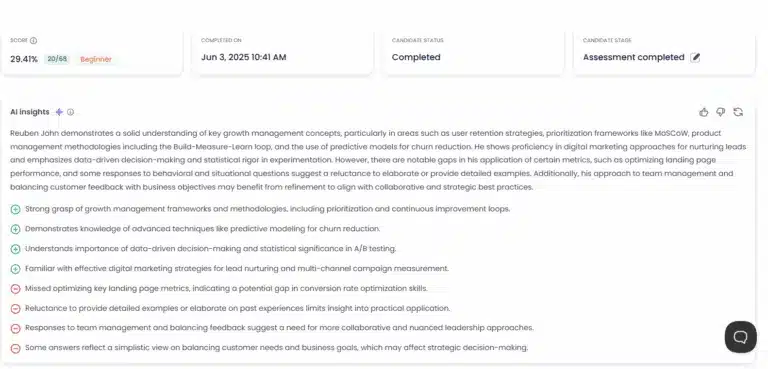
Xobin reports position each candidate on a bell curve against its global pool, color-code proficiency per section, embed the full proctoring log, and add AI-suggested follow-up questions for the interview. Its AI Evaluate feature grades open-ended and coding answers.
Verdict: Even on depth, different in emphasis. Xobin's follow-up question generator is a nice touch for junior interviewers. Testlify's one-click summary plus the shareable link is faster for a hiring committee that reviews 40 reports a week. Neither replaces a structured debrief, and both are clear that the AI summarizes evidence rather than deciding.
Testlify vs. Xobin: Integrations
Testlify connects to 100+ ATS and HR tools, with API access and webhooks on every plan. The catch: on the Starter plan the ATS integration pack is a $2,388 per year add-on, so budget for it if you want assessment scores flowing into Greenhouse or Lever automatically.
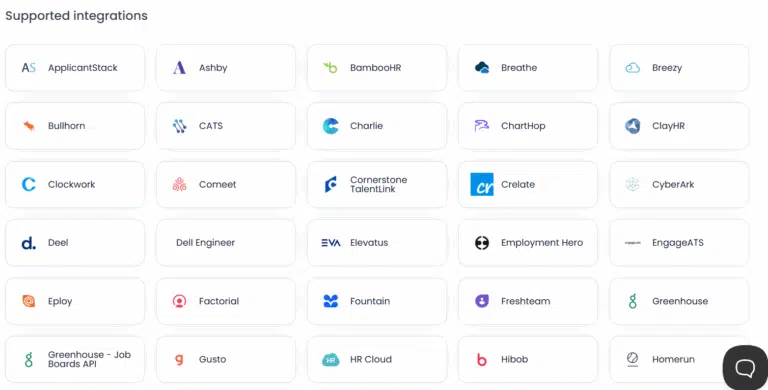
Xobin names Greenhouse, Workable, SmartRecruiters, BambooHR, Lever, Ashby, Zoho Recruit, Slack, Google Meet and Google Calendar on its site, plus Zapier for everything else, and API and webhook access on Enterprise credit packages.
Verdict: Testlify on breadth, Xobin on price for a small team, because its native connectors come with the credit pack. If your ATS is on Xobin's short list, that is a real saving. If it isn't, Zapier gets you most of the way, with more maintenance.
Testlify vs. Xobin: Customer support
Testlify runs email and chat support on Starter, adds call support, a dedicated success manager and a guaranteed uptime SLA on Custom, and keeps a public help center for self-serve answers.
Xobin offers live chat, email and phone support with a support portal, and priority handling for enterprise accounts.
Verdict: Even. Both vendors treat support as a selling point rather than a cost center, and both put the fastest channels behind the larger contract.
How much do Testlify and Xobin cost in 2026?
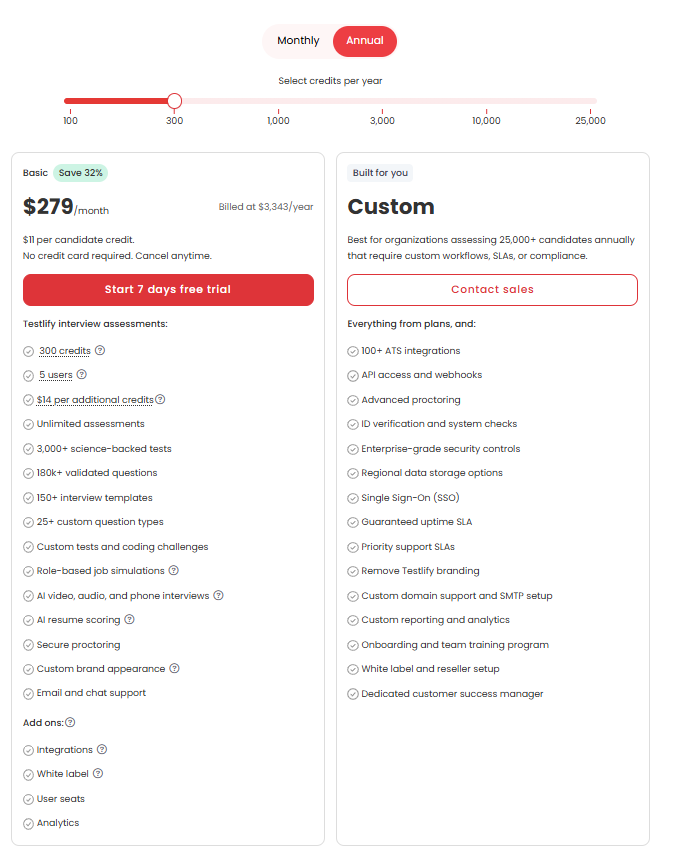
Testlify's Starter plan costs $139 per month, billed at $1,668 per year, and includes 100 candidate credits (about $16.68 per candidate), three user seats, unlimited assessments, AI video and audio interviews, secure proctoring and API access. Xobin sells credits instead of a subscription: $900 buys 100 credits at a volume-discounted $9 each ($10 list), and 100 credits cover 30 evaluations, so about $30 per candidate.
Testlify, from its pricing page:
- Starter: $139 per month, billed $1,668 per year. 100 credits, $21 per extra credit, 3 seats, $15 per extra seat per month. 7-day free trial, no card. 30-day money-back guarantee. Base price locked for 24 months.
- Add-ons on Starter: white label $2,388 per year; 100+ ATS integrations $2,388 per year; AI phone interviews $0.18 per minute.
- Custom: for 25,000+ assessments per year. Adds call support, SSO, a dedicated success manager, an uptime SLA, ID verification and advanced proctoring. Quote-based.
- Non-profits get 25% off with a published code.
Xobin, from its pricing page:
- Credit packs: from $900 for 100 credits. $10 per credit at list, $9 with the 10% volume discount that applies from 100 credits. Packs run from 100 to 900 credits; above 900 it is a custom quote.
- What a credit buys: 100 credits equal 30 AI interviews, or 30 psychometric assessments, or 30 skill assessments, or 30 lockdown-browser sessions. Mix and match from one pool.
- Seats: unlimited teammates, no per-seat fee. Credits draw from one shared pool.
- Trial: 14 days, 5 credits, no card.
- Enterprise: custom credit package with SAML SSO, a dedicated customer success manager and API or webhook integrations.
Here is what that means for a team that assesses 100 candidates in a year, one assessment each, using the September 2026 published rates. Treat it as an illustration; both vendors change prices, and neither table includes tax.
Line item | Testlify Starter | Xobin credit packs |
|---|---|---|
Base purchase | $1,668 per year (100 credits) | $900 per 100 credits (30 evaluations) |
Credits needed for 100 evaluations | 100 | About 334 |
Cost for 100 evaluations | $1,668 | About $3,006 at $9 per credit |
Cost per evaluation | $16.68 | About $30 |
Extra recruiter seats (2) | $360 per year ($15 each per month) | $0 |
White label | $2,388 per year add-on | Not published |
Native ATS integration | $2,388 per year add-on | Included for named connectors |
Total, assessments plus 2 seats | $2,028 | About $3,006 |
Verdict: On the core job, assessing candidates, Testlify costs about 44% less per evaluation at this volume ($16.68 vs about $30). Add white label and native ATS on the Starter plan and the gap narrows or reverses, which is why a staffing agency with five recruiters and a branded portal should price both carefully. A ten-person company screening 100 candidates a year should take the Testlify number and move on.
How does Xobin compare to TestGorilla?
Xobin and TestGorilla are both pre-employment assessment platforms with large ready-made libraries, so the choice between them usually turns on four things: how many kinds of evidence you can collect, how strict the proctoring is, whether you buy credits or a subscription, and how deep the ATS integration runs.
Here is the honest caveat, and it should shape how much weight you give this section. Testlify sells against both of them, so a ranked verdict from us is worth very little, and this page does not publish feature or pricing figures for a rival we cannot source from a document we trust. What we can give you is the part that transfers: what Xobin is documented to do, and the criteria to test any competitor against on a trial rather than in a comparison table.
On the record, from Xobin's own pricing page and support documentation: credit packs from $900 per 100 credits with no per-seat fee, roughly 30 evaluations per 100 credits, browser-level lockdown (XoLock) with eye tracking and auto-submit after four off-tab warnings, an agentic AI interviewer, and about a dozen named ATS connectors plus Zapier. Pull the equivalent three pages for whichever other platform is on your shortlist, its pricing page, its proctoring documentation and its integration list, and you will have a fairer comparison than any vendor page will hand you, this one included.
Then use the same six criteria to size any of them up, Testlify included:
- Evidence variety. How many kinds of work can a candidate show you in one assessment: multiple choice only, or coding, spreadsheets, files and live conversation too? More variety means a stronger signal per candidate, and several role-relevant signals beat one test or one interviewer's opinion every time.
- Proctoring layers. Identity, environment, behavior, AI assistance, and whether a human reviews the flags. A vendor that only has a lockdown browser has one layer.
- Pricing unit. Per candidate, per credit, per seat, or per plan. Match it to your volume curve. Credit packs suit bursty campus hiring; per-candidate subscriptions suit steady monthly hiring.
- Integration depth. Native connector, Zapier, or CSV. A native connector that pushes scores into the ATS stage is the difference between adoption and a tool nobody opens.
- Compliance evidence. SOC 2 Type II and ISO 27001 as a floor; GDPR handling for European candidates.
- Candidate experience. Time to complete, mobile support, and whether the proctoring feels proportionate to the role.
On those criteria Xobin scores high on proctoring, pricing simplicity and compliance, mid on evidence variety and integration depth. Score every shortlisted platform the same way on the same six rows and the winner usually stops being a matter of opinion. For a longer list of platforms in this category, see our roundup of employment assessment tools and the Xobin alternatives guide.
Is Testlify a better alternative to Xobin?
Yes, for most hiring teams. Testlify collects more kinds of evidence per candidate, charges about half as much per evaluation at entry volumes, and covers identity and AI-assistance proctoring that Xobin's public feature list does not. Xobin wins on seat pricing, browser lockdown and buying simplicity. The honest answer depends on which of those you weigh most.
The case for Testlify comes down to three things:
- Depth of evidence. 25+ question types, in-app Office and Workspace tasks, file uploads, vibe coding, and AI interviews in voice, video and phone, all in one builder. That's more signal per candidate, and more signal is what predicts performance.
- Proctoring that covers identity and AI. Photo ID verification, dual-device proctoring, multi-monitor restriction and AI-assistance detection, with proctoring presets so strictness matches the role. Xobin is strong on lockdown and eye tracking; it does not publicly name ID verification or AI-written-answer detection.
- Published, per-candidate pricing. $16.68 per candidate on Starter, versus about $30 per evaluation on Xobin's entry pack. Recruiting is hard enough already: in SHRM's 2026 Talent Trends survey of more than 2,000 HR professionals, 68% reported difficulty recruiting full-time employees and 53% said it had become harder in the past year. The cheaper the screen, the earlier in the funnel you can afford to run it.
There's a fourth reason that's harder to put in a table. Testlify is built around the idea that AI assists and humans decide. The AI Insights summary, the proctoring flags and the interview scores all land in front of a reviewer as evidence, not as a verdict. For a hiring team that has to defend a decision to a candidate, a manager or a regulator, that design choice matters more than any single feature.
When is Xobin the better pick?
Xobin is the better pick when you have many recruiters and few candidates, when you need a lockdown browser on every test, or when procurement prefers a one-time credit purchase over a subscription. Three concrete cases:
- A staffing agency with eight recruiters running 40 assessments a month. Testlify's seat fees ($15 per extra seat per month) add $900 a year for five extra seats; Xobin charges nothing per seat. At that seat-to-candidate ratio the credit price gap shrinks.
- A coding bootcamp or certification body. Xobin's auto-submit after four tab switches, keystroke playback and XoLock browser are exactly the blunt controls a high-stakes, one-shot test needs.
- A team already on Ashby, Workable or Zoho Recruit that wants a native connector without an add-on fee. Xobin includes its named integrations; Testlify's ATS pack costs $2,388 per year on Starter.
One caveat cuts the other way. Xobin's 5-credit trial gives you about one full evaluation to judge the product. Testlify's 7-day trial lets you build a full assessment and run both the voice and video AI interviews before you pay. Run both trials on the same three candidates before you sign anything.
Ready to see the evidence side by side? Book a Testlify demo and bring a real job description: the team will build the assessment live, run a sample AI interview, and show you the proctoring report a reviewer actually sees.
FAQs

Director of Marketing
Akash Patange is the Director of Marketing at Testlify, where he works closely with HR leaders and recruiters to help organizations improve hiring outcomes. He writes about talent assessment, recruitment technology, and data-driven hiring practices.
LinkedInRelated resources
View all
Competitor Comparisons
Testlify vs. Saville Assessment: Which Platform is Best for HR Teams?
Competitor Comparisons
Testlify vs. Talogy: Skills Assessment Platform Comparison
Competitor Comparisons
Testlify vs. Hire Success: Which Skills Assessment Platform is Best for HR Teams?
Competitor Comparisons
Testlify vs. Testgrid: Which Skills Assessment Platform is Best for HR Teams?
Competitor Comparisons
Testlify vs. Testello: Which Skills Assessment Platform is Best for HR Teams?
Competitor Comparisons
Testlify vs. TalentLyft: Which Skills Assessment Platform is Best for HR Teams?
Get started.
Hire on proof, not resumes.
Run your first skills-based assessment free — no credit card required.