
Testlify vs easy.jobs: A detailed comparison
Discover the perfect solution for evaluating your candidates’ skills with Testlify. Dive into our comprehensive Testlify vs Easy.jobs…
 ChatGPT
 Gemini
 Claude
 Grok
Grok Perplexity
Testlify vs easy.jobs: which one do you need?
easy.jobs is an applicant tracking system with a career site attached. Testlify is a skills assessment platform. They sit at different points in the same hiring process, and easy.jobs ships a native Testlify integration, so for most teams the honest answer is not either/or. Pick based on which gap you actually have.
TL;DR
- easy.jobs owns the pipeline: job posts, a branded careers page, candidate stages, and interview scheduling.
- Testlify owns the evidence: role-specific skills tests, cognitive and personality assessments, coding challenges, and proctoring.
- The two connect natively, so assessments get assigned and scored without anyone leaving the easy.jobs pipeline.
- They bill on different meters. easy.jobs charges for hiring capacity (active jobs, candidate caps, seats). Testlify charges per candidate who starts an assessment.
- If your shortlists keep disappointing the hiring manager, the gap is usually measurement, not tracking. Buying a second pipeline tool will not fix it.
Testlify is trusted by 1,500+ hiring teams, from fast-scaling startups to enterprise TA functions.

What is easy.jobs?
easy.jobs is hiring software for posting roles, running a branded careers page, and moving candidates through a visual pipeline. It was built to sit next to WordPress and Elementor, which is why it turns up so often in small-team and agency stacks. Paid plans add AI screening, remote interviews, workflow automation, analytics, a custom domain, and 24/7 support.
It also includes a quiz feature for filtering people early, and that quiz earns its place. Knockout questions are exactly the right tool for work authorization, notice period, or whether someone has ever touched the software they will be using on day one. What a short quiz cannot do is tell you how well someone works. Those are different jobs, and treating one as the other is how a pipeline fills up with candidates who look fine on paper and fall apart in the first technical conversation.
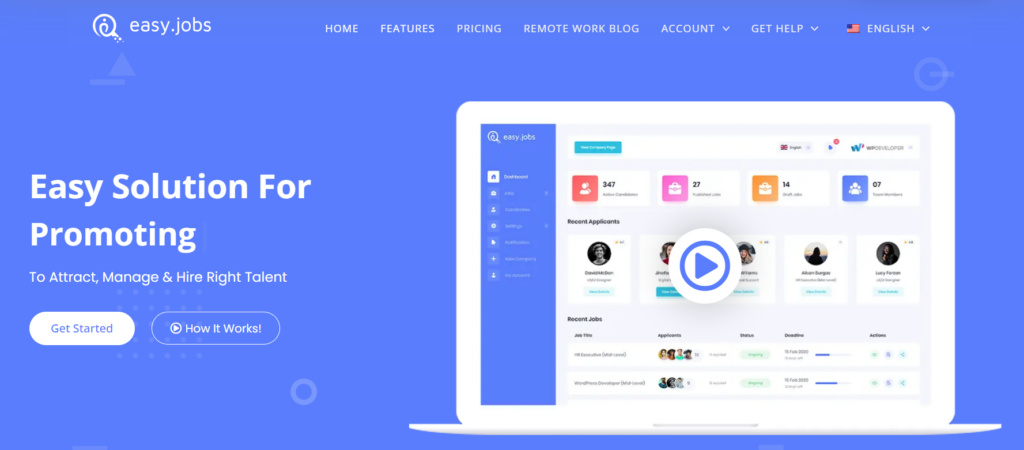
Best for: startups, recruiting agencies, and remote-first teams that need a careers page and a working pipeline without enterprise ATS pricing.
What is Testlify?
Testlify is a talent assessment platform. It measures what a candidate can do before anyone spends an hour interviewing them: role-specific skills tests, cognitive ability, personality and behavioral assessments, coding challenges, typing, situational judgment, and language. The library runs to 3,500+ tests built on 180k+ validated questions, and every plan carries 100+ ATS integrations.
Being precise about scope matters more than the feature list. Testlify is not an ATS. It does not post your jobs, host your careers page, or manage offers, and it is not trying to. It plugs into the system that already does those things. So if you are comparing these two to work out which one to cancel, that is the wrong question to be asking.
The approach behind the product is the Testlify Multi-Signal Talent Evaluation Model: one signal is fragile, and several role-relevant signals pointing the same direction give you a decision you can defend to a hiring manager. Worth noticing that a resume plus a five-question quiz is really one signal wearing two hats. Both are self-reported. Neither watches the candidate do anything. If you want a wider view of the options, start with the main categories of pre-employment testing and work back to the ones your roles actually need.
Feature-wise comparison for Testlify vs easy.jobs
The table below sets the two side by side across test library, assessment features, integrity controls, candidate experience, reporting, and support. Read it as a map of which layer owns which job, not as a scoreboard. An X against easy.jobs on cognitive testing is not a flaw in easy.jobs, any more than Testlify not posting your jobs is a flaw in Testlify.
Features | Testlify | Easy.jobs |
|---|---|---|
Test Library | ||
Role-specific tests | ✓ | ✗ |
Cognitive ability tests | ✓ | ✗ |
Programming Tests | ✓ | ✓ |
No. of programming languages supported | 40+ | ✗ |
Situational judgment tests | ✓ | ✗ |
Typing test | ✓ | ✗ |
Software skills tests | ✓ | ✗ |
Non-technical tests | ✓ | ✗ |
Psychometric tests | ✓ | ✓ |
Personality tests | ✓ | ✓ |
Motivation test | ✓ | ✗ |
Assessment templates | ✓ | ✗ |
Custom assessments creation | ✓ | ✓ |
Test recommendations for different job roles | ✓ | ✗ |
Coding tests | ✓ | ✗ |
Assessments | ||
Custom assessment builder | ✓ | ✓ |
Custom coding questions | ✓ | ✗ |
Multiple-choice questions | ✓ | ✓ |
Descriptive questions | ✓ | ✗ |
Video interview questions | ✓ | ✗ |
Assessments curated by I/O psychologists | ✓ | ✓ |
Google doc | ✓ | ✗ |
Google sheets | ✓ | ✗ |
Google slides | ✓ | ✗ |
Audio questions | ✓ | ✗ |
Qualifier questions | ✓ | ✗ |
File upload questions | ✓ | ✗ |
Quality check | Extensive process incl. peer reviews, sample testing, review by psychometrician & more | Not stated |
Video interview questions | ||
One-way video interview | ✓ | ✓ |
Custom video questions creation | ✓ | ✓ |
Candidate's recording attempts per question | ✓ | ✗ |
Live video interview | ✗ | ✓ |
Candidate experience | ||
Fully customizable email templates | ✓ | ✗ |
Custom invitation and rejection email | ✓ | ✓ |
Mobile-friendly | ✓ | ✓ |
Candidate support | ✓ | ✓ |
Instructions before assessment | ✓ | ✓ |
Average assessment length | 40-60 minutes | Not stated |
Anti-cheating features | ||
Session recording | ✓ | ✗ |
Snapshot capturing | ✓ | ✗ |
Mouse tracking | ✓ | ✗ |
Copy-paste disabled | ✓ | ✗ |
Microphone and camera access | ✓ | ✗ |
Location access | ✓ | ✗ |
IP address tracking | ✓ | ✗ |
Randomization of question sequence | ✓ | ✗ |
Time limit on tests | Yes, typically 10 minutes | Not stated |
Reporting and analytics | ||
Detailed reports | ✓ | ✓ |
Easy to share reports and scorecards | ✓ | Not stated |
Exportable/downloadable reports | ✓ | ✓ |
Recruiting analytics | ✓ | ✓ |
Candidate benchmarking | ✓ | ✗ |
Completion rate and response insights | ✓ | ✓ |
Enterprise friendly | ||
White label feature | ✓ | ✗ |
Custom branding | ✓ | ✓ |
ATS integration | ✓ | ✓ |
User, role, and access management | ✓ | ✓ |
Bulk candidate invite | ✓ | ✗ |
Share public link invite to candidates | ✓ | Not stated |
Candidate pipeline management | ✓ | ✓ |
Internationalization | ✓ | ✓ |
Campus hiring support | ✓ | ✗ |
Dedicated account manager | ✓ | ✓ |
GDPR compliant | ✓ | ✗ |
Multilingual abilities | ✓ | ✓ |
Customer support | ||
24/7 support | ✓ | ✓ |
On-call support | ✓ | Not stated |
Email support | ✓ | Not stated |
Product demo | ✓ | ✓ |
Training & onboarding tour | ✓ | ✓ |
Do Testlify and easy.jobs work together?
Yes. easy.jobs ships a native Testlify integration, so you assign assessments to candidates from inside easy.jobs and read the scores back on the candidate record. No CSV exports, no second browser tab open while you shortlist, no copying results into a spreadsheet that goes stale by Friday.
Setup runs through the easy.jobs integration settings and runs to four steps:
- Create your Testlify account with the same email as your easy.jobs company profile.
- Build the assessment you want to run in Testlify, then copy your workspace URL from Settings.
- In easy.jobs, open Settings, then Others, then Integration, and click Configure on Testlify.
- Enter the OTP and workspace URL, then save.
From there you can assign an assessment to one person from their candidate detail view, or bulk assign from Jobs, then Candidates. Candidates get the link by email and in easy.jobs messages. Results come back under the candidate's Evaluation tab, in Assessment.
This is the fact almost every "Testlify vs easy.jobs" page leaves out, and it changes the decision. The products were never really competing for the same slot in your stack.
How much do Testlify and easy.jobs cost?
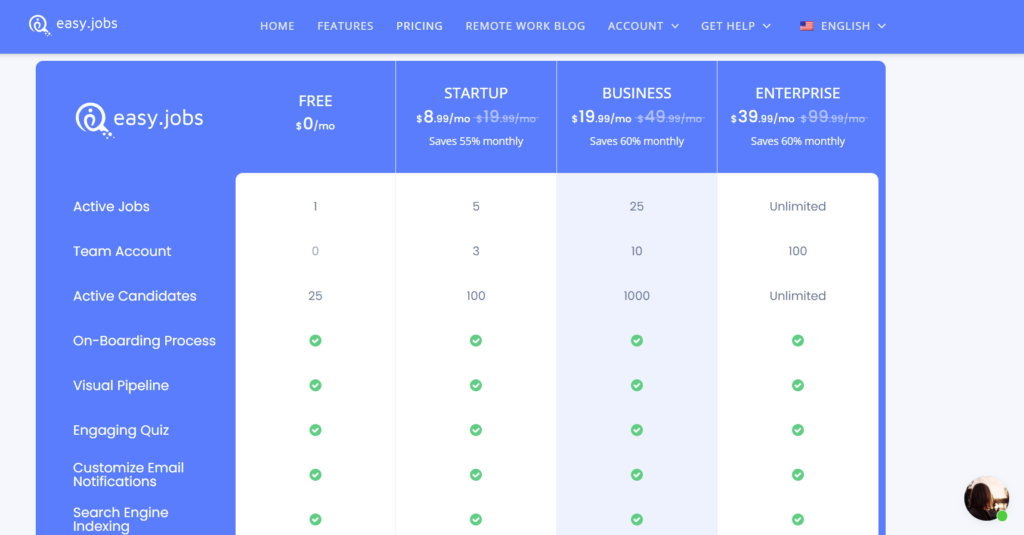
They charge on different meters, so a straight price comparison misleads. easy.jobs bills for hiring capacity. Testlify bills for candidates assessed.
easy.jobs runs four plans at these monthly list prices:
Plan | Monthly price | Active jobs | Candidate limit | Team accounts |
|---|---|---|---|---|
Free | $0 | 1 | 25 | 0 |
Startup | $29.99 | 10 | 1,000 | 3 |
Growth | $49.99 | 25 | 2,500 | 10 |
Scale | $249.99 | 100 | 10,000 | 25 |
Paying annually brings those down to $19.99, $41.99, and $124.99 a month for Startup, Growth, and Scale, per the easy.jobs pricing page.
Testlify runs on credits instead. One credit per candidate, spent when they start. The Starter plan is $139 a month billed at $1,668 a year for 100 credits, which works out at $16.68 per candidate assessed. Three user seats are included, extra seats cost $15 a month, extra credits are $21 each, and there is a 7-day free trial.
Here is the practical read. Post a lot of roles and assess only a handful of finalists, and the capacity meter is kinder to you. Post a few roles and assess deeply, and the credit meter is. Running both lets you pay for capacity in one place and accuracy in the other, instead of asking one tool to do both jobs badly.
Which should you choose for your hiring stack?
Start with the gap you actually have, not the tool you saw first.
No pipeline tooling yet. If candidates currently arrive in a shared inbox and live in a spreadsheet, buy the pipeline first. Assessment scores are not much use when nobody can tell you who applied last week. easy.jobs, or any ATS you like, solves the more urgent problem.
A pipeline that works and shortlists that do not. This is the common case, and it is a measurement problem. Your ATS is doing its job by tracking people accurately. It just has no way of knowing whether the candidate in stage three can write SQL. SHRM's 2025 recruiting benchmarking data puts screening and interviewing at 8 to 9 days each, and those days are spent on whoever the resume filter passed through. Get the evidence before the interview, not after it, and the same 8 days start buying you better answers. It also helps to put assessment at the screening stage rather than bolting it on before the offer, where it just delays a decision you have already made.
Hiring for skills that keep moving. The World Economic Forum's Future of Jobs Report 2025 puts the share of workers' core skills that will change by 2030 at 39%, down from 44% two years earlier. When the skill mix keeps shifting, credentials age faster than the roles do, and a test written for this quarter's stack tells you more than a degree awarded eight years ago.
A caution on that last point, because the skills-first argument gets oversold. Dropping a degree requirement from the job ad is not the same as hiring differently. Research from the Burning Glass Institute and Harvard Business School found the shift reached fewer than 1 in 700 hires, roughly 97,000 people out of 77 million hired in 2023. Announcing skills-based hiring changes nothing. Measuring skills does, and only if the measurement sits early enough in the funnel to affect who gets an interview.
The cost of getting it wrong is what makes this worth the effort at all. Gallup puts the price of replacing an employee at one-half to two times their annual salary. Against that, $16.68 to find out whether someone can do the work is not really a budget question.
Now the tradeoff nobody selling assessments likes to name. Every test you add is time you ask a candidate for before you have offered them anything. Two hours of assessment on a junior role will cost you good applicants who have three other processes running. Keep it to 20 or 30 minutes at the screening stage, test only what the role genuinely needs, and save depth for the shortlist. Assessment improves your decisions. Too much of it, too early, shrinks the pool you are deciding from. And if your problem is that nobody is applying at all, neither product on this page will help you, and where your candidates come from is the more useful thing to fix.
Pro tip: run the assessment before the first human screen, not after it. Most teams bolt testing on just before the offer, which means recruiters have already spent their week on candidates the data would have ranked differently. Moving the same test two stages earlier costs nothing and changes who reaches the hiring manager.
Put skills evidence in front of your first interview
If your easy.jobs pipeline is healthy and your shortlists still miss, the fix is not a different ATS. Connect a role-specific assessment to the pipeline you already run and let the first interview start from evidence. You can start on the 7-day free trial, or book a walkthrough with the Testlify team and have someone map your open roles to the right tests first.
Key takeaways
- These are different layers, not rivals. easy.jobs tracks candidates and Testlify measures them. Comparing them feature for feature and picking one leaves you missing whichever job the winner does not do.
- The native integration removes the usual objection. Assessments assign from inside easy.jobs and scores return to the candidate record, so adding measurement does not mean adding a tool your recruiters have to remember to open.
- The pricing meters answer different questions. easy.jobs charges for active jobs, candidate caps, and seats. Testlify charges per candidate who starts. Work out which number grows faster in your hiring plan before comparing headline prices.
- A built-in quiz is a filter, not a measurement. Knockout questions belong early and work well. They are not evidence of skill, and treating them as such is what produces shortlists that collapse in the technical round.
- Skills-first only counts when something changes. Fewer than 1 in 700 hires shifted when employers dropped degree requirements. The signal has to sit early enough in the funnel to change who gets interviewed, or it is a policy statement.
- More assessment is not automatically better. Long tests early in the process cost you candidates. Twenty to thirty minutes at screening, depth reserved for the shortlist, is the balance that holds.
- Decide from the gap, not the demo. No pipeline means buy the pipeline. A working pipeline and weak shortlists means buy the measurement. Both problems at once means the integration is the point.
FAQs
Related resources
View all
Competitor Comparisons
Testlify vs Discover Assessments: A detailed comparison
Competitor Comparisons
Testlify vs ExpertRating: A detailed comparison
Competitor Comparisons
Testlify vs ExaminLab: A detailed comparison
Competitor Comparisons
Testlify vs eVerifile: A detailed comparison
Competitor Comparisons
Testlify vs Quest Wing: A detailed comparison
Competitor Comparisons
Testlify vs Psyft: A detailed comparison
Get started.
Hire on proof, not resumes.
Run your first skills-based assessment free — no credit card required.