
AutoCAD assessment test: how to screen CAD candidates in 2026
Learn what to put in an AutoCAD assessment test, how long to make it, how to score the drawing and where it fits in your hiring process.

An AutoCAD assessment test is a timed skills test that checks whether a candidate can actually draft, edit and annotate drawings in AutoCAD before you spend interview time on them. A good one pairs a short knowledge screen with a practical drawing task, so "proficient in AutoCAD" on a resume becomes a score you can compare.
TL;DR:
- An AutoCAD assessment test checks real drafting skill: commands, layers, blocks, dimensions, layouts and, for senior roles, 3D and discipline tools.
- The best format is two steps: a 10-minute online skills screen for everyone, then a 30 to 60 minute practical drawing task for the shortlist.
- Keep the practical short and clearly unpaid-work free. Long, real-project tests put good candidates off.
- Name the exact software and version. Plain AutoCAD, Civil 3D and Revit are different skills.
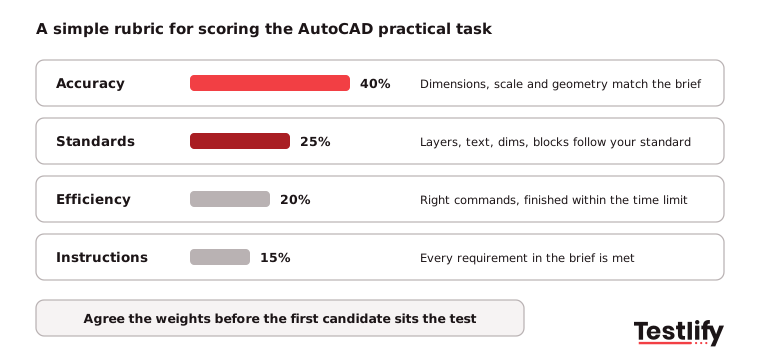
- Score the drawing with one agreed rubric: accuracy 40%, standards 25%, efficiency 20%, following instructions 15%.
- Treat the score as one input next to portfolio, experience and a drawing walkthrough, and give every candidate feedback.
 ChatGPT
 Gemini
 Claude
 Grok
 Perplexity
What is an AutoCAD assessment test?
An AutoCAD assessment test is a pre-employment test that measures how well a candidate uses Autodesk AutoCAD for the drafting work the role involves. The test usually combines questions on commands and drawing setup with hands-on tasks, such as producing a dimensioned 2D plan from a sketch or editing an existing drawing to a standard.
Hiring teams use an AutoCAD assessment test for drafters, CAD technicians, architectural and interior designers, and civil, mechanical and structural engineers who draw their own details.
The role matters: there are about 180,200 drafting jobs in the US and around 14,400 openings a year, with a median pay of $68,090 in May 2025, according to the BLS Occupational Outlook for drafters. BLS also lists CAD as a core technical skill and detail orientation as a key quality for the job.
An AutoCAD assessment test is not the same as an Autodesk certification. A certification shows that someone passed a general exam at some point. An assessment test shows how a candidate performs on your kind of drawing, today, under the same conditions as every other applicant.

Why test AutoCAD skills before you hire?
Testing AutoCAD skills before you hire separates candidates who can produce a correct drawing from those who only list the software. In CAD forums such as CADTutor and Archinect, hiring managers describe the same pattern again and again: applicants who claim proficiency but cannot use layers, blocks or the mirror command once they sit at the screen.
- Fewer errors and rework: Small drafting mistakes become costly site changes and project delays. A test shows who draws accurately before they touch a live project.
- Faster shortlists: A short online test lets you screen every applicant in days instead of booking in-office tests one by one.
- Fairer comparisons: Every candidate gets the same task, the same time and the same rubric, so the decision rests on skill instead of interview confidence.
- Better training plans: Results show which skills a new hire still needs, such as xrefs or sheet sets, so onboarding starts in the right place.
- Up-to-date skills: AutoCAD changes every release. Testing on the version and toolsets you use shows who has kept up.
The pressure to hire right first time is real. SHRM's 2025 Talent Trends report found that 69% of organizations are still struggling to fill roles, and 47% are updating existing roles to include new skills. For engineering and design firms, that means more applicants with mixed CAD backgrounds and less time to check each one by hand.
What skills should an AutoCAD assessment test cover?
An AutoCAD assessment test should cover the commands and drawing practices the job uses every day, at the level the job needs. Entry roles need clean 2D drafting. Mid-level roles add blocks, xrefs and layouts. Senior roles add 3D, standards and discipline tools.
Skill area | What to check | Level |
|---|---|---|
Draw and modify | Line, polyline, offset, trim, mirror, array, copy with exact distances | Entry |
Layers and properties | Correct layers, colors, linetypes and lineweights | Entry |
Dimensions and text | Dimension styles, text styles, leaders and annotation scale | Entry to intermediate |
Blocks and attributes | Creating, inserting and editing blocks, title block attributes | Intermediate |
Xrefs and layouts | Attaching references, viewports, paper space and plotting | Intermediate |
Drawing management | Templates, sheet sets, purging, AUDIT and recovering files | Intermediate to advanced |
3D modeling | Solids, surfaces and mesh objects, views and sections | Advanced |
Discipline tools | Civil 3D surfaces and alignments, or Revit for BIM roles | Role-specific |
Match the list to the job. The O*NET profile for architectural and civil drafters lists tasks such as drawing scale plans for foundations and structures and coordinating structural, electrical and mechanical designs, and it marks AutoCAD Civil 3D as an in-demand technology.
A civil drafter test should reflect that. A furniture designer test should not. For roles that mix tools, add a Revit test or a civil engineering test next to the AutoCAD one.
Which AutoCAD test formats work best?
AutoCAD test formats fall into four types: an online knowledge test, a practical drawing task, a review of submitted drawing files, and a live session where you watch the candidate draw. Most hiring teams get the best signal by combining a short online test with one practical task.
Format | What it shows | Time | Best stage |
|---|---|---|---|
Online knowledge test | Command knowledge, setup, standards | About 10 minutes | First screen, every applicant |
Practical drawing task | Real output: accuracy, layers, dimensions | 30 to 60 minutes | Shortlist |
File upload review | How the candidate builds a DWG | Same as practical | Shortlist, remote hiring |
Live or recorded session | Speed, command choice, problem solving | 20 to 30 minutes | Final round |
Practitioners on Archinect point out that "every command you run in AutoCAD can be seen by the person testing you", which is why a live or recorded session tells you so much about efficiency. Someone who draws a rectangle as four separate lines, or redraws instead of mirroring, will take longer on every project.
How long should an AutoCAD test take?
An AutoCAD test should take about 10 minutes for the online screen and 30 to 60 minutes for the practical task. The 30-minute dimensioned drawing from a sketch is the most common hiring practical in CAD forums, and it is long enough to show accuracy, standards and speed.
Avoid multi-hour tests. Candidates on Archinect report tests of up to 3 hours, and several describe them as unpaid production work for the office. Strong drafters with other offers simply decline. Use a made-up drawing, not a live project, and say so in the invite.
Pro tip: Give the practical task as a short written brief with a sketch, the layer list and your dimension style. Unclear wording, unfamiliar terms or missing standards test reading, not AutoCAD, and the CADTutor thread shows how often that trips candidates up.
How do you choose the right AutoCAD assessment test?
Choosing the right AutoCAD assessment test starts with the work the role does every day, not with a generic exam. Check five things before you send a single invite.
- Software and version: Confirm whether the role uses plain AutoCAD, AutoCAD LT, Civil 3D or another toolset, and test on that.
- Level: Pick beginner, intermediate or advanced content to match the job. A test that is too easy will not separate experienced drafters, and one that is too hard rejects good juniors.
- Discipline: Use examples from your field: floor plans for architecture, cross-sections for civil, part drawings for mechanical.
- Format and access: Make sure candidates can take it online without installing anything for the screen, and that the practical task works for remote applicants.
- Custom questions: Look for a provider that lets you add your own drawing brief or file upload so the test reflects your standards.
Duration, cost per candidate and how results reach your applicant tracking system matter as much as the content. Use your drafter job description to list the skills first, then pick the test that covers them.
How do you add an AutoCAD assessment test to your hiring process?
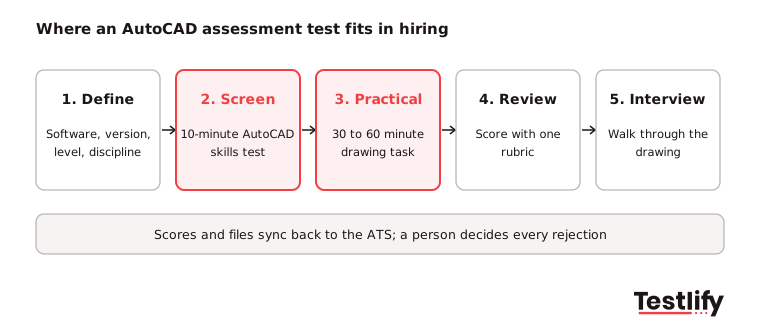
Adding an AutoCAD assessment test to your hiring process works best in five steps: define the skills, screen everyone with a short test, give the shortlist a practical task, score with one rubric, then interview around the drawing.
1. Define the role
Identify the software, version, proficiency level and drawing types required for the role. Establish clear assessment criteria so everyone agrees on what a successful candidate should demonstrate.
2. Screen candidates early
Send an online AutoCAD test with the application or immediately after submission. This helps filter candidates early and ensures you only spend time reviewing those who meet the required skill level.
3. Set clear expectations
Inform candidates about the test format, time limit and practical tasks involved. Include these details in the job posting and assessment invitation to avoid confusion.
4. Conduct a practical assessment
Give shortlisted candidates a drawing brief with a fixed time limit. Whether conducted online or in person, use the same files, instructions and evaluation standards for everyone.
5. Evaluate the complete picture
Combine assessment scores with portfolio reviews, relevant experience and a technical interview. Ask candidates to walk you through their drawings to understand their decisions, technical knowledge and problem-solving approach.
Close the loop after every round. Tell candidates who pass what happens next, and give those who do not a line or two on what to improve, such as layer discipline or dimension styles. Review the test itself every few hiring rounds with hiring managers and recent hires, and update it when you move to a new AutoCAD release.
How should you score AutoCAD test results?
Scoring AutoCAD test results works best with one written rubric that every reviewer uses. Weight accuracy most, then adherence to your CAD standard, then efficiency and following instructions, and agree the pass mark before the first candidate sits the test.
Have two reviewers score the same drawing for the first few candidates and compare. If their scores differ by more than one band, tighten the rubric wording. Do not fail someone on a single missed command: one CADTutor contributor judged candidates partly on how easy they would be to train, which is a fair view for junior roles.
Key takeaway: An AutoCAD assessment test is only as fair as its brief and rubric. Write both before you invite anyone, and use the same ones for every candidate.
What mistakes should you avoid with AutoCAD tests?
Mistakes with AutoCAD tests usually come from testing the wrong thing or testing for too long. Watch for these:
- Testing the wrong software: A Civil 3D task given to an architectural drafter, or the other way round, tells you nothing.
- Real project work: Using a live drawing as a test looks like free labor and drives strong candidates away.
- Speed over accuracy: Fast but wrong drawings cost more than careful ones. Weight accuracy first.
- Score-only decisions: Use the score with portfolio and interview evidence, and keep a person in charge of every rejection.
- No integrity checks on remote tests: Without proctoring you cannot tell who did the work.
How does Testlify run an AutoCAD assessment test?
Testlify runs an AutoCAD assessment test as part of a wider skills assessment, so hiring teams can screen, run the practical and compare candidates in one place. The ready-made AutoCAD test is an intermediate, 10-minute test with 10 questions covering 3D modeling, multiple copies, modify, copy and dimensions, and draw commands.
- Add your own practical: Combine the AutoCAD test with your own questions from 25+ question types, including file upload for a DWG or PDF and practical tasks, so the shortlist step uses your brief.
- Mix in related skills: Pick from 3,500+ tests to add Revit, SolidWorks, civil engineering or cognitive ability tests in the same assessment.
- Keep remote tests honest: 20+ proctoring checks, including webcam snapshots, full-screen enforcement and copy-paste tracking, are included. Explore Testlify's anti-cheating and proctoring features in detail.
- Compare on evidence: Results are scored automatically, with a per-skill breakdown and a ranked list of candidates, and sync to 100+ ATS and HRIS tools through Testlify integrations.
Ready to test AutoCAD skills on your next hire?
Start a 7-day free trial of Testlify, no credit card required, and send the AutoCAD test to your next applicants. You pay only when a candidate starts an assessment, so you can try it on one open drafting role first.
Frequently asked questions

People and Talent Partner
Arushi Shah runs day-to-day talent acquisition and candidate experience at Testlify. She writes on interviewing, structured hiring, and giving candidates a fair, fast process.
LinkedInRelated resources
View all
HR & recruitment
Customized talent assessments: how to build and score them

HR & recruitment
Application assessment checklist: 30 checks for fair, fast hiring

HR & recruitment
How to incorporate AWS test into your recruitment strategy

HR & recruitment
How to simplify candidate screening with AWS test

HR & recruitment
How to hire top talent using AWS test

HR & recruitment
How to incorporate Kotlin test into your recruitment strategy
Get started.
Hire on proof, not resumes.
Run your first skills-based assessment free — no credit card required.