
How to evaluate candidates with a Google Analytics assessment
How to test a candidate's GA4 skills before you hire: the skills to measure by level, sample tasks, a scoring rubric and red flags.

A Google Analytics assessment is a timed skills test that shows whether a candidate can set up, read and act on Google Analytics 4 (GA4) data before you hire them. It replaces "proficient in Google Analytics" on a resume with scored evidence: questions on GA4 concepts plus a short task on real reports, judged against the same rubric for every candidate.
TL;DR:
- A Google Analytics assessment tests GA4 skills with scored questions and a practical task. It does not track candidates' browsing, whatever older articles say.
- Test GA4 only. Google's standard Universal Analytics properties stopped processing data on July 1, 2023, so answers built on views, goals and bounce rate are out of date.
- Certificates and badges are weak proof: Google's GA4 certification is a free 50-question exam valid for 12 months, and LinkedIn retired its skill assessments, including Google Analytics.
- Measure 3 to 5 of six skill areas: setup and tracking, data quality, reports, explorations, attribution and turning data into a decision.
- Match the depth to the role: a marketer needs to read reports, an analyst needs explorations and attribution, an analytics lead needs tracking design and governance.
- Keep it short: a 10-minute GA4 knowledge test plus one 20 to 30 minute task gives you a shortlist without losing good candidates.
- Score the task with a 1 to 4 rubric agreed before the first invite, then use the weakest scores as interview prompts.
 ChatGPT
 Gemini
 Claude
 Grok
 Perplexity
What is a Google Analytics assessment?
A Google Analytics assessment is a pre-employment test that measures how well a candidate uses Google Analytics 4 to collect, check and explain website and app data. A good one mixes knowledge questions (what is a key event, how does a data stream work) with a practical task, so you see both what the candidate knows and how they apply it.
The older version of this article described the test as a way to track applicants' web activity. That is wrong. The assessment looks at the candidate's skill with the tool, not at the candidate's own browsing. It is one kind of analytics assessment, focused on marketing and product data, and it checks the Google Analytics knowledge most marketing roles now list as a requirement.
Hiring for these roles is steady. The US Bureau of Labor Statistics projects employment of market research analysts to grow 7 percent from 2025 to 2035, with about 82,000 openings a year and a median wage of $78,760 in May 2025, according to its Occupational Outlook Handbook. Many of those roles name GA4 in the job description, so a fair way to test it pays off quickly.

Why are certificates and badges not enough?
Certificates and badges are not enough because they show a candidate passed a general quiz once, not that they can work with your data today. They are a fine starting signal, but they are easy to prepare for by rote and they say nothing about your tracking setup, your funnel or your reporting needs.
- Google's certification: According to Love's Data, the GA4 certification on Google Skillshop is free, has 50 multiple-choice questions in 75 minutes, requires 80% to pass and is valid for 12 months. It is a Google assessment of product knowledge, not of how someone works with a messy property.
- LinkedIn skill badges: LinkedIn's help center now states that LinkedIn Skill Assessments are no longer available and that all badges were removed from profiles in 2024. LinkedIn's reason is telling: hirers found examples of applied skills more useful for judging fit.
- Answer keys: We have seen more people search for Google Analytics assessment answers than for the assessment itself. In Ahrefs US data from November 2026, "google analytics assessment 4 answers" gets about 70 searches a month and "google analytics linkedin assessment" about 60, against about 20 for "google analytics assessment".
Key takeaway: Treat a certificate as a reason to invite someone to your own test, not as a reason to skip it.
Which GA4 skills should a Google Analytics assessment measure?
A Google Analytics assessment should measure six GA4 skill areas: setup and tracking, data quality, reports and metrics, explorations, attribution, and turning numbers into a recommendation. Most roles need three to five of them, so pick the ones the job uses every week instead of testing everything.
- Setup and tracking: Data streams, events, key events (GA4's name for conversions), custom dimensions and how tags reach GA4. For hands-on roles, add a task on how tags fire, for example from Google Tag Manager.
- Data quality: Internal traffic filters, referral exclusions, consent mode, sampling and thresholding, and spotting a sudden drop that is a tracking bug rather than a real trend.
- Reports and metrics: Users, sessions, engaged sessions and engagement rate, and which standard report answers which business question.
- Explorations: Funnel and path explorations, segments and comparisons, and free-form tables built to answer a specific question.
- Attribution: Channel groups, UTM tagging rules and how attribution settings change which channel gets credit for a key event.
- Insight and story: Turning a chart into one clear recommendation a non-analyst can act on.
Everything should be tested on GA4. Google's own help center confirms that standard Universal Analytics properties stopped processing data on July 1, 2023, and access to all Universal Analytics properties ended in July 2024. A test that still asks about views, goals or bounce rate as the main metric is measuring a tool nobody can use.
What should you test at each level?
The skills to test depend on how deep the role goes into GA4. A content marketer needs to read standard reports correctly, a marketing analyst needs explorations and attribution, and an analytics lead needs tracking design and data governance. The table below is a starting point for this kind of assessment analytics planning.
Role | Must test | Nice to test | Task format | Suggested length |
|---|---|---|---|---|
Content or social marketer | Reports and metrics, insight | UTM rules | Read three reports, answer five questions | 10 to 15 min |
Performance or PPC marketer | Attribution, key events, UTMs | Explorations | Explain a channel's drop in key events | 20 min |
Marketing or web analyst | Explorations, data quality, attribution | Setup | Build a funnel, find the leak, write two lines | 25 to 30 min |
Analytics lead or director | Setup, data quality, governance | BigQuery export | Review a tracking plan and list the gaps | 30 to 40 min |
For data-heavy roles, add a broader marketing analytics test or a data analyst test so you see SQL, spreadsheet and statistics skills next to GA4. When you write the role up, the director of marketing analytics job description lists the responsibilities senior candidates should be tested against.
How do you build a Google Analytics assessment step by step?
You build a Google Analytics assessment in six steps: define the role and level, pick the skills, combine a short GA4 test with one task, set the scoring before you invite anyone, run it with proctoring, and use the results to plan the interview. The whole setup takes an afternoon the first time.
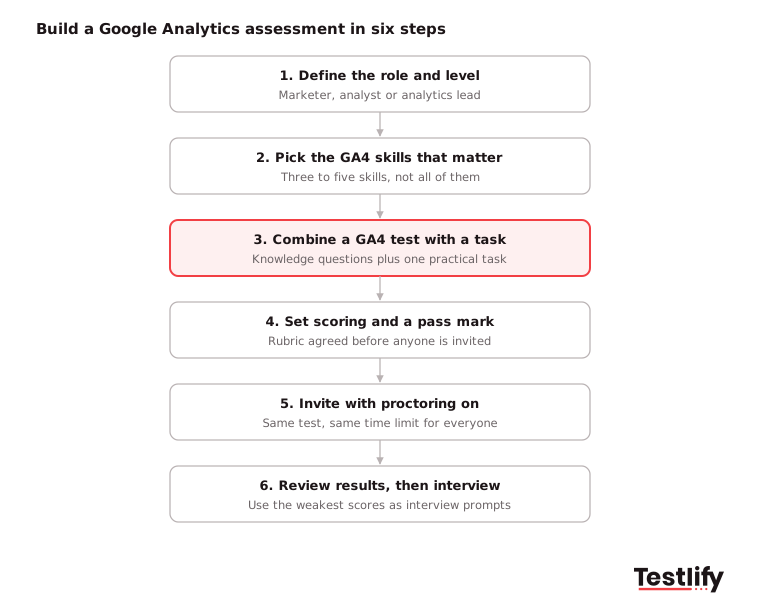
Define the role and experience level
Work with the hiring manager to establish what the candidate should be able to achieve with GA4 during their first 90 days. Identify three key decisions they will be expected to make using analytics data, such as tracking campaign performance, identifying traffic trends or improving conversion rates.
Identify the essential GA4 skills
Refer to the skills table above and select the three to five competencies most relevant to the role. Prioritize skills based on the candidate's responsibilities rather than testing every GA4 feature.
Combine a knowledge test with a practical task
Start with a ready-made Google analytics test to assess the candidate's understanding of GA4 concepts and features. Follow it with a practical exercise using a GA4 screenshot, sample data export or demo account to see how well they interpret reports and apply their knowledge.
Establish scoring criteria and cut-off marks
Agree on a scoring rubric and minimum passing score with the hiring manager before sending assessment invitations. Define what strong, average and weak performance looks like for each skill so every candidate is evaluated against the same standards.
Invite candidates and enable proctoring
Send every candidate the same assessment, time limit and instructions. Enable relevant proctoring measures, such as tab-switching and copy-paste tracking, to flag suspicious activity and help ensure candidates complete the assessment independently.
Review results and conduct structured interviews
Review practical task submissions alongside assessment scores before shortlisting candidates. Use weaker scoring areas to frame follow-up questions and understand how candidates approach real analytics challenges. These marketing analyst interview questions provide a useful starting point for the interview.
Pro tip: Keep the total under 45 minutes. A short knowledge test plus one focused task tells you more than a long quiz, and strong analysts with other offers are less likely to drop out.
What do good sample tasks look like?
Good sample tasks give the candidate a realistic GA4 situation, a time limit and one clear output to deliver. They test the job, not trivia, and they can be scored in five minutes with a rubric. Here are four tasks you can adapt.
- The traffic drop: "Sessions from organic search fell 30% last week while key events stayed flat. List three checks you would run in GA4, in order." Strong answers check for tracking or consent changes before blaming SEO.
- The funnel leak: Share a funnel exploration screenshot from product view to purchase. Ask which step to fix first and why. Strong answers use rates, not raw counts.
- The UTM mess: Show ten campaign URLs with inconsistent tags. Ask the candidate to fix them and write one naming rule. Strong answers explain how bad tags land in the wrong channel group.
- The one-line summary: Give a monthly report and ask for a two-sentence update for the CMO. Strong answers lead with the decision, not the metric.
Score each task on the same 1 to 4 scale so results compare across candidates:
Score | What it looks like |
|---|---|
4 | Right answer, checks data quality first, explains it plainly |
3 | Right answer with a small gap in reasoning or wording |
2 | Partly right, misses a key GA4 concept or relies on old Universal Analytics ideas |
1 | Wrong or generic answer that could apply to any tool |
Which red flags should you watch for?
The biggest red flags in a Google Analytics assessment are answers stuck in Universal Analytics, numbers quoted without a check on data quality, and recommendations that do not follow from the data. Each one tends to cause problems in the first months of the job, so note them even when the overall score is high.
- Old vocabulary: Talks about views, goals and bounce rate as the main metric with no mention of key events or engagement rate.
- No data checks: Accepts a sudden spike or drop at face value without asking about tracking, filters or consent.
- Report reading only: Describes what a chart shows but cannot say what to do next.
- Copied wording: Task answers that match public answer keys or each other word for word. Proctoring logs help you confirm this before you reject anyone.
How does Testlify help you run a Google Analytics assessment?
Testlify helps by putting the GA4 knowledge test, the practical task and the scoring in one place. You can start from the ready-made Google Analytics test (10 questions, about 10 minutes, intermediate level, covering concepts, metrics, models, reports and problem solving) and add your own task.
- Ready-made tests: Pick from 3,500+ tests and combine the Google Analytics test with a marketing analytics or data analyst test in one assessment.
- Custom tasks: Add your own GA4 task with 25+ question types, including file upload, Google Sheets and open-ended answers, or let the AI test builder suggest questions from your job description.
- Fair comparison: Every candidate gets the same questions and automated scoring, with per-skill breakdowns and a ranked shortlist.
- Cheating checks: 20+ anti-cheating and proctoring checks, such as copy-paste tracking, tab proctoring and AI assistance detection, matter when answer keys are a search away.
- Your ATS: 100+ ATS and HRIS integrations send invites and results back to the tools your recruiters already use.
If you are hiring for HR or people analytics rather than web analytics, use a talent analytics assessment instead. It covers HR data, trends and people reporting, which a GA4 test does not.
Ready to test GA4 skills before you hire?
Start with the Google Analytics test, add one task from this guide and send it to your next five applicants. Browse the Testlify test library or start a 7-day free trial, no credit card needed. For an enterprise rollout across many marketing roles, book a demo and see the scoring and reports on your own role.
Frequently asked questions (FAQs)

Human Resources Lead
Snehi Parmar leads People at Testlify, owning hiring, culture, performance, and retention for a 90-person team. She writes on practical HR strategy and building people processes that scale.
Related resources
View all
Skill assessment
How to evaluate candidates’ skills with a Vue 3 assessment

Skill assessment
How to evaluate candidates’ skills with a Lean Six Sigma assessment

Skill assessment
How to evaluate candidates’ skills with a Swift assessment

Skill assessment
How to evaluate candidates’ skills with a Microsoft SQL assessment

Skill assessment
Basic math skills test for employment: a hiring guide with sample questions

Skill assessment
How to evaluate email marketing skills in candidates
Get started.
Hire on proof, not resumes.
Run your first skills-based assessment free — no credit card required.