
Data visualization skills: what they are and how to evaluate them
The 8 data visualization skills hiring teams should test, plus a 5-step evaluation process, a work sample rubric and interview questions.

Data visualization skills are the abilities to turn data into charts, dashboards and visual stories that people understand and act on. They combine data preparation and analysis, chart choice, visual design, storytelling, dashboard design and tool skills such as Tableau, Power BI, Excel or Python. For hiring teams, the hard part is not listing these skills but checking them fairly, because a polished chart can hide weak analysis and a plain one can carry the best insight in the room.
TL;DR / Key Takeaways
- Data visualization skills fall into 4 groups: data (preparation and analysis), design (chart choice, accuracy, accessibility), communication (storytelling, dashboard design) and tools (Tableau, Power BI, Excel, SQL, Python or R).
- Test the skill, not the taste: score every candidate on the same written rubric, built before the first application arrives.
- The strongest evidence comes from two stages: a short online skills test for every applicant and a 30 to 60 minute work sample on a real-looking dataset.
- Portfolios show range but not authorship. Ask candidates to walk through one piece and explain each choice they made.
- Tool knowledge is the easiest skill to check and the weakest signal on its own. Interpretation and storytelling separate strong hires from average ones.
- In LinkedIn's 2025 Future of Recruiting report, 93% of talent acquisition pros said accurately assessing skills is crucial for quality of hire.
- Check for misleading charts and poor contrast in every work sample. Both are common, and both cost trust with stakeholders.
 ChatGPT
 Gemini
 Claude
 Grok
 Perplexity
What are data visualization skills?
Data visualization skills are the mix of analytical, design and communication abilities needed to show data so that an audience understands it quickly and correctly. The US O*NET profile for data scientists lists the core task plainly: "Create graphs, charts, or other visualizations to convey the results of data analysis using specialized software." That task depends on 8 skills.
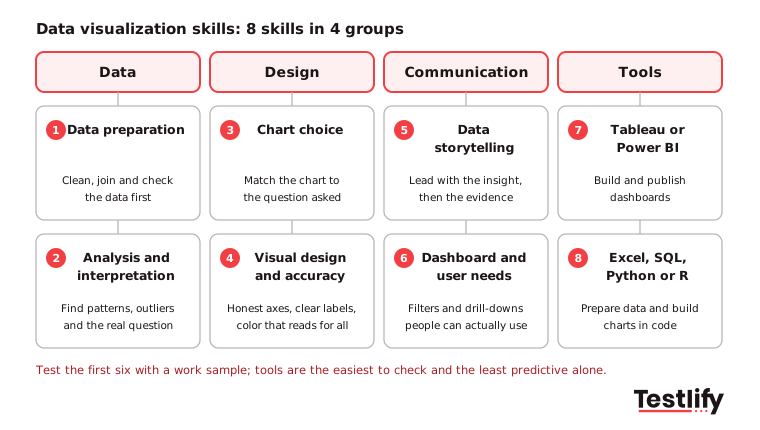
A ninth skill is now showing up in job posts: AI literacy. Analysts use AI assistants to draft charts and summaries, so the skill is knowing when the output is wrong and checking it against the data. O*NET's data scientist profile also flags Power BI as an in-demand technology skill for the role.

Why do data visualization skills matter in hiring?
Data visualization skills matter in hiring because a chart is often the only part of an analysis that a decision maker sees. A candidate who analyzes well but presents poorly leaves insight on the table, and one who designs well but analyzes poorly can mislead a whole leadership team.
Testing these skills early brings four practical benefits for talent acquisition teams:
- Objective comparison: Every candidate gets the same task and the same scoring criteria, so the shortlist rests on evidence rather than on how confident someone sounds in an interview.
- Faster shortlisting: A short skills test filters a large applicant pool before anyone spends interview time, so hiring managers meet only the people who can do the work.
- A view of problem solving: A visualization task shows how a candidate approaches messy data, which question they decide to answer and what they leave out.
- Less bias: Scoring a work sample on a written rubric reduces the pull of resume brands, accents and interview polish.
Quality of hire is the outcome most teams care about. LinkedIn's 2025 Future of Recruiting report found that 89% of talent acquisition pros expect measuring quality of hire to become more important, yet only 25% feel highly confident they can do it well. Skill evidence collected at the screening stage is one of the few inputs that can be tracked against later performance.
Which roles need data visualization skills?
Data analysts, business intelligence analysts, data scientists and data visualization engineers need data visualization skills most, but product, marketing and finance analysts use them every week too. Demand is growing: the US Bureau of Labor Statistics projects data scientist jobs to grow 35% from 2025 to 2035, with a median wage of $120,230 in May 2025.
Role | What they build | Skills to weight most | Useful tests |
|---|---|---|---|
Data analyst | Weekly reports, ad hoc charts | Interpretation, chart choice, Excel or SQL | Data visualization, data interpretation |
BI analyst or developer | Dashboards for many users | Dashboard design, Tableau or Power BI, data modeling | Tableau, Power BI |
Data scientist | Model results, experiment readouts | Analysis, Python or R charts, storytelling | Data visualization, coding |
Data visualization engineer | Custom interactive visuals | Design, accessibility, front-end charting libraries | Coding, data visualization |
Product, marketing or finance analyst | KPI decks, campaign and budget views | Storytelling, chart choice, accuracy | Data storytelling, Excel |
The BLS outlook for data scientists lists "Use data visualization software to present findings" among the role's main duties. For the wider analyst hiring process, see the data analyst hiring guide.
How do you evaluate data visualization skills?
Data visualization skills are best evaluated in five steps: define the skills the role uses, screen every applicant with a short skills test, set a timed work sample for the shortlist, run a portfolio walkthrough with structured interview questions, and score every stage on one rubric.
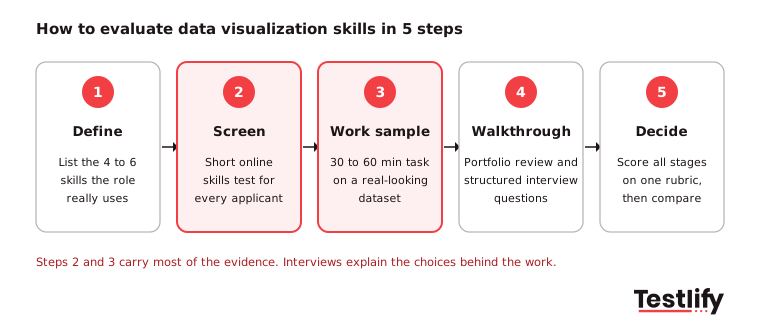
- Define the skills: Pick the 4 to 6 skills from the list above that the role uses every week. A BI developer needs dashboard design; a finance analyst needs storytelling for a board deck.
- Screen with a skills test: Send a short online test to every applicant. It checks chart reading, chart choice, basic analysis and tool knowledge in minutes, before any human time is spent.
- Set a work sample: Give the shortlist a small, realistic dataset and one business question. Keep it to 30 to 60 minutes so strong candidates with full-time jobs still complete it. A paid work trial suits senior roles where a longer task is fair.
- Walk through the work: Ask the candidate to present the work sample or one portfolio piece and explain each choice. Use the same questions for everyone, as in any structured interview.
- Score and decide: Rate each stage against the same rubric and compare candidates on the totals and on the skills that matter most for the role.
Pro tip: Write the rubric before you see any candidate work. Teams that write it afterward tend to reward the style they personally like, not the skills the job requires.
How do you assess data interpretation skills?
Data interpretation is assessed by giving candidates a finished chart or dashboard and asking what it shows, what it hides and what they would do next. This separates people who can read data from people who can only format it.
- Analytical thinking: Ask the candidate to find the main pattern, the trend and any outlier, then draw one conclusion the business could act on.
- Data comprehension: Ask them to name the key variables, the likely data sources and any assumptions behind the chart.
- Business context: Check whether they link the numbers to the industry and the decision at hand, for example seasonality in retail sales or churn in a SaaS cohort.
- Accuracy and attention to detail: Plant one error, such as a wrong total or a mislabeled axis, and see whether they catch it.
- Communication of findings: Listen for a clear, ordered explanation that a non-analyst could repeat.
A ready-made data interpretation test covers the reading side at the screening stage.
How do you assess chart choice and visual design?
Chart choice and visual design are assessed by asking candidates to match charts to questions and by reviewing their own work for accuracy, clarity and accessibility. A good candidate explains why a chart fits, not only how to build it.
The question in the data | Chart a strong candidate picks | Common mistake to watch for |
|---|---|---|
How do categories compare? | Bar chart, sorted | Pie chart with 8 or more slices |
How did a value change over time? | Line chart | Bars for 50+ time points |
How is a value distributed? | Histogram or box plot | Average only, no spread |
What makes up the whole? | Stacked bar or single pie with few parts | 3D pie that distorts size |
Are two measures related? | Scatter plot | Two lines on separate axes that suggest a link |
How does a value vary by region? | Map with shading, or a bar chart | Map when the region does not matter |
On visual design, look for:
- Aesthetics and composition: A clear visual hierarchy, consistent fonts, white space and a limited palette.
- Data-driven design choices: Axes that start at zero for bars, scales that match the data and no cherry-picked date ranges.
- Effective use of visual elements: Labels, annotations and icons that help comprehension rather than decorate.
- Accessibility: Text contrast of at least 4.5:1 and no meaning carried by color alone.
- Creativity with restraint: A fresh format only when a standard chart cannot answer the question.
Microsoft's guidance on accessible Power BI reports is a helpful checklist to score against: it asks for 4.5:1 text contrast, alt text on every meaningful visual and markers instead of color alone.
How do you assess data storytelling?
Data storytelling is assessed by asking the candidate to present a short sequence of visuals to a named audience, such as a sales director with five minutes, and scoring whether the story leads to a clear decision.
- Narrative structure: The insight comes first, then the evidence, in a logical order.
- Data-driven insights: The candidate picks the two or three findings that matter and drops the rest.
- Audience understanding: The level of detail fits the audience's data literacy and goals.
- Visual flow: Titles that state the takeaway and transitions that guide attention from one chart to the next.
- Clarity and simplicity: No clutter, no jargon and one message per chart.
A data storytelling test checks the same skills in a scored format before the presentation round.
How do you assess dashboard and interactive design skills?
Dashboard and interactive design skills are assessed by asking how the candidate learned what users needed, then testing the dashboard itself: can a new user find the answer to a stated question in under a minute?
- User-centric approach: The candidate talked to users before building and can name who the dashboard serves.
- Intuitive navigation: Filters, menus and page order follow the way users think about the problem.
- Interactivity: Tooltips, drill-downs and cross-filtering add detail without hiding the main number.
- Responsive design: The view still works on a laptop screen and on mobile.
- Feedback and usability testing: The candidate tested with real users and changed the design based on what they saw.
- Accessibility: Lines, bars and slices stay distinguishable for every viewer.
The W3C non-text contrast guidance sets 3:1 contrast for the parts of a graphic needed to understand it, such as each line in a graph. A candidate who knows this rule usually builds dashboards that work for the whole audience.
What does a good data visualization work sample look like?
A good data visualization work sample uses a small, realistic dataset, one business question, a 30 to 60 minute limit and a rubric shared with every reviewer. For example: "Here are 12 months of orders by region and channel. Sales leadership wants to know where growth slowed and why. Build one chart or a one-page dashboard and write three sentences of findings."
Criterion | Weight | 1 (weak) | 3 (solid) | 5 (strong) |
|---|---|---|---|---|
Answers the question | 25% | Shows data, no answer | Answers it, some noise | Clear answer in the title |
Analysis and accuracy | 25% | Errors or missed outlier | Correct, surface level | Correct and finds the cause |
Chart choice | 15% | Wrong chart type | Right type, cluttered | Right type, minimal |
Design and accessibility | 15% | Poor contrast, color only | Readable | Readable for all, labeled |
Written findings | 20% | Restates the chart | Some insight | Insight plus next step |
Two readers should score each sample on their own, then compare. Large gaps point to an unclear rubric line, which you fix before the next candidate.
Which interview questions reveal data visualization skills?
Data visualization interview questions work best when they ask about a real piece of the candidate's work and the choices behind it. Use the same questions for every candidate and note what a strong answer includes.
- Walk me through a chart you built that changed a decision: A strong answer names the audience, the decision and what changed.
- How do you choose a chart type? Listen for the question first, then the data type, then the chart.
- Tell me about a time a chart misled someone: Look for honest axes, context and a fix.
- How do you design for color blindness and low contrast? Expect palettes, markers or labels, and a contrast check.
- How do you decide what to leave out of a dashboard? Strong candidates cut to what users need for a decision.
- How do you check an AI-generated chart or summary? Look for a habit of checking totals and filters against the source data.
- How would you show this result to an executive with two minutes? Expect one headline, one chart and one ask.
For more analyst questions, see these data analyst interview questions.
What mistakes do hiring teams make when evaluating data visualization skills?
Hiring teams most often judge data visualization skills on taste, trust portfolios without checking authorship, and over-test tools. Each mistake rewards the wrong candidates.
- Judging on looks: A colorful dashboard can hide a wrong total. Score analysis and accuracy before design.
- Portfolio-only decisions: Portfolio pieces may be team work or heavily edited. Pair them with a timed task done by the candidate alone.
- Tool trivia: Asking for menu paths in Tableau tests memory. Test what candidates build with the tool instead, for example with a Tableau test or a Power BI test.
- Long unpaid take-homes: Tasks over a few hours put off strong candidates who already have jobs. Keep unpaid tasks short.
- Ignoring integrity: Online tasks can be copied or fully AI-built. Proctoring checks and a live walkthrough confirm the work is the candidate's own.
Key takeaway: Score evidence, not polish. Across the teams that move to structured skills tests, the biggest change is that interviews become a conversation about real work instead of a guess about ability.
How does Testlify help you test data visualization skills?
Testlify helps you test data visualization skills with ready-made tests, custom tasks and structured scoring in one place. The data visualization skills test checks how candidates turn data sets and metrics into charts and graphs, with basic data analysis and Tableau and Power BI knowledge, and suits data analysts, data managers, BI analysts and data scientists.
- Test library: 3,500+ tests, so you can pair the data visualization test with SQL, Excel or data interpretation tests in one assessment.
- Custom questions: 25+ question types, including file upload for a chart or dashboard, video answers for a short walkthrough and Google Sheets or MS Excel tasks.
- AI test builder: Generate a role-specific assessment from your job description, then edit it.
- Scoring and reports: Automated scoring, per-skill breakdowns and weighted scoring that match the rubric in this guide.
- Integrity: 20+ proctoring checks, including tab proctoring, copy and paste blocking and AI assistance detection.
- ATS fit: 100+ ATS and HRIS integrations with two-way sync.
Testlify is credit-based, so you pay only when a candidate starts an assessment. Start a 7-day free trial with no credit card, or book a demo to see the data visualization tests on your own roles.
Frequently asked questions (FAQs)

Content Writer
Yashika Khandelwal is a Content Writer with 3+ years of experience creating research-backed content on hiring, talent assessment, and HR technology. She is a registered Organizational Psychologist and subject matter expert who combines behavioral science with practical recruitment insights to produce accurate, evidence-based content.
LinkedInRelated resources
View all
Skill assessment
5 tips to evaluate project management skills

Skill assessment
Financial analyst skills: what to look for and how to test them

Skill assessment
5 tips to evaluate Python programming skills

Skill assessment
Trustworthiness in the workplace: How to assess it in hiring

Skill assessment
5 tips to evaluate UX design skills

Skill assessment
Importance of assessing relationship building skills in recruitment for strong networks
Get started.
Hire on proof, not resumes.
Run your first skills-based assessment free — no credit card required.